PDA

View Full Version : Show more on Forums Pages...


MacEffects
Dec 21, 2005, 11:49 PM
Since some of the popular Forums are quite long, I really think there should be an option to have say the user Select 10 per page, 25 per page, 50 per page, 100 per page, etc... This would really help I'd imagine, and this is why I don't like to post on those Threads...



840quadra
Dec 21, 2005, 11:53 PM
I see your point, but I believe that this is a global setting for the forum software.

The other issue is with people with limited bandwidth (this is a forum with a world audience, and not everyone has broadband), as any posts with many images, or lots of avatars would take an extremely long time to load for those people. Also for us Quadra using people, page loads with lots of images can take a long time ;) .

tag
Dec 21, 2005, 11:56 PM
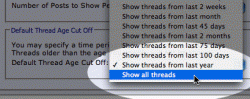
Are you referring to number of threads per page in a section, or number of posts per per page in a thread? If you are referring to the latter, you can goto 'User CP' > 'Edit Options' and change 'Number of Posts to Show Per Page' from 5 up to 40.

grapes911
Dec 21, 2005, 11:56 PM
Are you talking about showing more or less posts in a thread? Or more or less threads in a forum?

If you are talking about posts per thread, go into the "User CP". Go to "Edit Options" on the right. Then go down some and find "Number of Posts to Show Per Page". You can select your number here.

Edit. Posted at the same minute, but still to slow. I'm always too slow. I'm exceptional (http://forums.macrumors.com/showthread.php?t=168471) at being slow. :o

Lacero
Dec 21, 2005, 11:58 PM
37300
http://forums.macrumors.com/attachment.php?attachmentid=37300

tag
Dec 21, 2005, 11:59 PM
Thats freaky grapes911 nearly same phrasing at exactly the same moment. TIE! :D

thomasp
Dec 22, 2005, 06:20 AM
I think the original poster is referring to showing either 10, 25, 50, etc THREADS on pages like this: http://forums.macrumors.com/forumdisplay.php?f=66

If it was possible to have the user set it, people who still have dialup could choose a lower value if they wanted their pages to load quicker.

mjstew33
Dec 22, 2005, 08:45 AM
37300
http://forums.macrumors.com/attachment.php?attachmentid=37300
Sorry, but I have to ask, how do you do that in photoshop?

mymemory
Dec 22, 2005, 05:46 PM
Take a picture of the desktop with the cursor on the selection.

Open the file in Photoshop, crop the selection.

Then select the area with the global shape selection tool.

Inverse selection and drecrease the opacity of the external area using the brightnes/ contrast tool.

That is it.

MacEffects
Dec 23, 2005, 06:04 PM
Thanks for the responses, I did know about that, I just thought it'd be handier to have an option for everyone on each page, it would be such a time saver.