
PDA

View Full Version : Intel iMac CPU Transplant Success


topgunn
Aug 2, 2006, 09:12 AM
5530855309
5531055311
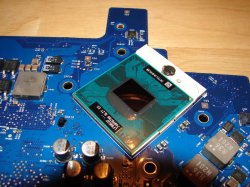
I had an acquaintance send me an engineering sample of a 2.16GHz Merom T7400 CPU. Within an hour of receiving the processor, I had my 20" iMac disassembled, ready to replace the stock T2500.

Disassembling the iMac was not fun at all. Usually I enjoy disassembling my Macs but this was one exception. It is much more difficult to access than any other Mac I have owned which includes pretty much every line over the last 5 years. First the front bezel has to come off which involves removing a few torx screws and then using a credit card bent at a 30 degree angle to release a latch in the upper corners that you access through the vent. Once the cover is off, you have to peel back gobs of EMI tape and the EMI shield. Next remove the LCD. Now you have access to the logic board. Proceed to remove 13 different wired connections to the logic board, many of which are tiny and frail and quite the little boogers to get out. Remove the logic board (of course they had to put the CPU on the back side) and the rather large heatsink/heatpipe contraption which is shared between the GPU and CPU. Finally, you can remove the old CPU and replace it with your new 64-bit capable, 4MB L2 cache having Merom.

When it came time to reassemble everything, I was torn between rushing through it to finally hear that reassuring startup "bong" and taking my time to make sure everything was correctly put back together. I only missed one thing and that was reconnecting the Airport antenna but it was easily accessible under the EMI shield. So with everything put back together with only the front bezel still off, I start up the machine. Oh, that beautiful bong. It is music to my ears.

Since it was so late, I just ran a quick Xbench test to see the difference between the T2500 and T7400. The results for the T2500 can be found here (http://db.xbench.com/merge.xhtml?doc2=153851) and the T7400 can be found here (http://db.xbench.com/merge.xhtml?doc2=180295). As you can see, the CPU test was 45% faster with the new CPU but this is just one test and Xbench is generally very limited. If any of you have any tests that you would like me to run, post them here and I try and run them in a timely fashion (assuming I have the software, of course).

I did have grand intentions of taking photos along the way but that fell by the wayside once I got into it. The pictures would have been largely unremarkable anyway as there are a number of pictures of Intel iMac guts already posted on the internet. One thing of note, the earliest pictures to be released of a disassembled Intel iMac on KODAWARISAN were completely different from mine, especially the layout of the cooling system. I thought it was a bit unusual.

Lastly, as a preemptive strike to all of you who have to ask why, I respond with "Because it's there."


MIDI_EVIL
Aug 2, 2006, 09:16 AM
Lies!

There is absolutely nothing to prove that you did this.

We need more than your word. I can't believe you didn't take photos.

Lies.

Rich.

grabberslasher
Aug 2, 2006, 09:21 AM
I was thinking of upgrading my 17" baseline iMac to the top of the range Merom when they come down in price, but after reading all that has to be done to disassemble I'm having second thoughts.

We'll see - I'd like to hear how gaming performance is improved in Quake 4 and Doom 3 at max settings and resolution. Call of Duty 2 if you can get hold of it would be a nice benchmark.

Chasealicious
Aug 2, 2006, 09:28 AM
how about a screen shot of the "about this mac" window and apple system profiler?

emotion
Aug 2, 2006, 09:35 AM
So does the machine support the power saving features of the Merom properly. There was a test of a similarly upgraded pc laptop posted on here the other day. The power consumption was worse becaus the mainboard chipset didn't fully support the new chip.

Any power consumption figures?

mkrishnan
Aug 2, 2006, 09:40 AM
I guess it's too late for you to have done an XBench of your system running 10.4.7 before the chip swap? :o

Sutekidane
Aug 2, 2006, 09:49 AM
I wonder how well the cooling can keep up with the newer processor.

emotion
Aug 2, 2006, 09:50 AM
I wonder how well the cooling can keep up with the newer processor.

It should actually be cooler, but only if the supporting chipset works correctly.

topgunn
Aug 2, 2006, 09:52 AM
Lies!

There is absolutely nothing to prove that you did this.
I didn't do this for you. I just thought I would share my experience.
We'll see - I'd like to hear how gaming performance is improved in Quake 4 and Doom 3 at max settings and resolution. Call of Duty 2 if you can get hold of it would be a nice benchmark.
The only games I have on my iMac are Half-life 2 (in Windows of course) and RTS games. If you would like me to benchmark Half-Life 2, let me know which settings and I will do a lost coast demo.
how about a screen shot of the "about this mac" window and apple system profiler?
I will do that when I get home from work although it doesn't really tell you much. I can also take a screen shot of CPU-Z in Windows.
So does the machine support the power saving features of the Merom properly. There was a test of a similarly upgraded pc laptop posted on here the other day. The power consumption was worse becaus the mainboard chipset didn't fully support the new chip.

Any power consumption figures?
The Speed Step (I am not sure what Intel calls it now) aspect of the CPU works. When the CPU is not being used, the clock drops to 1GHz. I have a kill-a-watt that I can check it out with to see what the system is drawing. I will do that tonight. I do have numbers preconversion to compare it to as well.
I guess it's too late for you to have done an XBench of your system running 10.4.7 before the chip swap?
I did not think about running another Xbench test before the switch although in hindsight it would have been nice. I may break the machine down again for pictures since I am more comfortable with it. If I do, I may swap the CPU out again to do another Xbench test but I doubt that will happen.

bowens
Aug 2, 2006, 09:55 AM
That's awesome. I would love to have a faster processor in my mini.

emotion
Aug 2, 2006, 09:55 AM
FWIW I think this is pretty cool.

:)

topgunn
Aug 2, 2006, 09:56 AM
I wonder how well the cooling can keep up with the newer processor.
At first, it looked like the CPU was running much warmer. I was idling in the low 40's and load was getting into the mid 60's. This was on the second boot, however. Ceramique, the thermal compound I used, needs to go through a number of thermal cycles before it reaches its max conductivity (something about the crystals aligning). Well, after a few thermal cycles, I am now back to idling in the low 30's and at load in the mid 50's. These are the same results as the Yonah. My thought was since the Meroms have a much larger core (physically) that it should cool better. I don't know if there is any truth to that, though.

topgunn
Aug 2, 2006, 09:57 AM
That's awesome. I would love to have a faster processor in my mini.
I will be selling the T2500 from my iMac soon if you are interested. I was going to post it in the Marketplace before moving it to eBay.

risc
Aug 2, 2006, 10:02 AM
Very nice! :)

emotion
Aug 2, 2006, 10:06 AM
I will be selling the T2500 from my iMac soon if you are interested. I was going to post it in the Marketplace before moving it to eBay.

An ace upgrade particularly for the Core Solo Minis

cruxed
Aug 2, 2006, 10:10 AM
Good job! Now I've gotta pass this on to my friend who thinks his "Yonah" iMac is "outdated":rolleyes:

kgarner
Aug 2, 2006, 10:16 AM
This really bodes well for the future of my mac purchases. I really hope they keep this ability in all future models as I would love to buy a reasonably powerful machine and then in about three years upgrade the processor to whatever the machine can safely handle to keep it usable for another 3 years or so.

Anyone have any idea if you can upgrade a Core Solo Mini to a Core 2 Duo? Just wondering if there are some MB or ROM restrictions in there.

JGruber
Aug 2, 2006, 10:18 AM
Yes you can swap out a Core Solo for a Core Duo... its been done a number of times on Xtremesystems.org

thestaton
Aug 2, 2006, 10:41 AM
awesome report! Keep us updated I'm looking at doing this same thing very soon. My iMac is pretty much instant with everything now I could not imagine adding even more power.

To the people asking about power consumption? What does it matter? Its hooked up to your wall.

JGruber
Aug 2, 2006, 10:55 AM
Well Power Consumption = more heat being generated = degraded CPU performance over time...

emotion
Aug 2, 2006, 10:59 AM
awesome report! Keep us updated I'm looking at doing this same thing very soon. My iMac is pretty much instant with everything now I could not imagine adding even more power.

To the people asking about power consumption? What does it matter? Its hooked up to your wall.

I'm more interesting to see if it is actually properly supported by the existing board.

Anyway, it's always sensible to have these things operating within normal operating temp range (for speedstep reasons etc).

Also where do you think that power in the wall comes from? Nuclear? Coal? Wind? (unlikely over there). Lower power consumption is _always_ good.

crees!
Aug 2, 2006, 11:00 AM
So did you update your system between XBench tests? The merom test has 10.4.7 and before has 10.4.4. Was the previous one taken at an earlier date?

JGruber
Aug 2, 2006, 11:03 AM
If you notice as well, the 2 different tests are using 2 different harddrives as well

topgunn
Aug 2, 2006, 11:11 AM
So did you update your system between XBench tests? The merom test has 10.4.7 and before has 10.4.4. Was the previous one taken at an earlier date?
Yes, I generally run and submit Xbench results when I get a new personal system for my reference when I get a new machine down the road. This one was run in February.

thestaton
Aug 2, 2006, 11:15 AM
people calm down. he's already stated its running 30c under normal operating conditions & 50c when being put under a load. i'm sorry but the very mild at most power consumption differences is not going to mean anything. if something this small bothers you I'll go hug a tree for you before it gets cut down.

I'm curious to know as well how it mated up to the mobo, and if the stock heat sink was used. can't wait to this mod myself, any idea how much these processors are going to run?

emotion
Aug 2, 2006, 11:21 AM
people calm down. he's already stated its running 30c under normal operating conditions & 50c when being put under a load. i'm sorry but the very mild at most power consumption differences is not going to mean anything. if something this small bothers you I'll go hug a tree for you before it gets cut down.


Meh, hummer driver? :)

As I say my interest was more in seeing the chip functioning correctly and maybe seeing if there is indeed a consumption reduction. I'm interested for laptop reasons.

topgunn
Aug 2, 2006, 11:25 AM
I'm curious to know as well how it mated up to the mobo, and if the stock heat sink was used. can't wait to this mod myself, any idea how much these processors are going to run?
All I did was take out the old and put in the new. Nothing else changed.

The prices for Merom in 1000 piece lots are:
T7200 - 2.00GHz - $294
T7400 - 2.16GHz - $423
T7600 - 2.33GHz - $600+

topgunn
Aug 2, 2006, 06:53 PM
how about a screen shot of the "about this mac" window and apple system profiler?
54103

yellow
Aug 2, 2006, 06:55 PM
Cool beans.

How about a GeekBench test?

topgunn
Aug 2, 2006, 08:37 PM
Cool beans.

How about a GeekBench test?
Geekbench 2006 (build 190). Email geekbench@geekpatrol.ca with feedback.

System Information
Geekbench Version: Geekbench 2006 (build 190)
Geekbench Platform: Mac OS X x86
Geekbench Compiler: GCC 4.0.1 (Apple Computer, Inc. build 5341)
OS: Mac OS X 10.4.7 (Build 8J2135)
Model: iMac (Early 2006)
Motherboard: iMac4,1
Processor: Genuine Intel(R) CPU @ 2.16GHz
Processor ID: GenuineIntel Family 6 Model 15 Stepping 4
Logical Processor Count: 2
Physical Processor Count: 2
Processor Frequency: 2170 MHz
Bus Frequency: 664 MHz
Memory: 2048 MB

Integer Performance
Emulate 6502
single-threaded scalar 135.2 (rate: 1.0, result: 255.7 MHz)
multi-threaded scalar 266.8 (rate: 2.0, result: 504.1 MHz)
Blowfish
single-threaded scalar 189.5 (rate: 1.0, result: 78.2 MB/sec)
multi-threaded scalar 377.6 (rate: 2.0, result: 155.8 MB/sec)
bzip2 Compress
single-threaded scalar 181.0 (rate: 1.0, result: 28.2 MB/sec)
multi-threaded scalar 358.3 (rate: 2.0, result: 55.6 MB/sec)
bzip2 Decompress
single-threaded scalar 230.1 (rate: 1.0, result: 85.6 MB/sec)
multi-threaded scalar 470.1 (rate: 2.0, result: 169.3 MB/sec)

Floating Point Performance
Mandelbrot
single-threaded scalar 146.5 (rate: 1.0, result: 1.0 Gflops)
multi-threaded scalar 292.0 (rate: 2.0, result: 2.1 Gflops)
Dot Product
single-threaded scalar 294.2 (rate: 1.0, result: 468.1 Mflops)
multi-threaded scalar 550.9 (rate: 1.9, result: 908.3 Mflops)
single-threaded vector 122.3 (rate: 3.7, result: 1.7 Gflops)
multi-threaded vector 234.7 (rate: 7.2, result: 3.4 Gflops)
JPEG Compress
single-threaded scalar 131.2 (rate: 1.0, result: 12.2 Mpixels/sec)
multi-threaded scalar 262.8 (rate: 2.0, result: 24.3 Mpixels/sec)
JPEG Decompress
single-threaded scalar 122.9 (rate: 1.0, result: 20.4 Mpixels/sec)
multi-threaded scalar 240.7 (rate: 2.0, result: 39.9 Mpixels/sec)

Memory Performance
Read Sequential
single-threaded scalar 327.9 (rate: 1.0, result: 4.1 GB/sec)
multi-threaded scalar 284.5 (rate: 0.4, result: 1.7 GB/sec)
Write Sequential
single-threaded scalar 450.2 (rate: 1.0, result: 3.4 GB/sec)
multi-threaded scalar 273.4 (rate: 0.3, result: 1.0 GB/sec)
Stdlib Allocate
single-threaded scalar 224.4 (rate: 1.0, result: 7.9 Mallocs/sec)
multi-threaded scalar 104.8 (rate: 0.5, result: 3.7 Mallocs/sec)
Stdlib Write
single-threaded scalar 119.0 (rate: 1.0, result: 3.0 GB/sec)
multi-threaded scalar 136.1 (rate: 1.1, result: 3.2 GB/sec)
Stdlib Copy
single-threaded scalar 251.4 (rate: 1.0, result: 2.7 GB/sec)
multi-threaded scalar 294.3 (rate: 1.1, result: 3.0 GB/sec)

Stream Performance
Stream Copy
single-threaded scalar 161.5 (rate: 1.0, result: 2.0 GB/sec)
multi-threaded scalar 173.5 (rate: 1.1, result: 2.2 GB/sec)
single-threaded vector 157.1 (rate: 1.1, result: 2.1 GB/sec)
multi-threaded vector 160.0 (rate: 1.1, result: 2.2 GB/sec)
Stream Scale
single-threaded scalar 185.0 (rate: 1.0, result: 2.2 GB/sec)
multi-threaded scalar 184.6 (rate: 1.0, result: 2.2 GB/sec)
single-threaded vector 156.7 (rate: 1.0, result: 2.1 GB/sec)
multi-threaded vector 159.6 (rate: 1.0, result: 2.2 GB/sec)
Stream Add
single-threaded scalar 162.5 (rate: 1.0, result: 2.1 GB/sec)
multi-threaded scalar 191.5 (rate: 1.2, result: 2.6 GB/sec)
single-threaded vector 167.8 (rate: 1.1, result: 2.3 GB/sec)
multi-threaded vector 182.4 (rate: 1.2, result: 2.6 GB/sec)
Stream Triad
single-threaded scalar 160.8 (rate: 1.0, result: 2.1 GB/sec)
multi-threaded scalar 191.3 (rate: 1.2, result: 2.6 GB/sec)
single-threaded vector 135.9 (rate: 1.1, result: 2.3 GB/sec)
multi-threaded vector 146.4 (rate: 1.2, result: 2.6 GB/sec)

Overall Score: 221.6

FWIW, someone else ran the test on their 2.0GHz iMac just before me and got 189.5 overall.

Edit: In BootCamp, my Merom iMac scored 268.2 (http://www.geekpatrol.ca/browse/2006/?view&id=2708)

bradc
Aug 2, 2006, 10:07 PM
Nice job man! I bet she flies like the....like the........really fast!:D

How long do you have the Eng. Sample for? Or do you get to keep it!?

topgunn
Aug 3, 2006, 06:24 AM
Nice job man! I bet she flies like the....like the........really fast!:D

How long do you have the Eng. Sample for? Or do you get to keep it!?
I get to keep it.

gnasher729
Aug 3, 2006, 07:39 AM
54103

From the screenshot we can see the following:

1. The operating system doesn't recognise the exact type of the chip. It recognises that it is an unknown kind of Intel chip (just wondering how many different types of existing Intel chips the system would recognise, since all Macs built so far used Core Solo, Core Duo or P4 (old development samples)).

2. The operating system apparently doesn't know how to find out the size of the L2 cache. Shouldn't be a problem; L2 cache will work whether you know its size or you don't. Might be a small problem for high performance code that adapts itself to the size of the L2 cache.

mkrishnan
Aug 3, 2006, 08:20 AM
Can a Moderator please moderate this guy?

I think what she/he said was uncalled for, but it was only said once and we should probably let it go... at least, the one person calling troll (fatsoforgotso) seems to be the only trolling going on in the thread.

To the OP, thank you again for providing all of this information. :) It seems essentially consistent with what others are reporting, suggesting that overall this chip may present a modest improvement. (I think it's sad it doesn't really appear to be substantially cooler, but... that's neither here nor there).

Dont Hurt Me
Aug 3, 2006, 08:23 AM
I get to keep it.
How about same game benches:D Doom,Quake,Far Cry....... This new Intel stuff is just pretty awesome in my view putting everyone in the dust far far back, AMD,G5,G4,,,,,

topgunn
Aug 3, 2006, 09:14 AM
How about same game benches:D Doom,Quake,Far Cry....... This new Intel stuff is just pretty awesome in my view putting everyone in the dust far far back, AMD,G5,G4,,,,,
The only FPS games I have are Half-Life 2 and UT 2004. HL2 wouldn't really be a good test since it is already GPU bound. UT may work but I have never tried to bench it. Anyone have any tips for doing this?

I did run SuperPi to 1 million digits and it came in under 23 seconds.

yellow
Aug 3, 2006, 11:27 AM
Kick ass TG, thanks for the GeekBench marks!

Scarlet Fever
Aug 4, 2006, 05:48 AM
I did run SuperPi to 1 million digits and it came in under 23 seconds.
Where do you get SuperPi from? I've searched, and either i cant find it, or i dont know what im looking for.

topgunn
Aug 4, 2006, 07:15 AM
Where do you get SuperPi from? I've searched, and either i cant find it, or i dont know what im looking for.
It is the Windows version. Just google search for it.

reflex
Aug 4, 2006, 08:14 AM
1. The operating system doesn't recognise the exact type of the chip. It recognises that it is an unknown kind of Intel chip (just wondering how many different types of existing Intel chips the system would recognise, since all Macs built so far used Core Solo, Core Duo or P4 (old development samples)).

That's weird. I've once written a small utility to get some system information for troubleshooting problems reported to us by our users. Among other things, it gets the cpu name.

For the Core Duo, this name contains the model number (T2400 for my iMac). So why wouldn't the Core 2 Duo's name also include the model number?

darthmullet
Aug 4, 2006, 01:41 PM
That's weird. I've once written a small utility to get some system information for troubleshooting problems reported to us by our users. Among other things, it gets the cpu name.

For the Core Duo, this name contains the model number (T2400 for my iMac). So why wouldn't the Core 2 Duo's name also include the model number?

Yes, maybe your utility does, but Apple System profiler does not. My system only says "Intel Core Duo" even though it is a T2600. And with an engineering sample (or even a new processor that did not exist publicly when the hardware was made) this is entirely understandable.

I am also curious about the power consumption, i.e. for a MacBook Pro...

topgunn
Aug 4, 2006, 05:31 PM
Yes, maybe your utility does, but Apple System profiler does not. My system only says "Intel Core Duo" even though it is a T2600. And with an engineering sample (or even a new processor that did not exist publicly when the hardware was made) this is entirely understandable.

I am also curious about the power consumption, i.e. for a MacBook Pro...
I checked the power consumption with a kill-a-watt (http://www.thinkgeek.com/gadgets/electronic/7657/) and the consumption levels at load, idle and while asleep were identical with the Merom as they were with the Yonah. This is supported by the recent article over at AnandTech (http://www.anandtech.com/cpuchipsets/showdoc.aspx?i=2808) comparing the T7600 to the T2700.

mkrishnan
Aug 4, 2006, 07:14 PM
I checked the power consumption with a kill-a-watt (http://www.thinkgeek.com/gadgets/electronic/7657/) and the consumption levels at load, idle and while asleep were identical with the Merom as they were with the Yonah.

Mmmm, god, I'm enough of a geek that I really want one of these. :o

topgunn
Aug 18, 2006, 12:57 AM
Added pictures.

MIDI_EVIL
Aug 27, 2006, 11:25 AM
Added pictures.

I apologise profusely.

Good job!

Rich.

yoak
Aug 28, 2006, 03:14 PM
I was wondering if this was possible, thanks Topgunn.
But from hearing how difficult you found it, I think I won“t ever try this at home;)

Do you think anyone can do this or just the tech savy people?

adese
Sep 8, 2006, 11:00 AM
is your system now true 64-bit?

I didnt know the motherboard could support the new chips!

macenforcer
May 27, 2007, 04:54 AM
GOOD LORD! That is a nightmare.

I got my kid the 2ghz core 2 duo 17" imac a while back and all he does is surf and play games. He is only 4 yrs old so he doesn't do much. I figured I could do some hardware swapping of his imac with the 1.66ghz mac mini I have seeing as how he doesn't need the power I figured I would grab his superdrive and his cpu and let him have mine. Well after a few hrs of starring at the superdrive in the imac I was finally able to get it out and swap it with my mac mini combo drive but that imac is setup is suicide. Worse than the powermac 8500 which was the most difficult mac to upgrade. I didn't even attempt it. He gets to keep the 2ghz core 2 duo chip by I got that superdrive.

I think I will wait and buy the chip later when the prices come down.

AppleMan101
May 27, 2007, 06:31 AM
Did the design of the iMac change so much between the G5 and the Intel models that you now go in through the front rather than the back?

topgunn
May 29, 2007, 12:34 PM
The designed changed between the iMac G5 and the iMac G5 with iSight. I can only think of two reasons why this might have been done. A) Apple didn't want people to easily fool around with the guts of their computers and B) the change was required due to the thinning of the enclosure that happened at the same time as the iMac getting the iSight.

leekohler
May 29, 2007, 01:16 PM
The designed changed between the iMac G5 and the iMac G5 with iSight. I can only think of two reasons why this might have been done. A) Apple didn't want people to easily fool around with the guts of their computers and B) the change was required due to the thinning of the enclosure that happened at the same time as the iMac getting the iSight.

iMac G5s came with iSight as well- at least the last rev did.

mavherzog
Aug 9, 2007, 09:44 AM
I got my kid the 2ghz core 2 duo 17" imac a while back and all he does is surf and play games. He is only 4 yrs old so he doesn't do much. I figured I could do some hardware swapping of his imac with the 1.66ghz mac mini I have seeing as how he doesn't need the power I figured I would grab his superdrive and his cpu and let him have mine. Well after a few hrs of starring at the superdrive in the imac I was finally able to get it out and swap it with my mac mini combo drive but that imac is setup is suicide. Worse than the powermac 8500 which was the most difficult mac to upgrade. I didn't even attempt it. He gets to keep the 2ghz core 2 duo chip by I got that superdrive.
I have this sick desire to pick up a used 17" iMac and do a CPU downgrade...yes, make it an iMac Core Solo! :)

belcar
Feb 29, 2008, 04:13 AM
I have the exactly same machine here (t2400), and I really want to transplant a T7400 or T7600 whenever it gets cheaper.

Here is the thing:
After the transplant, could it read more than 2Gb of ram?

belcar
Feb 29, 2008, 05:32 AM
Another thing...
Is it possible to install a Santa Rosa CPU on that machine?

Sorry about the double post.

netdog
Feb 29, 2008, 05:35 AM
Lies!

There is absolutely nothing to prove that you did this.

We need more than your word. I can't believe you didn't take photos.

Lies.

Rich.

Why do people find this canned response to be funny?

topgunn
Mar 10, 2008, 11:33 PM
Another thing...
Is it possible to install a Santa Rosa CPU on that machine?

Sorry about the double post.
Wow...digging this one out from the depths.

The answer to both of your questions is no. The RAM limitation is one of the chipset not the processor. The fastest CPU for your machine is the T7600.

diamond.g
Mar 11, 2008, 08:09 AM
Wow...digging this one out from the depths.

The answer to both of your questions is no. The RAM limitation is one of the chipset not the processor. The fastest CPU for your machine is the T7600.

Actually he could use the processor from the "Santa Rosa" iMac. It may or may not POST, but if it did POST (at least in the PC world) it would just lead to him having a CPU that runs at a lower speed (166 quad pumped versus 200). I say this because the CPU in the "Santa Rosa" iMac is Merom just like the iMac before it. With an EFI update I would be willing to bet the existing chipset could probably be OC'ed to run 34Mhz higher so the CPU runs at it's native speed. Shoot, with an EFI update you could probably run Penryn CPU's as well (or at least that is somewhat true in the PC world). Of course the RAM speed would still be stuck at 667, well as long as the memory speed is separate from the FSB speed, if it isn't then you are also OC'ing your memory 34Mhz which can be a bad thing if there isn't good enough cooling(or enough voltage).

So I guess in the end, for normal folks the correct answer really is no huh? :o

leopard-pagan
Apr 22, 2009, 05:02 PM
Hello all. out of all the searching on this subject. this has been thee most helpful thread. i have found way too much "cant be done/why?" posts.

anyways to the point...
i have a 1.83Mhz 32 bit Core duo early intel iMac. 2 days ago i attempted to update the Java version as one app told me to..Java V1.6+ would not install as my processor is a 32bit! not 64 like everyone else's! foreseeing future compatibility issues with app upgrades and "your mac is too old" stuff.. which lead me here looking to upgrade to a core 2 duo chip. i dont have a problem opening the iMac up as needs must. i work in Prototype electronics and with PCBs all day and have a wealth or solder/component/rework experience to call on from my co-workers if need be.

does BUS speed matter? mine is 667mhz most the chips i have read about have also been 667mhz.

i am looking at upgrading to
1) T5600 C2Duo 1.83Ghz/2MB/667Mhz
2) T7200 C2Duo 2.0GHz/4MB/667MHz
3) T7600 C2Duo 2.33GHz/4MB/667MHz
i am leaning towards option 1 or 2..

thoughts or tips would be grateful.
Thanks LP

pilotError
Apr 22, 2009, 07:57 PM
Hello all. out of all the searching on this subject. this has been thee most helpful thread. i have found way too much "cant be done/why?" posts.

anyways to the point...
i have a 1.83Mhz 32 bit Core duo early intel iMac. 2 days ago i attempted to update the Java version as one app told me to..Java V1.6+ would not install as my processor is a 32bit! not 64 like everyone else's! foreseeing future compatibility issues with app upgrades and "your mac is too old" stuff.. which lead me here looking to upgrade to a core 2 duo chip. i dont have a problem opening the iMac up as needs must. i work in Prototype electronics and with PCBs all day and have a wealth or solder/component/rework experience to call on from my co-workers if need be.

does BUS speed matter? mine is 667mhz most the chips i have read about have also been 667mhz.

i am looking at upgrading to
1) T5600 C2Duo 1.83Ghz/2MB/667Mhz
2) T7200 C2Duo 2.0GHz/4MB/667MHz
3) T7600 C2Duo 2.33GHz/4MB/667MHz
i am leaning towards option 1 or 2..

thoughts or tips would be grateful.
Thanks LP

I think you need to stay in the T7 family. I'm not sure if the T5 family works. I upgraded mine with a T7600 (2006 White iMac).

Thunderchicken
Apr 22, 2009, 11:10 PM
so do you think that the T7700 will work? And where did you purchase the processor because I can't seem to find one on the market.

leopard-pagan
Apr 23, 2009, 02:04 AM
i haven't started looking for one yet. need to work out which one to get 1st.
google the part number will get you a few prices.
or this site seemed to have quite a few to pick from
http://www.cpuexpress.co.uk/index.php?main_page=index&cPath=40&sort=20a&page=2

T5 v T7.. only difference i can see if the 2/4MB cache.

i am basically covering all my bases before 1) i buy a chip 2) fit it then it damage my Mother Board = replace iMac anyways which i cant afford!
i know its been a few years since this thread was started and i know several people have done the mod in that time. just wondering how those people got on with their macs afterwards?

pilotError
Apr 23, 2009, 08:33 AM
so do you think that the T7700 will work? And where did you purchase the processor because I can't seem to find one on the market.

I bought mine off of ebay.

leopard-pagan
Apr 24, 2009, 01:28 AM
quite surprising how prices vary for these chips. from £150-£400!

pilotError
Apr 24, 2009, 07:59 AM
so do you think that the T7700 will work?

The T7700 has an 800Mhz front side bus, it won't work...

leopard-pagan
Apr 25, 2009, 03:02 AM
i am sticking to 667Mhz bus speed, the 3 chips i posted earlier are all 667.
thing for me to do now is buy the chip, but finding a cheap one to buy.
i'll try and go for T7600 C2Duo 2.33GHz/4MB/667MHz as my 1st option. if upgrading, why not go for the max.
T7200 C2Duo 2.0GHz/4MB/667MHz is my 2nd option.
the hunt is on! ......

pilotError
Apr 25, 2009, 01:54 PM
There's also a T7400, which I see around $100 - $125.

leopard-pagan
Apr 29, 2009, 02:03 AM
won a 2Ghz chip on ebay saturday. it came from a mac mini, only used for 10hrs....
tools are on their way
using heat sync paste from work
doing the upgrade at work on my day off. all ESD safe benches + soldering equipment if i need it.

www.sionics.co.uk

pilotError
Apr 29, 2009, 08:14 AM
It's really an easy upgrade. Getting the top off is the hardest part. Just go slow and you'll be fine.

brand
Apr 29, 2009, 01:29 PM
soldering equipment if i need it.

If you need to solder anything when changing the processor then you are doing something wrong.

leopard-pagan
May 13, 2009, 02:08 AM
soldering equipment was if i needed to repair any thing that got broken. as it is i spotted a few "rework" on the circuit board its self. other than that i was impressed with Apples PCB SMT quality.

the mod took about 2hours to do yesterday.

the link below is what i did.
http://www.macassistforums.co.uk/viewtopic.php?t=4938

macintouch
Aug 26, 2009, 02:41 PM
I am completely capable of doing this upgrade.

However, I'm curious of one thing. My iMac (Late 2007) 20" currently has the T7300 2.0ghz processor in it.

What fits in this thing?! No one seems to know. I'd like to put a T9300 or X7900 in, but I just can't figure out if the damn things will fit & function properly!

Thanks in advance!

Hellhammer
Aug 26, 2009, 02:49 PM
I am completely capable of doing this upgrade.

However, I'm curious of one thing. My iMac (Late 2007) 20" currently has the T7300 2.0ghz processor in it.

What fits in this thing?! No one seems to know. I'd like to put a T9300 or X7900 in, but I just can't figure out if the damn things will fit & function properly!

Thanks in advance!

In theory, even T9900 should work (same socket) but I can't confirm this

munkees
Aug 26, 2009, 04:54 PM
I am correct in saying the T7200, T7400, and T7600 all are the same socket?

Hellhammer
Aug 27, 2009, 06:16 AM
I am correct in saying the T7200, T7400, and T7600 all are the same socket?

Yea, all use Socket M

macintouch
Aug 28, 2009, 06:27 PM
In theory, even T9900 should work (same socket) but I can't confirm this

I agree, it should work.

But...

To me the T9900 wouldn't be worth it. Sure you would have the 3ghz clock speed but you would not have the full 1066 FSB (if you have a late 2007 iMac like me), and that is where a lot of the power comes from. I would rather stick with the T9300/9500, they have the 800mhz bus speed and are faster, yet still relatively reasonably priced.