PDA

View Full Version : Any trick to getting the screws open for ram installation?


Khurram
Sep 14, 2006, 06:51 PM
So i just got 2 gigs of g skill ram but I can't install it:(

I opened the left and right screws on the L shaped protector in front of the ram, but I cannot make the middle screw budge for the life of me, my fingers are practically bleeding! Is there a trick to loosening it?

If I take my macbook to the apple store do you think they will open the screw for me even though I'm not installing apple ram?
How should I go about this?


treblah
Sep 14, 2006, 07:02 PM
Are you using one of these?

If so, apply pressure on the end and twist with your other hand.

benthewraith
Sep 14, 2006, 07:03 PM
So i just got 2 gigs of g skill ram but I can't install it:(

I opened the left and right screws on the L shaped protector in front of the ram, but I cannot make the middle screw budge for the life of me, my fingers are practically bleeding! Is there a trick to loosening it?

If I take my macbook to the apple store do you think they will open the screw for me even though I'm not installing apple ram?
How should I go about this?

Well, if you're screw is stripped, I don't know. Are you sure you're using the correct screwdriver? :o

One of my screws were tight as bejeezus, but I was able to get it to open.

Khurram
Sep 14, 2006, 08:16 PM
Are you using one of these?

If so, apply pressure on the end and twist with your other hand.


No, i'm just using a tiny screwdriver...what is the specific name for that thing your holding?

Do you think they will open it up for me at the apple store if i'm not installing apple ram?

treblah
Sep 14, 2006, 09:05 PM
No, i'm just using a tiny screwdriver...what is the specific name for that thing your holding?

Do you think they will open it up for me at the apple store if i'm not installing apple ram?

It's a Stanley #0 Phillips head screwdriver. Picked it up at Target. Comes in a package with 4 other small screwdrivers.

miles01110
Sep 14, 2006, 10:09 PM
Apply downward pressure while applying torque. 2 of the screws on my MBP were quite hard to get out.

Khurram
Sep 15, 2006, 06:58 AM
Apply downward pressure while applying torque. 2 of the screws on my MBP were quite hard to get out.

So should I go at the screws from a vertical position with my macbook up on it's side?
Or horizontally?

MACDRIVE
Sep 15, 2006, 07:04 AM
I thought ALL the screws on Macs were #6 and #8 Torx. :confused:

AndyR
Sep 15, 2006, 07:17 AM
Took me ages to get the middle screw out! Never ever had that much trouble with something like that.

Was quicker upgrading the Mini :rolleyes:

Khurram
Sep 15, 2006, 10:36 AM
Took me ages to get the middle screw out! Never ever had that much trouble with something like that.

Was quicker upgrading the Mini :rolleyes:

So, I guess the middle screw has been a problem for other people as well..I'm gonna get the phillips 0 today after college and give it another shot, It just wont budge a milimeter...the other two came off relativley easily...I hope it's not jammed against the metal bar...

If it is, do you think they will open it for me at the apple store?

Apple Corps
Sep 15, 2006, 12:17 PM
So, I guess the middle screw has been a problem for other people as well..I'm gonna get the phillips 0 today after college and give it another shot, It just wont budge a milimeter...the other two came off relativley easily...I hope it's not jammed against the metal bar...

If it is, do you think they will open it for me at the apple store?

Khurram - you are over thinking the issue - if you can't unscrew it take it to the Apple store and ask one of the techs to loosen the screw for you.

Also - there is an old acronym (RTFM) - you are supposed to use a Phillips 00 screwdriver.


Done deal!!!

Khurram
Sep 15, 2006, 12:19 PM
Khurram - you are over thinking the issue - if you can't unscrew it take it to the Apple store and ask one of the techs to loosen the screw for you.

Done deal!!!

Good deal,
thats what I wanted to know.
thanks

Apple Corps
Sep 15, 2006, 12:32 PM
I thought ALL the screws on Macs were #6 and #8 Torx. :confused:

Not according to the manual.

bokdol
Sep 15, 2006, 12:39 PM
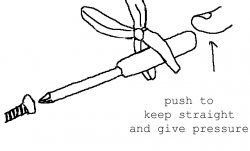
there is one trick i use. especially with the macbook. place the drive to the screw. hold the drive at the end. like your pushing it in. and use a set of pliers to grip the handle of the drive. the tork of the pliers are much stronger then your hands. and very little push is needed. works great.

57596

miles01110
Sep 15, 2006, 12:44 PM
So should I go at the screws from a vertical position with my macbook up on it's side?
Or horizontally?

I did it with my Macbook Pro on it's flat side, I guess that's "vertically".

JAT
Sep 15, 2006, 01:25 PM
I thought those screws were Philips #00, not 0. Slow, firm and steady is the way to open tiny, stuck screws.

MACDRIVE
Sep 16, 2006, 04:00 AM
Try to get a good screwdriver like a Wiha.

https://www.tselectronic.com/wiha/wiha_image/precdrvr.jpg

mac000
Sep 16, 2006, 08:54 AM
i went to CVS and bought an eyeglass repair kit, that seemed to do the trick for me!

tehdee
Sep 16, 2006, 03:09 PM
i had a really tough time with one of the ram screws on my mbp. i read on some other boards, that there was a problem with some of the screws being siliconed and over-tightened.

my screw was not budging, and in the process of trying to take it out, i started stripping the screw. i stopped there, and had them fix it when i took my mbp in for the logic board swap. they had no trouble with it, and even threw the ram in for me.