
Got a tip for us?
Let us know
Become a MacRumors Supporter for $50/year with no ads, ability to filter front page stories, and private forums.
External HD Help
- Thread starter JackArc
- Start date
- Sort by reaction score
You are using an out of date browser. It may not display this or other websites correctly.
You should upgrade or use an alternative browser.
You should upgrade or use an alternative browser.

Schroedinger
macrumors regular
open up disk utility and reformat it to a mac format. I assume it came from the store preformatted for windows, so your comp is able to read it, but not write to it.


mad jew said:If you format it as FAT32 (called MS-DOS File System in Disk Utility) then both Macs and PCs will be able to work with it. 🙂
Perfec, how do you format it?
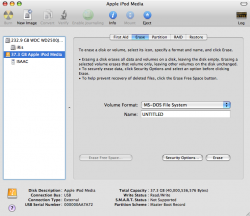
external drive format
sounds like the drive you have is formated NTFS (windows file system) macs can read it but not write to it, kind of a bummer for all of us, you can't format big drives FAT32 so both apple and microsoft can read it (somehow maxtor does it though) so your choice is to format it mac extended and roll with it, if you need to access it from a PC use the network. I run into things like this all the time being a mac noob
DD
sounds like the drive you have is formated NTFS (windows file system) macs can read it but not write to it, kind of a bummer for all of us, you can't format big drives FAT32 so both apple and microsoft can read it (somehow maxtor does it though) so your choice is to format it mac extended and roll with it, if you need to access it from a PC use the network. I run into things like this all the time being a mac noob
DD

CommonMan
macrumors regular
External HD Problems
I just bought a used PowerMac G3 (Yosimite). I've got a whole bunch of data on an external HD that I use with my PC. I thought I could just plug it into the USB port of the MAC and copy the data to the MAC but, as discussed earlier in this thread, this does not work. This is a real disappointment since I thought MACs were supposed to be so great (and I'm still hoping I find that they are). Obviously I cannot format the HD since that would erase all the data. I guess I could try what one participant suggested and that is, start with a new external HD and format it in such a way that it can be read by both the MAC and the PC. The whole point of buying the G3 was to learn about MACs and to be able to organize all the data I've accumulated on the PC. So, I need a way to transfer data back and forth. In another forum (on the transfer of data back and forth between PC and MAC) they suggested using a networking function and connecting the computers with a cable. However, this is not a good solution for me since the computers are located in different areas of the house. That's why I'm still hoping to be able to use an external HD to move data back and forth betweent the PC and the MAC. Any suggestions would be appreciated. I'm completely new to the MAC world.
I just bought a used PowerMac G3 (Yosimite). I've got a whole bunch of data on an external HD that I use with my PC. I thought I could just plug it into the USB port of the MAC and copy the data to the MAC but, as discussed earlier in this thread, this does not work. This is a real disappointment since I thought MACs were supposed to be so great (and I'm still hoping I find that they are). Obviously I cannot format the HD since that would erase all the data. I guess I could try what one participant suggested and that is, start with a new external HD and format it in such a way that it can be read by both the MAC and the PC. The whole point of buying the G3 was to learn about MACs and to be able to organize all the data I've accumulated on the PC. So, I need a way to transfer data back and forth. In another forum (on the transfer of data back and forth between PC and MAC) they suggested using a networking function and connecting the computers with a cable. However, this is not a good solution for me since the computers are located in different areas of the house. That's why I'm still hoping to be able to use an external HD to move data back and forth betweent the PC and the MAC. Any suggestions would be appreciated. I'm completely new to the MAC world.

Eidorian
macrumors Penryn
NTFS is a proprietary file system created by Microsoft. You can READ off of NTFS but you won't be able to modify it. I blame Microsoft additionally for locking you into only being able to format FAT32 partitions 32 GB or less.CommonMan said:I just bought a used PowerMac G3 (Yosimite). I've got a whole bunch of data on an external HD that I use with my PC. I thought I could just plug it into the USB port of the MAC and copy the data to the MAC but, as discussed earlier in this thread, this does not work. This is a real disappointment since I thought MACs were supposed to be so great (and I'm still hoping I find that they are). Obviously I cannot format the HD since that would erase all the data. I guess I could try what one participant suggested and that is, start with a new external HD and format it in such a way that it can be read by both the MAC and the PC. The whole point of buying the G3 was to learn about MACs and to be able to organize all the data I've accumulated on the PC. So, I need a way to transfer data back and forth. In another forum (on the transfer of data back and forth between PC and MAC) they suggested using a networking function and connecting the computers with a cable. However, this is not a good solution for me since the computers are located in different areas of the house. That's why I'm still hoping to be able to use an external HD to move data back and forth betweent the PC and the MAC. Any suggestions would be appreciated. I'm completely new to the MAC world.
Backup the data and format it to FAT32 using your Mac. Quit whining.
CommonMan
macrumors regular
External HD issue verification
Eidorian, thanks for the quick response. Your saying NTFS is a proprietary file system created by Microsoft and that I can READ off of NTFS but you won't be able to modify it?
If this is true, why could I not "see" the files on the external HD after I plugged it into the MAC?
Also, you are suggesting that I "backup the data and format it to FAT32 using your Mac." Okay, just to make sure I understand correctly, you are suggesting that I take all the data off the external HD and then format it using the MAC?
If I do this, are you sure the PC will recognize the HD?
P.S. My MAC has OSX on it.
Eidorian, thanks for the quick response. Your saying NTFS is a proprietary file system created by Microsoft and that I can READ off of NTFS but you won't be able to modify it?
If this is true, why could I not "see" the files on the external HD after I plugged it into the MAC?
Also, you are suggesting that I "backup the data and format it to FAT32 using your Mac." Okay, just to make sure I understand correctly, you are suggesting that I take all the data off the external HD and then format it using the MAC?
If I do this, are you sure the PC will recognize the HD?
P.S. My MAC has OSX on it.
Eidorian
macrumors Penryn
I can't explain that one. Check in Windows to see what format the drive is in. (FAT32/NTFS) Additionally the Yosemite comes with USB 1.1 ports. Does your drive have a power adapter or is it bus powered? Don't expect lightning fast transfer rates either. OS X should be able to read NTFS drives just not write. It has worked for me.CommonMan said:Eidorian, thanks for the quick response. Your saying NTFS is a proprietary file system created by Microsoft and that I can READ off of NTFS but you won't be able to modify it?
If this is true, why could I not "see" the files on the external HD after I plugged it into the MAC?
Disk Utility can format your drive to FAT32 on any parition size up to its maximum limit. (4 TB - 1 byte?)CommonMan said:Also, you are suggesting that I "backup the data and format it to FAT32 using your Mac." Okay, just to make sure I understand correctly, you are suggesting that I take all the data off the external HD and then format it using the MAC?
If I do this, are you sure the PC will recognize the HD?
P.S. My MAC has OSX on it.
So yes take the data off and format it using the Mac. I have my flash drives formatted to FAT32 and they work just fine on OS X or Windows.
Eidorian
macrumors Penryn
I bought a Mac compatible USB 2.0 PCI cardfor $29.CommonMan said:Eidorian,
Hmmm, I wonder how hard it would be and how much it would cost to update some of the USB ports. I'm in a real cheap mode as you can probably tell just by the fact that I bought such an old computer.