View Full Version : Screen Shots
MACDRIVE
Oct 29, 2006, 07:15 AM
Why are my screen shots being loaded as a pdf? I'm trying to do an attached thumbnail with a screen shot. And is there some other place besides this forum where I can practice loading screen shots? :confused:
http://forums.macrumors.com/images/attach/pdf.gif
kainjow
Oct 29, 2006, 09:57 AM
I think it was 10.2 or 10.3 that generated PDF screenshots by default. Maybe the users uploading them are on those systems?
macEfan
Oct 29, 2006, 10:26 AM
yes, I belive you are right... OS X.2 and X.3 made .pdf's by default. I'm almost positive there is a way to change this...
if not you could always launch the PDF from your desktop and go file --> export.
then you can export the file as a .jpg or .png
MACDRIVE
Oct 29, 2006, 07:25 PM
Yes you guys are right, I'm running 10.3.9
I want my screen shots to look like this guy's over here:
http://forums.macrumors.com/showthread.php?t=246174
But I think he is running Tiger. Does that mean that I am forever doomed to have pdf screen shots? :(
WildCowboy
Oct 29, 2006, 07:28 PM
Unfortunately not. You can change the format in 10.4 (and I believe you could in 10.1 as well), but not in 10.3.
MACDRIVE
Oct 29, 2006, 10:44 PM
Unfortunately not. You can change the format in 10.4 (and I believe you could in 10.1 as well), but not in 10.3.
Son of a ______, that sucks big time. I guess that gives me another reason to get an MBP eventually. :cool:
mad jew
Oct 30, 2006, 12:06 AM
It's messy, but if you open the PDF in Preview, you should be able to save it as a different format. The Tiger screenshot format is PNG but for posting on forums, JPG should be just as good.
tfh1013
Oct 30, 2006, 07:31 AM
You can use Cocktail for OS X... It works perfectly. All you have to do is open it up, and click on the Finder tab. It lets you change the file format of your screen shots. I think the option is at the bottom somewhere...
Another application you can try is OnyX. It works pretty much the same way.
tfh1013
killmoms
Oct 30, 2006, 07:33 AM
I was about to say, how hard is it to open Preview and just save it as a JPG? :confused:
skoker
Oct 30, 2006, 11:20 AM
Another application you can try is OnyX. It works pretty much the same way.
Warning: OnyX trashed the drive on my iBook G4 (running Tiger I think at the time), requiring a reinstall. Be forewarned.
iBlue
Oct 30, 2006, 11:50 AM
You could use an outside application like Snapz Pro X (http://www.apple.com/downloads/macosx/system_disk_utilities/snapzprox.html) to take the screenshot. Nice little app actually.
That said, I seem to recall I changed the way my screenshots saved in Panther without any trouble. I'm sorry I cannot remember how I did this. I think I did a search here and found the answer actually.
spicyapple
Oct 30, 2006, 11:54 AM
Use the Grab application.
Use Spotlight to search for it. Oh, wait... :)
WildCowboy
Oct 30, 2006, 04:14 PM
You can use Cocktail for OS X... It works perfectly. All you have to do is open it up, and click on the Finder tab. It lets you change the file format of your screen shots. I think the option is at the bottom somewhere...
Another application you can try is OnyX. It works pretty much the same way.
Those apps (and others like TinkerTool) will do the job just fine on Tiger, but the Panther versions don't include this option.
skoker
Oct 30, 2006, 04:15 PM
Use the Grab application.
Use Spotlight to search for it. Oh, wait... :)
Meanie! :p
MACDRIVE
Oct 30, 2006, 09:57 PM
Warning: OnyX trashed the drive on my iBook G4 (running Tiger I think at the time), requiring a reinstall. Be forewarned.
Yeah I'm extremely leary of third party software ever since I tried (safari speedup). I had to completely erase the drive to get rid of it. :mad:
MACDRIVE
Oct 30, 2006, 11:27 PM
http://att.macrumors.com/attachment.php?attachmentid=60995&stc=1&d=1162272379
Ok I think I did it....Wooohooo!!! :)
Now I just need to figure out how to make it smaller so that when someone clicks on it, it enlarges to the size that it is now. This is soooo cool. :)
MACDRIVE
Oct 30, 2006, 11:58 PM
http://att.macrumors.com/attachment.php?attachmentid=60997&stc=1&d=1162274275
Ok I figured out how to make it smaller, now I just got to figure out how I can lose the desktop page in the background; any ideas?
MACDRIVE
Oct 31, 2006, 12:08 AM
http://att.macrumors.com/attachment.php?attachmentid=60998&stc=1&d=1162274891
Ok this one turned out without the desktop background; I don't know what I did to do that, but it's looking just like I want it. :)
MACDRIVE
Oct 31, 2006, 12:21 AM
It's messy, but if you open the PDF in Preview, you should be able to save it as a different format. The Tiger screenshot format is PNG but for posting on forums, JPG should be just as good.
mad jew, I hope you get mobbed tomorrow by a bunch of tini boppers in short plaid skirts with pleats. :) :) :)
I was about to say, how hard is it to open Preview and just save it as a JPG? :confused:
I'm still learning.... :o
WildCowboy
Oct 31, 2006, 12:25 AM
mad jew, I hope you get mobbed tomorrow by a bunch of tini boppers in short plaid skirts with pleats. :) :) :)
I'll let max_altitude and Chundles know so they can get their wardrobes ready.
MACDRIVE
Oct 31, 2006, 12:39 AM
http://att.macrumors.com/attachment.php?attachmentid=60999&stc=1&d=1162276280
Do I this on the right settings?
http://att.macrumors.com/attachment.php?attachmentid=61000&stc=1&d=1162276516
Do I have this on the right settings too?
http://att.macrumors.com/attachment.php?attachmentid=61001&stc=1&d=1162276707
And this one?
pengu
Oct 31, 2006, 01:06 AM
look in the OSX Help. it has all the screen shot combinations. and if you take a screenshot as the default format (pdf) you can just open it in Preview.app and go Save As and save it as a JPG or PNG or any other supported format.
MACDRIVE
Oct 31, 2006, 02:58 AM
I just now tried to capture a window using 'Grab', but was unable to upload it. Is it because of it being a 'tiff' format? :confused:
mad jew
Nov 1, 2006, 04:24 AM
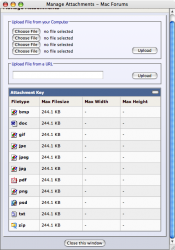
The formats you can upload onto MacRumors are listed at the bottom of the Manage Attachments window. Unfortunately, it doesn't seem to allow TIFF uploads. :(
To take a screenshot of just a single window, press COMMAND-SHIFT-4-SPACE and then click on the window you want captured. Before you click to capture the image, the window should be highlighted (blue by default). :)
61096
MACDRIVE
Nov 1, 2006, 06:25 AM
^^^^
That's realy cool, now I don't have to trace the outline of the image with the cross hair icon. Oh and thanks to you MJ, I've learned how to convert the formats using Preview.
I think I'm set.
As always mad jew, I'm grateful for your help. :) :) :)
mad jew
Nov 1, 2006, 05:49 PM
No worries mate. :)
decksnap
Nov 1, 2006, 06:11 PM
What you need to do to screengrab a specific window like you are trying is to press shift+apple+3, (this brings up the crosshairs) THEN hit spacebar. This puts it into a mode where it will screengrab any window you hover over. Then just open it in preview in save it in whatever format you like.
Edit: ooh.. yeah.. how did I miss MJ's post. whoops. Well, if my post is ANY help at all, it's that you don't have to press all four keys at once. Just the first three, then hit space afterward.
mad jew
Nov 1, 2006, 06:37 PM
I believe it's COMMAND-SHIFT-4, not COMMAND-SHIFT-3. Either way,. you're correct in saying the SPACE doesn't have to be pressed at the same time. :)
decksnap
Nov 1, 2006, 06:42 PM
I believe it's COMMAND-SHIFT-4, not COMMAND-SHIFT-3. Either way,. you're correct in saying the SPACE doesn't have to be pressed at the same time. :)
Yeah, I'm all sorts of wrong. :)
vBulletin® v3.8.6, Copyright ©2000-2012, Jelsoft Enterprises Ltd.