View Full Version : Can't do full screen on TV
2fives
Jan 6, 2007, 05:46 AM
Got a MBP 15" and bought a DVI to S-Video adapter for $30. Forget windows it won't even work. Mac is no problem it boots up and BANG!!! the extended desktops on the TV. Wish there was a way to stretch the screen to fit the whole TV, but what ever.
My actual question here is when playing movies in either Quicktime or with VLC and I drag the window onto the TV and then try to go fullscreen the window pops back on to the MBP and does fullscreen there. It'll play fine on the TV in windowd mode but try to goto fullscreen and no-go. It (like I said) just pops back onto the laptop screen. Crazy if you ask me, anyone have a clue??
countach
Jan 6, 2007, 05:55 AM
Umm, are you using the F7 key to fit the TV like you are supposed to?
risc
Jan 6, 2007, 06:03 AM
Do shift+command+f in QuickTime to bring up the "Present Movie..." options.
Compile 'em all
Jan 6, 2007, 06:20 AM
My actual question here is when playing movies in either Quicktime or with VLC and I drag the window onto the TV and then try to go fullscreen the window pops back on to the MBP and does fullscreen there. It'll play fine on the TV in windowd mode but try to goto fullscreen and no-go. It (like I said) just pops back onto the laptop screen. Crazy if you ask me, anyone have a clue??
Yes. The reason is that the VLC "Controller" is still located on the mbp's screen not the TV. You only moved the window of the playing movie not the controller, so when you go full screen VLC uses the screen where the controller is located. Hence, going full screen on the mbp's screen
The fix is simple, before going full screen on the TV just move the VLC controller (window->controller) too to the TV, then go full screen and it will work.
joshysquashy
Jan 6, 2007, 06:22 AM
go to sys prefs -> displays and drag the "menu bar" in the preview from the computer to the TV screen, this is now the dominant display that will show things by default.
mkrishnan
Jan 6, 2007, 06:37 AM
When you say that you wish there were a way to stretch the screen to fill the TV... what kind of TV is this exactly? LCD, Plasma, DLP, or CRT? HD or SD? 16:9 or 4:3? And what native resolution?
2fives
Jan 6, 2007, 01:07 PM
Thanks for the help all I'll try those suggestions. I was just going by the PC side of things. You don't have to drag the "controller" window over to the TV for it to work. :confused:
But anyways it's a Sony 32" CRT. Probably about 10+ yrs old now. After buying a MBP the big screen TV will have to wait. :o
mkrishnan
Jan 6, 2007, 07:46 PM
Wait, so you've got an ancient 32" CRT and you're getting an S-vid screen that does not fill the entire TV screen? This is a common problem on new widescreen TVs, but I wouldn't have expected it on that. If you're having the displayed image "come short" on all sides, you might either be able to auto-adjust it from the TV (if it holds separate auto-adjusts for different input sources), or you may have an overscanning problem. CRTs for TV were designed so that they crop the image slightly, so that there's never a gap at the edges of the screen, whereas computers are designed to go right to the edge. To compensate, computers use slightly lower resolutions (by a few pixels in each direction) than the equivalent for a TV. If you adjust the computer to an overscan resolution, you can compensate. You might still try SwitchResX to accomplish that.
balamw
Jan 7, 2007, 01:25 AM
go to sys prefs -> displays and drag the "menu bar" in the preview from the computer to the TV screen, this is now the dominant display that will show things by default.
Both VLC and QT have settings that allow you to set the default display without moving the menu bar/dock or the "controller window".
In recent versions of VLC, go Video -> Video Device and select the screen you want to use before you go full screen.
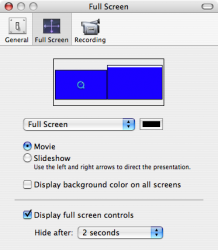
In QT, go QuickTime Player -> Preferences -> Full Screen tab click on the display you want to use for full screen.
65700
As you can see QT is set to go to my TV, which is not where the menu bar and dock are.
EDIT: If you want to blank the other screen like Front Row does select the "display background color on all displays" and select the background color (the black bar).
B
Compile 'em all
Jan 7, 2007, 05:53 AM
In recent versions of VLC, go Video -> Video Device and select the screen you want to use before you go full screen.
B
Thanks for the tip. I always moved the controller window before going full screen :o but now, not anymore :cool:
mkrishnan
Jan 7, 2007, 10:47 AM
Thanks for the tip. I always moved the controller window before going full screen :o but now, not anymore :cool:
Correct me if I'm wrong, but there is no easy way to set iTune's default full screen window, without changing the main display, is there? That's the only app at this point that I'm really pining for this feature in. :(
balamw
Jan 7, 2007, 11:00 AM
Correct me if I'm wrong, but there is no easy way to set iTune's default full screen window, without changing the main display, is there? That's the only app at this point that I'm really pining for this feature in. :(
iTunes and Front Row both don't seem to have this extremely handy feature. I'd also like to be able to do this with iPhoto for slideshows.
B
vBulletin® v3.8.6, Copyright ©2000-2012, Jelsoft Enterprises Ltd.