PDA

View Full Version : Post Your Applications Folder


mcarnes
Aug 29, 2007, 05:20 PM
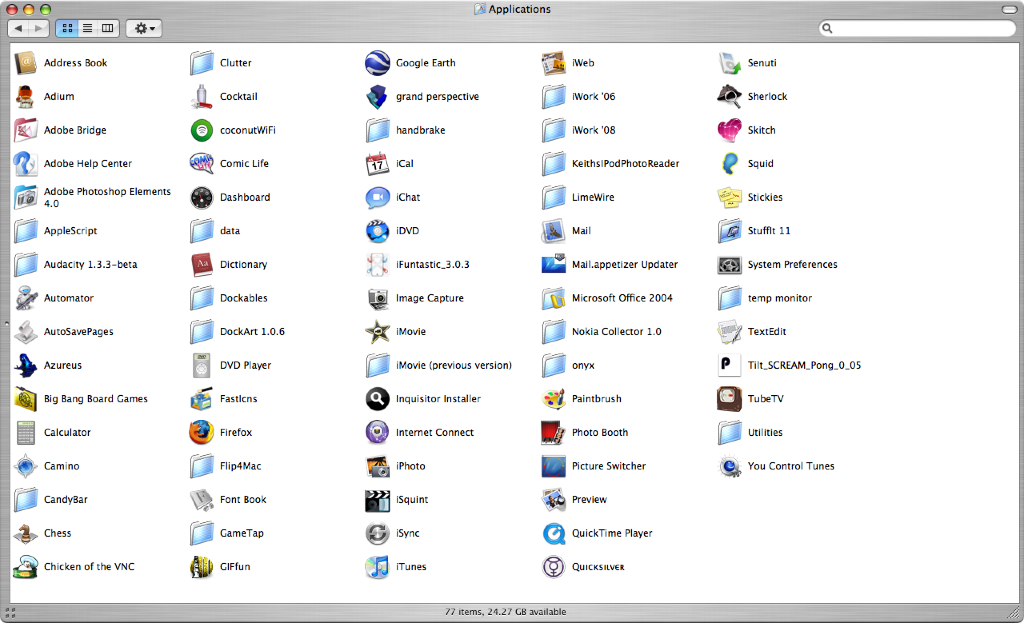
Here's mine. :D And yes, I do use all these apps.


DJMastaWes
Aug 29, 2007, 05:40 PM
http://img206.imageshack.us/img206/9895/picture1dx2.png

I probably have about 200-225 apps on my External HD.

PS. Isn't this in the wrong section?

squeeks
Aug 29, 2007, 07:32 PM
this thread belongs in the pictures forum

but ill post mine anyway

wozzlewoozle
Aug 29, 2007, 08:13 PM
just under 100, plus all other *nix programs...

WillJS
Aug 29, 2007, 08:46 PM
Probably should clean up.. :rolleyes:

kick52
Aug 30, 2007, 06:05 PM
http://kick52.com/dump/caps/apps.jpg

daneoni
Aug 30, 2007, 06:48 PM
Pretty minimal....will probably grow overtime

henk12321
Aug 31, 2007, 04:37 AM
Here is mine.

http://xs218.xs.to/xs218/07355/Afbeelding1.jpg

http://xs318.xs.to/xs318/07355/Afbeelding2.jpg

Killyp
Aug 31, 2007, 05:45 AM
Doing pretty well considering this OS X install was fresh 2 days ago.

®îçhå®?
Aug 31, 2007, 08:35 AM
Mine are arranged into folders that they correspond to

SBik2
Aug 31, 2007, 09:59 AM
heres mine...(77 apps) had more but i did a fresh install last month and have about another 50 or so on my external HD..click for bigger
http://i28.photobucket.com/albums/c248/SBik2/th_Picture1-17.png (http://i28.photobucket.com/albums/c248/SBik2/Picture1-17.png)

WillJS
Aug 31, 2007, 05:05 PM
Mine are arranged into folders that they correspond to

I might do that. Does it mess up the file structure? (ie only should do after a fresh install?) or will doing it now (existing install) hurt anything?

decksnap
Aug 31, 2007, 05:35 PM
Mine are arranged into folders that they correspond to

I'm not sure that's a great idea for the Apple apps... like Safari. I've seen software update go horribly wrong when trying to update moved Apple apps.

®îçhå®?
Sep 1, 2007, 04:26 AM
I'm not sure that's a great idea for the Apple apps... like Safari. I've seen software update go horribly wrong when trying to update moved Apple apps.

No its fine, it just creates a completely new app and you just move that one.

I think that it should work without a fresh install too although you might have to change the shortcut from the dock

macbotics
Sep 1, 2007, 09:28 PM
As you can see i am a graphics and music enthusiast.
http://img376.imageshack.us/img376/44/picture4fl3.th.png (http://img376.imageshack.us/my.php?image=picture4fl3.png)

psychofreak
Sep 1, 2007, 09:34 PM
Here's mine :)

http://ugli.quickshareit.com/share/picture1550ea.png

mrcmosx
Sep 1, 2007, 09:43 PM
Here is my app folder

http://myttz.net/junk/apps.png

techlover828
Nov 3, 2007, 09:06 PM
Hey,

Thought it might be a cool idea to post your applications folder to give people ideas for good apps.

I'll start with mine:

janitorC7
Nov 3, 2007, 09:12 PM
Hey,

Thought it might be a cool idea to post your applications folder to give people ideas for good apps.

I'll start with mine:

okay, to start with

Office 2008, elaborate.

techlover828
Nov 3, 2007, 09:14 PM
okay, to start with

Office 2008, elaborate.

it's a 60 day beta

psychofreak
Nov 3, 2007, 09:16 PM
okay, to start with

Office 2008, elaborate.

There is a private beta...buggy as hell, but awesome...

Here's mine:
http://mandarin.quickshareit.com/share/picture25e48a.png

I'll scrap iScrobbler for Last.fm when the dock-icon bug on 10.5 has been sorted...

techlover828
Nov 3, 2007, 09:19 PM
There is a private beta...buggy as hell, but awesome...


it is awsome, I've probably used it for 5 hours total and it hasn't crashed at all. It's so much faster than office 2004!

edit: what's xslimmer?

Luis
Nov 3, 2007, 09:19 PM
There is a private beta...buggy as hell, but awesome...

Here's mine:
http://mandarin.quickshareit.com/share/picture25e48a.png

I'll scrap iScrobbler for Last.fm when the dock-icon bug on 10.5 has been sorted...

How does Xslimmer work for you?

psychofreak
Nov 3, 2007, 09:21 PM
edit: what's xslimmer?Strips PPC binaries (on Intel Macs) and other languages to make apps faster (slightly) and save a few GBs of space :)

How does Xslimmer work for you?

Awesome, no problems so far...

techlover828
Nov 3, 2007, 09:27 PM
Strips PPC binaries (on Intel Macs) and other languages to make apps faster (slightly) and save a few GBs of space :)


Awesome, no problems so far...

wow, if i had 13 dollars i'd get it, it would cut my applications folder more than half (like 10 gb total)!

xUKHCx
Nov 3, 2007, 09:35 PM
Mine

90134
90135
90136

janitorC7
Nov 3, 2007, 09:59 PM
Strips PPC binaries (on Intel Macs) and other languages to make apps faster (slightly) and save a few GBs of space :)


Awesome, no problems so far...

ahhhhhh I used xslimmer a while ago

it killed CS3, Logic, word, FCP, iTunes, Soundtrack,

basically most of the pro apps I use plus office, it was terrible, also made my computer slow

squeeks
Nov 3, 2007, 10:54 PM
we did this one already

http://forums.macrumors.com/showthread.php?t=347969&highlight=applications

Luis
Nov 4, 2007, 01:57 AM
ahhhhhh I used xslimmer a while ago

it killed CS3, Logic, word, FCP, iTunes, Soundtrack,

basically most of the pro apps I use plus office, it was terrible, also made my computer slow

Word is PPC only (unless it killed your 2008 beta?) so what binary did Xslimmer it strip from it?

janitorC7
Nov 4, 2007, 02:05 AM
Word is PPC only (unless it killed your 2008 beta?) so what binary did Xslimmer it strip from it?

I never used it on the beta....

but it killed my PPC word, nothing else in the office family though, my guess is that it didnt kill work directly but proably some resource on the system that word used...... best guess would have to be some file system resource

janitorC7
Nov 4, 2007, 02:19 AM
it's a 60 day beta

I know, I have it to, I just wanted your opinion, because mine keeps unexpectedly quitting on it.

techlover828
Nov 4, 2007, 05:37 AM
we did this one already

http://forums.macrumors.com/showthread.php?t=347969&highlight=applications

Oh, sorry, I searched and didn't see that.

I know, I have it to, I just wanted your opinion, because mine keeps unexpectedly quitting on it.

Oh, I see. Ya, used mine once for 4 strait hours doing homework and it didn't crash once. Because it's universal it is sooo much faster. If it just opens and crashed look for a new beta, maybe you have an old one.

squeeks
Nov 4, 2007, 05:24 PM
Oh, sorry, I searched and didn't see that.


i noticed it didnt show up in a general forum search, but specifically for this forum it does, but its over 2 months old so its ok:D

psychofreak
Nov 4, 2007, 05:26 PM
ahhhhhh I used xslimmer a while ago

it killed CS3, Logic, word, FCP, iTunes, Soundtrack,


Those two work for me...

Italiana
Nov 4, 2007, 05:36 PM
wow, if i had 13 dollars i'd get it, it would cut my applications folder more than half (like 10 gb total)!

I believe Monolingual (http://monolingual.sourceforge.net/) would do the job, and for free. ^_^

I'm on my brother's Linux box atm so I'll post my apps folder later.

janitorC7
Nov 11, 2007, 04:09 PM
I really must say that all of the binary strippers.

BACK UP FIRST!!!!!!!

vohdoun
Nov 11, 2007, 04:34 PM
Why do some of you have CandyBar with Leopard... I thought it wasn't Leopard friendly, that is why they are coming out with v3.

Dear CandyBar User,

Are you planning to purchase Mac OS X 10.5 ("Leopard") this weekend? Hooray, us too!

But take note: CandyBar 2 won't work in Leopard. Don't even try it! :) Due to major system changes, if you were hoping to change some Leopard icons on Saturday, we're sad to say you'll be (temporarily) out of luck.

The good news? We're hard at work on the next major update to CandyBar! That's right, CandyBar 3 is coming soon, and it'll be worth the wait.

more about candybar 3

We don't normally talk about future products, but what the heck — we'd like to share with you a little bit about CandyBar 3.

CandyBar 3 will continue with CandyBar's proven, safe, and easy system icon customization engine: getting a cool trashcan or replacing the new Leopard default folder will be as easy as dragging and dropping. But CandyBar 3 will go even further, with full support for the new mega-sized Leopard icons (up to 512 pixels in size), a number of new Leopard icon types, and significantly more robust icon restoration.

And one piece of CandyBar 3 is just too exciting not to mention. If all goes according to plan, CandyBar 3 will offer the ability to customize some of the look of Leopard's new Dock! Don't quite like the shiny new cyberspace-shelf appearance? Want something a little more opaque? That's what we're here for.

Believe it or not, that's not even the half of it! There are even more secret, shocking features in CandyBar 3 that we'll reveal on launch day.

the important details

We plan to ship CandyBar 3 before the end of November. Pricing (including upgrade pricing) has not yet been determined.

Additionally, it's important to note that CandyBar 3 will be Leopard only. If you have not yet purchased CandyBar 2, want to keep using it, and do not intend to upgrade to Leopard, we recommend you purchase CandyBar 2 right away. In other words, CandyBar 2 will be effectively discontinued upon the release of CandyBar 3.

We'll explain more once CandyBar 3 is finished.

thanks for using candybar!

That's really it for now. I hope you're as excited about Leopard as we are, and thanks for your patience while we finish up this major new release! I'll drop you a line once we're done!

Best,
Cabel
Panic

xUKHCx
Nov 11, 2007, 04:37 PM
Why do some of you have CandyBar with Leopard... I thought it was Leopard friendly, that is why they are coming out with v3.

For me it is to serve as a reminder to check out the new version when that comes out, as well as the fact that i didn't know that it was leopard unfriendly when i installed it.

psychofreak
Nov 11, 2007, 04:38 PM
Why do some of you have CandyBar with Leopard... I thought it wasn't Leopard friendly, that is why they are coming out with v3.

Upgrading doesn't get rid of incompatible apps...I can't wait for v3...

Virgil-TB2
Nov 11, 2007, 04:39 PM
it is awsome, I've probably used it for 5 hours total and it hasn't crashed at all. It's so much faster than office 2004!

edit: what's xslimmer?Any of you Beta testers know if Office leaves all that junk in your Documents folder still? And what about CS-3?

With Leopard I am actually using my Documents folder for the first time as it now makes sense to, but all the crapola from Microsoft and "Adobesoft" is stressing me out.

xUKHCx
Nov 11, 2007, 04:43 PM
Are you referring to the Microsoft User Data folder, if so yes it does.

squeeks
Nov 11, 2007, 06:39 PM
anyway heres my new application folder for leopard

GSMiller
Nov 12, 2007, 06:31 PM
Mine...

backsidetailsli
Nov 19, 2007, 06:34 PM
http://img222.imageshack.us/img222/2614/picture1rd4.png

Schtumple
Nov 27, 2007, 10:13 AM
Mine

sk8r527
Dec 1, 2007, 02:42 AM
my applications folder

Melrose
Feb 21, 2008, 10:43 PM
Let's see what everybody's got!

Wallpapers get changed overnight, docks get switched around - apps are forever...sort of :)

Show your stuff!

puckhead193
Feb 21, 2008, 10:46 PM
lo and be hold:

Me1000
Feb 21, 2008, 11:17 PM
too many apps for my stack :rolleyes:, but here it is...

SevenInchScrew
Feb 22, 2008, 12:16 AM
Pretty basic here. I will say though, I don't know how some of you stand it with all your CS3 stuff all over the place. I made a folder for all that to go in. Then its all contained in there, not all over my Apps folder. Other than that, just some different icons for things, and its pretty average.

http://img252.imageshack.us/img252/3759/picture4hu9.png

richard.mac
Feb 22, 2008, 12:41 AM
is anyone else's grid stack for the apps folder choppy even after the 10.5.2 and graphics update? for my setup (in sig) seems even more choppy than 10.5.1... doesnt worry me anymore though as i use lift view.

104351
[click for full size]

i uninstalled iMovie '08, iDVD '08 and GarageBand '08 and downloaded iMovie '06 from Apple.

todd2000
Feb 22, 2008, 12:53 AM
Ok here ya go. Not too many right now, but I re-installed about a month ago, and tend to just install Apps as I need them.

P.S. You stole my wallpaper :p (I swear I had it before I read this thread)

secretpact
Feb 22, 2008, 02:07 AM
Wow i didn't know leopard had that feature!! I just got it today and I'm installing it tomorrow after school (finishing backing up today). Looks really cool.
In the meantime this is the best I can do :D :

PowerFullMac
Feb 22, 2008, 03:13 AM
Mine is VERY exciting... :rolleyes:

Family iMac so im not really allowed to install stuff on it, and im still saving for my MacBook.

anti-microsoft
Feb 22, 2008, 03:22 AM
Probably ordering Mac OS X Leopard by the weekend but in the meantime:

MattGarner
Feb 22, 2008, 03:25 AM
http://i29.tinypic.com/9qfwpc.png

tominated
Feb 22, 2008, 04:07 AM
http://img.skitch.com/20080222-b7f6futwpqnex1est6yi66kgb3.jpg

Everythingisnt
Feb 22, 2008, 07:17 PM
http://img156.imageshack.us/img156/4550/picture1tn1.png (http://imageshack.us)

Rhosfelt
Feb 22, 2008, 07:50 PM
Here you go, included the CS3 folder in case you guys were curious, and my .dmgs too I have been lazy and installing things as I need them.

djejrejk
Feb 22, 2008, 07:58 PM
My Applications folder is pretty intense so I had to shrink the size of my icons.. I also stash apps such as Super Duper and Carbon Copy cloner in Utilities because it seems like a more logical place.

Melrose
Feb 22, 2008, 09:44 PM
Back on topic, those are some intense collections of apps; I separated all my browsers into their own folder, but my number is still pretty small..

eh, I'm happy nonetheless :)

Everythingisnt
Feb 22, 2008, 10:03 PM
Am I the only one whose looking at other people's apps and googling the name if they look cool? :P

I found Joost a few minutes ago... It's fantastic!

MrSmith
Feb 22, 2008, 10:30 PM
Regarding applications, do you guys actually use them all. Or even nearly all?

Everythingisnt
Feb 22, 2008, 10:42 PM
Regarding applications, do you guys actually use them all. Or even nearly all?

The only apps I don't use on a weekly basis might be CandyBar, ImageCapture, uh, Mail, and iWeb (I use Coda instead).

nickster9224
Feb 22, 2008, 10:54 PM
http://content.answers.com/main/content/wp/en/0/02/Character_of_the_donkey_from_Shrek_2.JPG

Oh you said apps. AM i mistaken.

SevenInchScrew
Feb 23, 2008, 02:12 AM
I found Joost a few minutes ago... It's fantastic!
I just looked back through the thread. Am I the only one in this thread so far who uses it?? I really like Joost. I started using it back a year or so ago when the private beta was going on. There wasn't much content back then, and really, there isn't THAT much now. But come on, its free. How can that be bad? I'm pretty bummed that more people don't use it. More people would mean more content. Oh well.

ZMRoach
Feb 23, 2008, 02:47 AM
here ya go:

ZMRoach
Feb 23, 2008, 03:01 AM
I just looked back through the thread. Am I the only one in this thread so far who uses it?? I really like Joost. I started using it back a year or so ago when the private beta was going on. There wasn't much content back then, and really, there isn't THAT much now. But come on, its free. How can that be bad? I'm pretty bummed that more people don't use it. More people would mean more content. Oh well.

just downloaded it and it seems pretty cool. have to look more into it tomorrow.

EvanLugh
Feb 23, 2008, 11:02 AM
I have 1/2 applications on my internal, 1/2 on my external hard drive(s).

http://img170.imageshack.us/img170/6813/picture1lk1.png
http://img341.imageshack.us/img341/4488/picture2pi8.png

Edit: My Aperture icon just doesn't want to change :@

Melrose
Feb 23, 2008, 12:42 PM
Am I the only one whose looking at other people's apps and googling the name if they look cool? :P

I found Joost a few minutes ago... It's fantastic!

I've been doing the same thing!

razorianfly
Feb 23, 2008, 08:01 PM
Here's Mine:

EvanLugh
Feb 24, 2008, 04:23 AM
I've been doing the same thing!

Would be a good idea if say you posted a screenshot but also asked previous members what there apps are. Would be easier :p

Melrose
Feb 24, 2008, 02:02 PM
yeh I guess so - I'll get there in the end tho' anyway :) It'll just take longer. Maybe...

jfull15
Feb 24, 2008, 04:06 PM
I have 1/2 applications on my internal, 1/2 on my external hard drive(s).


Edit: My Aperture icon just doesn't want to change :@


try restarting the dock,
i use this widget and it will restart it: http://www.innermindmedia.com/dock_doctor_widget.html

after the dock restarts my icons usually show up then.

phiberglass
Feb 24, 2008, 04:45 PM
http://austingrade.com/desktop/Apps.jpg
Click to enlarge.

lostfan916
Feb 25, 2008, 12:37 AM
:)

callmemike20
Feb 25, 2008, 01:07 AM
http://lh3.google.com/CALLmeMIKE20/R8JaZooGdLI/AAAAAAAAAYM/7EftCReajmQ/s144/Picture%201.png

http://picasaweb.google.com/CALLmeMIKE20/Forums/photo#5170794718623593650

EvanLugh
Feb 26, 2008, 02:56 AM
try restarting the dock,
i use this widget and it will restart it: http://www.innermindmedia.com/dock_doctor_widget.html

after the dock restarts my icons usually show up then.

Thanks - that did the trick. :o

jfull15
Feb 26, 2008, 01:12 PM
Thanks - that did the trick. :o

sure, thoose icons not changing bugs me out :mad:

jfull15
Feb 26, 2008, 01:18 PM
Thanks - that did the trick. :o

sure, thoose icons not changing bugs me out :mad:

Father Jack
Feb 26, 2008, 01:19 PM
Here's mine:

ThisIsMyName
Feb 27, 2008, 10:54 AM
heres my tiger apps

Prof.
Feb 27, 2008, 01:38 PM
Nothing to see here. Move along, move along.

Prom1
Feb 28, 2008, 04:21 PM
1st off I'd like to thank you ALL for this thread! It helps many ppl such as myself consider what I have to gain and little to loose to switch to the mac platform.

Using Windows for so many years is truely becoming a Witches Brew!

I have 1/2 applications on my internal, 1/2 on my external hard drive(s).

http://img170.imageshack.us/img170/6813/picture1lk1.png
http://img341.imageshack.us/img341/4488/picture2pi8.png

Edit: My Aperture icon just doesn't want to change :@

WIth your apps on the external HDD, do the alias auto disappear when its disconnected? Also if you attach that external HDD say from your iMac and connect to the MBP are those applications automatically usuable, and if not is there a way to enable that?

Thanks for any help in advance.

WannaBMW3
Mar 10, 2008, 03:33 AM
The icons for a mac are simply classic!

Hello-Jeremy
Mar 10, 2008, 11:27 AM
On the mbp

EvanLugh
Mar 10, 2008, 02:21 PM
1st off I'd like to thank you ALL for this thread! It helps many ppl such as myself consider what I have to gain and little to loose to switch to the mac platform.

Using Windows for so many years is truely becoming a Witches Brew!


WIth your apps on the external HDD, do the alias auto disappear when its disconnected? Also if you attach that external HDD say from your iMac and connect to the MBP are those applications automatically usuable, and if not is there a way to enable that?

Thanks for any help in advance.
Yeah, they're there and usable. :)

HD303
Mar 10, 2008, 02:27 PM
How do you get your application folder to appear like that?

Techguy172
Mar 10, 2008, 02:59 PM
Here's mine

EvanLugh
Mar 10, 2008, 03:37 PM
How do you get your application folder to appear like that?

Stacks - Part of leopard

Techguy172
Mar 10, 2008, 03:56 PM
How do you get your application folder to appear like that?

You Drag you applications folder into the Stacks section of your Dock.

RobertD63
Mar 12, 2008, 11:13 PM
Here is mine.. Stacks rock...
-Robert :apple:

Jelite
Mar 13, 2008, 01:34 PM
This

Qwest905
May 19, 2008, 12:52 PM
http://img293.imageshack.us/img293/6168/picture1zp2.jpg

Babooshka
May 20, 2008, 05:07 PM
some other ones in the various folders

Melrose
Jun 9, 2008, 11:03 AM
I've added several new ones, so I thought I'd resurrect this thread show off my Apps stack again.

darkvineyard
Aug 14, 2008, 01:04 PM
Here are all of my applications -- all 131 of them! xD
I know, I'm crazy, but I can't imagine my Mac without these! *sheepish*

http://img.skitch.com/20080814-jrrg1d6c4jt6ir4a536k2hqmc4.preview.jpg (http://skitch.com/darkvineyard/uk3t/user-apps-1)
Click for full size (http://img.skitch.com/20080814-jrrg1d6c4jt6ir4a536k2hqmc4.jpg)
http://img.skitch.com/20080814-dmcwxj3kkx9gptj61bcwrgwixf.preview.jpg (http://skitch.com/darkvineyard/uk31/user-apps-2)
Click for full size (http://img.skitch.com/20080814-dmcwxj3kkx9gptj61bcwrgwixf.jpg)
http://img.skitch.com/20080814-8ch2sabjpkq3nh22pqnces186n.preview.jpg (http://skitch.com/darkvineyard/uk3u/user-apps-3)
Click for full size (http://img.skitch.com/20080814-8ch2sabjpkq3nh22pqnces186n.jpg)


Here is one big screenshot.
http://img.skitch.com/20080814-q288jpwkwsptciy1nfanss18f.preview.jpg (http://skitch.com/darkvineyard/uk4w/user-apps-4)
Click for full size (http://img.skitch.com/20080814-q288jpwkwsptciy1nfanss18f.jpg)

I would elaborate more, but I'm going out for dinner with my Grandma and Aunt. ^^;;

ayeying
Aug 14, 2008, 01:30 PM
why is all of them aliases?

anyways, here's mines. 69 apps.

darkvineyard
Aug 14, 2008, 03:12 PM
why is all of them aliases?

anyways, here's mines. 69 apps.

They are aliases because I'm a perfectionist, and I had to get the screenshot to be just right, and I didn't want to mess around with the size of my User Apps folder, but with this, I can resize it all I want, because after I take the screenshot, I'm just going to delete it. xD
Can you say OCD? *sheepish*