View Full Version : Can't use Quick Look!!
Azelixi
Nov 1, 2007, 06:51 PM
I've just installed Leopard everyting seems to be workin fine..is just that i've realise that, I dnt have the Quick Look shortcut or lil "eye" image on my finder tool bar, i kno the key shorcut is command-Y but i still wana kno y is not ther on my toolbar and is just handy i think...anyways thanks for your help in advance!! :)
!!!(I can use it if i use the command-y but i wana see the image on the toolbar thanks)!!!
psychofreak
Nov 1, 2007, 06:52 PM
View->Customize toolbar, then add it :)
Also, you can just use the spacebar, not CMD+Y
xUKHCx
Nov 1, 2007, 06:55 PM
View->Customize toolbar, then add it :)
Also, you can just use the spacebar, not CMD+Y
BTW cmd+opt+y is the shortcut for fullscreen quicklook.
psychofreak
Nov 1, 2007, 06:57 PM
BTW cmd+opt+y is the shortcut for fullscreen quicklook.
I know, but opt was not mentioned, neither was fullscreen...spacebar is tons easier than clicking a button...
Azelixi
Nov 1, 2007, 07:01 PM
dat was just so simple cheers n...sorry shameful:confused:
Azelixi
Nov 1, 2007, 07:03 PM
i fink da toolbar is just da best option!
bb10lue
Nov 1, 2007, 07:05 PM
I tried to use view-->customized the tool bar to add the quick look, it didn't work!!!!!!!:(
xUKHCx
Nov 1, 2007, 07:12 PM
I tried to use view-->customized the tool bar to add the quick look, it didn't work!!!!!!!:(
What happened?
To do it see below
89897
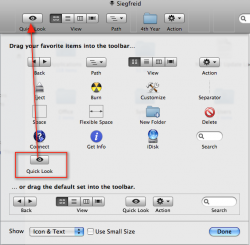
Then this window appears, drag the Quicklook up to the top then press Done
89898
psychofreak
Nov 1, 2007, 07:13 PM
dat was just so simple cheers n...sorry shameful:confused:
P.S. This is the way to add toolbar icons in most apps :)
bb10lue
Nov 1, 2007, 07:25 PM
What happened?
To do it see below
89897
Then this window appears, drag the Quicklook up to the top then press Done
89898
Fixed!!! Thank you so much!!!! :D
psychofreak
Nov 1, 2007, 07:27 PM
Fixed!!! Thank you so much!!!! :D
Sorry about my lacking instructions, I just guessed that would be obvious...
xUKHCx
Nov 1, 2007, 07:28 PM
Fixed!!! Thank you so much!!!! :D
No problemo. It can be hard to follow written directions sometimes.
vBulletin® v3.8.6, Copyright ©2000-2012, Jelsoft Enterprises Ltd.