PDA

View Full Version : multiple installers


glenn12
Nov 9, 2007, 01:09 PM
I am currently running as iBook G4 with Panther. When I installed my palm software, somehow I downloaded mutiple installers. When trying to toss them, I get the message that the installers "are inuse and can't be deleted". I can't find them running anywhere...anyone have an idea?

Thanks


wrldwzrd89
Nov 9, 2007, 01:27 PM
Log out and back in, then try again. If that doesn't help, restart the computer and try again.

glenn12
Nov 9, 2007, 01:40 PM
Thanks for the suggestion. Tried that and nothing changes. I'm stumped.

wrldwzrd89
Nov 9, 2007, 02:02 PM
Check your Login Items to make sure they're not running at startup, and also check Activity Monitor to see if they're actually running. If they are you can simply force-quit them.

Login Items are found in the Accounts pane of System Preferences, and Activity Monitor is in your Utilities folder.

glenn12
Nov 9, 2007, 02:26 PM
They show up in start-up...how do I turn them off? Nothing in activity monitor. And also, thanks for your responses, wrldwzrd.

I think I'm going to step away from this for a bit. I hear a pint calling me name.

luffx
Nov 9, 2007, 02:29 PM
They show up in start-up...how do I turn them off? Nothing in activity monitor. And also, thanks for your responses, wrldwzrd.

I think I'm going to step away from this for a bit. I hear a pint calling me name.

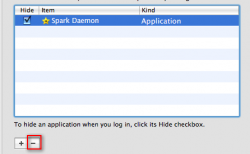
Highlight the item & Click the '-' button underneath the selection box. Reboot.

glenn12
Nov 9, 2007, 05:47 PM
luffx...Thanks, but that didn't work either. There are no '_' boxes by the item. Man...this is nuts.

xUKHCx
Nov 9, 2007, 05:53 PM
here

90821

glenn12
Nov 9, 2007, 06:00 PM
Tried that...what I've got is a couple of copies of Palm Installer on the desktop. When trying to delete..drag to trash then empty...the empty trash window says that the copies are in use and can not be deleted. ugh..
Give me a hydraulic circuit...'puters drive me crazy.

xUKHCx
Nov 9, 2007, 06:06 PM
Well if you see them in startupitems just delete them from there, cmd+backspace. Reboot then delete then from the Desktop.

glenn12
Nov 9, 2007, 11:05 PM
Got it. Thanks for all the responses.