PDA

View Full Version : Mac 512k w/internal Hyperdrive... Rare? Valuable?


iMpathetic
Jan 26, 2008, 07:08 AM
Yep, someone gave me a fully functioning 512k with an internal HyperDrive. And, I was wondering what these puppies are worth. I'm not likely to sell it anytime soon, but it'd be good to know how big my Thinkpad nest egg is ATM.

If any of you have any ballpark figures or something to say on the matter, please reply! Thanks!


gkarris
Jan 26, 2008, 02:56 PM
Yep, someone gave me a fully functioning 512k with an internal HyperDrive. And, I was wondering what these puppies are worth. I'm not likely to sell it anytime soon, but it'd be good to know how big my Thinkpad nest egg is ATM.

If any of you have any ballpark figures or something to say on the matter, please reply! Thanks!

Interstellar or Intergalactic? :p

iMpathetic
Jan 26, 2008, 08:59 PM
Tee Hee. No, it's really a 20MB internal hard drive for 512ks.

RacerX
Jan 27, 2008, 04:28 AM
It has been a long time since I saw a 512 last, but I always thought that there was no way to connect a hard drive to one... either internally or externally. I thought that (along with allowing 4 MB of memory) the major advantage of the Plus was the ability to connect external SCSI hard drives. And I was under the impression that the SE was the first compact Mac to have room for an internal drive (in place of a second floppy).

So yeah, I guess a 512 with an internal hard drive would be considered pretty rare. :eek:

iMpathetic
Jan 27, 2008, 07:18 AM
Yeah, someone on the 68k Macintosh Liberation army said I was the only other person he'd ever heard of with a hyperdrive. If mine wasn't kinda dirty, he said, it'd go for $400. He DOES live in Japan though, you know how they are about compacts...:rolleyes:

ReanimationLP
Jan 27, 2008, 11:55 AM
Pics?

I'd love to personally see the inside, I've never heard of any 128k or 512k with an internal HD drive.

iMpathetic
Jan 28, 2008, 07:38 PM
Um... it's really grimy, haven't cleaned it yet. I shall tomorrow night. And, no way in hell I'm opening that up. But, if you insist...

http://img.skitch.com/20080129-j2k2395i53dt3t9453h2csj1s5.jpg

shu82
Jan 28, 2008, 11:36 PM
Lord I am crying. If it boots, I would say 100 for the guts. The hyperdrive was a dealer add on anyway. There were no macs that left the factory with a hyperdrive sticker. If not eh, keep it as a conversation piece. That is the most mistreated mac I have seen in a while.

You poor soul. We should have the previous owners arrested for neglect.

Unspeaked
Jan 28, 2008, 11:51 PM
Lord I am crying. If it boots, I would say 100 for the guts. The hyperdrive was a dealer add on anyway. There were no macs that left the factory with a hyperdrive sticker. If not eh, keep it as a conversation piece. That is the most mistreated mac I have seen in a while.

You poor soul. We should have the previous owners arrested for neglect.

It doesn't look that bad...!

iMpathetic
Jan 29, 2008, 07:59 AM
Well, it does boot, that's for sure. I actually have another 512k that hasxa way better case, and I could transfer the intervals of the one with the hyperdrive to it. How much do ya think it'd be worth then?

Lord I am crying. If it boots, I would say 100 for the guts. The hyperdrive was a dealer add on anyway. There were no macs that left the factory with a hyperdrive sticker. If not eh, keep it as a conversation piece. That is the most mistreated mac I have seen in a while.

You poor soul. We should have the previous owners arrested for neglect.

Mechcozmo
Jan 29, 2008, 07:23 PM
Well, it does boot, that's for sure. I actually have another 512k that hasxa way better case, and I could transfer the intervals of the one with the hyperdrive to it. How much do ya think it'd be worth then?

Do you trust yourself with the CRT displays? I think there's a much greater chance of you botching the conversion than making anything better...

iMpathetic
Jan 29, 2008, 08:00 PM
Do you trust yourself with the CRT displays? I think there's a much greater chance of you botching the conversion than making anything better...

Nah, I'd get a friend to do it.

shu82
Jan 29, 2008, 11:18 PM
Its more that just worrying about CRTs. When I am working with 20+ year old hardware, I do it barefoot on concrete wearing a labcoat. And I definitely would not work on anyone elses stuff. Unless you know a grey haired mac god who used to work with these guys 20 years ago. I have one, but I have to spend all afternoon with the guy to get a simple little part from his glorious bin.

iMpathetic
Jan 30, 2008, 08:17 AM
Its more that just worrying about CRTs. When I am working with 20+ year old hardware, I do it barefoot on concrete wearing a labcoat. And I definitely would not work on anyone elses stuff. Unless you know a grey haired mac god who used to work with these guys 20 years ago. I have one, but I have to spend all afternoon with the guy to get a simple little part from his glorious bin.

FOA, why do you work on them barefoot on concrete wearing a lab coat? o protect against shock? I didn't even know that helped. :p

I actually might just sell the two as a bundle, so some lil' collector can make a nice, shiny 512k with an internal HyperDrive!

gnasher729
Jan 30, 2008, 08:57 AM
Yep, someone gave me a fully functioning 512k with an internal HyperDrive. And, I was wondering what these puppies are worth. I'm not likely to sell it anytime soon, but it'd be good to know how big my Thinkpad nest egg is ATM.

If any of you have any ballpark figures or something to say on the matter, please reply! Thanks!

A real, working HyperDrive? One that lasted 20+ years? Incredible.

I loved their backup software. Tried to backup a full HyperDrive onto floppy disks. It showed that it needed 35 floppy disks, and as I shoved them in one after the other they filled up on the screen as the backup went on. However, the screen had only space for 30 floppy disk symbols. Floppy #34 had a problem: Instead of a small floppy image like all the others the backup software showed a _big_ floppy icon. Got me a bit worried. Floppy #35: The backup software crashed. The whole 35 floppy disk backup was unusable. One hour work gone, and no backup :o

iMpathetic
Jan 31, 2008, 10:03 AM
A real, working HyperDrive? One that lasted 20+ years? Incredible.

I loved their backup software. Tried to backup a full HyperDrive onto floppy disks. It showed that it needed 35 floppy disks, and as I shoved them in one after the other they filled up on the screen as the backup went on. However, the screen had only space for 30 floppy disk symbols. Floppy #34 had a problem: Instead of a small floppy image like all the others the backup software showed a _big_ floppy icon. Got me a bit worried. Floppy #35: The backup software crashed. The whole 35 floppy disk backup was unusable. One hour work gone, and no backup :o

hah! Wow, 1980s computing goodness. Of course, when I was born, people were anticipating what would eventually become Windows 95...

Yay for skipping huge unfathomably excruciating sections of computing history!

Somone decided he had too many macs in his collection so he just gae the 512k to me.

iMpathetic
Jan 31, 2008, 10:03 AM
*double post. delete* must have clicked it twice!

MacSimum
Feb 2, 2008, 05:08 PM
Pics?

I'd love to personally see the inside, I've never heard of any 128k or 512k with an internal HD drive.

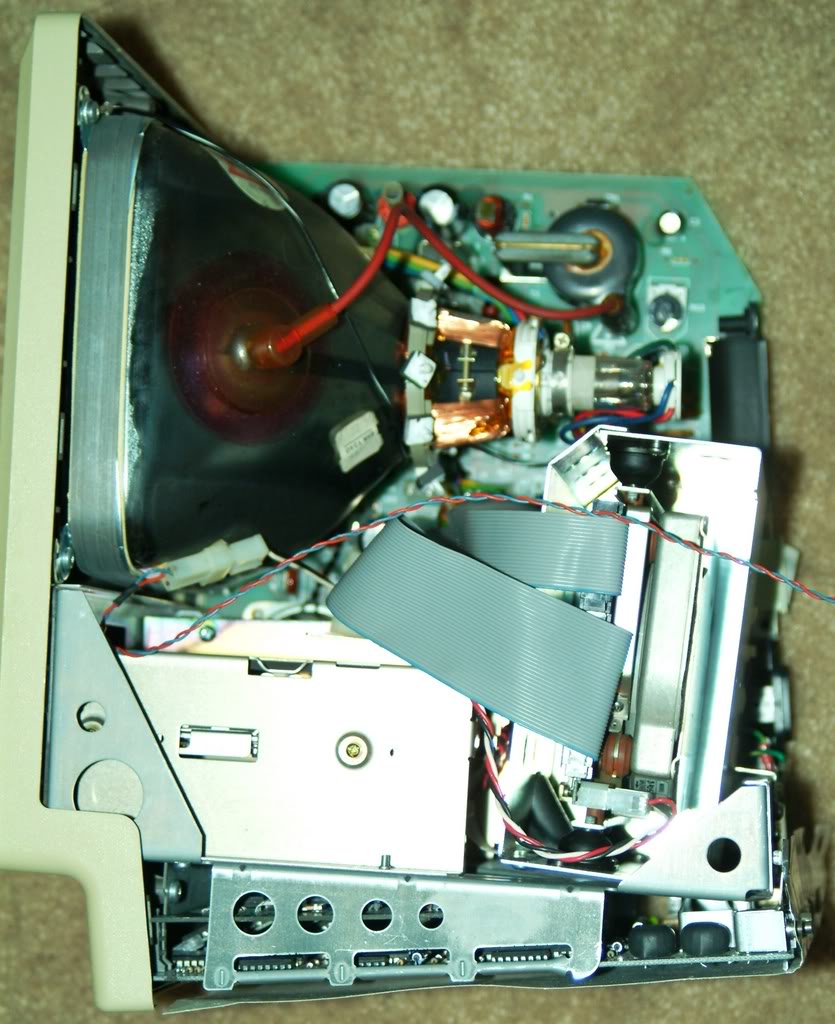
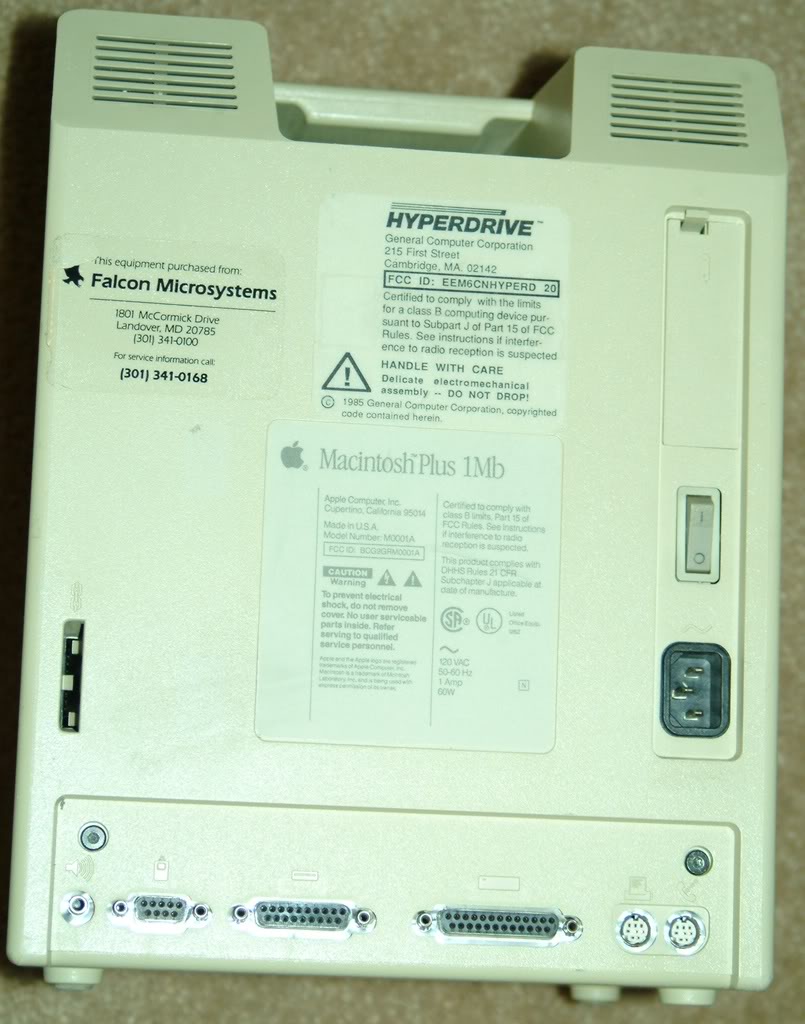
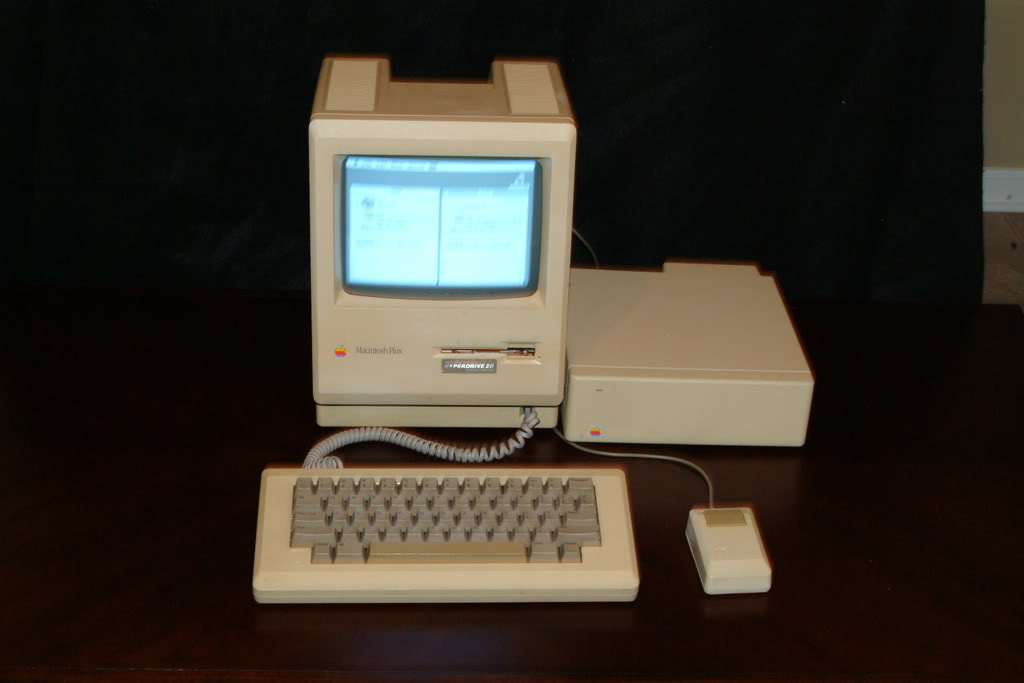
Here are some images from my Hyperdrive equipped Mac Plus...

http://i54.photobucket.com/albums/g82/dcorsivo/MacPlusHyperDrive2.jpg

http://i54.photobucket.com/albums/g82/dcorsivo/MacPlusHyperDrive1.jpg

http://i54.photobucket.com/albums/g82/dcorsivo/MacPlusHyperDrive3.jpg

http://i54.photobucket.com/albums/g82/dcorsivo/MacPlusHyperDrive5.jpg

http://i54.photobucket.com/albums/g82/dcorsivo/MacPlusHyperDrive4.jpg

http://i54.photobucket.com/albums/g82/dcorsivo/HyperDriveII.jpg

http://i54.photobucket.com/albums/g82/dcorsivo/DSCF0079.jpg

MacSimum
Feb 2, 2008, 05:18 PM
Oooops!

I guess those photos where just a TAD bit biger than I thought. Sorry.

Anyway, the story goes...

You are generally correct when you say that the Mac SE's are the first Macs to support an internal hard drive. They are the first to NATIVELY support them.

The Hyperdrive is an add-on, and is made possible via a ribbon cable clip that attaches directly onto the Mac 128k, 512k, and the Plus' processor. The clip which is attached to a circuitboard via ribbon cable contains additional programming instructions, and runs tandomly with the native instructions to enable the internal hard drive to be recognized and accessed.

Along with the processor clip-on, a voltage transformer has been added, so as to provide enough power to the drive without dropping the voltage throughout the rest of the system.

An internal fan has been added as well. It's a small fan, but the effect is enourmous. I can run this Mac 24/7 and upon placing my hand on the chasis over the analog board, it's still cool to the touch!!!

Also, take note of the rubber anti-shock dampers attached to the hard drive. Essentially, the drive is just floating in it's enclosure. Pretty good thinking for the time!

Enjoy the pics!!!

MacSimum
Feb 2, 2008, 05:28 PM
On an additional note:

If you plan on tearing out the Hyperdrive componants and transferring them to another Mac, You need to be extremely careful, and know what you are doing!

One of the most important steps to a successful installation involves adjustments to the analog board, tweaking voltage regulation.

Upon installing the Hyperdrive, when your system is first turned on, you are severly undervolting, which in most cases causes the display to go crazy, if it comes on at all, and you will most likely get a Sad Mac error relating to the analog board.

To make the proper adjustment, you will need a multimeter, antistatic plastic flathead screwdriver, and a Mac Diagnostic cable. If you don't have the diagnostic cable, you can make a dongle that will work as well, but you will have to be extremely careful to avoid shorting out your logic board. If that happens, you're done. You've fried your logic board and the HyperDrive circuirty.

Bottom line, if you know what you're doing, overall it's easy. otherwise, this is not for the faint of heart...

gkarris
Feb 2, 2008, 05:31 PM
^^^^^^^^ thanks for the cool pics and info...

Interstellar or Intergalactic? :p

Tee Hee. No, it's really a 20MB internal hard drive for 512ks.

Oh, that makes sense now (too much Sci-Fi). I've never heard of an original Mac or Plus with an internal HD either.

Looks like a 3rd party add-on that a computer store provided and installed to people who bought or already had a machine.

Cool - they are indeed rare finds!

ReanimationLP
Feb 2, 2008, 06:25 PM
No wonder why they are so rare.

The installation sounds like a complete and total b*tch.

Anyhoo, thanks for the awesome pictures. :)

CanadaRAM
Feb 2, 2008, 06:44 PM
Right - there were two main companies that provided aftermarket mods to early Macs - Levco and General Computer Corp. GCC started life as a contract manufacturer of Atari coin-operated videogames. I floated around Boston harbour with the president of GCC one year at MacWorld Expo back when there was a MW in Boston in the Summer as well as SF in the winter.

Levco made a modification called the Monster Mac which turned a 512 into a Plus by adding memory (and maybe a SCSI port, I don't remember).

Also, a SCSI port was not strictly necessary for a hard drive - the first Apple external hard drives plugged into the Serial port IIRC.

RacerX
Feb 3, 2008, 01:27 PM
Levco made a modification called the Monster Mac which turned a 512 into a Plus by adding memory (and maybe a SCSI port, I don't remember).A friend of mine got one of those once. He had done some work for someone in trade for a Plus, but instead got a 512 with a 20 MB external hard drive and the logic board upgraded to 1 MB of memory.

Needless to say, he felt a little ripped off... sure the Plus came with 1 MB, but it was expandable to 4 MB. That was what made the Plus such a great system, you could still add memory to it as system and software got larger.

He totally envied my system at the time (an SE with 4/40), and I helped him get a replacement for his 512 a couple years later (a IIsi with 5/50... for under $1000 as I recall, which was amazing).

MacSimum
Feb 3, 2008, 04:03 PM
Well, it does boot, that's for sure. I actually have another 512k that hasxa way better case, and I could transfer the intervals of the one with the hyperdrive to it. How much do ya think it'd be worth then?

Instead of transferring the internals to another case, you do the complete opposite. With the proper size torx-bits you can remove the front face plate from each machine and swap them out, as well as the back of the machine, of course. You could re-attach the internal fan via double-sided tape. That should help you increase the value of the Mac.

The only possible issue that I am not fully aware of is serial matching. I don't recall if the serial number is etched or stamped on the internals anywhere, as well as the case. If not, than you should be good to go, and no one would be the wiser.


Hope this helps...

iMpathetic
Feb 4, 2008, 06:48 PM
Instead of transferring the internals to another case, you do the complete opposite. With the proper size torx-bits you can remove the front face plate from each machine and swap them out, as well as the back of the machine, of course. You could re-attach the internal fan via double-sided tape. That should help you increase the value of the Mac.

The only possible issue that I am not fully aware of is serial matching. I don't recall if the serial number is etched or stamped on the internals anywhere, as well as the case. If not, than you should be good to go, and no one would be the wiser.


Hope this helps...

Hey, thanks! Now I have to go buy some torx bits and learn a little bit about the insides of these compact Macs...

scary.

5300cs
Feb 4, 2008, 08:25 PM
http://img.skitch.com/20080129-j2k2395i53dt3t9453h2csj1s5.jpg

A good rule of thumb is, if it's rare in the US then it's probably doubly-rare in Japan. To get anywhere near $400 though, you'd have to clean it, and have the boxes and manuals for it.

Neat find :apple:

iMpathetic
Feb 4, 2008, 08:34 PM
A good rule of thumb is, if it's rare in the US then it's probably doubly-rare in Japan. To get anywhere near $400 though, you'd have to clean it, and have the boxes and manuals for it.

Neat find :apple:

Yes, it was a neat find, I suppose, but I got it for free so I'm not concerned about final sale price.

No boxes, manuals, keyboard, or mouse.

5300cs
Feb 4, 2008, 10:02 PM
Yes, it was a neat find, I suppose, but I got it for free so I'm not concerned about final sale price.

No boxes, manuals, keyboard, or mouse.

Best thing would be to use it ;) :apple:

mtbdudex
Feb 9, 2008, 11:31 PM
Cool thread.
Ahh memories from 1980's and the Mac's of the time.

I bought the 128k Mac in 9/1984 via my sisters U of M discount.
Upgraded it to a MacPlus in 1986 ( they took the computer and returned same one with new logic board/etc).

Then I bought a GCC Hyperdrive FX/20 20MB External SCSI Hard Drive (I love that name, FX/20, so 80's computer speak) in 1987 or 1988 for ....$1,000.

Worked fine, I sold it with the computer in 1991 when I got my 1st PowerBook.

I still keep all my MacReceipts for every hardware purchase made since 1984.

One time in 1998 I added all them up, over $33k I spent from 1894 - 1998 on Mac's.

iMpathetic
Feb 10, 2008, 08:57 AM
Cool thread.
Ahh memories from 1980's and the Mac's of the time.

I bought the 128k Mac in 9/1984 via my sisters U of M discount.
Upgraded it to a MacPlus in 1986 ( they took the computer and returned same one with new logic board/etc).

Then I bought a GCC Hyperdrive FX/20 20MB External SCSI Hard Drive (I love that name, FX/20, so 80's computer speak) in 1987 or 1988 for ....$1,000.

Worked fine, I sold it with the computer in 1991 when I got my 1st PowerBook.

I still keep all my MacReceipts for every hardware purchase made since 1984.

One time in 1998 I added all them up, over $33k I spent from 1894 - 1998 on Mac's.

Tell me about the computers from 1894!

4JNA
Feb 11, 2008, 10:59 AM
Tell me about the computers from 1894!

1890 - Dr. Herman Hollerith introduces the first electro-mechanical punched-card data processing machine. It is used to compile information from the 1890 US census.

1892 - Burroughs produces the first adding machine with a printer.

1899 - Magnetic recording is invented.

and not directly related... 1894 - The first Hershey Bar is sold. and has been fueling the coding and repair of computers everywhere since.

JonnyBowley
Feb 11, 2008, 12:21 PM
1890 - Dr. Herman Hollerith introduces the first electro-mechanical punched-card data processing machine. It is used to compile information from the 1890 US census.

1892 - Burroughs produces the first adding machine with a printer.

1899 - Magnetic recording is invented.

and not directly related... 1894 - The first Hershey Bar is sold. and has been fueling the coding and repair of computers everywhere since.

that is hilarious. right there. ha. old mac hardware sure gets you boys excited though!

JDW
Feb 13, 2008, 05:23 PM
I enjoyed seeing those internal GCC HyperDrive 20 photos (of the Mac Plus). One photo clearly shows the drive as having been manufactured by Miniscribe, but I couldn't see the rest of the sticker to make out the model. Is the Miniscribe drive mechanism Model Number shown anywhere?

Thank you.

By the way, we have this 68kML thread (http://68kmla.net/forums/viewtopic.php?p=5873&sid=bd8f83fbd8c5ab404bc0577bdbf5ca25#5873) on the HyperDrive 20, showing several of my Mac512 photos.

snagitseven
Feb 14, 2008, 08:06 AM
I bought the second 128k Mac ever sold in Colorado in 1984. I eventually upgraded it like yours to 512k, double sided 800k floppy (basically a Mac Plus) and then added the 10Mb Hyperdrive which I upgraded to a 20MB version soon after.
I gave it away to a friend in 1988 who gave it to another friend who gave it to his son in college. The son eventually outgrew it and gave it back to his Dad who gave it back to me in 1996.
I still have it and it will never leave my possession. Still works. I even have the travel case and 800k external floppy drive. It has MS Multiplan still loaded.
(orig Mac > IIci> 8500> G4 Sawtooth> new Mac Pro).