PDA

View Full Version : Apple Updates iWork '08


ozthegweat
Jan 29, 2008, 04:11 PM
Check Software Update for Numbers 1.0.2, Pages 3.0.2 and Keynote 4.0.2.



psychofreak
Jan 29, 2008, 04:13 PM
Yep, should mean 10.5.2 sooner rather than later :)

Although I have had no iWork problems thus far...

cloudnine
Jan 29, 2008, 04:13 PM
Check Software Update.

damn! i wanted to be the first to post that :P haha :)

something tells me 10.5.2 should follow close behind... but i won't hold my breath :rolleyes:

skyrider007
Jan 29, 2008, 04:14 PM
you are fast!!! i hope 10.5.2 update will follow!! :)

IJ Reilly
Jan 29, 2008, 04:15 PM
This update addresses compatibility with Mac OS X.

Be still my heart! (It's about time!)

ppnkg
Jan 29, 2008, 04:15 PM
Downloading now :D

10.5.2 tonight?

MacRumors
Jan 29, 2008, 04:18 PM
http://www.macrumors.com/images/macrumorsthreadlogo.gif (http://www.macrumors.com)

Apple has released a number of updates for the iWork '08 suite today.

Keynote 4.0.2 (http://www.apple.com/support/downloads/keynote402.html)
This update primarily addresses performance issues while playing or exporting presentations.

Pages 3.0.2 (http://www.apple.com/support/downloads/pages302.html)
This update addresses compatibility with Mac OS X.

Numbers 1.0.2 (http://www.apple.com/support/downloads/numbers102.html)
This update addresses compatibility with Mac OS X.

The updates are available directly from Apple (http://www.apple.com/support/downloads/) or through your Mac OS X Software Update.

Article Link (http://www.macrumors.com/2008/01/29/apple-updates-iwork-08/)

FreeState
Jan 29, 2008, 04:20 PM
"This update addresses compatibility with Mac OS X."

as apposed to compatibility with what? :confused:

Installed and all works...

xUKHCx
Jan 29, 2008, 04:21 PM
99884

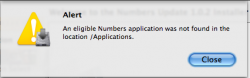
This is crap, it can't detect the applications unless they are in the "iWork '08" folder. Without this folder the updates fail.

Also if you have a corrupt application (Pages) the update fails, I suspect this update is todo with issues such as corruption with Pages but if it has already done its damage the update cant sort it out. :rolleyes:

Software update doesn't even recognise the applications unless they are in that folder.

ozthegweat
Jan 29, 2008, 04:21 PM
Well, it just finished installing, and I really don't notice anything different. And the description in Software Update wasn't really extensive.

ifonline
Jan 29, 2008, 04:22 PM
99884

This is crap, it can't detect the applications unless they are in the "iWork '08" folder. Without this folder the updates fail.

Isn't this typical of any application, that if you move it from its original install location, updates won't work? Or is that not what happened here?

BWhaler
Jan 29, 2008, 04:23 PM
Well, I suspect we were all hoping for 10.5.2 so we can (hopefully) get out of the buggy mess that is Leopard.

But this is a welcome update. iWork 08 is great overall, and shows promise for a iWork future of nothing less excellence.

What I wonder is: do updates put new features in to support the new multi-touch pads?

I certainly hope so.

quovadis
Jan 29, 2008, 04:24 PM
Installed and all looks good ....:D

Perdix
Jan 29, 2008, 04:24 PM
"This update addresses compatibility with Mac OS X."

as apposed to compatibility with what? :confused:


I was just about to say that. I thought it NEEDED OS X.

However, I have found it is slow with my big (3700 x 20) spreadsheet; much slower than E*cel.

amoda
Jan 29, 2008, 04:24 PM
Edit: Downloaded and installed. Is it just me or do the programs seem to launch faster?

bdkennedy1
Jan 29, 2008, 04:25 PM
I hope this is just the beginning. It's 2 weeks and I want my Apple TV update! :)

macintel4me
Jan 29, 2008, 04:26 PM
"This update addresses compatibility with Mac OS X."

as apposed to compatibility with what? :confused:

Installed and all works...

My thoughts exactly. Was the previous version not meant for OS X or something?!

Eidorian
Jan 29, 2008, 04:26 PM
"This update addresses compatibility with Mac OS X."

as apposed to compatibility with what? :confused:

Installed and all works...Sounds like we might find out. Anyone want to dig through the files that are installed? :eek:

Well, I suspect we were all hoping for 10.5.2 so we can (hopefully) get out of the buggy mess that is Leopard.

But this is a welcome update. iWork 08 is great overall, and shows promise for a iWork future of nothing less excellence.

What I wonder is: do updates put new features in to support the new multi-touch pads?

I certainly hope so.Now here's some good speculation! We'll need iLife updates too.

Squonk
Jan 29, 2008, 04:27 PM
Besides 10.5.2, I predict a wave of updates for iLife and other apps as well.... Then seem to come in waves! :cool:

ozthegweat
Jan 29, 2008, 04:29 PM
Well, they say it "adresses" compatibility, not "enables". So it may have to do with Leopard, or, more specifically, with 10.5.2. If it is the latter, it makes sense they release these updates before 10.5.2.

reckless_0001
Jan 29, 2008, 04:33 PM
I hope it improves application launch times, that's the only thing that turns me off about the current iWork suite. :p

phytonix
Jan 29, 2008, 04:34 PM
Compatibility. How about better performance as well?
Office 2008 is still slow.

justflie
Jan 29, 2008, 04:35 PM
I'm downloading now. I'm guessing that this is the first of at least a few updates we see pushed out today. :)

Paix247
Jan 29, 2008, 04:35 PM
I was starting to think that everyone at Apple, Inc. had the day off... ;)

xUKHCx
Jan 29, 2008, 04:44 PM
Isn't this typical of any application, that if you move it from its original install location, updates won't work? Or is that not what happened here?

Maybe but you would think that it would look in the Applications folder for them, which by the way is what the error message suggests. The error should say /Application/iWork '08 then it would be obvious what was wrong.

Still doesn't negate the fact that if Pages corrupts itself the update doesn't resolve it, have to reinstall pages and then apply the update in the hope that pages doesn't corrupt itself in the process.

will99
Jan 29, 2008, 04:47 PM
Check Software Update for Numbers 1.0.2, Pages 3.0.2 and Keynote 4.0.2.

Does anyone use these programs? They came with my Mac but I haven't really had a use for them.

simmorya
Jan 29, 2008, 04:48 PM
I want 10.5.2 now damn it. Hope its out today! Dont care for iWork too much as I just bought Microsoft Office 2008 Special Media Edition.

skyrider007
Jan 29, 2008, 04:49 PM
Does anyone use these programs? They came with my Mac but I haven't really had a use for them.

Are you sure they came with your Mac? I'm pretty sure you have to pay for it.

MKnight
Jan 29, 2008, 04:50 PM
Are you sure they came with your Mac? I'm pretty sure you have to pay for it.

All recent MBP's come with a trial of iWork 08, but a full version of iLife 08.

FJ218700
Jan 29, 2008, 04:50 PM
Compatibility. How about better performance as well?
Office 2008 is still slow.

iWork update, not MS office.

NAG
Jan 29, 2008, 04:51 PM
I prefer iWork over Office. Only downside is that Numbers isn't really mature yet (can't do a lot of stats).

simmorya
Jan 29, 2008, 04:51 PM
they probably received iWork 08 (30-day Trial) with the Mac OS DVD's bundled with new Mac's.

Muzzway
Jan 29, 2008, 04:51 PM
Does anyone use these programs? They came with my Mac but I haven't really had a use for them.

Have you found a use for Office? :p

Virgil-TB2
Jan 29, 2008, 04:53 PM
Well, they say it "adresses" compatibility, not "enables". So it may have to do with Leopard, or, more specifically, with 10.5.2. If it is the latter, it makes sense they release these updates before 10.5.2.Yeah, "addresses compatibility" is correct grammatically speaking.

amoda
Jan 29, 2008, 04:53 PM
I prefer iWork over Office. Only downside is that Numbers isn't really mature yet (can't do a lot of stats).

Yeah, I don't like Numbers that much either. The only program from iWork I use is Papers. I find PowerPoint and Excel much more useful. I received iWork for free, if it wasn't for that I wouldn't have purchased it.

pyramid6
Jan 29, 2008, 04:54 PM
Does anyone use these programs? They came with my Mac but I haven't really had a use for them.

I do. Pages is great. Numbers not so much. Keynote I have not used.

P6

Virgil-TB2
Jan 29, 2008, 04:55 PM
they probably received iWork 08 (30-day Trial) with the Mac OS DVD's bundled with new Mac's.You can also order them pre-installed on any Mac I think. But that would mean the Mac he has is second hand.

Manic Mouse
Jan 29, 2008, 04:57 PM
Keynote and Pages are both awesome and waaaaay better than Word and PowerPoint. Numbers, however, is next to useless. I had to buy Office 2008 for Excel alone pretty much.

MacQueequeg
Jan 29, 2008, 04:58 PM
Isn't this typical of any application, that if you move it from its original install location, updates won't work? Or is that not what happened here?

Well, "traditionally" you could put your Mac application anywhere and run it, and updaters were smart enough to cope. Part of the point of having application bundles (and /Library/Application Support/), after all, is that the application doesn't have to be in some magic location. Not that this is a show stopper, but it's an annoyance (and, as others have pointed out, the error message is wrong).

xUKHCx
Jan 29, 2008, 04:58 PM
Ughhhh

Note to Apple:

I decide what applications I put in my dock, not you.

will99
Jan 29, 2008, 04:59 PM
Regretfully I do use Office. Mostly Word and Excel. Maybe I should give Pages a thorough try...

Manic Mouse
Jan 29, 2008, 05:00 PM
Ughhhh

Note to Apple:

I decide what applications I put in my dock, not you.

Try Office 2008, it puts everything in your dock after installation. I nearly threw up.

Schnebar
Jan 29, 2008, 05:00 PM
The only program from iWork I use is is Papers

Ohh I have not used that yet. :rolleyes:

Yeah I have iWork '08 and am downloading the updated now. The reason I got it is because my Office kept crashing a bunch. I got it from my brother and it was probably pirated so that should be the reason. But pages has been fine for me.

I always use the templets for reports and it makes it look sooo much better with no extra work put into it.

The only thing I had a problem with is I could not make a line of best fit for a graph I made for physics. Maybe I just couldn't find out how.

Virgil-TB2
Jan 29, 2008, 05:00 PM
Ughhhh

Note to Apple:

I decide what applications I put in my dock, not you.It didn't change my dock. What app? All of them?

quovadis
Jan 29, 2008, 05:01 PM
I hope it improves application launch times, that's the only thing that turns me off about the current iWork suite. :p

I can confirm that launch time for Pages is almost instantaneous now!

xUKHCx
Jan 29, 2008, 05:01 PM
It didn't change my dock. What app? All of them?

All 3 of them, if it wasn't for keynote I would consider ditching the iWork suite due to antics like this.

vansouza
Jan 29, 2008, 05:02 PM
Are you sure they came with your Mac? I'm pretty sure you have to pay for it.

I think you get a trial version...

MacSamurai
Jan 29, 2008, 05:06 PM
its a shame i dont have my updated mbp to update iwork...DAMN YOU STEVE!!!:mad:

johny5
Jan 29, 2008, 05:07 PM
I can confirm that launch time for Pages is almost instantaneous now!

Heh, here we go, wait for all the posts claiming the apps are more "snappier" now :o

Prof.
Jan 29, 2008, 05:08 PM
My MacBook says there are no updates:confused:

psychofreak
Jan 29, 2008, 05:08 PM
Heh, here we go, wait for all the posts claiming the apps are more "snappier" now :o

Well it is. Pages '06 was instant-start up after the first few updates, and now Pages 08 is.

Virgil-TB2
Jan 29, 2008, 05:08 PM
All 3 of them, if it wasn't for keynote I would consider ditching the iWork suite due to antics like this.Yeah, that's definitely sucky behaviour.

I had Pages and Numbers there already but not Keynote and it left it that way. That would kind of imply that they stuck them "in your face" as a kind of promotion or something. Bad Apple. :(

LSK6453
Jan 29, 2008, 05:09 PM
I have to create the iWork '08 folder again and move the apps there for the update to work..

Pretty lame if you ask me

xUKHCx
Jan 29, 2008, 05:10 PM
My MacBook says there are no updates:confused:

Try this

Do you have the applications in "iWork '08" folder because, if like me, you have moved them out of there SU doesn't show you the updates. You can download them directly from apple here (http://www.apple.com/support/downloads/). But again if they aren't in that folder the updater will fail.

tothelimit
Jan 29, 2008, 05:11 PM
Wirelessly posted (Mozilla/5.0 (iPhone; U; CPU like Mac OS X; en) AppleWebKit/420.1 (KHTML, like Gecko) Version/3.0 Mobile/4A93 Safari/419.3)

Edit: Downloaded and installed. Is it just me or do the programs seem to launch faster?

I believe what you meant to say is, "safari seems snappier!"

Prof.
Jan 29, 2008, 05:12 PM
Try this

All the iWork apps are in this folder:

EDIT: Thanks, xUKHCx, it's updating as I type this. Thanks for your help. :D

ccunning
Jan 29, 2008, 05:12 PM
I hope this is just the beginning. It's 2 weeks and I want my Apple TV update! :)

Indeed...I thought I was the only one expecting an update to be released today.

shadowfax
Jan 29, 2008, 05:13 PM
All 3 of them, if it wasn't for keynote I would consider ditching the iWork suite due to antics like this.

It didn't change my dock. At least, not with the update. I think it did with the initial install, but who cares? I think you have to have a serious chip on your shoulder if an installer adding icons to the dock bugs you. Gosh, your time must be so important that you can't afford the 1-3 seconds it takes to drag three items out of the dock. WTF? Some people are too stupid to find the apps, so it's a convenience for them. They're a lot quicker to remove from the dock than they are to add.

xUKHCx
Jan 29, 2008, 05:15 PM
All the iWork apps are in this folder:

Check the direct link, download them from there.

It didn't change my dock. At least, not with the update. I think it did with the initial install, but who cares? I think you have to have a serious chip on your shoulder if an installer adding icons to the dock bugs you. Gosh, your time must be so important that you can't afford the 1-3 seconds it takes to drag three items out of the dock. WTF? Some people are too stupid to find the apps, so it's a convenience for them. They're a lot quicker to remove from the dock than they are to add.

But if I made the decision to not have them in my dock by removing them after the initial install don't you think this update should keep that decision rather than trying to shove it done my throat.

bdkennedy1
Jan 29, 2008, 05:16 PM
I used them all the time.

Does anyone use these programs? They came with my Mac but I haven't really had a use for them.

Prof.
Jan 29, 2008, 05:18 PM
Check the direct link, download them from there.

Software updater is working now, thanks for your help:)

achtung!
Jan 29, 2008, 05:19 PM
hey, after this update all de OS seems snappier!! nice job apple, seems like now i don't really need the next leo updt. LOL here we go with the snappier thing! AGAIN, you placebos!! :D

jdavtz
Jan 29, 2008, 05:21 PM
But if I made the decision to not have them in my dock by removing them after the initial install don't you think this update should keep that decision rather than trying to shove it done my throat.

Strange behaviour on your install. I removed the dock icons after installing initially and this update has NOT put anything back into the dock.

tothelimit
Jan 29, 2008, 05:24 PM
Indeed...I thought I was the only one expecting an update to be released today.

Yeah. Add me to that list. With all the other products/updates a little up in the air, I thought today was a shoe in for the take 2 update. Hopefully by the end of the week.

ltldrummerboy
Jan 29, 2008, 05:26 PM
I'm a Firefox and iWork user. Does anyone know if Safari is snappier?

byeehaaw
Jan 29, 2008, 05:26 PM
where in the name is 10.5.2

gikku
Jan 29, 2008, 05:28 PM
Wow!
My morning coffee really does feel snappier.
Starbucks must have applied the update to their beans already.

shadowfax
Jan 29, 2008, 05:30 PM
But if I made the decision to not have them in my dock by removing them after the initial install don't you think this update should keep that decision rather than trying to shove it done my throat.It didn't shove it down your throat. It sounds like a mistake. It might be considered shoving it down your throat if it happened to everyone, but it sure didn't happen when I applied the updates, and I haven't noticed everyone else mentioning it. I'm not saying it isn't annoying, just that I think it's overreacting to start talking about how much crap you put up with and ditching the application suite.

One thing I will say, though, It's kind of retarded that they can't find their own Applications unless they are in the default location. OS X packages were specifically designed NOT to need crap like that. That's definitely some weak sauce there.

4God
Jan 29, 2008, 05:32 PM
Funny how they all in .2 don't you think?

That-Is-Bull
Jan 29, 2008, 05:36 PM
My thoughts exactly. Was the previous version not meant for OS X or something?!

Too lazy to check the other pages, but maybe improved compatibility with Mac OS 10.5.2?

Morod
Jan 29, 2008, 05:38 PM
I'm a Firefox and iWork user. Does anyone know if Safari is snappier?

Good gosh, Safari sure opens quicker! It wasn't bad before, but it is definitely quicker now. Give it a shot. I was a Firefox user until 8 days ago, when I got this wonderful machine and put my PC to sleep with the fishes. 10.5.2 should be happening in the next 24 hours would be my guess, but I've never won the Powerball so that shows the track record of my guesses....
Morod

xUKHCx
Jan 29, 2008, 05:40 PM
I'm not saying it isn't annoying, just that I think it's overreacting to start talking about how much crap you put up with and ditching the application suite.

In this thread

Also if you have a corrupt application (Pages) the update fails, I suspect this update is todo with issues such as corruption with Pages but if it has already done its damage the update cant sort it out. :rolleyes:


Still doesn't negate the fact that if Pages corrupts itself the update doesn't resolve it, have to reinstall pages and then apply the update in the hope that pages doesn't corrupt itself in the process.


It is just an extra thing that when added up to the whole issue makes it less and less appealing to keep iWork.

iWork issues:

Pages constantly needs reinstalling because it corrupts itself - Major flaw
This is particularly annoying as I don't want to carry the disc around with me and have to install it in a lecture. This is reason enough not to use it.

Can't find itself so that it can update itself.

Can't update it if it is broken even though it needs updating because it breaks itself.

Even if it was a mistake it did shove itself down my throat because it put them in my dock.

Numbers - needs lots of work.

MacFly123
Jan 29, 2008, 05:42 PM
Does anyone use these programs? They came with my Mac but I haven't really had a use for them.

I LOVE Keynote and Pages. I don't ever do spread sheets really but Numbers looks good too. I pride myself on not even owning Microsoft Office :)

shadowfax
Jan 29, 2008, 05:51 PM
In this thread
It is just an extra thing that when added up to the whole issue makes it less and less appealing to keep iWork.

iWork issues:

Pages constantly needs reinstalling because it corrupts itself - Major flaw
This is particularly annoying as I don't want to carry the disc around with me and have to install it in a lecture. This is reason enough not to use it.

Can't find itself so that it can update itself.

Can't update it if it is broken even though it needs updating because it breaks itself.

Even if it was a mistake it did shove itself down my throat because it put them in my dock.

Numbers - needs lots of work.

Alright, point taken, I agree, heh.

hbt15
Jan 29, 2008, 05:51 PM
I can't believe over a dozen of you people have complained about how these programs are putting all the icons in your dock. Get over it. Taking out the 1 or 2 you don't need is a lot faster than adding in the ones you do need.

Grow up.

numbsafari
Jan 29, 2008, 05:53 PM
Isn't this typical of any application, that if you move it from its original install location, updates won't work? Or is that not what happened here?

Depends... on Windows, some applications are smart and use the registry to keep track of where they are installed physically. Also, if an application is hosting its own update process (like FireFox) it can know it's location based on the the executable's path. Also... Some applications use environment variables to do this... but that's pretty unreliable and sucks.

Oh... and some applications will search for themselves if the default location isn't valid.

So... I would say that the updater is kinda lame and not robust... especially if there is a known defect that is causing it to be moved or be corrupted.

FullGaz
Jan 29, 2008, 05:56 PM
I'm eagerly awaiting the day that iWork will support right to left properly. I use hebrew quite a lot and it's a real pain to guess where the cursor is when you edit text. For instance, Keynote doesn't put the bullets to the right (no pun intended) side and the cursor is erratic at best in Pages. I don't use Numbers but I suspect that tabbing from cell to cell goes the wrong way round for a right to left table.
Maybe that's the way Apple found to not sell to arabic speaking people? :D
It's a problem that has been discussed for years and neither Apple nor MS seem willing to properly support right to left languages (on Apple's products). Weird...

wellwatermusic
Jan 29, 2008, 05:59 PM
So check this out. Really odd. I have the applications! They are in the original folder. Nothing new. So what the heck? Anyone got any ideas?

I've tried 3 times and have had no luck.

twoodcc
Jan 29, 2008, 06:00 PM
always like updates. hopefully 10.5.2 is coming soon

jacg
Jan 29, 2008, 06:01 PM
Hopefully my Apple remote will now work with Keynote/Leopard. Useless since 10.5 despite working fine for iTunes. Will test tomorrow.

psychofreak
Jan 29, 2008, 06:01 PM
So check this out. Really odd. I have the applications! They are in the original folder. Nothing new. So what the heck? Anyone got any ideas?

I've tried 3 times and have had no luck.

Yep, I just downloaded them manually and it worked :)

deathshrub
Jan 29, 2008, 06:02 PM
All 3 of them, if it wasn't for keynote I would consider ditching the iWork suite due to antics like this.

haha, the dock is serious business :rolleyes:

arkmannj
Jan 29, 2008, 06:05 PM
99884

This is crap, it can't detect the applications unless they are in the "iWork '08" folder. Without this folder the updates fail.

Also if you have a corrupt application (Pages) the update fails, I suspect this update is todo with issues such as corruption with Pages but if it has already done its damage the update cant sort it out. :rolleyes:

Software update doesn't even recognise the applications unless they are in that folder.

This is true of most Apple apps, I've submitted feedback to Apple on it several time. ( http://www.apple.com/feedback )
I wish if an app could not be located it would ask you to select the path.

I prefer to have all my apps organized in a specific manner but because of headaches with updates I got sick of moving apps back to the "default location" and then back to my preferred spot.

for a while I even would open the install packages and even mess with the plists etc. worked for some apps but not others.

I finally gave up on manualy doing this for all updates, and loosing list view in the dock was the final straw so I finally just gave in to Apples mentality of "Pile everything into the Applications folder".

just as a couple example of how I would usually organize:
iWork'08 apps: /Applications/Press/iWork08/
iLife'08 apps: /Applications/iLife/
DVD Player: /Applications/Media/
Final Cut Studio apps: /Applications/Press/FinalCutStudio2/
Safari /Applications/Internet/Sarafi.app

most 3rd party applications work just fine updating where I put them though.

bmk
Jan 29, 2008, 06:10 PM
But if I made the decision to not have them in my dock by removing them after the initial install don't you think this update should keep that decision rather than trying to shove it done my throat.

Like a number of people here (probably the majority) the update does NOT put the icons into the dock from a straightforward update. From what you said, you messed around with where your applications were kept so the update probably reinstalled and put the icons back. Like other people here (probably the majority) it is slightly tedious to get people making overly aggressive comments and blaming other people about something which is really (a) not a problem anyway, and (b) their own fault to start with.

steerpikegg
Jan 29, 2008, 06:10 PM
Haven't tried this, but I would think that just making a temporary symlink from your app to the applications folder would work.

eg go to terminal and type

symlink -s <path to apps> /Applications/<folder>

after the update, just remove the symlink

xUKHCx
Jan 29, 2008, 06:16 PM
haha, the dock is serious business :rolleyes:

Like a number of people here (probably the majority) the update does NOT put the icons into the dock from a straightforward update. From what you said, you messed around with where your applications were kept so the update probably reinstalled and put the icons back. Like other people here (probably the majority) it is slightly tedious to get people making overly aggressive comments and blaming other people about something which is really (a) not a problem anyway, and (b) their own fault to start with.

Oh its my fault that I moved the program from /Appilcations/iWork '08 to /Applications :rolleyes:. We should be able to put the applications where ever we want and I think the Application folder is a perfectly logical place to put it, especially considering the error message states it looked their so Apple think it is a logical place too.

Perhaps read the thread and my comments and then you will see why it does actually become a problem, specifically here (http://forums.macrumors.com/showpost.php?p=4855426&postcount=72)

Techguy172
Jan 29, 2008, 06:20 PM
Worked Fine Here's to hoping 10.5.2 is next

bmk
Jan 29, 2008, 06:24 PM
Oh its my fault that I moved the program from /Appilcations/iWork '08 to /Applications :rolleyes:. We should be able to put the applications where ever we want and I think the Application folder is a perfectly logical place to put it, especially considering the error message states it looked their so Apple think it is a logical place too.

Perhaps read the thread and my comments and then you will see why it does actually become a problem, specifically here (http://forums.macrumors.com/showpost.php?p=4855426&postcount=72)

Duh - you moved the application - how can it be anyone's fault but yours? Apple stated that the applications should go in the application folder. You decided you didn't want them there and moved them. Therefore it is your fault. QED

You may disagree with Apple's decision but that's a different point altogether. It is your 'right' to do anything you want, but if you do it after you've been advised by the manufacturer not to, you have to put up with the consequences.

eastcoastsurfer
Jan 29, 2008, 06:25 PM
Oh its my fault that I moved the program from /Appilcations/iWork '08 to /Applications :rolleyes:. We should be able to put the applications where ever we want and I think the Application folder is a perfectly logical place to put it, especially considering the error message states it looked their so Apple think it is a logical place too.

Perhaps read the thread and my comments and then you will see why it does actually become a problem, specifically here (http://forums.macrumors.com/showpost.php?p=4855426&postcount=72)

Well if you don't put them where Steve wants them, then obviously it's wrong. I swear that I read some verbage similar to that on the EULA the first time I booted my mac... ;)

Welly
Jan 29, 2008, 06:26 PM
All 3 of them, if it wasn't for keynote I would consider ditching the iWork suite due to antics like this.

You would stop using an application because it put a couple of icons on your dock? Wow.. that's pretty pathetic.

xUKHCx
Jan 29, 2008, 06:26 PM
Duh - you moved the application - how can it be anyone's fault but yours? Apple stated that the applications should go in the application folder. You decided you didn't want them there and moved them. Therefore it is your fault. QED

The applications were in the applications folder, exactly where the error message said for them to be.

Still doesn't negate the fact that Pages keeps corrupting itself.

You would stop using an application because it put a couple of icons on your dock? Wow.. that's pretty pathetic.

See here (http://forums.macrumors.com/showpost.php?p=4855426&postcount=72)

eastcoastsurfer
Jan 29, 2008, 06:30 PM
Duh - you moved the application - how can it be anyone's fault but yours? Apple stated that the applications should go in the application folder. You decided you didn't want them there and moved them. Therefore it is your fault. QED

You may disagree with Apple's decision but that's a different point altogether. It is your 'right' to do anything you want, but if you do it after you've been advised by the manufacturer not to, you have to put up with the consequences.


Guess what? They are still in the /Applications folder! I know many on these boards think Apple can do no wrong, but in this case they have a crappy, not very robust installation script. At worst case it should ask you to point to what folder each application is in so it can apply the update.

Welly
Jan 29, 2008, 06:31 PM
Numbers - needs lots of work.


What version is Numbers at? 1.0.2? What version is Excel at? Of course it needs more work, but it's a 1.x version! What would you expect for software this young?

kasei
Jan 29, 2008, 06:35 PM
So long as 10.5.2 fixes Safari and my issue with space on my hard drive.

xUKHCx
Jan 29, 2008, 06:35 PM
Notice how you skipped past the big clanger of Pages

What version is Numbers at? 1.0.2? What version is Excel at? Of course it needs more work, but it's a 1.x version! What would you expect for software this young?

That was a minor issue as I fully expect it to get better over time but some simple things such as, if you are dragging a series of numbers but you get to the end of the spreadsheet the spreadsheet gets bigger etc etc.

The major issue is Pages, but when combined with all of the issues posted I feel that it is reasonable to say that you would no longer use the software. And no I didn't post all issues, that was just a quick list.

rtdunham
Jan 29, 2008, 06:47 PM
But if I made the decision to not have them in my dock by removing them after the initial install don't you think this update should keep that decision rather than trying to shove it done my throat.

Of course, what you're proposing would be a logical approach. But apple chose a different one, one that suits a different subset of users, and which had consequences for you that are negligible, at best. I agree with superfax that considering that "shoving it down your throat" is overreacting. Reminds me of my daughters when they were 16 and hormonal: a parental decision isn't the desired one, and suddenly there's a crisis. :D They'd take a month sometimes to be able to see the issue any way other than the way they reacted initially (and yeah, for full disclosure, i've been guilty of that too!). But I'll bet if you wait 15 minutes and think about it, your jets will have cooled on this issue.

...Even if it was a mistake it did shove itself down my throat because it put them in my dock.

well, with that attitude i'm not going to nominate you to be negotiator or mediator on anything important!

BUT I do agree if the app corrupts, and the update doesn't fix it in a simple fashion, THAT's pretty frustrating. That would stick in my craw too. Sorry you're having to go thru that.

Peace out.

Mydel
Jan 29, 2008, 06:47 PM
Notice how you skipped past the big clanger of Pages


That was a minor issue as I fully expect it to get better over time but some simple things such as, if you are dragging a series of numbers but you get to the end of the spreadsheet the spreadsheet gets bigger etc etc.

The major issue is Pages, but when combined with all of the issues posted I feel that it is reasonable to say that you would no longer use the software. And no I didn't post all issues, that was just a quick list.

I completely agree. Keynote is really good, I dont have any major issues. pages sometimes makes me nuts, like for example whats the problem with having only part of text in two columns?? Why it has to be everything?? And why when I open .doc with 2 columns they are always merged??
Numbers is a disaster for now. Its really not a prime time App.
And in the name of God how hard is to put in Numbers and Keynote Standard Error bars????

Mindflux
Jan 29, 2008, 06:48 PM
I just did the update and none of the iWork programs appeared on my Dock.

Dunno what folks are whining about.

wellwatermusic
Jan 29, 2008, 06:48 PM
So check this out. Really odd. I have the applications! They are in the original folder. Nothing new. So what the heck? Anyone got any ideas?

I've tried 3 times and have had no luck.

Solved. The Software update wouldn't work for this - I just downloaded them from apple and all works fine now.

Welly
Jan 29, 2008, 06:49 PM
Notice how you skipped past the big clanger of Pages


...because I've not experienced any of the issues you mentioned. Ever.

In this thread
Pages constantly needs reinstalling because it corrupts itself - Major flaw
This is particularly annoying as I don't want to carry the disc around with me and have to install it in a lecture. This is reason enough not to use it.


Never had this problem since I installed iWork a few days after it was released.

In this thread
Can't find itself so that it can update itself.


It found itself without issue and updated itself without issue.

In this thread
Can't update it if it is broken even though it needs updating because it breaks itself.

It's never been broken on my machine.

In this thread
Even if it was a mistake it did shove itself down my throat because it put them in my dock.


Boo hoo hoo. It put three icons in your dock.

xUKHCx
Jan 29, 2008, 06:54 PM
So it is a case of I've never had an issue so everything must be fine.

These are some big issues and stating them as valid reasons as to why I am considering not using iWork anymore is perfectly legitimate.

ifonline
Jan 29, 2008, 06:55 PM
iWork issues:

Pages constantly needs reinstalling because it corrupts itself - Major flaw
This is particularly annoying as I don't want to carry the disc around with me and have to install it in a lecture. This is reason enough not to use it.

Can't find itself so that it can update itself.

Can't update it if it is broken even though it needs updating because it breaks itself.

Even if it was a mistake it did shove itself down my throat because it put them in my dock.

Numbers - needs lots of work.

I have not had any issues with Pages becoming corrupt. I am not attempting to diminish your issues, but have you considered that this isn't a Pages problem specifically? As a matter of fact, it almost sounds like Pages doesn't like being moved out of the iWork folder, hence the update issues and the corruption issues. Possible? So, why move it in the first place if it seemingly causes so much grief?

AppleMojo
Jan 29, 2008, 07:00 PM
So it is a case of I've never had an issue so everything must be fine.

These are some big issues and stating them as valid reasons as to why I am considering not using iWork anymore is perfectly legitimate.

I write software for a living, and I get a kick out of users who go screw with the intended design of the Application and complain when things don't work, because they *think* it should work another way.

You may still have some issues (most software has a few complaints), who knows... but you'd have far less if you just left it alone (if you are in fact moving it, etc).

I don't support these situations, so I wouldn't expect Apple to either.

xUKHCx
Jan 29, 2008, 07:08 PM
I have not had any issues with Pages becoming corrupt. I am not attempting to diminish your issues, but have you considered that this isn't a Pages problem specifically? As a matter of fact, it almost sounds like Pages doesn't like being moved out of the iWork folder, hence the update issues and the corruption issues. Possible? So, why move it in the first place if it seemingly causes so much grief?

Because I like to order my applications in a way that is useful and logical to me, also quite a few people have reported that they moved them so it is quite common.

I don't think thats it. There are legitimate concerns with every application.

I write software for a living, and I get a kick out of users who go screw with the intended design of the Application and complain when things don't work, because they *think* it should work another way.

You may still have some issues, who knows... but you'd have far less if you just left it where it was.

I don't support these situations, so I wouldn't expect Apple to either.


You don't think that issues such as application corruption are legitimate reasons not to use an application :rolleyes:

Also Pages would become corrupt if left inside its original iWork '08 folder as well so it really made no difference.

The installer update should recognise that the application is still inside the application folder. All I did was change one folder and if you check the error message it seems it is perfectly inline with want apple thinks is correct and where the installer is telling me it is looking. And is perfectly reasonable given the way in which the applications are bundled and designed.


Sorry for not posting that Apple are amazing

bigwig
Jan 29, 2008, 07:15 PM
I'm still waiting for ODF support. Maybe the next update.

Welly
Jan 29, 2008, 07:21 PM
So it is a case of I've never had an issue so everything must be fine.

Yes, basically. Why should I be worried or concerned if having used iWork on a daily basis since it was released, it's run flawlessly?

xUKHCx
Jan 29, 2008, 07:27 PM
Yes, basically. Why should I be worried or concerned if having used iWork on a daily basis since it was released, it's run flawlessly?

:rolleyes: Well people come on this site for discussion and help so it is perfectly within the confines of this to discuss problems with applications, just because you don't have these issues doesn't mean that they should not be discussed. The issue with pages corruption seems to be very rare however many people fell fowl of the installer error and if nobody bothered to post the solution then everyone would have to go through and try and work it out themselves with some people not working it out.

Did you apply the update? If so why did you?

DsurioN
Jan 29, 2008, 07:41 PM
I sense 10.5.2 is imminent... tonight or tomorrow!

HailToTheVictor
Jan 29, 2008, 07:47 PM
5 bounces on the dock before the update. 3 bounces after, enough said :cool:

mdriftmeyer
Jan 29, 2008, 07:48 PM
I'm running with 1.12GB Ram on an iBook 1Ghz 14" G4.

After the update:

Much faster. I nearly shaved 50% of the load time/startup time with every one of these applications.

I would love another update with some extended features, but this performance improvement is a greatly appreciated.

:)

ifonline
Jan 29, 2008, 07:49 PM
Because I like to order my applications in a way that is useful and logical to me, also quite a few people have reported that they moved them so it is quite common.

Fair enough, but instead of tinkering with the Applications Folder (which I see as similar to tinkering with the Registry in Windows), you could just create a shortcuts folder and organize aliases until the cows come home. You get the logical order that you want, and you don't end up breaking the software. Additionally, you get to "ignore" certain applications by not creating an alias, thereby keeping your shortcuts even more organized.

Best of both worlds, as I see it, unless this boils down to "I want to do it my way and my way only" in which case I guess you'll continue to move the application package itself and you'll continue to have problems.

Just a friendly suggestion.

bacaramac
Jan 29, 2008, 07:50 PM
Wow, this update was much needed for speed of opening docs. Haven't played with it much, but it has improved the load time on my main spreadsheet I use to track budget and a few other things by three fold.

dt1611
Jan 29, 2008, 08:01 PM
Wirelessly posted (Mozilla/5.0 (iPhone; U; CPU like Mac OS X; en) AppleWebKit/420.1 (KHTML, like Gecko) Version/3.0 Mobile/4A93 Safari/419.3)

Apple... We don't care about iWork... Give us 10.5.2 or maybe the AppleTV update your promised today

AlphaAnt
Jan 29, 2008, 08:09 PM
Wirelessly posted (Mozilla/5.0 (iPhone; U; CPU like Mac OS X; en) AppleWebKit/420.1 (KHTML, like Gecko) Version/3.0 Mobile/4A93 Safari/419.3)

Apple... We don't care about iWork... Give us 10.5.2 or maybe the AppleTV update your promised today

Who is this we you speak of? I certainly care about this update.

chubad
Jan 29, 2008, 08:10 PM
Pages is now...................................... Snappier !!! :D

Sorry. I had to say it!;)

dt1611
Jan 29, 2008, 08:12 PM
Wirelessly posted (Mozilla/5.0 (iPhone; U; CPU like Mac OS X; en) AppleWebKit/420.1 (KHTML, like Gecko) Version/3.0 Mobile/4A93 Safari/419.3)

we as in the people that think iWork is already perfect... Just a statement

live2learn
Jan 29, 2008, 08:13 PM
I'm currently running with Office: Mac 2004, and have decided against upgrading to 2008. Just yesterday, I downloaded the 30-day free trial of iWork '08, hoping to find it a helpful complement to my Office '04 product.

Does anyone know whether or not a new update (iWork '08) can be downloaded and applied to a trial version of the product, just for the purposes of testing the actual product before purchase?

Thanks to anyone who takes a minute to post a response.

bacaramac
Jan 29, 2008, 08:17 PM
I'm currently running with Office: Mac 2004, and have decided against upgrading to 2008. Just yesterday, I downloaded the 30-day free trial of iWork '08, hoping to find it a helpful complement to my Office '04 product.

Does anyone know whether or not a new update (iWork '08) can be downloaded and applied to a trial version of the product, just for the purposes of testing the actual product before purchase?

Thanks to anyone who takes a minute to post a response.

I would think that Apple updated the soft copy that is available for download. Check your version number on your copy. Also, if you downloaded it prior to this update, check software update.

ChrisA
Jan 29, 2008, 08:18 PM
I write software for a living, and I get a kick out of users who go screw with the intended design of the Application and complain when things don't work,

Me too. (I should be fixing some kind of serious bugs right now.) And I know that testing is generally never exhaustive. So I'm careful to always, install or build software using the default options. I figure these are what have been tested the most. The other cases, well maybe someone did a cursory check. Not just on Mac OS X. When I installed Oracle on a Solaris system I try to keep close to the "standard" too.

You would be surprised at the subtle interaction of bugs. Foe example the code that appends strings to make a "full path" write a stay byte, bad but no harm. Then some other routine uses that memory and expects it to still be all zeros and it would be except for the stay byte error. Only when the code runs in a certain order do you see the crash. There is a story behind every case where a program runs fine for years then one day fails. If you stray much from the well tested code path you are more likely to run into those things. Apple does better testing than most but still they have budgets and schedules to keep up so they intensionally triage what parts to test
You have to really enjoy puzzles to want to debug this kind of problem.

MacGeek7
Jan 29, 2008, 08:32 PM
I LOVE Keynote and Pages. I don't ever do spread sheets really but Numbers looks good too. I pride myself on not even owning Microsoft Office :)

What is this "Microsoft Office" you speak of? Does this mean there is competition for iWork?

bjett92
Jan 29, 2008, 08:38 PM
Yeah, I don't like Numbers that much either. The only program from iWork I use is Papers. I find PowerPoint and Excel much more useful. I received iWork for free, if it wasn't for that I wouldn't have purchased it.

I can understand Excel being better than Number, but I don't think PowerPoint is more useful than Keynote. Keynote has better, transitions, templates look better, nicer effects, more features, builds, etc.

Pine-Tree
Jan 29, 2008, 09:10 PM
Nice update, improves opening up of all three apps which is nice. I use both Office 2004 and iWork and I'm using iWork a lot more now. Keynote is without question superior to PowerPoint, the only reason to use PP is for compatibility issues. I've switched to Pages although it did take a while to get used to it after using Word for so long. And I use Numbers daily even though Excel has more features, I like Numbers more.

I work as a professor of mathematics for my community college, a student getting my MBA, and own a business. I use iWork for all three, and the biggest issue remains the compatibility, other than that I've pretty much switched over to iWork exclusively.

Abe

lostfan916
Jan 29, 2008, 09:13 PM
I'm currently running with Office: Mac 2004, and have decided against upgrading to 2008. Just yesterday, I downloaded the 30-day free trial of iWork '08, hoping to find it a helpful complement to my Office '04 product.

Does anyone know whether or not a new update (iWork '08) can be downloaded and applied to a trial version of the product, just for the purposes of testing the actual product before purchase?

Thanks to anyone who takes a minute to post a response.

I haven't actually started my iWork trial yet (I got my MB in November and I figure I'll use iWork when I need to) but I just checked software update and the updates showed up for me. I got extremely happy for about a milisecond (thinking it was .2) but alas....the wait continues.

I wasn't going to install this (since I don't use iWork) but I guess there's no harm.

cms2
Jan 29, 2008, 09:22 PM
Software Update says no new updates found... so I downloaded the updates for iWork directly from apple, but when I run them, it says "no eligible application found within location/applications." I have all three programs in my Applications folder. I don't think I've moved them :confused: Maybe I took them out of a folder to make getting to them from the Applications Stack easier.. I don't remember. Maybe it's because I did a clean install of leopard and then moved everything over from my external HD. In any case, What can I do?

As always, thanks in advance :o

eastcoastsurfer
Jan 29, 2008, 09:28 PM
I write software for a living, and I get a kick out of users who go screw with the intended design of the Application and complain when things don't work, because they *think* it should work another way.

You may still have some issues (most software has a few complaints), who knows... but you'd have far less if you just left it alone (if you are in fact moving it, etc).

I don't support these situations, so I wouldn't expect Apple to either.

I hope you don't write any real software, since hardcoding a path where you *think* users should have installed it is only looking for trouble. Robust software checks for and either prevents errors or works around them when they occur. I know good software design and implementation is rarely taught anymore, but sheesh...

RRutter
Jan 29, 2008, 09:29 PM
Yep, should mean 10.5.2 sooner rather than later :)

Although I have had no iWork problems thus far...

Who has? Apples are just perfectionists.

:apple:

xUKHCx
Jan 29, 2008, 09:32 PM
Software Update says no new updates found... so I downloaded the updates for iWork directly from apple, but when I run them, it says "no eligible application found within location/applications."

Go into your application folder and see where abouts they are. They have to be inside a folder called iWork '08 for this installer to work.

Mattzane15
Jan 29, 2008, 09:35 PM
How come when i try to install the updates i keep getting the error message that says there was no software found to install?

jakebarnes
Jan 29, 2008, 09:35 PM
Wirelessly posted (Mozilla/5.0 (iPhone; U; CPU like Mac OS X; en) AppleWebKit/420.1 (KHTML, like Gecko) Version/3.0 Mobile/4A93 Safari/419.3)

Does anyone use these programs? They came with my Mac but I haven't really had a use for them.

I do. Pages is great. Numbers not so much. Keynote I have not used.

P6

keynote is very good.

Analog Kid
Jan 29, 2008, 09:44 PM
I write software for a living, and I get a kick out of users who go screw with the intended design of the Application and complain when things don't work, because they *think* it should work another way.

You may still have some issues (most software has a few complaints), who knows... but you'd have far less if you just left it alone (if you are in fact moving it, etc).

I don't support these situations, so I wouldn't expect Apple to either.
Don't get distracted by the petty "icons in my dock" complaint-- everything else he's talking about is legit.

As a software developer, you should be among the first to recognize legitimate beefs. The whole point of Apple's bundle structure, and Defaults/Preferences hierarchy is to make applications freely relocatable.

Besides, it's not like they can't just use Spotlight to find where stuff is in the system.

If someone messed with the contents of the .app bundle, then you'd be doing something unintended.

edit: and I should mention that, while trivial, the icons shouldn't be replaced in the dock if they're not there to begin with-- please don't do that in software you write either. It harkens back to the stupid browser wars...

Analog Kid
Jan 29, 2008, 10:00 PM
Nice update, improves opening up of all three apps which is nice. I use both Office 2004 and iWork and I'm using iWork a lot more now. Keynote is without question superior to PowerPoint, the only reason to use PP is for compatibility issues. I've switched to Pages although it did take a while to get used to it after using Word for so long. And I use Numbers daily even though Excel has more features, I like Numbers more.

I work as a professor of mathematics for my community college, a student getting my MBA, and own a business. I use iWork for all three, and the biggest issue remains the compatibility, other than that I've pretty much switched over to iWork exclusively.

Abe
I find Keynote more compatible with Powerpoint files than Powerpoint is. Actually, I just noticed the updates were there because someone sent me a PP file that MSPP opened as big grey blocks rather than text, so I opened it in Keynote (which I can now read) and found the update.

Had the same problem with Word files for a long time, particularly ones in foreign languages. Rumor is MS finally fixed the issue, but it's still stupid that Pages can open a Word file and show me the correct Cyrillic content automatically (so the information is clearly in the file) but Word can't even when I help it by telling it that it's a Russian file.

Just out of curiosity: as a Math prof, what do you use for inputting equations? That's something that I really wish Apple would add support for... I wind up typesetting in Latex and adding them as images, but then I lose the editable content of the formula in the document.

MacFly123
Jan 29, 2008, 10:35 PM
So check this out. Really odd. I have the applications! They are in the original folder. Nothing new. So what the heck? Anyone got any ideas?

I've tried 3 times and have had no luck.

I think it means that you moved the apps out of the folder that they are installed in the applications so it can't find them, they have to be in that folder the way they are installed. Read the beginning of this thread, I think there was a guy with this problem.

BTW
Jan 29, 2008, 10:51 PM
damn! i wanted to be the first to post that :P haha :)

something tells me 10.5.2 should follow close behind... but i won't hold my breath :rolleyes:

I have iWorks 08 but haven't used it much, so it should be a stronge product by the time I get around to seriously using it.

Strange that these updates would come out before a Leopard update.

A Friday roll out of 10.5.2 would be nice. I'll start using TimeMachine once the update is out or maybe beforehand. ;)

Pine-Tree
Jan 29, 2008, 10:54 PM
I find Keynote more compatible with Powerpoint files than Powerpoint is. Actually, I just noticed the updates were there because someone sent me a PP file that MSPP opened as big grey blocks rather than text, so I opened it in Keynote (which I can now read) and found the update.

Had the same problem with Word files for a long time, particularly ones in foreign languages. Rumor is MS finally fixed the issue, but it's still stupid that Pages can open a Word file and show me the correct Cyrillic content automatically (so the information is clearly in the file) but Word can't even when I help it by telling it that it's a Russian file.

Just out of curiosity: as a Math prof, what do you use for inputting equations? That's something that I really wish Apple would add support for... I wind up typesetting in Latex and adding them as images, but then I lose the editable content of the formula in the document.

Only reason I keep Office around is for situations where there's something wrong when I import from iWork, which happens a lot. Otherwise I would have deleted the apps. Having a Keynote slide not properly aligned or boxes not showing up, papers that won't open up on a windows box. Just last week I couldn't for the life of me have Excel on a windows machine open up my Numbers doc without going crazy, and all I wanted to do was print it! So yeah, I like iWork better, but it's things like that that forces me to use Office as well.

As for inputting equations, I use the character palette which has many math symbols and you can use digits in different ways. Obviously it's not as good as the math editor stuff that comes with Word in Windows, like being able to properly input fractions and other complex equations. I mainly teach college algebra, so I don't run into that problem a lot. The character palette is under the international settings.

Symbols I write using this are: ≤,≠,÷,∜, 2⁴, 3²,∞ things like that. Let me know if you can't find it.

This is off topic, but sort of related. The other day I was trying to attach a Word doc off a Mac and it kept saying it was a virus or it just wouldn't work. This was off a friend's laptop. I never ran into a problem like that, so I tried using my Mac laptop and ran into the same problem. Using Mail, gmail online it would keep saying it can't send it or using gmail it kept saying it was a virus. Anyone else running into that problem? Any ideas on how to resolve it? Thanks.

Abe

cms2
Jan 29, 2008, 11:00 PM
Go into your application folder and see where abouts they are. They have to be inside a folder called iWork '08 for this installer to work.
Thank you. Worked like a charm. And that was just silly on your part, Apple. :mad:

hmm. Not seeing any speed bump launching these applications. But I'm glad that they're now compatible with Mac OS X....

nsbio
Jan 29, 2008, 11:12 PM
One area where Pages kicks Word's b%tt is in its search function implementation. In Pages, I can type a search word and see all occurrences listed at the same time. This is very useful.


The .2 Pages update seems to have improved keyboard responsiveness during typing (I am on a G4 PB). Pages was next to impossible to type in on my machine, but the update may have fixed that. (Word 04 is still more responsive than Pages, but the difference is no longer deal-breaking).

Incidentally, Microsoft had the same problem with Word 04. Early revisions were unusable but then they fixed that in later software updates.

vandlism
Jan 30, 2008, 12:40 AM
Well I discovered on of the changes in Pages, a bug fix. Previously, if you were typing in Pages in one space, then switched to another space that contained an article/website and switched back to the space with Pages, the application would be active but not the window. This required you to click in the window again before you could continue typing. 3.0.2 fixes this issue.

For those of you complaining about the application needing to be in a specific folder, it has to do with the way software updater checks against a list of possible updates. If you want to have some fun with it, find Spaces or Expose in your Applications folder and duplicate it. Rename the duplicate to "Aperture" and run software update. Then come back and report your findings...

hint: software update checks each application in your application folder's name and version number against the apple software database and gets any necessary updates. spaces and expose are version 1.0 and aperture is 1.5.6, and thus the updater believes you have an Aperture application eligible for updating...and downloads the complete application. Note that you still would need a serial number for Aperture to run correctly. Not to mention you can get a free trial straight from Apple's website, but this little trick works with any application - you just need to edit the info.plist.

DiamondMac
Jan 30, 2008, 12:43 AM
I can confirm that launch time for Pages is almost instantaneous now!

Not for me. Has now slowed from 3-4 bounces to 14-15

Other apps are much, much quicker

vandlism
Jan 30, 2008, 12:44 AM
As for inputting equations, I use the character palette ...Symbols I write using this are: ≤,≠,÷,∜, 2⁴, 3²,∞ things like that. Let me know if you can't find it.

You can also find the character palette in any application by going to Edit and Special Characters (option-command-T). This eliminates the need to have the international thing in the menubar.

MacAddict1978
Jan 30, 2008, 12:47 AM
Check the direct link, download them from there.


But if I made the decision to not have them in my dock by removing them after the initial install don't you think this update should keep that decision rather than trying to shove it done my throat.

i think your installer was bugged with i-crack

Pine-Tree
Jan 30, 2008, 12:54 AM
You can also find the character palette in any application by going to Edit and Special Characters (option-command-T). This eliminates the need to have the international thing in the menubar.

Thanks for the tip vandlism, that flag on the menubar was getting a little annoying...

Abe

DukeofAnkh
Jan 30, 2008, 02:03 AM
Keynote and Pages are both awesome and waaaaay better than Word and PowerPoint. Numbers, however, is next to useless. I had to buy Office 2008 for Excel alone pretty much.

I bought Office for Excel and track changes compatibility.


The only thing I had a problem with is I could not make a line of best fit for a graph I made for physics. Maybe I just couldn't find out how.

There is no line of best fit. One of the reasons I needed Excel (the other was error bars).

I'm currently running with Office: Mac 2004, and have decided against upgrading to 2008. Just yesterday, I downloaded the 30-day free trial of iWork '08, hoping to find it a helpful complement to my Office '04 product.

Does anyone know whether or not a new update (iWork '08) can be downloaded and applied to a trial version of the product, just for the purposes of testing the actual product before purchase?

Thanks to anyone who takes a minute to post a response.

Yes, it does update the trial.


Just out of curiosity: as a Math prof, what do you use for inputting equations? That's something that I really wish Apple would add support for... I wind up typesetting in Latex and adding them as images, but then I lose the editable content of the formula in the document.

The formula thing in Neo Office / Open Office is good. As far as I know, it has the ability to insert just about any mathematical formula or matrix. You can do a straight cmd-c, cmd-v into Pages or Word, or just edit the file in Neo when you need equations. OK, so it's still a bit voodoo, but it's a valid alternative to Latex.

I have iWorks 08 but haven't used it much, so it should be a stronge product by the time I get around to seriously using it.

Strange that these updates would come out before a Leopard update.

A Friday roll out of 10.5.2 would be nice. I'll start using TimeMachine once the update is out or maybe beforehand. ;)

As a precaution, I'd do a Time Machine backup before 10.5.2, in case something goes wrong in the major system update.

Analog Kid
Jan 30, 2008, 04:37 AM
The formula thing in Neo Office / Open Office is good. As far as I know, it has the ability to insert just about any mathematical formula or matrix. You can do a straight cmd-c, cmd-v into Pages or Word, or just edit the file in Neo when you need equations. OK, so it's still a bit voodoo, but it's a valid alternative to Latex.
I'll have to look at it-- haven't looked at OpenOffice for a long while... Having installed MacTeX and MaxTeXtras, I find TeX FoG and Equation Service to be reasonably good. The syntax can be a bit much, but the results are beautiful. The biggest limitation I found is that once I've pasted the (nicely scalable) image into the document, I have to reenter the whole thing if I want to change it. The document doesn't remember the content (it is just a picture after all...).

DukeofAnkh
Jan 30, 2008, 08:29 AM
I'll have to look at it-- haven't looked at OpenOffice for a long while... Having installed MacTeX and MaxTeXtras, I find TeX FoG and Equation Service to be reasonably good. The syntax can be a bit much, but the results are beautiful. The biggest limitation I found is that once I've pasted the (nicely scalable) image into the document, I have to reenter the whole thing if I want to change it. The document doesn't remember the content (it is just a picture after all...).

I have to admit I haven't actually done the pasting thing into Word (or Pages) since I got my Mac, but on my PC, I could write up whatever I wanted in Word, then open it in OpenOffice, put in equations, save, etc. Opening it later in Word for a text edit didn't destroy the equations though they didn't show up properly. The only reason I even bothered to use Word was because the OO interface looked annoying in Windows. The NeoOffice one for Mac isn't nearly as bad looking. ;)

Digitalclips
Jan 30, 2008, 08:49 AM
Edit: Downloaded and installed. Is it just me or do the programs seem to launch faster?

No but Safari is much snappier :D

Larry B
Jan 30, 2008, 10:30 AM
I can't see any difference in the launch time for any of these applications.

alfonsog
Jan 30, 2008, 11:44 AM
I use Pages and it never has corrupted itself and nothing re-docked itself after updating. So far only 1 person here is complaining about this, has anyone else had these problems?

I even use Numbers for a few things (but I never used Excel, but did use Calcstar!)

I used to move applications and other things and file things under created directories as well, a habit from DOS days for the most part. In OS X there is really no need to change the default directories. Especially since spotlight I just leave everything alone and put files anywhere, even my desktop has a bunch of files and I just make sure my file names are good enough to recall. Despite being a neat freak in general!

eoren1
Jan 30, 2008, 02:05 PM
Anyone have the update screw up their ethernet connection? I use my macbook at work directly connected to an ethernet cable. Was working fine last week but today, after doing this update, I cannot get access to the internet despite ethernet showing as 'connected' in the system prefs. Wifi worked at home today. Ethernet works when connected to the desktop at work. On the phone with Applecare now and they haven't been able to fix the problem. Can't think of anything else that's changed between Friday (when the macbook last worked here) and today.
E

ifonline
Jan 30, 2008, 02:42 PM
Anyone have the update screw up their ethernet connection? I use my macbook at work directly connected to an ethernet cable. Was working fine last week but today, after doing this update, I cannot get access to the internet despite ethernet showing as 'connected' in the system prefs. Wifi worked at home today. Ethernet works when connected to the desktop at work. On the phone with Applecare now and they haven't been able to fix the problem. Can't think of anything else that's changed between Friday (when the macbook last worked here) and today.
E

I had my ethernet drop out last night after the update (several hours after I updated). I didn't make any assumptions it was the update, though, but my experience was the same as yours: ethernet showed connected via cable, but no traffic was getting through either via e-mail or internet. I had to renew my DHCP lease and it worked again. I haven't tried today but will see what happens when I get home.

eoren1
Jan 30, 2008, 03:19 PM
Ian-
thanks for the post. I'm going to try on my airport extreme at home tonight. apple care had no clue and bumped me up to a product specialist. he recommended an archive and install of leopard.
E

nanoboy
Jan 30, 2008, 04:35 PM
I bought Office for Excel and track changes compatibility.

There is no line of best fit. One of the reasons I needed Excel (the other was error bars).

The formula thing in Neo Office / Open Office is good. As far as I know, it has the ability to insert just about any mathematical formula or matrix. You can do a straight cmd-c, cmd-v into Pages or Word, or just edit the file in Neo when you need equations. OK, so it's still a bit voodoo, but it's a valid alternative to Latex.


I have Office 2004 which I barely used, apart from occasionally checking what my Pages documents look like (the very important ones) under a Microsoft software. So far from my experience, track changes has always been fully compatible between Pages and Word, when I sent my documents to my supervisors who are all on Windows.

The only compatibility issue I have between Pages and Word is positioning / aligning pictures within a document. What I've found now is if you ticked the "cause text to wrap" option under the graphic tab in the inspector, you'd only get troubles when you open it in Word. Untick that option seems to do fine, although the picture will be then "hard fixed" to the text, sometimes the picture is aligned to the middle, sometimes to the left, I haven't played around this long enough to figure it out.

Another problem I once had is, although I can't remember if I used the text wrap option with the picture, but I had it aligned to the centre using one of the align buttons on the menu bar. Exported the document to .doc and opened and edited it in Word, (i think I tried both Word 2004 [Mac] and Word 2003 [on Win XP]), if I moved a picture's position in Word, the whole document went blank, I mean it just turned straight into white empty pages of blank space. I hope this is addressed / fixed in this update.

I just installed the update and running without problems. Haven't used it enough yet to report the performance improvements.

Also thank for pointing out using NeoOffice for equations editing. I was also looking for an equation editor rather than just using the character palette.

For one of the main short-comings in functionality in Numbers - graph plotting, I recently have found a perfect complement program to Numbers - Plot 0.997
http://mac.softpedia.com/get/Math-Scientific/Plot.shtml

It's a freeware and it has very extensive functionalities, error bars, fit, normalise, etc etc, you name it! It's perfect for technical and scientific work. Easy to use, the formatting of the graph looks professional. What I do is, I create a data file in Numbers (with columns of numberic data), then export the file as a CSV file. The program can work with lots of these CSV (or ASCII) data files at the same time, so you can very conveniently switch on and off the curves you want and don't want to appear on the final graph. Afterwards, you can export your plotted graph as an image file, so it'll always look the same (ever had an imported Excel graph in Word that one day you found your document cannot display it for some mysterious reaons?)

Hope this helps someone.

Morod
Jan 30, 2008, 04:47 PM
FYI:
I just ran my software updater and an update fot iWeb (I forget the version number) was available. I downloaded it.
Morod

bjett92
Jan 30, 2008, 04:50 PM
FYI:
I just ran my software updater and an update fot iWeb (I forget the version number) was available. I downloaded it.
Morod

Yep iWeb 2.0.3 is in Software update.

eoren1
Jan 30, 2008, 05:18 PM
Ian-
thanks for the post. I'm going to try on my airport extreme at home tonight. apple care had no clue and bumped me up to a product specialist. he recommended an archive and install of leopard.
E

Home ethernet works fine. Might have been a fluke.
E

ifonline
Jan 30, 2008, 07:15 PM
Home ethernet works fine. Might have been a fluke.
E

So far, so good for me at home. It's possible that a reboot was needed after the update. Fingers crossed that nothing odd happens tonight.

jacg
Jan 31, 2008, 03:26 AM
Apple Remote now works with Keynote. Yay!

I hope this also fixes the bug where iWork docs clicked out of the dock are all corrupted until the screen is refreshed.

DukeofAnkh
Jan 31, 2008, 04:13 AM
I have Office 2004 which I barely used, apart from occasionally checking what my Pages documents look like (the very important ones) under a Microsoft software. So far from my experience, track changes has always been fully compatible between Pages and Word, when I sent my documents to my supervisors who are all on Windows.

I've tried creating comments and tracked changes in Word 04 and Pages 08 and opening the files between the two but they don't show up properly in one app when created in the other. I always save these documents as .rtf since that's the format in which I have to send them to people and hence the most useful for me. Could that be the problem? To answer my own question after having tried it: yes, that is the problem. It works if the file is a .doc. How annoying.

Also thank for pointing out using NeoOffice for equations editing. I was also looking for an equation editor rather than just using the character palette.

You're welcome :)

For one of the main short-comings in functionality in Numbers - graph plotting, I recently have found a perfect complement program to Numbers - Plot 0.997
http://mac.softpedia.com/get/Math-Scientific/Plot.shtml

It's a freeware and it has very extensive functionalities, error bars, fit, normalise, etc etc, you name it! It's perfect for technical and scientific work. Easy to use, the formatting of the graph looks professional. What I do is, I create a data file in Numbers (with columns of numberic data), then export the file as a CSV file. The program can work with lots of these CSV (or ASCII) data files at the same time, so you can very conveniently switch on and off the curves you want and don't want to appear on the final graph. Afterwards, you can export your plotted graph as an image file, so it'll always look the same (ever had an imported Excel graph in Word that one day you found your document cannot display it for some mysterious reaons?)

Hope this helps someone.

Thanks. I've grabbed that one. It looks a lot more professional than Excel (from the screenshots, anyway) if nothing else. I find I'm quite sick of the standard blue-and-pink Excel graph with impractical grey background. ;)

AndreasBrink
Jun 22, 2010, 04:35 AM
≤,≠,÷,∜, 2⁴, 3²,∞ and things like that.
Where do i find these in iWork?

AndreasBrink
Jun 22, 2010, 04:38 AM
Only reason I keep Office around is for situations where there's something wrong when I import from iWork, which happens a lot. Otherwise I would have deleted the apps. Having a Keynote slide not properly aligned or boxes not showing up, papers that won't open up on a windows box. Just last week I couldn't for the life of me have Excel on a windows machine open up my Numbers doc without going crazy, and all I wanted to do was print it! So yeah, I like iWork better, but it's things like that that forces me to use Office as well.

As for inputting equations, I use the character palette which has many math symbols and you can use digits in different ways. Obviously it's not as good as the math editor stuff that comes with Word in Windows, like being able to properly input fractions and other complex equations. I mainly teach college algebra, so I don't run into that problem a lot. The character palette is under the international settings.

Symbols I write using this are: ≤,≠,÷,∜, 2⁴, 3²,∞ things like that. Let me know if you can't find it.

This is off topic, but sort of related. The other day I was trying to attach a Word doc off a Mac and it kept saying it was a virus or it just wouldn't work. This was off a friend's laptop. I never ran into a problem like that, so I tried using my Mac laptop and ran into the same problem. Using Mail, gmail online it would keep saying it can't send it or using gmail it kept saying it was a virus. Anyone else running into that problem? Any ideas on how to resolve it? Thanks.

Abe

Where do i find ≤,≠,÷,∜, 2⁴, 3²,∞ in iWork?

macintoshtoffy
Jun 22, 2010, 05:38 AM
≤,≠,÷,∜, 2⁴, 3²,∞ and things like that.
Where do i find these in iWork?

Why the hell are you digging up a thread from over 2 years ago? if you have a question regarding iWork then go to the support channel - this part of the forum isn't for support, it is only discussion of the news, no more, no less.