PDA

View Full Version : Apple release Security Update 2008-002


James17
Mar 18, 2008, 03:27 PM
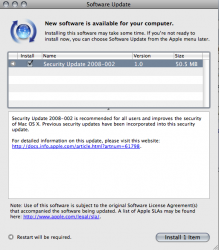
Available now via software update.
Size may vary from PPC and Intel macs.


bartelby
Mar 18, 2008, 03:30 PM
69.6MB for me.

Tiger on a PPC machine.

FJ218700
Mar 18, 2008, 03:33 PM
50.5 MB here too.

10.5.2 on a PB 1.67 HR

Axemantitan
Mar 18, 2008, 03:47 PM
105 MB on MacBook running 10.4.11.

dwman
Mar 18, 2008, 03:51 PM
As a brand new Mac owner, I'm curious, how often are these updates issued? Is this akin to "Patch Tuesday" for Windows users?

Doctor Q
Mar 18, 2008, 03:53 PM
AFP Client - Accessing a maliciously crafted afp:// URL may lead to an application termination or arbitrary code execution
Multiple stack buffer overflow issues exist in AFP Client's handling of afp:// URLs. By enticing a user to connect to a malicious AFP Server, an attacker may cause an unexpected application termination or arbitrary code execution. This update addresses the issues through improved bounds checking.

AFP Server - Cross-realm authentication with AFP Server may be bypassed
An implementation issue exists in AFP Server's check of Kerberos principal realm names. This may allow unauthorized connections to the server, when cross-realm authentication with AFP Server is used. This update addresses the issue by through improved checks of Kerberos principal realm names. This issue does not affect systems running Mac OS X v10.5 or later. Credit to Ragnar Sundblad of KTH - Royal Institute of Technology, Stockholm, Sweden for reporting this issue.
Apache - Multiple vulnerabilities in Apache 1.3.33 and 1.3.39
Apache is updated to version 1.3.41 to address several vulnerabilities, the most serious of which may lead to arbitrary code execution. Further information is available via the Apache web site at http://httpd.apache.org For Mac OS X v10.5, Apache version 1.3.x is only shipped on Server configurations. mod_ssl is also updated from version 2.8.24 to 2.8.31 to match the upgraded Apache; no security fixes are included in the update.
Apache - Multiple vulnerabilities in Apache 2.2.6
Apache is updated to version 2.2.8 to address several vulnerabilities, the most serious of which may lead to cross-site scripting. Further information is available via the Apache web site at http://httpd.apache.org
AppKit - Usage of the NSDocument API to may lead to arbitrary code execution
A stack buffer overflow exists in the NSDocument API's handling of file names. On most file systems, this issue is not exploitable. This update addresses the issue through improved bounds checking. This issue does not affect systems running Mac OS X v10.5 or later.
AppKit - A local user may be able to execute arbitrary code with system privileges
A mach port in NSApplication intended for inter-thread synchronization is unintentionally available for inter-process communication. By sending maliciously crafted messages to privileged applications in the same bootstrap namespace, a local user may cause arbitrary code execution with the privileges of the target application. This update addresses the issue by removing the mach port in question and using another method to synchronize. This issue does not affect systems running Mac OS X v10.5 or later.
AppKit - Visiting a maliciously crafted website may lead to arbitrary code execution
Multiple integer overflow vulnerabilities exist in the parser for a legacy serialization format. By causing a maliciously formatted serialized property list to be parsed, an attacker could trigger a heap-based buffer overflow which may lead to arbitrary code execution. This update addresses the issue by performing additional validation of serialized input. This issue does not affect systems running Mac OS X v10.5 or later.
AppKit - Querying a network printer may cause an unexpected application termination or arbitrary code execution
A stack based buffer overflow exists in AppKit's handling of PPD files. By enticing a user to query a network printer, an attacker may cause an unexpected application termination or arbitrary code execution. This update addresses the issue through improved handling of PPD files. This issue does not affect systems running Mac OS X v10.5 or later.
Application Firewall - The German translation of the Application Firewall preference pane was misleading
The "Set access for specific services and applications" radio button of the Application Firewall preference pane was translated into German as "Zugriff auf bestimmte Dienste und Programme festlegen", which is "Set access to specific services and applications". This might lead a user to believe that the listed services were the only ones that would be permitted to accept incoming connections. This update addresses the issue by changing the German text to semantically match the English text. This issue does not affect systems prior to Mac OS X v10.5.
CFNetwork - A malicious proxy server may spoof secure websites
A malicious HTTPS proxy server may return arbitrary data to CFNetwork in a 502 Bad Gateway error. A malicious proxy server could use this to spoof secure websites. This update addresses the issue by returning an error on any proxy error, instead of returning the proxy-supplied data. This issue is already addressed in systems running Mac OS X v10.5.2.
ClamAV - Multiple vulnerabilities in ClamAV 0.90.3
Multiple vulnerabilities exist in ClamAV 0.90.3 provided with Mac OS X Server v10.5 systems, the most serious of which may lead to arbitrary code execution. This update addresses the issue by updating to ClamAV 0.92.1. Further information is available via the ClamAV website at www.clamav.net
ClamAV - Multiple vulnerabilities in ClamAV 0.88.5
Multiple vulnerabilities exist in ClamAV 0.88.5 provided with Mac OS X Server v10.4.11, the most serious of which may lead to arbitrary code execution. This update addresses the issue by updating to ClamAV 0.92.1. Further information is available via the ClamAV website at www.clamav.net
CoreFoundation - A local user may be able to execute arbitrary code with system privileges
An integer overflow exists in CoreFoundation's handling of time zone data. This may allow a local user to cause arbitrary code execution with system privileges. This update addresses the issue through improved bounds checking on time zone data files. This issue does not affect systems running Mac OS X v10.5 or later.
CoreServices - Visiting a website could cause files to be opened in AppleWorks
Files with names ending in ".ief" can be automatically opened in AppleWorks if Safari's "Open 'Safe' files" preference is enabled. This is not the intended behavior and could lead to security policy violations. This update addresses the issue by removing ".ief" from the list of safe file types. This issue only affects systems prior to Mac OS X v10.5 with AppleWorks installed.
CUPS - A remote attacker may be able to cause an unexpected application termination if printer sharing is enabled
A memory leak exists in CUPS. By sending a large number of requests to add and remove shared printers, an attacker may be able to cause a denial of service. This issue can not result in arbitrary code execution. This update addresses the issue through improved memory management. This issue does not affect systems prior to Mac OS X v10.5.
CUPS - A remote attacker may be able to cause an unexpected application termination or arbitrary code execution if printer sharing is enabled
A heap buffer overflow exists in the CUPS interface's processing of search expressions. If printer sharing is enabled, a remote attacker may be able to cause an unexpected application termination or arbitrary code execution with system privileges. If printer sharing is not enabled, a local user may be able to gain system privileges. This update addresses the issue by performing additional bounds checking. This issue does not affect systems prior to Mac OS X v10.5. Credit to regenrecht working with the VeriSign iDefense VCP for reporting this issue.
CUPS - Multiple vulnerabilities in CUPS may lead to an unexpected application termination or arbitrary code execution with system privileges
Multiple input validation issues exist in CUPS, the most serious of which may lead to arbitrary code execution with system privileges. This update addresses the issues by updating to CUPS 1.3.6. These issues do not affect systems prior to Mac OS X v10.5.
curl - Running curl with a maliciously crafted URL may lead to an unexpected application termination or arbitrary code execution
A one byte buffer overflow exists in curl 7.13.1. By enticing a user to run curl with a maliciously crafted URL, an attacker may cause an unexpected application termination or arbitrary code execution. This update addresses the issue by updating curl to version 7.16.3. Crash Reporter was updated to match the curl changes. This issue does not affect systems running Mac OS X v10.5 or later.
Emacs - Format string vulnerability in Emacs Lisp may lead to an unexpected application termination or possibly arbitrary code execution
A stack buffer overflow exists in Emacs' format function. By exploiting vulnerable Emacs Lisp which allows an attacker to provide a format string containing a large precision value, an attacker may cause an unexpected application termination or possibly arbitrary code execution. Further information on the patch applied is available via the Savannah Emacs website at http://cvs.savannah.gnu.org/viewvc/emacs/emacs/src/editfns.c?r1=1.439.2.3&r2=1.439.2.9&view=patch
Emacs - Safe mode checks in Emacs may be bypassed
A logic error in Emacs' hack-local-variable function allows any local variable to be set, even if `enable-local-variables' is set to :safe. By enticing a user to load a file containing a maliciously crafted local variables declaration, a local user may cause an unauthorized modification of Emacs Lisp variables leading to arbitrary code execution. This issue has been fixed through improved :safe mode checks. The patch applied is available via the Savannah Emacs website at http://cvs.savannah.gnu.org/viewvc/emacs/lisp/files.el?r1=1.937&r2=1.938&sortby=date&root=emacs&view=patch This issue does not affect systems prior to Mac OS X v10.5.
file - Running the file command on a maliciously crafted file may lead to an unexpected application termination or arbitrary code execution
An integer overflow vulnerability exists in the file command line tool, which may lead to an unexpected application termination or arbitrary code execution. This update addresses the issue through improved bounds checking. This issue does not affect systems running Mac OS X v10.5 or later. Credit to Colin Percival of the FreeBSD security team for reporting this issue.
Foundation - Usage of the NSSelectorFromString API may result in an unexpected method being called
An input validation issue exists in the NSSelectorFromString API. Passing it a malformed selector name may result in the return of an unexpected selector, which could lead to an unexpected application termination or arbitrary code execution. This update addresses the issue by performing additional validation on the selector name. This issue does not affect systems running Mac OS X v10.5 or later.
Foundation - A local user can interfere in other users' file operations and may be able to obtain elevated privileges
When performing a recursive file copying operation, NSFileManager creates directories as world-writable, and only later restricts the permissions. This creates a race condition during which a local user can manipulate the directory and interfere in subsequent operations. This may lead to a privilege escalation to that of the application using t he API. This update addresses the issue by creating directories with restrictive permissions. This issue does not affect systems running Mac OS X v10.5 or later.
Foundation - Programs using the NSFileManager API could be manipulated to execute arbitrary code
A long pathname with an unexpected structure can expose a stack buffer overflow vulnerability in NSFileManager. Presenting a specially crafted path to a program using NSFileManager could lead to the execution of arbitrary code. This update addresses the issue by ensuring a properly sized destination buffer. This issue does not affect systems running Mac OS X v10.5 or later.
Foundation - Visiting a maliciously crafted website may lead to a denial of service or arbitrary code execution
A thread race condition exists in NSURLConnection's cache management, which can cause a deallocated object to receive messages. Triggering this issue may lead to a denial of service, or arbitrary code execution with the privileges of Safari or another program using NSURLConnection. This update addresses the issue by removing an unsynchronized caching operation. This issue does not affect systems running Mac OS X v10.5 or later. Credit to Daniel Jalkut of Red Sweater Software for reporting this issue.
Foundation - Processing an XML document may lead to an unexpected application termination or arbitrary code execution
A race condition exists in NSXML. By enticing a user to process an XML file in an application which uses NSXML, an attacker may cause an unexpected application termination or arbitrary code execution. This update addresses the issue through improvements to the error handling logic of NSXML. This issue does not affect systems running Mac OS X v10.5 or later.
Help Viewer - Accessing a maliciously crafted help: URL may lead to arbitrary Applescript execution
A malicious help:topic_list URL may insert arbitrary HTML or JavaScript into the generated topic list page, which may redirect to a Help Viewer help:runscript link that runs Applescript. This update addresses the issue by performing HTML escaping on the URL data used in help topic lists before building the generated page. Credit to Brian Mastenbrook for reporting this issue.
Image Raw - Viewing a maliciously crafted image may lead to an unexpected application termination or arbitrary code execution
A stack based buffer overflow exists in the handling of Adobe Digital Negative (DNG) image files. By enticing a user to open a maliciously crafted image file, an attacker may cause an unexpected application termination or arbitrary code execution. This update addresses the issue through improved validation of DNG image files. This issue does not affect systems prior to Mac OS X v10.5. Credit to Clint Ruoho of Laconic Security for reporting this issue.
Kerberos - Multiple vulnerabilities in MIT Kerberos 5 may lead to an unexpected application termination or arbitrary code execution with system privileges
Multiple memory corruption issues exist in MIT Kerberos 5, which may lead to an unexpected application termination or arbitrary code execution with system privileges. Further information on the issues and the patches applied is available via the MIT Kerberos website at http://web.mit.edu/Kerberos/ CVE-2008-0062 and CVE-2008-0063 do not affect systems running Mac OS X v10.5 or later. CVE-2007-5901 does not affect systems prior to Mac OS X v10.4.
libc - Applications that use the strnstr API could be vulnerable to a denial of service
An off by one issue exists in Libsystem's strnstr(3) implementation. Applications that use the strnstr API can read one byte beyond the limit specified by the user, which may lead to an unexpected application termination. This update addresses the issue through improved bounds checking. This issue does not affect systems running Mac OS X v10.5 or later. Credit to Mike Ash of Rogue Amoeba Software for reporting this issue.
mDNSResponder - A local user may be able to execute arbitrary code with system privileges
A format string issue exists in mDNSResponderHelper. By setting the local hostname to a maliciously crafted string, a local user could cause a denial of service or arbitrary code execution with the privileges of mDNSResponderHelper. This update addresses the issue by using a static format string. This issue does not affect systems prior to Mac OS X v10.5.
notifyd - A local user may be able to deny access to notifications
notifyd accepts Mach port death notifications without verifying that they come from the kernel. If a local user sends fake Mach port death notifications to notifyd, applications that use the notify(3) API to register for notifications may never receive the notifications. This update addresses the issue by only accepting Mach port death notifications from the kernel. This issue does not affect systems running Mac OS X v10.5 or later.
OpenSSH - A remote attacker may be able to execute arbitrary code with elevated privileges
OpenSSH forwards a trusted X11 cookie when it cannot create an untrusted one. This may allow a remote attacker to gain elevated privileges. This update addresses the issue by updating OpenSSH to version 4.7. Further information is available via the OpenSSH website at http://www.openssh.org/txt/release-4.7
pax archive utility - Running the pax command on a maliciously crafted archive may lead to arbitrary code execution
The pax command line tool does not check a length in its input before using it as an array index, which may lead to an unexpected application termination or arbitrary code execution. This update addresses the issue by checking the index. This issue does not affect systems prior to Mac OS X v10.5.
PHP - Multiple vulnerabilities in PHP 5.2.4
PHP is updated to version 5.2.5 to address multiple vulnerabilities, the most serious of which may lead to arbitrary code execution. Further information is available via the PHP website at http://www.php.net/ PHP version 5.2.x is only provided with Mac OS X v10.5 systems.
PHP - Multiple vulnerabilities in PHP 4.4.7
PHP is updated to version 4.4.8 to address multiple vulnerabilities, the most serious of which may lead to arbitrary code execution. Further information is available via the PHP website at http://www.php.net/
Podcast Producer - Podcast Capture exposes passwords to other local users
The Podcast Capture application provides passwords to a subtask through the arguments, potentially exposing the passwords to other local users. This update corrects the issue by providing passwords to the subtask through a pipe. This issue does not affect systems prior to Mac OS X v10.5. Credit to Maximilian Reiss of Chair for Applied Software Engineering, TUM for reporting this issue.
Preview - Saving to encrypted PDF in Preview produces files that may be read without the password
When Preview saves a PDF file with encryption, it uses 40-bit RC4. This encryption algorithm may be broken with significant but readily available computing power. A person with access to the file may apply a brute-force technique to view it. This update enhances the encryption to 128-bit RC4.
Printing - Printing to encrypted PDF produces files that may be read without the `open' password
Printing to a PDF file and setting an 'open' password uses 40-bit RC4. This encryption algorithm may be broken with significant but readily available computing power. A person with access to the file may apply a brute-force technique to view it. This update enhances the encryption to 128-bit RC4. This issue does not affect systems prior to Mac OS X v10.5.
Printing - Printing to an authenticated print queue may disclose login credentials
An information disclosure issue exists in the handling of authenticated print queues. When starting a job on an authenticated print queue, the credentials used for authentication may be saved to disk. This update addresses the issue by removing user credentials from printing presets before saving them to disk. This issue does not affect systems prior to Mac OS X v10.5.
System Configuration - A local user may be able to execute arbitrary code with system privileges
The privileged tool NetCfgTool uses distributed objects to communicate with untrusted client programs on the local machine. By sending a maliciously crafted message, a local user can bypass the authorization step and may cause arbitrary code execution with the privileges of the privileged program. This update addresses the issue by performing additional validation of distributed objects.
UDF - Opening a maliciously crafted disk image may lead to an unexpected system shutdown
A null pointer dereference issue exists in the handling of Universal Disc Format (UDF) file systems. By enticing a user to open a maliciously crafted disk image, an attacker may cause an unexpected system shutdown. This update addresses the issue through improved validation of UDF file systems. This issue does not affect systems prior to Mac OS X v10.5. Credit to Paul Wagland of Redwood Software, and Wayne Linder of Iomega for reporting this issue.
Wiki Server - A user with access to edit wiki content may be able to execute arbitrary commands as the wiki server
A path traversal issue exists in the Mac OS X v10.5 Server Wiki Server. Attackers with access to edit wiki content may upload files that leverage this issue to place content wherever the wiki server can write, which may lead to arbitrary code execution with the privileges of the wiki server. This update addresses the issue through improved file name handling. This issue does not affect systems prior to Mac OS X v10.5. Credit to Rodrigo Carvalho, from the Core Security Consulting Services (CSC) team of CORE Security Technologies.
X11 - Multiple Vulnerabilities in X11 X Font Server (XFS) 1.0.4
Multiple vulnerabilities exist in X11 X Font Server (XFS) 1.0.4, the most serious of which may lead to arbitrary code execution. This update addresses the issue by updating to version 1.0.5. Further information is available via the X.Org website at http://www.x.org/wiki/Development/Security These issues are already addressed in systems running Mac OS X v10.5.2.
X11 - Multiple vulnerabilities in X11's libpng 1.2.8
The PNG reference library (libpng) is updated to version 1.2.24 to address several vulnerabilities, the most serious of which may lead to a remote denial of service or arbitrary code execution. Further information is available via the libpng website at http://www.libpng.org/pub/png/libpng.html This issue affects libpng within X11. It does not affect systems prior to Mac OS X v10.5.
X11 - Multiple vulnerabilities in the X11 server
Numerous vulnerabilities in the X11 server allow execution of arbitrary code with the privileges of the user running the X11 server if the attacker can authenticate to the X11 server. This is a security vulnerability only if the X11 server is configured to not require authentication, which Apple does not recommend. This update fixes the issue by applying the updated X.Org patches. Further information is available via the X.Org website at http://www.x.org/wiki/Development/Security

dwman
Mar 18, 2008, 03:57 PM
Uh, was this really necessary? :confused:

philgilder
Mar 18, 2008, 03:57 PM
As a brand new Mac owner, I'm curious, how often are these updates issued? Is this akin to "Patch Tuesday" for Windows users?
whenever they are needed
theres no regular update schedule
just be glad apple doesnt take a year and a half to get out one service pack, compared to leopard thats had 2 'service packs' in 3 months or so...

Uh, was this really necessary?
see the post above yours

sblasl
Mar 18, 2008, 03:59 PM
Here is the stand alone installer for intel machines 103MB.

http://www.apple.com/support/downloads/securityupdate2008002v10universal.html

And the PPC stand alone installer 68MB.

http://www.apple.com/support/downloads/securityupdate2008002v10ppc.html

When did Apple start to providing such in-depth support documents for security updates?

Cameront9
Mar 18, 2008, 03:59 PM
As a brand new Mac owner, I'm curious, how often are these updates issued? Is this akin to "Patch Tuesday" for Windows users?

About every 1-2 months, I think. Not quite as frequent as patch tuesday.

Morod
Mar 18, 2008, 04:02 PM
50.5 MB here on 10.5.2.
I had no idea it was so all-encompassing by the brief description on the MR home page. So thanks, Doctor, for the detail in what this update entailed.
Morod

On Edit: Dang, two reboots in one day! That is some kind of record for me.

xUKHCx
Mar 18, 2008, 04:03 PM
When did Apple start to providing such in-depth support documents for security updates?

A long time

25 Jan 2005 to Present (http://docs.info.apple.com/article.html?artnum=61798)
03-Oct-03 to 11 - Jan -2005 (http://docs.info.apple.com/article.html?artnum=300667)
2003 and earlier (http://docs.info.apple.com/article.html?artnum=25631)

edit:
50.5 MB here on 10.5.2.
I had no idea it was so all-encompassing by the brief description on the MR home page. So thanks, Doctor, for the detail in what this update entailed.
Morod

You can see all the security issues regarding the updates from the link provided in Software Update. Although Doctor Q listed (all 46) of them here for you, so just for future reference.

dwman
Mar 18, 2008, 04:03 PM
Yes

Sorry, I should have clarified. I wasn't implying that the update wasn't necessary, but the need for the poster to list every single bug fix from Apple's support page. I think a link would have more then sufficed.

tarz4n
Mar 18, 2008, 04:06 PM
two reboots in the same day :rolleyes:

/dev/toaster
Mar 18, 2008, 04:11 PM
Thanks for mirroring the patch notes, it appears the Apple doc site is down :(

xUKHCx
Mar 18, 2008, 04:12 PM
Thanks for mirroring the patch notes, it appears the Apple doc site is down :(

It's not for me, direct link to the patch notes (http://docs.info.apple.com/article.html?artnum=307562).

MidiMonk
Mar 18, 2008, 04:12 PM
Who cares about uptime,keep the fixes coming.All we need is the wi-fi fix and then I will forgive Apple for a few days :eek:

japanime
Mar 18, 2008, 04:14 PM
Sorry, I should have clarified. I wasn't implying that the update wasn't necessary, but the need for the poster to list every single bug fix from Apple's support page. I think a link would have more then sufficed.

As a (relatively) longtime user of these forums, I find it quite handy when other members list the bug fixes rather than just provide a link.

To paraphrase the old Trix commercials, "Silly newbie! Links are for kids." :D

skiesforme
Mar 18, 2008, 04:18 PM
Who cares about uptime,keep the fixes coming.All we need is the wi-fi fix and then I will forgive Apple for a few days :eek:
I have come across this complaint hundreds of times and faced it myself 3 times (new router/new MB/MBP). Solved it each time !
What exactly is your problem ? Is it network drop-outs ? Poor bandwidth ? Poor reception ?
I have a SR 2.2 MB and a Penryn 2.4 MBP. Used to have a crappy Trendnet 432BRP 802.11 b/g and now got a 802.11n APExpress. Faced wireless issues each time while setting up the network (1st time) but fixed it every single time !
What did I change ? Channel (1/6/11) or DNS (4.2.2.1/2 , OpenDNS.com)
Do it once and once it starts working for you it never goes bad. My 1st Penryn MBP had a faulty Airport and DNS/Channel changes did not work. But I got it replaced and now it's all good !
Tools: speakeasy/internetfrog; iStumbler ; Router config/Airport Utility.

scotty56
Mar 18, 2008, 04:23 PM
This day just keeps getting better! :D

Glideslope
Mar 18, 2008, 04:25 PM
Uh, was this really necessary? :confused:

Yes. The Goose Bumps are just receding.

powerbuddy
Mar 18, 2008, 04:27 PM
Funny..Mine says there are no software updates available :rolleyes:

milo
Mar 18, 2008, 04:28 PM
A second update requiring a reboot in one day?

Seriously, they couldn't just hold Safari until this was ready so we'd only have to reboot once?

iCeFuSiOn
Mar 18, 2008, 04:29 PM
Installed and everything is working swimmingly, thanks :)

joseph2166
Mar 18, 2008, 04:42 PM
A second update requiring a reboot in one day?

Seriously, they couldn't just hold Safari until this was ready so we'd only have to reboot once?

The things we go through

benspratling
Mar 18, 2008, 04:51 PM
Dang; I had no idea there were so many ways to achieve arbitrary code execution, most of them related to stack/buffer overflow. Sounds like one of the original expandable memory classes didn't work quite right, or the internal technical documentation didn't show how to use it properly.

Stridder44
Mar 18, 2008, 04:56 PM
Working great here.

fanbrain
Mar 18, 2008, 04:56 PM
Dang; I had no idea there were so many ways to achieve arbitrary code execution, most of them related to stack/buffer overflow. Sounds like one of the original expandable memory classes didn't work quite right, or the internal technical documentation didn't show how to use it properly.

Dang; I have no idea what you just said.

Are all security updates this large? I don't remember them being 100+ Mb.

Antares
Mar 18, 2008, 05:05 PM
Well, I'm gald that Apple releases these as needed. It's better than them doing nothing or sitting on it for a long time.

appie57
Mar 18, 2008, 05:16 PM
Installed and all seems well:D

pgwalsh
Mar 18, 2008, 05:30 PM
aaaaaaaaaaaaaaah! I feel much more secure now. :rolleyes: :p ;) :D

daenney
Mar 18, 2008, 05:35 PM
I would for now advise everyone to stay away from this update.
As reports are dripping in on this Apple Support thread (http://discussions.apple.com/thread.jspa?messageID=6859221#6859221) it seems the Security Update today did at least break the ssh client for some people.
If you rely on it for work like I and other people do, just don't update

fanbrain
Mar 18, 2008, 05:37 PM
I would for now advise everyone to stay away from this update.
As reports are dripping in on this Apple Support thread (http://discussions.apple.com/thread.jspa?messageID=6859221#6859221) it seems the Security Update today did at least break the ssh client for some people.
If you rely on it for work like I and other people do, just don't update

Good catch. Now I think I'll wait for a while.

pgwalsh
Mar 18, 2008, 05:39 PM
I would for now advise everyone to stay away from this update.
As reports are dripping in on this Apple Support thread (http://discussions.apple.com/thread.jspa?messageID=6859221#6859221) it seems the Security Update today did at least break the ssh client for some people.
If you rely on it for work like I and other people do, just don't update

My SSH client seems to be working fine. Mac Pro 3.0 Ghz. I didn't test everything, but I did do a file upload just to see.

EagerDragon
Mar 18, 2008, 05:48 PM
Dang; I had no idea there were so many ways to achieve arbitrary code execution, most of them related to stack/buffer overflow. Sounds like one of the original expandable memory classes didn't work quite right, or the internal technical documentation didn't show how to use it properly.

That is what happens when you try to pour a gallon of milk into an 8 ounce glass.

A lot of applications do not check the length of a message, section of a file before attempting to copy the section into a memory buffer of a fixed size. If the assumption is incorrect the extra bytes of information override memory locations past the limits of the buffer. This causes memory corruption. If done right it can also cause an override of the return address from the last routine call. If you override the return address this way you can then direct the processor to start executing at the location you inserted and as such you now pown the machine. The computer is now running your code instead of the program it was running before.

Very old hacking technique that still works because of a programmer error of not verifying that the content of one will fit in the other before attempting the operation. Had it checked it would not have attempted to pour a gallon into an 8 ouch glass. The whole thing is easy to avoid if you study the code and fix those mistakes.

BTW the source of the problem is usually old C code, a lot of times a library or even parts of the kernel.

megfilmworks
Mar 18, 2008, 05:51 PM
Uh, was this really necessary? :confused:
No, but much appreciated!

daenney
Mar 18, 2008, 05:51 PM
My SSH client seems to be working fine. Mac Pro 3.0 Ghz. I didn't test everything, but I did do a file upload just to see.

Well I guess you're in luck then...
Gotta tell ya, it feels extremely disturbing and weird to depend on your Windows VM for ssh functionality... that's the only solution for me right now.

Funny enough, telnet still works :P

pgwalsh
Mar 18, 2008, 05:58 PM
Well I guess you're in luck then...
Gotta tell ya, it feels extremely disturbing and weird to depend on your Windows VM for ssh functionality... that's the only solution for me right now.

Funny enough, telnet still works :P
strange..

I'm running 10.5.2 and all is good, so far. I actually had a little bit of flakey response with OS X this morning. Spotlight wasn't working 100% and I kept getting syncServer crashes. I cleaned the cache's and repaired permissions and it seems better.

Are you running ssh in the terminal or some other program? I tested it through the terminal.

mrkgoo
Mar 18, 2008, 05:59 PM
A second update requiring a reboot in one day?

Seriously, they couldn't just hold Safari until this was ready so we'd only have to reboot once?

Seriously, this matters?

milo
Mar 18, 2008, 06:04 PM
Seriously, this matters?

When it takes over 15 minutes for my machine to reboot AND load up all the apps and files I had open? Meaning I wasted over a half hour today because of reboots?

HELL, YES it matters.

Would it really have killed apple to hold the Safari update a few hours so they could release the two together and only require one reboot?

daenney
Mar 18, 2008, 06:04 PM
strange..

Are you running ssh in the terminal or some other program? I tested it through the terminal.

Terminal as usual.

As you can see on the Apple Support thread more reports are coming in, including bug reports, have seen some other reports on different forums to.

What causes the bug is unknown, Permission Repair, Cache cleaning etc. don't fix it...

pgwalsh
Mar 18, 2008, 06:06 PM
Terminal as usual.

As you can see on the Apple Support thread more reports are coming in, including bug reports, have seen some other reports on different forums to.

What causes the bug is unknown, Permission Repair, Cache cleaning etc. don't fix it...

I wonder if something got messed up in the firewall settings. I'm curious what it could be and also why my machine wasn't affected.

arvidtp
Mar 18, 2008, 06:07 PM
My 10.5.2 macbook pro is still has not restarted yet after installing this update - its been on the blank-blue-screen-with-gray-spinny-progress-indicator for about 30 minutes now. I installed at the same time as Safari 3.1, airport utility update and a Pro Apps Support update... Should I just kill the thing? This is taking way longer than a permissions repair or something.:confused:

pgwalsh
Mar 18, 2008, 06:08 PM
My 10.5.2 macbook pro is still has not restarted yet after installing this update - its been on the blank-blue-screen-with-gray-spinny-progress-indicator for about 30 minutes now. I installed at the same time as Safari 3.1, airport utility update and a Pro Apps Support update... Should I just kill the thing? This is taking way longer than a permissions repair or something.:confused:
I had the same issues when installing the Safari 3.1 update. I killed it after 15 minutes, but I'm glad I was away from my desk or it would have been a WTF moment. Anyway, I restarted it and then it went through the install stage after booting up. Then it reboot again.

daenney
Mar 18, 2008, 06:11 PM
I wonder if something got messed up in the firewall settings. I'm curious what it could be and also why my machine wasn't affected.

I just killed Little Snitch and the OSX firewall isn't running.
It's not a firewall thing, the Bus Error isn't an "I can't connect error", it's an "openSSH has gone haywire error" as far as I can gather.
Just look at the bug reports submitted in the Apple thread, the application just dies, badly.

kbmb
Mar 18, 2008, 06:16 PM
Can anyone else check their console logs. Near the end of the logs for startup, I get this error:

Dock[103]: _DESCRegisterDockExtraClient failed 268435459

Anyone have any idea what this is? Anyone else seeing this error?

Dock and widgets both seem fine. I'm not running any hacks. Just have the 2D dock on the bottom. Can't tell if this is a new error or not.

And yes....I'm a geek and check these things for no reason! :D

-Kevin

arvidtp
Mar 18, 2008, 06:16 PM
oh i see - pgwalsh, thanks for the info. They have an indicator in Leopard now of the installs that are happening when you start up. How nice! you are now no longer left in the dark... at least that is the idea - if your machine ever shuts down in the first place!

mrkgoo
Mar 18, 2008, 06:28 PM
When it takes over 15 minutes for my machine to reboot AND load up all the apps and files I had open? Meaning I wasted over a half hour today because of reboots?

HELL, YES it matters.

Would it really have killed apple to hold the Safari update a few hours so they could release the two together and only require one reboot?

Well, if time is that crucial, I suggest not updating machines until you have the time to do so. Like, maybe at the end of the week in the evening before you go home from work, or before you go to bed. The only reason time is being wasted is because you are hanging on every update every single day. You download as soon as one comes out. If you didn't do that and just collected the updates as you wanted, you'd be fine.

virtuatony
Mar 18, 2008, 06:37 PM
I wonder why it feels like leopard makes you reboot more than tiger ever did to update it?

Pippen Man
Mar 18, 2008, 06:38 PM
whenever they are needed
theres no regular update schedule
just be glad apple doesnt take a year and a half to get out one service pack, compared to leopard thats had 2 'service packs' in 3 months or so...


see the post above yours

If I remember correctly, 10.5.1 was just a patch that Apple found that was severe. It was fixed within a week. Vista has been getting regular updates for the past 14 months since it came out. Every other Tuesday, Windows Update sparks with 4 new updates and so on.

I know how people think that Apple and a Macintosh are the utopias of computers, but seriously, doesn't it get old bashing Microsoft and Vista after a while?:confused:

xUKHCx
Mar 18, 2008, 06:39 PM
I wonder why it feels like leopard makes you reboot more than tiger ever did to update it?

Tiger was updated lots when it first came out too but as it matured the updates came further and further apart. I expect this trend to continue with Leopard.

virtuatony
Mar 18, 2008, 06:46 PM
I just don't remember rebooting after the updates for tiger unless I've blocked that part of my memory.

displaced
Mar 18, 2008, 06:51 PM
Tiger was updated lots when it first came out too but as it matured the updates came further and further apart. I expect this trend to continue with Leopard.

Yeah - all this brouhaha is for nothing.

Safari Update: also updates WebKit, a core component of OS X used by many apps for HTML rendering, JavaScript support and more. Reboot unsurprising. Note how WebKit nightly builds do not need a reboot simply because they install beside the system-level version, not replace it. Every Safari update I've ever installed since its first appearance back in the day has required a restart.

Mac OS X Security Update: low-level update which touches many core components of the OS. Again, reboot unsurprising -- every Security Update since the dawn of time has required one.

Software Update should be used for its intended purpose: notification of the availability of updates. Note that Software Update shows the small 'reboot required' symbol next to updates which require a restart. Not only that, but it notifies the user that a reboot will be required before the updates are installed and provides the option to cancel. Finally, after the updates are ready to be installed, Software Update once again asks the user if it is convenient to restart, providing a handy Not Now button. You'll notice that in Leopard, the actual file-copy process for reboot-required updates only occurs during the shutdown sequence, so it's perfectly safe to answer 'Not Now'.

Really -- the power is in our hands :)

DaBrain
Mar 18, 2008, 07:12 PM
Uh, was this really necessary? :confused:

Yep I think so and I really appreciate him/her taking the time to post the particulars of this security update. Why would you have a problem with that? :confused:

milo
Mar 18, 2008, 07:25 PM
Well, if time is that crucial, I suggest not updating machines until you have the time to do so. Like, maybe at the end of the week in the evening before you go home from work, or before you go to bed. The only reason time is being wasted is because you are hanging on every update every single day. You download as soon as one comes out. If you didn't do that and just collected the updates as you wanted, you'd be fine.

A security update is pretty important, I'd say users shouldn't wait on installing it.

Again, why couldn't apple just have waited for the second of today's updates and released them together? Apple usually does this instead of releasing updates just hours apart (I did the first because I didn't expect there would be another just hours later), I just wish they would have been more careful with the ones today.

Eric S.
Mar 18, 2008, 07:44 PM
I would for now advise everyone to stay away from this update.
As reports are dripping in on this Apple Support thread (http://discussions.apple.com/thread.jspa?messageID=6859221#6859221) it seems the Security Update today did at least break the ssh client for some people.

It would be rather absurd to install a security update and then be forced to use telnet instead of ssh!

Eric S.
Mar 18, 2008, 07:51 PM
seriously, doesn't it get old bashing Microsoft and Vista after a while?:confused:

Nope. :D

But you would think they'd get tired of being such an easy target.

twitter
Mar 18, 2008, 07:53 PM
It looks like some people have some problems with the update.

using OS X 10.5.2 and updated my system with the newest Safari 3.1 and Security Update a few hours ago. After I did this update, I cant use the command-line ssh client anymore. When I start the ssh, I immediately get a "Bus error" on the shell.


from here
http://http://discussions.apple.com/thread.jspa?messageID=6859298 (http://discussions.apple.com/thread.jspa?messageID=6859298)

rockosmodurnlif
Mar 18, 2008, 08:00 PM
A second update requiring a reboot in one day?

Seriously, they couldn't just hold Safari until this was ready so we'd only have to reboot once?
OMG! :eek: I has to reboot again! :( Just another sign of how Apple is becoming less and less consumer oriented and more about making evil money! :mad:

but seriously ... does Doc Q do the details for every update? I never noticed that before. Thanks Doctor Q.

retroneo
Mar 18, 2008, 08:12 PM
whenever they are needed
theres no regular update schedule
just be glad apple doesnt take a year and a half to get out one service pack

Some of these flaws have been public since 2005!! Several are from 2006 too!

http://docs.info.apple.com/article.html?artnum=307562

Doctor Q
Mar 18, 2008, 08:49 PM
but seriously ... does Doc Q do the details for every update? I never noticed that before. Thanks Doctor Q.When I can, I try to provide that information in Security Update threads because it helps focus the discussion (some people are too lazy to click the link or two to get to Apple's description) and because it lets the thread be retrieved when people search the forums for some of the terminology or application names.

Chrysaor
Mar 18, 2008, 09:20 PM
I would for now advise everyone to stay away from this update.
As reports are dripping in on this Apple Support thread (http://discussions.apple.com/thread.jspa?messageID=6859221#6859221) it seems the Security Update today did at least break the ssh client for some people.
If you rely on it for work like I and other people do, just don't update

Installed the security update and ssh works fine on my hackintosh.

york2600
Mar 18, 2008, 10:00 PM
Dang; I had no idea there were so many ways to achieve arbitrary code execution, most of them related to stack/buffer overflow. Sounds like one of the original expandable memory classes didn't work quite right, or the internal technical documentation didn't show how to use it properly.

The nice thing is most or the arbitrary code execution exploits are only for 10.4.X. Apparently Apple's done some work to make sure they don't work under 10.5

On a side note the cool thing about these updates is they aren't just security updates. If you look at the release notes any time there's a security hole in a *nix service Apple just bumps the version to the newest point release since it's easier for them. This means we get all the latest security updates and the bug fixes. This may be why some people are having problems with SSH since the new version included includes a lot of updates to the encryption algorithms used in the client / server.

gikku
Mar 18, 2008, 10:14 PM
Thank you :apple:
I feel all refreshed, and new again.

asdavis10
Mar 18, 2008, 10:34 PM
As a brand new Mac owner, I'm curious, how often are these updates issued? Is this akin to "Patch Tuesday" for Windows users?

whenever they are needed
theres no regular update schedule
just be glad apple doesnt take a year and a half to get out one service pack, compared to leopard thats had 2 'service packs' in 3 months or so...

Apple and M$ have two different update methodologies in all fairness. Windows Service Packs are more like major (ex. 10.4 to 10.5) point releases (minus dramatic feature changes) than Apple's minor (10.5.1 to 10.5.2) point releases. I prefer Apples approach because it addresses problems quickly. But the Service Pack approach has its advantages also.

stoutboy1
Mar 19, 2008, 12:02 AM
crashed my iMac! I don't know if it was this the safari update or my 1password update. My compter froze to a white screen when restarted I get a blue screen. Any sugestions? Thank goodness for the touch or I'd be without the web.

Ice Berg
Mar 19, 2008, 03:22 AM
After the updates did anyone else notice a slower than normal boot time? The first restart after update was slower than usual as expected, but every boot after that is slower than before.

4np
Mar 19, 2008, 04:24 AM
It looks like some people have some problems with the update.

from here
http://http://discussions.apple.com/thread.jspa?messageID=6859298 (http://discussions.apple.com/thread.jspa?messageID=6859298)

I have the bus error as well... extremely annoying as I cannot reach any of my linux boxes anymore :S Looks like I need to get a SSH app instead :S


This worked for me; seems like AirFoil is the cause:


Have you installed Rogue Amoeba's Instant Hijack?

If so, try:

sudo /usr/local/hermes/bin/hermesctl unload

then see if ssh works again.

davearter
Mar 19, 2008, 04:25 AM
It seems that people suffering the bus error have Rogue Amoeba's Instant Hijack installed, which may or may not be causing the problem.
As per this message (http://discussions.apple.com/message.jspa?messageID=6861911#6861911) on the Apple Discussions site, disabling Instant Hijack with
sudo /usr/local/hermes/bin/hermesctl unload
seems to fix the problem.
Another work around is to run ssh via sudo, e.g.
ssh user@example.com
becomes
sudo ssh user@example.com
Of course, any keys or configuration stored in your ~/.ssh directory won't get applied to this connection but if you simply can't live without Instant Hijack, it's the way to go until this is fixed by the responsible party.

mrkgoo
Mar 19, 2008, 05:57 AM
A security update is pretty important, I'd say users shouldn't wait on installing it.

Again, why couldn't apple just have waited for the second of today's updates and released them together? Apple usually does this instead of releasing updates just hours apart (I did the first because I didn't expect there would be another just hours later), I just wish they would have been more careful with the ones today.

Does it really matter? Anyway, my point was perhaps more, the safari update could've waited, and people could wait out the week or until more important updates come (such as the security one).

Also, I stand a little corrected, as I forgot the updates were only hours apart (I downloaded Safari before I went to bed and the security one in the morning).

sickassdog13
Mar 19, 2008, 06:37 AM
I don't get it.....for some reason when i downloaded it and installed it, it got stuck at the screen where it says CONFIGURING FILES. during the reboot process.

anyone have any idea why this is happening?

EDIT: WIERD! I just re-downloaded it from the apple.com link from the front page and installed it with no problems now.

Ant1-Hero
Mar 19, 2008, 06:54 AM
i notice that my over all system is slower after these updates, graphicaly choppy, and it was smooth before

skyline1999
Mar 19, 2008, 08:09 AM
crashed my iMac! I don't know if it was this the safari update or my 1password update. My compter froze to a white screen when restarted I get a blue screen. Any sugestions? Thank goodness for the touch or I'd be without the web.

I installed the updates for both packages and my Powerbook is now unable to boot. I've gone through the battery of boot options (safe, verbose) and done the non-intrusive fixes (nvram, PRAM) -- both with no success.

Any thoughts?

10.5.2
PB G4 1.67
768 RAM

morespce54
Mar 19, 2008, 09:01 AM
A second update requiring a reboot in one day?

Seriously, they couldn't just hold Safari until this was ready so we'd only have to reboot once?

...or you could have waited at the end of the day to install both at the same time...;)

katorga
Mar 19, 2008, 10:26 AM
After the updates did anyone else notice a slower than normal boot time? The first restart after update was slower than usual as expected, but every boot after that is slower than before.

I did. My finder menu remains grayed-out for 30-45 seconds after the machine is booted. The only menu item not gray is "Label". After that the normal items become black text and usable.

I'm still trying to figure this one out.

mkrad
Mar 19, 2008, 11:53 AM
Warning:

All working fine for the last month until security update 3-18-08 totally wrecked system - cannot boot - I would recommend back-up, preferably cloning to separate disk before attempting this update.

Never had this occur with mac update. Many times with Windows.

Beware...

On reboot attempt following application of update, I got grey screen with apple and spinning dial, stayed that way for about 30 min. Press button for hard reboot, then just gray screen, multiple repeats, only grey screen.

Still checking to see if all previously installed stuff works following install disk repair.

Time Machine failed (not enough "privileges" to replace system - I'm not networked, doesn't ask for a password - guess I'll have to get permission from Mr. Jobs).

Got out install discs, hold "C" boot from DVD, re-install (repair) - 2 hours later things seem back to square one.

Parallels can't find its drivers now - Fusion is working fine.
Still testing apps installed before crash.

Disappointing experience on multiple levels...

HLdan
Mar 19, 2008, 12:00 PM
I don't see why you are having so many problems. I've never once had an issue with any of Apple security updates including this latest one. My Time Capsule and Time Machine are rock stable, VMware Fusion runs perfect as well as the rest of the system.
It's got to be your setup that's interacting negatively with security update especially if you've made mods on the system or dock changes. It pains me when I see people say they have so many major problems after a software update, it's most likely the cause of the user.

mkrad
Mar 19, 2008, 12:04 PM
If you look around, I'm not the only one...

Like I said, first time for me with apple update.

Two kinds of people in this world, those whose systems have failed, and those whose systems are about to fail

HLdan
Mar 19, 2008, 03:08 PM
If you look around, I'm not the only one...

Two kinds of people in this world, those whose systems have failed, and those whose systems are about to fail

Try and find a solution rather than being negative. That last line you wrote helps no one. :p

Wakakanada
Mar 19, 2008, 08:12 PM
Try and find a solution rather than being negative. That last line you wrote helps no one. :p

Yes, I will try to find a solution as well, I foolishly did the update. Now 15000 family pictures have disappeared from Iphoto. I hadn't backed up for the last few months, so no more christmas pictures...beware!...yes I will try to find the solution once the panic settles...back up, as this is a very odd update.

swindmill
Mar 19, 2008, 09:02 PM
The security update won't install on my system. I get an error message during the install (after selecting "restart" on the pop-up) that says something to the effect of 'the package cannot be installed because it cannot be verified. Please contact the software manufacturer.'

Any ideas?

discosoap
Mar 20, 2008, 04:25 AM
crashed my iMac! I don't know if it was this the safari update or my 1password update. My compter froze to a white screen when restarted I get a blue screen. Any sugestions? Thank goodness for the touch or I'd be without the web.

Aaarghh please help..:eek:

downloaded the security update & Safari update. Reboot took a few minutes, but reboot seemed ok. This morning I woke up, and my Macbook was not starting up anymore :(. Even after holding the startup button for a long time (= hard reboot?), I only got a blue screen, with a boxed questionmark. This box appeared for some time before the update, but it always changed into the apple logo :apple: after a while, and start up OSX). Now my Mac doesn't boot, and while trying to boot, it makes a sound like the hard drive is looking for information (not a healthy sound...). I am not a computer specialist, and I am hoping anyone can help. Thanks in advance.

mkrad
Mar 20, 2008, 10:14 AM
Sorry about emanating negative vibes, HLdan, but frustration is ultimately a human trait...

I was able to reconstitute just about everything by booting the install DVD and running install, which actually seemed to repair the system yet left pretty much everything else intact. Safari still did not work but it was a simple matter to throw the corrupt copy away and download and reinstall v.3.1. I have tested most of my critical apps like MS Office, Photoshop, Osirix, and a few others and all seems OK. No data loss apparent at this time. Still rather unnerving that Time Machine did not allow me to replace the corrupt old system folder; as it seems, this was the root of the problem following the failed application of the security update.

Anyway, I cloned my revived working system to another hard drive (I use Carbon Copy Cloner) then held my breath and retried the update to the startup drive - this time it worked. Apps do seem to open a little slower on first try following the update, though.

I will rely on cloning as my back-up strategy from now on as I have in the past - takes longer but has not failed me.

Eric S.
Mar 20, 2008, 06:54 PM
Aaarghh please help..:eek:

downloaded the security update & Safari update. Reboot took a few minutes, but reboot seemed ok. This morning I woke up, and my Macbook was not starting up anymore :(. Even after holding the startup button for a long time (= hard reboot?), I only got a blue screen, with a boxed questionmark. This box appeared for some time before the update, but it always changed into the apple logo :apple: after a while, and start up OSX). Now my Mac doesn't boot, and while trying to boot, it makes a sound like the hard drive is looking for information (not a healthy sound...). I am not a computer specialist, and I am hoping anyone can help. Thanks in advance.

From this description it sounds like your hard drive has gone bad, in fact has been on the way south for some time, and the fact that it died just after the update is probably a coincidence. Is your Macbook still under warranty (Applecare, or whatever they call it now)? If not you may have to seek out a repair service. I hope you were backed up!

discosoap
Mar 21, 2008, 06:17 AM
From this description it sounds like your hard drive has gone bad, in fact has been on the way south for some time, and the fact that it died just after the update is probably a coincidence. Is your Macbook still under warranty (Applecare, or whatever they call it now)? If not you may have to seek out a repair service. I hope you were backed up!

thanks for your reply :)!! I somehow feel you're right on this one. Yesterday I put in the :apple: installer DVD's that came with the macbook. They ran perfectly, untill the point where I needed to specify the disk on which it should install OSX. There was no drive available to install to...:eek: Does this mean my harddrive is dead ?? I don't have any form of warranty left. Any suggestions on getting the data back from the disk? Is there anything I can do myself? Is it Apple I should turn to (with no warranty left)? Do you think putting in a new harddrive and installing OSX will get me back in macland?? AArrrchhh!!!! Any help is welcome. :o

SaintIsidorus
Mar 21, 2008, 07:39 AM
This security update brought me nothing but trouble. All native Apple-programms didn't work any more (safari, ichat etc) and my macbook was much slower (booting etc). Fortunatly I could still use firefox and read the macrumors forums. I'm a newbee to the mac, but i didn't expect this.. I had to reinstall Leopard (took me 1,5 hours). I advise you guys to ignore this update...

Doctor Q
Mar 21, 2008, 08:01 AM
This security update brought me nothing but trouble. All native Apple-programms didn't work any more (safari, ichat etc) and my macbook was much slower (booting etc). Fortunatly I could still use firefox and read the macrumors forums. I'm a newbee to the mac, but i didn't expect this.. I had to reinstall Leopard (took me 1,5 hours). I advise you guys to ignore this update...
With such an extreme symptom, which others didn't experience, I'd guess that there was something already wrong with your MacBook software, which the update revealed. Reinstalling Leopard might have been a good idea in any case.

SaintIsidorus
Mar 21, 2008, 08:05 AM
You are probably right dr.Q. Onyx already told me earlier that there was something wrong with the Macintosh HD, but I didn't pay attention because everything functioned as it should.. After the update my macbook thought it was enough and collapsed....:(

megfilmworks
Mar 21, 2008, 01:17 PM
thanks for your reply :)!! I somehow feel you're right on this one. Yesterday I put in the :apple: installer DVD's that came with the macbook. They ran perfectly, untill the point where I needed to specify the disk on which it should install OSX. There was no drive available to install to...:eek: Does this mean my harddrive is dead ?? I don't have any form of warranty left. Any suggestions on getting the data back from the disk? Is there anything I can do myself? Is it Apple I should turn to (with no warranty left)? Do you think putting in a new harddrive and installing OSX will get me back in macland?? AArrrchhh!!!! Any help is welcome. :o
Have you tried Disk Utility? See if it mounts and repair the disk. It may be fixable.. Can you hear the drive spinning and accessing?

Eric S.
Mar 21, 2008, 01:59 PM
Does this mean my harddrive is dead ?? I don't have any form of warranty left. Any suggestions on getting the data back from the disk? Is there anything I can do myself? Is it Apple I should turn to (with no warranty left)? Do you think putting in a new harddrive and installing OSX will get me back in macland?? AArrrchhh!!!! Any help is welcome. :o

First, I agree with megfilmworks that you should try Disk Utility to see if it can at least see the drive, or at look at the system configuration under "About This Mac" in the Apple menu (I think you can do this by booting the installation CD and quitting the Installer), just to see if the drive shows up at all.

If the drive can be seen, Disk Utility may be able to fix it. Or DiskWarrior from Alsoft is a good product for recovering data. But if the drive cannot be seen at all, you are probably out of luck.

As far as service, I don't know where you are located but I would look for a place that is authorized to do Apple warranty repair, even though it's not under warranty. They are more likely to be familiar with Macs. Don't go to Apple itself because they will way overcharge you for a new disk. New 160GB laptop drives can be bought for $100 or less online from MacSales.com. My experience with Apple repair shops is that they will charge at least around $100 just to look at the problem, but will apply the diagnostic fee to the cost of repair if you decide to have the work done - and in your case I don't think you have a choice unless you want to open up the Macbook yourself. If you want to go that route though, there are guides available on how to change Macbook drives yourself.

AMRJatO2uk
Mar 27, 2008, 04:46 AM
Well, I'm not doing as badly as some...

installed safari upd when it first came out, everything fine for a couple of weeks, then

installed security update yesterday
the system boots, but Safari crashes the first time you load a large page (even if it has no plugins, js etc.)
software update crashes after about 15 seconds
(forcing me to install the fix for this, whenever that is, manually)

I've never had probs with apple sec. updates before. :eek:

From what I have read, it seems unlikely that anyone on this forum can help, not meant to be insulting, but this is a bit of a mystery for all. I dont use the official support forums but i have sent several crashreporter logs to them.

It's a shame because Safari 3.1 has been the most stable safari ever got.

I have a Mac Mini (early 07)

AJ

Eric S.
Mar 28, 2008, 01:27 AM
installed security update yesterday
the system boots, but Safari crashes the first time you load a large page (even if it has no plugins, js etc.)
software update crashes after about 15 seconds
AJ

Well you're not alone. There are a number of threads about similar symptoms on the Apple discussion site, like this one:

http://discussions.apple.com/thread.jspa?messageID=6920652

mkrad
Mar 31, 2008, 02:06 PM
Last 2 security updates applied (along with other apple updates) and Leopard now takes about 3-4 times longer to boot - anyone have similar experience?

Siron
Apr 1, 2008, 06:55 AM
I installed the updates with absolutely no problems on my 08 MP and MBA. However I have a related question. When I clicked on Software Update it did not show any security updates. Then I saw the posting here and went to Apples website and downloaded it. Why doesn't Software Update show a critical update?
Alan