View Full Version : MacBook Pro InvisibleShield Pics
uiop.
Jul 30, 2008, 11:35 AM
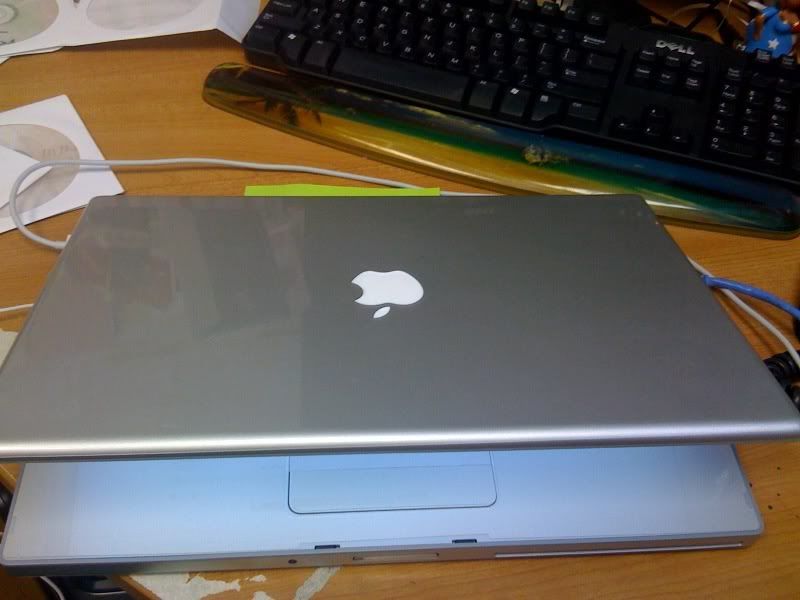
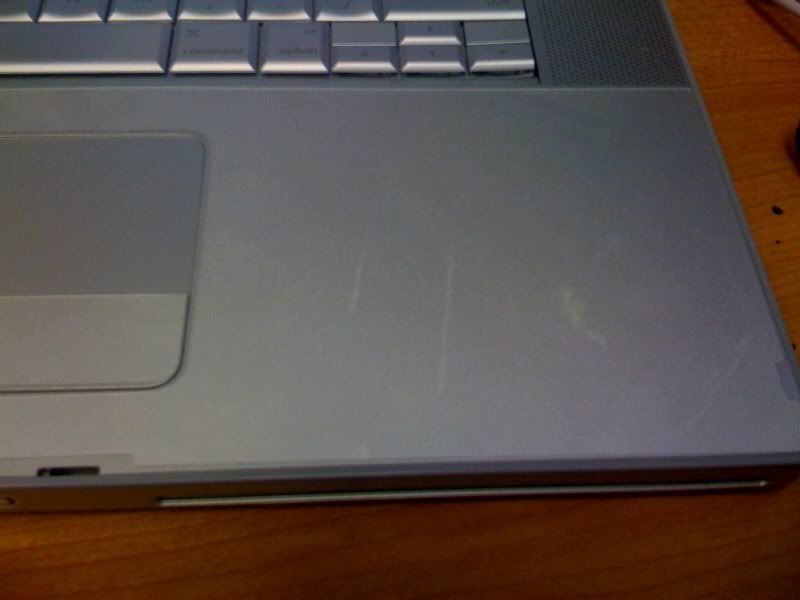
So yesterday my InvisibleShield for my MacBook Pro arrived. (Standard body coverage) Prior to me ordering, I looked high and low for pictures of what it looks like on a MBP but couldn't find a thing. So since mine is installed and looks amazing, I thought I shall do the duty of posting pics for future reference to others. (And if there is already a thread about this with pics, sorry, I'm an idiot)
My apologies for the shoddy pics. So here goes.
Here's one from my Flickr: http://flickr.com/photos/cjh6793/2715590859/
http://farm4.static.flickr.com/3195/2715590859_f8dbcd7a3c.jpg
Baffles
Jul 30, 2008, 11:43 AM
Looks nice, though glossy as hell, I kind of like the flat look.
Also, your dual screen vista setup looks hella similar to mine. What screens are they? I'm running dual E228WFPs.
engles
Jul 30, 2008, 12:24 PM
Man how much was that and how easy/long did it take to install and does it affect the trackpad? are the keys covered?
AliensAreFuzzy
Jul 30, 2008, 12:30 PM
I got the Invisible Shield on my MBP a while back, and I really love how it looks. It's also nice to have on the wrist rest so I don't have to worry about the pitting that some people experience.
uiop.
Jul 30, 2008, 12:51 PM
The monitors are E207WFPs. I love em. Someday I'd love to upgrade to Cinema displays connected to a Mac Pro. ;)
It was $40 for standard body, $55 for full body coverage which goes on the bottom of the Mac too. Overkill in my opinion.
As for the track pad- HECK yes it affects it. I think I might take it off as it is just to tacky/sticky for my fingers to slide around on. Poor design by Zagg, they should have made it matte. Nope the keys aren't covered...it would be a pain the a** to install the plastic individually over each key. Ha.
The primary reason for me getting this was to avoid the shiny spots on the wrist rest.
Bobioden
Jul 30, 2008, 01:02 PM
I had the full body BSE on my Blackbook. The trackpad cover lasted all of a few hours. I also hated the sticky feel of it. I felt like I had to drag my fingers across it. The rest of the skin was great.
Queen of Spades
Jul 30, 2008, 01:06 PM
Thanks for posting the pics. I agree with you, before I ordered my best skins ever, I only found one post on the internet (on another board) showing pictures of a MacBook Pro with an invisible shield/best skins ever on it. I was desperate to see what it looked like in advance.
I love my best skins ever on my macbook pro, so I'll share too:
http://img.photobucket.com/albums/v638/cruzalicious/th_photo.jpg (http://img.photobucket.com/albums/v638/cruzalicious/photo.jpg)
http://img.photobucket.com/albums/v638/cruzalicious/th_photo2.jpg (http://img.photobucket.com/albums/v638/cruzalicious/photo2.jpg)
http://img.photobucket.com/albums/v638/cruzalicious/th_photo3.jpg (http://img.photobucket.com/albums/v638/cruzalicious/photo3.jpg)
Not the highest quality photos (from my iphone), but it gives you an idea.
Installation was not bad at all. It probably took me 45 minutes in total. The corners go down as long as you give them a few minutes to dry first. I thought I would hate the glossiness, but it actually looks pretty good.
I did not use my trackpad piece, but I used the piece on the button. I wanted to keep the feel of the trackpad intact.
Good luck.
digitalpencil
Jul 30, 2008, 01:16 PM
look a lot better than I expected them to although way too glossy for my liking.. how much depth does it add?
uiop.
Jul 30, 2008, 01:17 PM
That Best Skins Ever thing looks just like the InvisibleShield. Ha.
Mine took maybe 15 minutes to install. The top piece gave me some trouble, but it was very very easy. I set it under a ceiling fan in my room for a few hours to let it all dry out.
Depth as in thickness? Nothing at all really. The thing is just a thin sheet of sticky plastic.
digitalpencil
Jul 30, 2008, 01:26 PM
That Best Skins Ever thing looks just like the InvisibleShield. Ha.
Mine took maybe 15 minutes to install. The top piece gave me some trouble, but it was very very easy. I set it under a ceiling fan in my room for a few hours to let it all dry out.
Depth as in thickness? Nothing at all really. The thing is just a thin sheet of sticky plastic.
Probably should have added one to mine as it's got a couple of scratches on the top lid by the catch from where i sat on it.. ah well, it's only cosmetic!
mchank
Jul 30, 2008, 01:32 PM
Have you had any higher temps with the Invisible Shield on? I've been meaning to get this for my Macbook Pro but the laptop is always so warm after a few hours of use so I'm worried that the Invisible Shield might worsen that.
Queen of Spades
Jul 30, 2008, 01:42 PM
That Best Skins Ever thing looks just like the InvisibleShield. Ha.
Mine took maybe 15 minutes to install. The top piece gave me some trouble, but it was very very easy. I set it under a ceiling fan in my room for a few hours to let it all dry out.
Depth as in thickness? Nothing at all really. The thing is just a thin sheet of sticky plastic.
They are very similar. Mine took a bit longer because I took breaks between the pieces of about 5 minutes to let them set up a bit. I'm also anal retentive, so I spend a ton of time checking for air bubbles. But uiop is right, it really was very easy and quick to install. Much easier than the iphone, imo, which I've given up on trying to get a shield on.
uiop.
Jul 30, 2008, 02:24 PM
Have you had any higher temps with the Invisible Shield on? I've been meaning to get this for my Macbook Pro but the laptop is always so warm after a few hours of use so I'm worried that the Invisible Shield might worsen that.
Nope I haven't.
If your MBP gets too hot, try downloading the app SMC Fan Control. It works wonders for heat issues. I keep my fans at about 3800RPM and don't have any problems.
SpookyLars
Jul 30, 2008, 03:16 PM
Nope I haven't.
If your MBP gets too hot, try downloading the app SMC Fan Control. It works wonders for heat issues. I keep my fans at about 3800RPM and don't have any problems.
3800 RPM? It's very high value. Is it not too loud?
uiop.
Jul 30, 2008, 04:37 PM
3800 RPM? It's very high value. Is it not too loud?
Noo not at all. I can't even start to hear the fans up until ~4800RPM.
alphaod
Jul 30, 2008, 04:43 PM
I posted thread on mine a while ago, but no one was interested. :(
I have the full body and it's worth it all! Never overlook the power of total protection! It's like only wearing half a condom during sex; what's the point?
I also use a Moshi Palmguard and PowerSupport Trackpad Film instead.
BTW:
http://i51.photobucket.com/albums/f390/alpha_ran/658e006f.jpg
http://i51.photobucket.com/albums/f390/alpha_ran/d619979a.jpg
http://i51.photobucket.com/albums/f390/alpha_ran/d770ddfe.jpg
http://i51.photobucket.com/albums/f390/alpha_ran/de84bf3d.jpg
http://i51.photobucket.com/albums/f390/alpha_ran/e5549ff9.jpg
http://i51.photobucket.com/albums/f390/alpha_ran/1e7b98b5.jpg
winninganthem
Jul 30, 2008, 06:21 PM
That actually looks pretty decent.[=
n8236
Jul 30, 2008, 07:06 PM
I actually had something very similar and it began to stain quite quickly due to stains/sweat. It yellowed the film from the lower portion of my palm (next to wrist). It is also anti-slip, so it sometimes grips by accident. It won't come off with anything, so I just removed it and put on Marware.
uiop.
Jul 30, 2008, 07:53 PM
I actually had something very similar and it began to stain quite quickly due to stains/sweat. It yellowed the film from the lower portion of my palm (next to wrist). It is also anti-slip, so it sometimes grips by accident. It won't come off with anything, so I just removed it and put on Marware.
Luckily the InvisibleShield comes with a lifetime warranty. If anything happens to it, I just send it back to them and they'll send a new one. Also, if I were to get a new laptop (doesn't matter what brand, model, etc) I can exchange the one on my MacBook Pro for a different one.
alphaod
Jul 30, 2008, 08:45 PM
Luckily the InvisibleShield comes with a lifetime warranty. If anything happens to it, I just send it back to them and they'll send a new one.
No they send you a new one first and then you send the old on back. You do have to pay for shipping both directions.
Also, if I were to get a new laptop (doesn't matter what brand, model, etc) I can exchange the one on my MacBook Pro for a different one.
You can only exchange for the same thing.
uiop.
Jul 30, 2008, 10:02 PM
No they send you a new one first and then you send the old on back. You do have to pay for shipping both directions.
You spelled one wrong.
I didn't say shipping was free either.
alphaod
Jul 30, 2008, 10:55 PM
You spelled one wrong.
That's what you think ;)
bc008
Jul 31, 2008, 12:52 AM
http://i51.photobucket.com/albums/f390/alpha_ran/1e7b98b5.jpg
what is that thing off the bottom? it looks like an ipod im so confused lol
i had a BSE for my macbook, but i didnt like the feel on the trackpad.
pics look great tho, but my incase sleeve is good enough for me when i travel (which isnt very often)
uiop.
Jul 31, 2008, 02:12 AM
what is that thing off the bottom? it looks like an ipod im so confused lol
i had a BSE for my macbook, but i didnt like the feel on the trackpad.
pics look great tho, but my incase sleeve is good enough for me when i travel (which isnt very often)
Not sure. You'll have to ask the person who posted that.
I too don't like the feeling of the plastic over the track pad. Its just hard to navigate around with it on.
I have Tucano sleeve which I love, but I wanted something else just in case.
uplusd
Jul 31, 2008, 02:24 AM
I posted thread on mine a while ago, but no one was interested. :(
I have the full body and it's worth it all! Never overlook the power of total protection! It's like only wearing half a condom during sex; what's the point?
I also use a Moshi Palmguard and PowerSupport Trackpad Film instead.
Where did you get the pieces for the sides and front?
team 79 krunch
Jul 31, 2008, 08:26 AM
3800 RPM? It's very high value. Is it not too loud?
I keep mine at 6000-RPM, I can hear the fans, but I don't care, I don't want my GPU ( or lap ) to burst into flames!
SpookyLars
Jul 31, 2008, 08:38 AM
I keep mine at 6000-RPM, I can hear the fans, but I don't care, I don't want my GPU ( or lap ) to burst into flames!
But such high RPM value makes a big noise and (at least to me) makes me difficult to work. Therefore, today I ordered the Lapcool (http://www.vantecusa.com/front/product/view_detail/4) for myself. I hope that my MBP will have a better cooling, and I will be able to focus on my work :)
team 79 krunch
Jul 31, 2008, 09:12 AM
After about 5 min I don't even notice the fan. If I am working on iMovie or Garageband, I lower the Fan speed, or use my Bose noise canceling headphones.
alphaod
Jul 31, 2008, 09:18 AM
Where did you get the pieces for the sides and front?
It's all part of the bottom piece. It's one hella-big bottom piece.
uplusd
Jul 31, 2008, 03:40 PM
It's all part of the bottom piece. It's one hella-big bottom piece.
Really? My bottom piece doesn't wrap up like that. I wonder if they changed the design recently.
alphaod
Jul 31, 2008, 07:01 PM
Really? My bottom piece doesn't wrap up like that. I wonder if they changed the design recently.
Yeah I had the older design; it was 5 pieces for the bottom.
Somehow I scratched the SHIELD and they sent me a new one; I thought it was a mistake at first, but they told me they had designed it a few days before. :p
uplusd
Jul 31, 2008, 07:40 PM
Yeah I had the older design; it was 5 pieces for the bottom.
Somehow I scratched the SHIELD and they sent me a new one; I thought it was a mistake at first, but they told me they had designed it a few days before. :p
I'm assuming the piece for the battery is still separate right?
uiop.
Jul 31, 2008, 08:10 PM
I'm assuming the piece for the battery is still separate right?
Yes it is. In fact, Zagg offers a shield just for the battery. Kinda pointless in my opinion.
IBradMac
Jul 31, 2008, 08:56 PM
I am sorry but I do not see the point in the product. :confused:
It wont protect it in a drop. It seems to me it will only protect well in the wrist area. And thats only cosmetic. :apple:
Queen of Spades
Jul 31, 2008, 09:00 PM
I am sorry but I do not see the point in the product. :confused:
It wont protect it in a drop. It seems to me it will only protect well in the wrist area. And thats only cosmetic. :apple:
It protects the aluminum from scratches. I've seen many, many macbook pros that have scratched up lids, not to mention the wrist area gets worn. It's just cosmetic protection, not drop protection.
uplusd
Jul 31, 2008, 09:22 PM
I wonder if I can order just the bottom piece. I have the old design 5 piece bottom set. I'd love to get side coverage.
uiop.
Aug 1, 2008, 12:20 PM
I wonder if I can order just the bottom piece. I have the old design 5 piece bottom set. I'd love to get side coverage.
Well according to the site for the MBP InvisibleShield site, you can't.
But Zagg is pretty good with custom orders. I had a custom order done for the nav screen in my car.
Here is the page for custom orders: http://www.zagg.com/invisibleshield/custom/index.php
But I would contact their support and say you just want the bottom shield for the MBP. That'd be much easier.
I am sorry but I do not see the point in the product. :confused:
It wont protect it in a drop. It seems to me it will only protect well in the wrist area. And thats only cosmetic. :apple:
That's fine...doesn't offend me. I want it solely for the purpose of protecting against scratches and wearing on the wrist rest/track pad area. I don't want those shiny spots, so instead I turned the whole thing into a shiny spot. :D
And as far as dropping it...that's my own damn fault if I do. I don't think there is any case that can protect a computer 100% when dropped. Luckily, I've never dropped a laptop. Shoot, I had my original iPhone for a year and only dropped it once...on carpet.
alphaod
Aug 1, 2008, 03:00 PM
I'm assuming the piece for the battery is still separate right?
Actually when you buy the full kit they give you an Argon arc welder to weld the computer shut and so you put one piece over the whole computer. :D
Yes the battery and memory covers are separate pieces; however the wrist area is also one piece now and it covers the top and button of the touchpad.
Yes it is. In fact, Zagg offers a shield just for the battery. Kinda pointless in my opinion.
I have spare batteries; not pointless at all!
uiop.
Aug 1, 2008, 04:07 PM
I have spare batteries; not pointless at all!
Your opinion, not mine.
Let me guess, you have one on your Apple Remote too.
alphaod
Aug 1, 2008, 05:16 PM
Your opinion, not mine.
Let me guess, you have one on your Apple Remote too.
Actually that's just a waste of money. Considering the Apple Remote is $20, why spend $12 on a SHIELD? I guess that's my opinion too. :rolleyes:
peapody
Aug 1, 2008, 09:10 PM
I am sorry but I do not see the point in the product. :confused:
It wont protect it in a drop. It seems to me it will only protect well in the wrist area. And thats only cosmetic. :apple:
The ultimate pointless "protective" product in my mind are speck cases. These add bulk, scratch the case, are hard to take off, and do not protect against drops. What is the point?
At least with these skins, you get NO scratches. They aren't meant to protect against drops obviously, but any macbook pro owner knows, scratching the aluminum casing is so easy to do, even if you tirelessly baby your computer. They are thin so you can just slip the computer in a sleeve that WOULD protect against drops. IMO a skin and a moshi wristguard are a great combo. I know a lot of people use the powersupport trackpad film, but that thing is glossy right? That feels wierd. Contact paper for the trackpad...is the best way to go. Great feel, no grease or stickiness.
ghulse
Oct 10, 2008, 11:47 AM
I have the Invisible Shield on my iphone (just for the front) and I like it quite a lot. On the computer, forget it.
I bought the Invisible Shield for my wife's MacBook and I have to tell you I found it impossible to put it on. Very difficult to line it up properly. The skin sticks to the case like glue despite having sprayed the **** out of it with the solution. And I was afraid some of the solution was going to seep into the computer's electronics. I did finally get it lined up, more or less, but there were numerous air bubbles and the squeegee just couldn't get the air bubbles out. I tried to lift up on the plastic but the skin stretches and then it's out of shape and doesn't line up properly any more. Same thing happened when I tried to install the back, which is a smaller piece. Ended up throwing the whole wad in the garbage in disgust. Working on getting a refund.
Is it possible that I had the wrong kind of solution? The MacBook Invisible Shield came without a squeegee or solution, so I used the leftover solution that came with the iPhone Invisible Shield. If that's true, I spent a lot of time for nothing.
marvel2
Oct 10, 2008, 12:01 PM
It makes my aluminum computer look like plastic. I'll pass.
alphaod
Oct 10, 2008, 12:04 PM
what is that thing off the bottom? it looks like an ipod im so confused lol
Yes I stuck my iPod on the bottom to show how grippy the shield is. :p
I bought the Invisible Shield for my wife's MacBook and I have to tell you I found it impossible to put it on. Very difficult to line it up properly. The skin sticks to the case like glue despite having sprayed the **** out of it with the solution. And I was afraid some of the solution was going to seep into the computer's electronics. I did finally get it lined up, more or less, but there were numerous air bubbles and the squeegee just couldn't get the air bubbles out. I tried to lift up on the plastic but the skin stretches and then it's out of shape and doesn't line up properly any more. Same thing happened when I tried to install the back, which is a smaller piece. Ended up throwing it in the garbage in disgust.
I do have a piece of the Invisible Shield on the front of my iphone and I like it quite a lot. On the computer, forget it.
You have use a lot spray; they give you 2 bottles for a reason; you shouldn't worry about the liquids seeping; just keep paper towels handy; you have to use a lot spray, so it's easy to slide the shield around when you apply it. First time I applied I was afraid to use the spray, but then I realized you have to use a lot to get it right. Also spray directed only to the machine to. After you apply it and position it, use the squeegee to squeeze the water and air bubbles out and soak the extra fluid with the paper towels. Don't use for computer for 24 hours and let it dry with with the computer in a /\ shape on your desk. Keep books on the side, so it doesn't sllde.
Boop
Oct 10, 2008, 12:14 PM
I'm curious..what happens in the event you want to remove this stuff? Does it leave a nasty, hard (if not impossible) to remove glue stain. :eek:
alphaod
Oct 10, 2008, 12:26 PM
I'm curious..what happens in the event you want to remove this stuff? Does it leave a nasty, hard (if not impossible) to remove glue stain. :eek:
No residue if you are careful; it's possible to have a little bit, but nothing you can't removed with some rubbing alcohol.
ghulse
Oct 10, 2008, 01:57 PM
You have use a lot spray; they give you 2 bottles for a reason; you shouldn't worry about the liquids seeping; just keep paper towels handy; you have to use a lot spray, so it's easy to slide the shield around when you apply it.
Well, now you tell me. They gave me no bottles at all and extremely minimal instructions. I'm still angry about the whole experience. If the company was in my neighborhood I'd throw a brick through their window. This was a birthday present for my wife and now it's a wad of very stuck together plastic in my trash can.
rychencop
Oct 10, 2008, 02:06 PM
nice product, but way too glossy for my taste.
alphaod
Oct 10, 2008, 02:19 PM
Well, now you tell me. They gave me no bottles at all and extremely minimal instructions. I'm still angry about the whole experience. If the company was in my neighborhood I'd throw a brick through their window. This was a birthday present for my wife and now it's a wad of very stuck together plastic in my trash can.
Take it out of the trash, give them a call and they will should sent you everything for free. They actually have pretty good CS.
Though, their instructions are brief, but it does get the point across, IMO.
jTreu
Oct 11, 2008, 05:38 PM
not bad, i wish they made some kind of matte invisible shield, i think that would look a lot better.
alphaod
Oct 11, 2008, 07:28 PM
not bad, i wish they made some kind of matte invisible shield, i think that would look a lot better.
So you want it to be smokey instead of transparent?
Fonzijr1964
Oct 11, 2008, 09:18 PM
what is that thing off the bottom? it looks like an ipod im so confused lol
i had a BSE for my macbook, but i didnt like the feel on the trackpad.
pics look great tho, but my incase sleeve is good enough for me when i travel (which isnt very often)
it is an iPod cuz the stuff is sticky so u can shtick other stuff to it
uiop.
Oct 11, 2008, 11:05 PM
not bad, i wish they made some kind of matte invisible shield, i think that would look a lot better.
It's a matter of preference, I suppose. I like the look of the gloss but don't really like the tacky feel of it. However that's better than a scratched MBP.
;)
ottlite123
Oct 11, 2008, 11:20 PM
any issues with the invisible shield melting on the macbook pro?
Stang68
Oct 12, 2008, 12:52 AM
I actually really like that glossy look it gives your MBP. Must have taken you a while to put them on the way you want!
alphaod
Oct 12, 2008, 01:48 AM
any issues with the invisible shield melting on the macbook pro?
Unless you're computer can reach 250ºC, you shouldn't have any issues. If your computer did reach that temperature, a melting shield would be the least of your problems!
uiop.
Oct 12, 2008, 11:49 AM
any issues with the invisible shield melting on the macbook pro?
Nooo not at all. Your MacBook Pro would have to able to fry an egg before the shield starts to melt.
Must have taken you a while to put them on the way you want!
It really wasn't too bad. The frustrating part is later noticing debris that got stuck under the shield during installation. :rolleyes:
skyrider007
Oct 24, 2008, 01:17 PM
cute iphone!
darshan
Nov 24, 2008, 12:04 PM
im bringing this badboy back in to discussion
was reading it... nearly perfect post...
so i went through all the comments... and since i was looking to get one for myself... what would you suggest is the best combination for the money
cuz i saw few people mentioning Power Support products, along with moshi palmguard
i mean shouldnt all-in-one like bodyguardz do the trick?
plus alot of you mention the "tacky" feeling of trackpad... how bad is it? cuz i have it on my iphone and if its anyclose to that feel, i wouldnt mind that on my track pad (personal opinion)
so get back to me...
NICE POST
sukanas
Nov 24, 2008, 12:24 PM
plus alot of you mention the "tacky" feeling of trackpad... how bad is it? cuz i have it on my iphone and if its anyclose to that feel, i wouldnt mind that on my track pad (personal opinion)
imagine ur iphone screen with the IS on the cover as your trackpad
it pretty much feels identical
so if u dont mind the slightly more grippy feel, then go for it
fyi, im using it too.
uiop.
Nov 24, 2008, 03:30 PM
im bringing this badboy back in to discussion
was reading it... nearly perfect post...
so i went through all the comments... and since i was looking to get one for myself... what would you suggest is the best combination for the money
cuz i saw few people mentioning Power Support products, along with moshi palmguard
i mean shouldnt all-in-one like bodyguardz do the trick?
plus alot of you mention the "tacky" feeling of trackpad... how bad is it? cuz i have it on my iphone and if its anyclose to that feel, i wouldnt mind that on my track pad (personal opinion)
so get back to me...
NICE POST
I went with the InvisibleShield because of the simplicity, I guess. I didn't feel like mix matching my types of protection, one large piece of plastic did the trick for me. The trackpad was (I say was since I use a GlassBook Pro now) very tacky and I didn't like it all. It might not seem that bad when its on your iPhone, but after constant use it gets annoying. I noticed that it eventually smoothed out over time, but I still don't think I would get the InvisibleShield for my new Mac. I'm looking into the BodyGuardz or Bestskinsever as people have reported them being "smoother" and less tacky.
NC MacGuy
Nov 24, 2008, 03:39 PM
I've done the shields but found that best skins ever sells a nearly identical product for 1/2 the price. Never did like it on my trackpad though, I likes to skim smoothly and the tackiness slows down my phalanges.
alphaod
Nov 25, 2008, 01:05 AM
cuz i saw few people mentioning Power Support products, along with moshi palmguard
i mean shouldnt all-in-one like bodyguardz do the trick?
No the bodyguardz won't work because like the IS the BG is also somewhat sticky, so if you apply that to palmrest area, it just feels too grippy sometimes.
---
Anyways I ordered the IS for the new 15"; should be here next week; will post pics.
toolbox
Nov 25, 2008, 03:58 AM
I have a iskin and a tech shell for my macbook and macbook pro.
But wow that looks cool
vBulletin® v3.8.6, Copyright ©2000-2012, Jelsoft Enterprises Ltd.