
View Full Version : HELP > "The iPhone "iPhone" could not be restored. An unknown error occurred (1600)"
yani2k8
Oct 19, 2008, 02:18 PM
Hi everyone.
I tried jailbreaking my iPhone 3G (2.1 firmware) using PwnageTool on my iMac, using this tutorial: http://forums.macrumors.com/showthread.php?t=550964
Everything was going well until I got to the point where I had to shift-click on the Restore button on iTunes and choose the ipsw. file it had created. I located the file, clicked on it, it started extracting and when it got to the end, I got the following message.
"The iPhone "iPhone" could not be restored. An unknown error occurred (1600)"
I tried to Google it but the results I got were not very clear so I decided to ask you guys for some help.
Any suggestions?
Thanks in advance.
Yani
TheConfuzed1
Oct 19, 2008, 08:01 PM
You may have a corrupt .ipsw. Try rebuilding a new one, and see if that makes a difference.
If that doesn't help, try QuickPwn.
XClint
Oct 19, 2008, 10:44 PM
Not matter how many times or different macs I use to make a custom ISPW and restore the custom way (opt+click on restore in iTunes using the Pwnage iPhone1,1_2.0.1_5B108_Custom_Restore.ipsw on the desktop) my original First generation iPhone has the same error - 1600. Should I upgrade letting iTunes 8 restore it fully & then use Pwnage to hack at it? HELP us please!
Opie
Oct 19, 2008, 11:08 PM
Use quickpwn for mac. Pwnage tool failed me about 50 times and finally I went to quickpwn and it worked on the first try. The results are the same. and a Jailbroken phone is WAY better then one thats not.
yani2k8
Oct 20, 2008, 11:01 AM
You may have a corrupt .ipsw. Try rebuilding a new one, and see if that makes a difference.
If that doesn't help, try QuickPwn.
Thank you all for the replies.
I tried building the .ipsw file like 5 times but I got the same result every time.
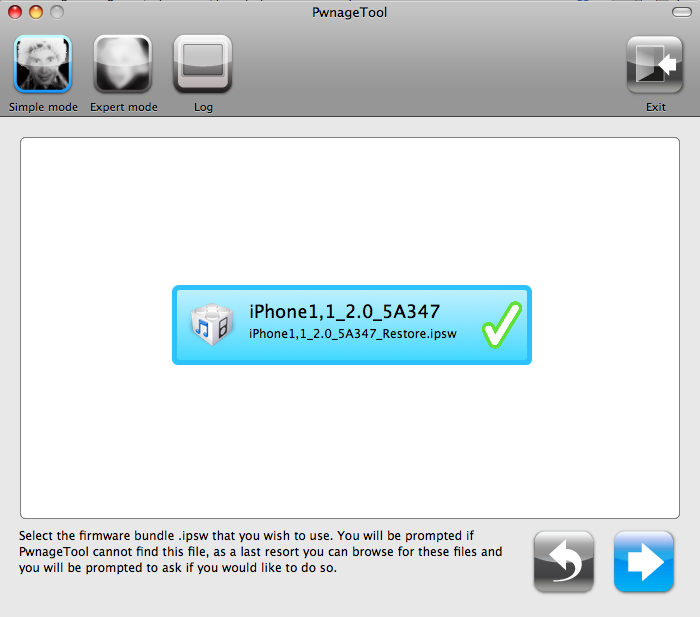
I think I know where I might be going wrong. The stage where you choose the .ispw file to start off with:
http://www.macgeekblog.com/wp-content/uploads/2008/07/step-2.png.
I used "iPhone1,2_2.0_5A347_Custom_Restore.ipsw" but I'm not sure if this is the correct one? Btw, its a 3G iPhone with a 2.1 firmware. Can you please guide me to what the correct .ipsw file to use is and possibly a link to download it.
Another thing is, pwnage tool didn't ask me for the bootloader file at any stage during the process? Is that normal?
dZp
Oct 20, 2008, 12:04 PM
From your snapshot, why are you using the version 2.0 firmware meant for the original iPhone to build your Custom_Restore ?
Why not use the iPhone 3G's 2.1 firmware ?
-> iPhone1,2_2.1_5F136_Restore.ipsw
And here's a very good guide including download link to the right firmware:
http://www.iclarified.com/entry/index.php?enid=1558
Pay attention to the guide, you must select the "Expert Mode". The iPhone 3G can't (at this time) be software unlocked, so there's no bootloader involved.
yani2k8
Oct 20, 2008, 02:44 PM
From your snapshot, why are you using the version 2.0 firmware meant for the original iPhone to build your Custom_Restore ?
Why not use the iPhone 3G's 2.1 firmware ?
-> iPhone1,2_2.1_5F136_Restore.ipsw
And here's a very good guide including download link to the right firmware:
http://www.iclarified.com/entry/index.php?enid=1558
Pay attention to the guide, you must select the "Expert Mode". The iPhone 3G can't (at this time) be software unlocked, so there's no bootloader involved.
Thanks for the reply.
I went on the 'iClarified' tutorial. I followed every single step exactly.
I downloaded Pwnage 2.1 and the correct .ipsw file (iPhone1,2_2.1_5F136_Restore.ipsw) and put them in a folder on my desktop.
Everything was going well but once again, when I shift-clicked on Restore and selected the custom .ipsw, I got exactly the same message as before:
Screenshot = http://img227.imageshack.us/my.php?image=picture3rj1.png (couldn't get it to show on the page)
Please help :(
gkarris
Oct 20, 2008, 02:49 PM
There are bad copies of pwnage out there. I heard you can try downloading from a different mirror.
yani2k8
Oct 20, 2008, 03:25 PM
There are bad copies of pwnage out there. I heard you can try downloading from a different mirror.
I downloaded it from the link given in the iClarified tutorial. Could that be a bad copy?
prodigy883
Oct 21, 2008, 12:39 AM
I had this problem before. You have to make sure your phone is in recovery mode. Once it is in recovery mode you will have no choice but to restore and from here you will be allowed to restore from a custom ipsw.
yani2k8
Oct 21, 2008, 03:49 PM
I had this problem before. You have to make sure your phone is in recovery mode. Once it is in recovery mode you will have no choice but to restore and from here you will be allowed to restore from a custom ipsw.
So how do I make 100% sure that it's in recovery mode?
edit: I used this tutorial to make sure I'm doing it right: http://www.iclarified.com/entry/index.php?enid=367
Mostly everything works exactly just like it's shown in the tutorial - I get the message saying that iTunes has detected an iPhone in recovery mode and that it needs to be restored. However there is one thing that is different. In the tutorial it says that my iPhone will look like this:
http://www.iclarified.com/images/tutorials/367/1352/1352.png
But mine didn't look like this. Mine just didn't have anything on the screen whatsoever.
RRutter
Oct 21, 2008, 05:31 PM
Download the firmware .ipsw online, check iClarified, and put your iPhone into DFU mode, than hold down option (when on a mac) and click restore, and locate the .ipsw file to restore it.
prodigy883
Oct 21, 2008, 11:14 PM
In recovery mode your phone screen should be all black. It shouldn't look like the picture. To put in recovery mode have you iphone plugged into your computer with usb. Then hold both power and home for ten seconds. After ten seconds release the power button and continue to hold the home for ten more seconds. If you get a 1600 error do a regular restore and then try it again.
You are right it was my mistake it is DFU but even with me mistaking the word recovery for dfu this way works.
RRutter
Oct 21, 2008, 11:28 PM
In recovery mode your phone screen should be all black. It shouldn't look like the picture. To put in recovery mode have you iphone plugged into your computer with usb. Then hold both power and home for ten seconds. After ten seconds release the power button and continue to hold the home for ten more seconds. If you get a 1600 error do a regular restore and then try it again.
No, recovery mode has the picture of the chord with an iTunes logo. DFU mode is black with no icon(s).
itsmedeka
Oct 22, 2008, 04:02 AM
Had the same 1600 issue like some of you, after endless searching on google I found nothing..
Then I thought "Instead of using the custom .ipsw or the .ipsw on iclarified why don't I use the .ipsw file in itunes"
DING DING DING !
go into harddrive/users/"yourusername"/library/itunes/device support and create your custom .ipsw for pwnage with the .ipsw located in this folder.
Voila !
yani2k8
Oct 22, 2008, 04:08 PM
Had the same 1600 issue like some of you, after endless searching on google I found nothing..
Then I thought "Instead of using the custom .ipsw or the .ipsw on iclarified why don't I use the .ipsw file in itunes"
DING DING DING !
go into harddrive/users/"yourusername"/library/itunes/device support and create your custom .ipsw for pwnage with the .ipsw located in this folder.
Voila !
Right, I located the file but how do I change it to create it my custom using pwnage? Or do I just delete the existing one and replace it with the custom one that I created? And what do I name it? Give a bit more detail if possible please.
Thanks a lot.
TheConfuzed1
Oct 22, 2008, 05:44 PM
Right, I located the file but how do I change it to create it my custom using pwnage? Or do I just delete the existing one and replace it with the custom one that I created? And what do I name it? Give a bit more detail if possible please.
Thanks a lot.
No, you don't change anything. When PwnageTool asks for the file, all you do is navigate to it.
yani2k8
Oct 22, 2008, 06:00 PM
Good news :D
I just did it using my vista laptop. I took me like 5 minutes to do. I should have tried that earlier but I always thought mac would be easier.
Thanks for all your help everyone :)
yani2k8
Oct 22, 2008, 07:19 PM
OK, bad news again. I just realized that after jailbreaking my iPhone, now it doesn't have any network coverage so I can't make any calls or send texts. I only got 1 bar on the network coverage thing at the top of the screen.
PLEASE help :(
Thanks.
RRutter
Oct 22, 2008, 07:46 PM
OK, bad news again. I just realized that after jailbreaking my iPhone, now it doesn't have any network coverage so I can't make any calls or send texts. I only got 1 bar on the network coverage thing at the top of the screen.
PLEASE help :(
Thanks.
If you mean you jailbroke your phone with PwnageTool, than make sure you didn't add any custom logos when booting, etc. This is a major glitch with Pwnage Tool, as it makes it unable to receive service. I know this from reading online, and also from experience. Happened to my brother's phone when I tried adding a custom boot-up image.
prodigy883
Oct 22, 2008, 11:08 PM
Make sure when you make your image that activate phone is NOT clicked. That is big if you use att.
yani2k8
Oct 23, 2008, 02:23 AM
If you mean you jailbroke your phone with PwnageTool, than make sure you didn't add any custom logos when booting, etc. This is a major glitch with Pwnage Tool, as it makes it unable to receive service. I know this from reading online, and also from experience. Happened to my brother's phone when I tried adding a custom boot-up image.
I did not add any custom logos whatsoever. I just kept it the way it is. I says No Service on the top of the screen.
Any other suggestions? :(
yani2k8
Oct 23, 2008, 04:40 AM
Make sure when you make your image that activate phone is NOT clicked. That is big if you use att.
I did it on Vista where that option wasn't available...
yani2k8
Oct 23, 2008, 03:24 PM
Hey guys.
Just letting you know that the problem has been solved. I restored it back to normal using iTunes and then I used QuickPwn (Mac) which was fast and effective. I now got a jailbroken iPhone 3G with network coverage.
Happy days :D
Thanks for the help everybody!
redeyedtreefrog
Oct 25, 2008, 10:59 PM
Had the same 1600 issue like some of you, after endless searching on google I found nothing..
Then I thought "Instead of using the custom .ipsw or the .ipsw on iclarified why don't I use the .ipsw file in itunes"
DING DING DING !
go into harddrive/users/"yourusername"/library/itunes/device support and create your custom .ipsw for pwnage with the .ipsw located in this folder.
Voila !
Gotta thank you, itsmedeka, for this--I had this exact problem today and was just thinking I was going to have to start everything all over again, but saw this and tried it tonight and your solution worked like a charm! Thank you for posting it! :D
staccato83
Oct 25, 2008, 11:50 PM
Use quickpwn for mac. Pwnage tool failed me about 50 times and finally I went to quickpwn and it worked on the first try. The results are the same. and a Jailbroken phone is WAY better then one thats not.
Hey guys.
Just letting you know that the problem has been solved. I restored it back to normal using iTunes and then I used QuickPwn (Mac) which was fast and effective. I now got a jailbroken iPhone 3G with network coverage.
Happy days :D
Thanks for the help everybody!
Just think, it only took you four days to follow someone's advice. ;)
Just kidding... glad you got it all figured out.
Jiddick ExRex
Oct 26, 2008, 04:09 AM
I had the same problem using Pwnage tool. Removing the SIM before Pwning and reinserting SIM after having restored did the trick. :)
XClint
Oct 28, 2008, 10:24 PM
Makes it very snappy too! Cheers.
RRutter
Oct 28, 2008, 10:49 PM
Removing and reinstalling the sim if very smart.
ninab83
Nov 20, 2008, 05:24 PM
i'm hopin you guys can help me!!
I actually found my iphone and had it unlocked after the police gave it back to me cos no1 claimed it!! I used a t-mobile sim without problem until today when I stupidly tried to update the software, which resulted in the phone locking again.
I have followed the instructions numerous times to jailbreak always with the same result. Error 1600. I am using windows xp and cannot find any answers anywhere else.
Please help
Ninab83
mkangrga
Apr 23, 2009, 11:54 PM
I had the same 1600 error problem and spent a good few hours googling and brushing through forums, but no solution...
Using QuickPwn would not work for me, as I would like to maintain the ability to run yellowsn0w in the near term.
The all-mighty Dev Team posted this wonderfully simple solution, which worked for me:
http://blog.iphone-dev.org/post/42858313/thanks-for-waiting
"Update 3: If you get Error 1600 from iTunes (or if you see in your log a failure to prepare x12220000_4_Recovery.ipsw), try: mkdir ~/Library/iTunes/”Device Support” ; if that directory already exists, remove any files in it. Then re-run PwnageTool."
Voilà!
I hope this works for everyone.
-M
Rusalka
Apr 24, 2009, 12:37 PM
I kept getting an error too, I downgraded my itunes from 8.1.1 to 8.0 and everything worked fine
Although it took my about three hours of reading and experimentation, wish I'd just used Quickpwn :(
macskrap
Apr 30, 2009, 04:54 PM
arrgghh, can't jailbreak my 2g iphone.
please help!!!!
went all the way through quickpwn 2.2.5, following the directions exactly, it runs fine all the way through "i haz sucezz." when the iphone re-boots, it goes to the apple logo and itunes say "no sim, etc, etc"?!?!?!
feels like i'm close, please save my sanity!!!!
K3mp
May 2, 2009, 09:30 AM
I keep getting the same error. I tried the Dev-team fix and it did not work. Im going to try to jailbreak one more time. I am using a hub also. With pwnage tool I get error 1600 and in quickpwn it runs through fine but it gets stuck in a boot loop. This is really annoying me.
d4rklamp
May 2, 2009, 09:36 AM
I just found this solution this week when restoring to a custom firmware 2.2.1...
The solution is get out of DFU mode!!!! Put normal mode instead when restoring... This is what I've done, for some reasons, using normal mode works!! Try it ;)
K3mp
May 2, 2009, 09:51 AM
I just found this solution this week when restoring to a custom firmware 2.2.1...
The solution is get out of DFU mode!!!! Put normal mode instead when restoring... This is what I've done, for some reasons, using normal mode works!! Try it ;)
Did not work for me. I think that I am going to hold off of JB'ing until there is a definite fix for the problems I'm having.
jav6454
May 2, 2009, 01:46 PM
Hi everyone.
I tried jailbreaking my iPhone 3G (2.1 firmware) using PwnageTool on my iMac, using this tutorial: http://forums.macrumors.com/showthread.php?t=550964
Everything was going well until I got to the point where I had to shift-click on the Restore button on iTunes and choose the ipsw. file it had created. I located the file, clicked on it, it started extracting and when it got to the end, I got the following message.
"The iPhone "iPhone" could not be restored. An unknown error occurred (1600)"
I tried to Google it but the results I got were not very clear so I decided to ask you guys for some help.
Any suggestions?
Thanks in advance.
Yani
160x errors are USB related when iTunes can't talk well with the iPhone.
Solution:
- Change USB port
- Restart computer
- Try on another computer.
K3mp
May 3, 2009, 02:08 PM
160x errors are USB related when iTunes can't talk well with the iPhone.
Solution:
- Change USB port
- Restart computer
- Try on another computer.
I'm using a hub right now because of 10.5.6. I also tried on a normal macbook pro classic with a hub and 10.5.6. Do I need a hub for it also? I can restore just fine with the hub.
vegas-steven
May 4, 2009, 01:40 AM
i had a phone like that given to me and was never able to fix it. it seemed that my problem was due to some sort of sim issue though.
i hate those strange errors.
K3mp
May 8, 2009, 05:27 PM
I have some updates
I have 2 MBP's 1Uni 1Classic
They both have 10.5.6
The uni has the newest iTunes, the classic has 8.xxx
I tried hub with the uni, and I got the error. I tried hub+Classic-got the error. The last time I Jailbroke my phone was with the classic with iTunes 7. Now I keep getting the same error. I can restore to stock firmware fine. Also I have tried the dev team fix several times and it has not worked.
Pwnage=error 1600
Quickpwn=Bootloop. In the bootloop the phone is recognized by the computer. iPhoto and iTunes load up, but the screen stays at the apple logo. Also iPhoto can see the pics on the iPhone, but iTunes does not sync with it.
OusSanDiego
Jun 13, 2009, 11:14 PM
Had the same 1600 issue like some of you, after endless searching on google I found nothing..
Then I thought "Instead of using the custom .ipsw or the .ipsw on iclarified why don't I use the .ipsw file in itunes"
DING DING DING !
go into harddrive/users/"yourusername"/library/itunes/device support and create your custom .ipsw for pwnage with the .ipsw located in this folder.
Voila !
Hi,
I've tried to select the file in the "library/itunes/device support" folder, and I got the message: "the iPhone could not be restored because the firmware file is not compatible".
Initially I had a 1.1.4. on my 2G iPhone that I have jailbroken 2 years ago. Yesterday, I've updated my phone through iTunes thinking that I may find a program like "QuickPwn" or "Ziphone" that will jailbrake it again.
I just got myself into trouble because now I have tried everything and nothing works: I have either a (1600) or a (26) error when I try to upload the restore file.
Can anybody help me out?
Thank you very much!
OusSanDiego
batmmannn
Aug 22, 2010, 12:36 PM
The error I got was 2006 whenI tried to restore to 4.0/ I have a G3S and forums are saying it won;t work for anything below 3.1.3 for my G3S.
I was told Mac is not letting anyone do anything now but 4.0
Will pawnage tool work for G3S?
GIZBUG
Jun 7, 2011, 09:15 AM
So this 1600 error is USB related?
QMdude
Sep 9, 2011, 06:40 PM
I have the same issue, running 3.1.3 on a 2G. Where can I download the appropriate version of pwnagetool? None of the links I found on google worked :(
morganee8
Sep 23, 2011, 05:29 PM
I had the same problem...got error 1600 about 5 times. I went into Pwnage Tool and created another custom firmware bundle and then tried again in iTunes to restore it to that. It finally worked! :)
vBulletin® v3.8.6, Copyright ©2000-2012, Jelsoft Enterprises Ltd.