View Full Version : MacBook Newb! Few Questions...
MacFly69
Dec 15, 2008, 03:19 AM
hello. i recently jumped the PC ship and got myself a MB 2.4. thus far, i love it. i'm learning the MAC-way and getting the hang of it.
few questions -
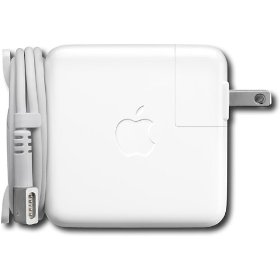
1) When traveling, how do you guys gather and/or organize the power cord since there doesn't seem to be a velcro strap to bundle it up with?
2) when uninstalling a program, do i simply take it from the application folder and move it to the trash?
thanks in advance!
drichards
Dec 15, 2008, 03:24 AM
1) There's a fold out bit on the power brick to wrap the cord. See photos.
2) Yes, you just toss it in the trash. There's some utilities you can install which delete oldapps preferences when you trash them, but nothing is coming to my mind, except appzapper, and that's payware. I know appcleaner is free, but there's probably better stuff than appcleaner...
http://ecx.images-amazon.com/images/I/31D%2BZG7j8WL._SL500_AA280_.jpghttp://i12.ebayimg.com/02/i/000/db/5e/8e24_1.JPG
MacFly69
Dec 15, 2008, 03:33 AM
1) There's a fold out bit on the power brick to wrap the cord. See photos.
2) Yes, you just toss it in the trash. There's some utilities you can install which delete oldapps preferences when you trash them, but nothing is coming to my mind, except appzapper, and that's payware. I know appcleaner is free, but there's probably better stuff than appcleaner...
http://ecx.images-amazon.com/images/I/31D%2BZG7j8WL._SL500_AA280_.jpghttp://i12.ebayimg.com/02/i/000/db/5e/8e24_1.JPG
thank you for the quick reply.
1) so i take it most do not take the power cord with the three prong with them, just leave the adapter 2 prong on for traveling.
2) ok, i'm so use to having to uninstall a program.
drichards
Dec 15, 2008, 03:39 AM
I don't take the grounding adapter anywhere, I leave that under the desk when I go. You could always head down to the hardware store and get some velcro cable ties like these for a buck...
http://www.topcableaccessories.co.uk/images/Image13.jpg
MacFly69
Dec 15, 2008, 12:47 PM
I don't take the grounding adapter anywhere, I leave that under the desk when I go. You could always head down to the hardware store and get some velcro cable ties like these for a buck...
http://www.topcableaccessories.co.uk/images/Image13.jpg
yes, exactly what i need! thanks again.
jessica.
Dec 15, 2008, 12:56 PM
appzapper is worth whatever the price is today. Seriously. It removes everything assocaited with that application better than the trash can has for me.
RTiii320
Dec 15, 2008, 01:44 PM
appzaper is very nice, quick and easy.
WayOutWest
Dec 15, 2008, 02:17 PM
I use appcleaner and it works really well; though I have never used AppZapper.
MacFly69
Dec 15, 2008, 03:27 PM
another question...
i have a jump drive that i've stuck into the USB. how do i access it? nothing popped up, nor can i find the drive.
pls advise, thanks!
drichards
Dec 15, 2008, 03:31 PM
Look at a Finder window, your jumpdrive should be there on the left under your hard drive.
Install macfuse (http://code.google.com/p/macfuse/) and then install ntfs-3g (http://macntfs-3g.blogspot.com/) to make your life easier.
If a drive fails to mount when you insert it, you can always mount it with disk utility, in /applications/utilities/
MacFly69
Dec 15, 2008, 03:38 PM
Look at a Finder window, your jumpdrive should be there on the left under your hard drive.
Install macfuse (http://code.google.com/p/macfuse/) and then install ntfs-3g (http://macntfs-3g.blogspot.com/) to make your life easier.
If a drive fails to mount when you insert it, you can always mount it with disk utility, in /applications/utilities/
no, it didn't mount automatically.
so i went into app/utilities.....but then what? what am i looking for in the utilities folder? it's a cruzer 2gb jump drive.
drichards
Dec 15, 2008, 03:45 PM
Launch disk utility. You should then see your USB stick in there with an orange icon. Select it and hit mount.
MacFly69
Dec 15, 2008, 03:49 PM
Launch disk utility. You should then see your USB stick in there with an orange icon. Select it and hit mount.
nope, i see my HD and CD/DVD drive..but no jump drive.
i stuck another jump drive, this time a Lexar and it mounted automatically. i'd still like to get my cruzer to work, since it's a larger drive.
any other ideas?
drichards
Dec 15, 2008, 03:52 PM
If disk utility can't see it, I'm tapped out. Something might be off with that drive. Tho you should be able to see it, even if it were damaged.
vBulletin® v3.8.6, Copyright ©2000-2012, Jelsoft Enterprises Ltd.