View Full Version : German character "ß" (ess-tset) on iPhone keyboard?
3Gmatt
Feb 12, 2009, 02:02 AM
Hi,
I have searched the forum and not found a solution.
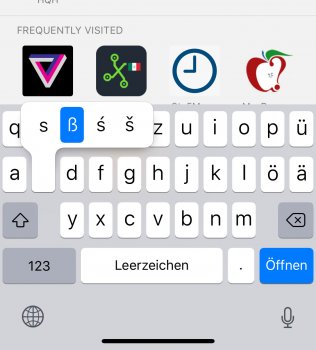
How do I type the "ß" (ess-tset, or in German, Eszett) character on my iPhone keyboard (3G, 2.2)? Umlauts are not a problem as you simply hold down the vowel key, but I can't find the ß anywhere.
Thanks,
3Gmatt.
mcpryon2
Feb 12, 2009, 02:24 AM
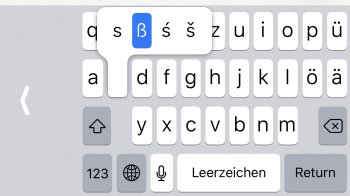
You'll probably kick yourself, but...hold down the s key.
elppa
Feb 12, 2009, 02:45 AM
option + s on a Mac (for anyone interested in doing the same thing).
Interestingly I think this is one example where a virtual keyboard has a fixed, physical one beat. You can't hold down a key on a physical keyboard to see more options.
stomer
Feb 12, 2009, 03:14 AM
You'll probably kick yourself, but...hold down the s key.
I think you need to add the German keyboard first though (Settings > General > Keyboard > International Keyboards ). ß wasn't available in the UK, French or Romanian keyboards.
Stampyhead
Feb 12, 2009, 03:22 AM
I think you need to add the German keyboard first though (Settings > General > Keyboard > International Keyboards ). ß wasn't available in the UK, French or Romanian keyboards.
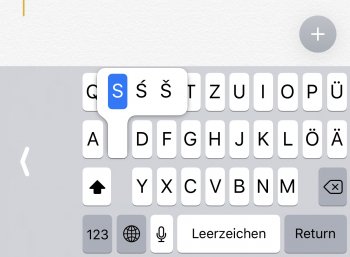
Yes it is, I just tried it on my UK 3G phone. It won't show up if you have the Shift key highlighted, but if you hold down the 's' key without Shift you'll see 'ß' as the first option in the list.
3Gmatt
Feb 12, 2009, 06:34 AM
Thanks, I was trying every key with Shift highlighted, ha ha. Consider myself kicked :p
Interestingly I think this is one example where a virtual keyboard has a fixed, physical one beat. You can't hold down a key on a physical keyboard to see more options.
Agreed, it's brilliant in that respect. Slightly o/t, but I am looking forward to the day when we have a keyboard-sized touch panel instead... totally re-configurable, oh yes :cool:
vBulletin® v3.8.6, Copyright ©2000-2012, Jelsoft Enterprises Ltd.