View Full Version : Safari 4: couldn't add images to posts... Solved!
GGJstudios
Feb 24, 2009, 04:23 PM
I'm not sure if this is a MR site issue, a Safari 4 issue, or a problem with my own setup:
I installed the Safari 4 Beta this morning, and since I did, I'm no longer able to add images to any posts. When I click the paperclip to add an image, the "Manage Attachments" window pops up, but when I click "Choose File", nothing happens. Any ideas? Is this a compatibility issue? Anyone having the same problem? I've reset Safari, rebooted.... same problem.
xUKHCx
Feb 24, 2009, 05:04 PM
Test
Posted from Safari 4:
xUKHCx
Feb 24, 2009, 05:05 PM
Using the paper clip to do the automatic insert
159526
xUKHCx
Feb 24, 2009, 05:08 PM
As you can see I have successfully managed to insert images using Safari 4 Beta.
When I tried the second time to use the paper clip to inset the [attach] tags automatically it didn't do anything until I previewed my post then it worked. This method has always been a little dodgy but seems slightly more so now.
Not sure what to suggest really, send a bug report to apple.
GGJstudios
Feb 24, 2009, 05:09 PM
Thanks for your response! I did send a bug report to Apple, but I didn't know if MR should be alerted, as well. I still can't figure out why it doesn't work at all for me, and it does for others. :confused:
jodelli
Feb 25, 2009, 01:53 AM
Had me wondering...
ravenvii
Feb 25, 2009, 03:25 AM
Test.
EDIT: Yeah, worked fine here.
GGJstudios
Feb 26, 2009, 02:05 AM
Update: I found the problem. There is a compatibility problem between Safari 4 Beta and some functions of SafariStand (http://hetima.com/safari/stand-e.html). I had two problems, one of which is now solved:
Problem 1: I couldn't upload pics to posts in this forum, because clicking on the "Choose File" button on the "Manage Attachments" window had no effect.
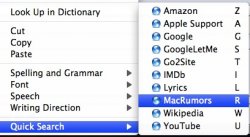
Resolution 1: I removed the SIMBL folder from the InputManager folder. (This was used to install SafariStand). I then reinstalled SafariStand using PimpKit (http://www.cocoamug.com/pimpkit/index.html). Problem solved! I still have my custom quick-search menus that SafariStand provides, and I can now upload images to posts.
Problem 2: Another feature of SafariStand is the ability to automate the Find function when visiting web pages. Usually, if you want to search for a word on a website, you press Command-F to open the Find window, then type your search. With SafariStand, you can check a box that "Automates the Find function", so just typing any alphabetic key while viewing a website will automatically open the Find window and search for what you type. This works fine in Safari 3, but in Safari 4, typing a key when this is activated will cause Safari to freeze and the only option is to Force Quit Safari.
Resolution 2: This problem remains unresolved, so I just unchecked the SafariStand option and have to endure the painful and tedious process of pressing Command-F to search for terms on a web site. Oh the misery! :D
The most important benefit I get from SafariStand is the customizable menu of Quick Searches, which I use constantly:
159799
I've posted this, just in case anyone runs into the same problems.
vBulletin® v3.8.6, Copyright ©2000-2012, Jelsoft Enterprises Ltd.