View Full Version : Before i mess everything up
Che Castro
Aug 22, 2009, 07:29 PM
I want to isntall this battery icon without winterboard
http://modmyi.com/forums/downloads/battery-icons/13/last-fire-battery-jesse-1966/
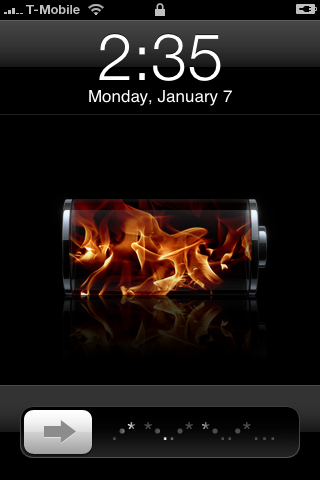
http://i35.photobucket.com/albums/d157/jayc7176/FirePainter.png
I will exchange the battery files png from that link into
System/Library/CoreServices/SpringBoard.app
my question is in the sprinboard folder there are 17 battery png's
but in that link there are 18 png files
the files from that link have a diff name then from the sprinboard folder
in the sprinboard folder the files are named like this
BatteryBG_1.png through 17
the files in the link are named
firee-1.png
I have to rename them to BatteryBG correct?
also since the link has 18 files do i just add that 18th file in as BatteryBG_18.png ?
thanks
Applejuiced
Aug 22, 2009, 09:42 PM
I changed mine to the duracell Battery instead.
Mine is also 17 files. I dont know what the 18 is for. I dont even think it exists inside the SpringBoard.app folder.
/System/Library/CoreServices/SpringBoard.app/BatteryBG_1.png
/System/Library/CoreServices/SpringBoard.app/BatteryBG_2.png
/System/Library/CoreServices/SpringBoard.app/BatteryBG_3.png
/System/Library/CoreServices/SpringBoard.app/BatteryBG_4.png
/System/Library/CoreServices/SpringBoard.app/BatteryBG_5.png
/System/Library/CoreServices/SpringBoard.app/BatteryBG_6.png
/System/Library/CoreServices/SpringBoard.app/BatteryBG_7.png
/System/Library/CoreServices/SpringBoard.app/BatteryBG_8.png
/System/Library/CoreServices/SpringBoard.app/BatteryBG_9.png
/System/Library/CoreServices/SpringBoard.app/BatteryBG_10.png
/System/Library/CoreServices/SpringBoard.app/BatteryBG_11.png
/System/Library/CoreServices/SpringBoard.app/BatteryBG_12.png
/System/Library/CoreServices/SpringBoard.app/BatteryBG_13.png
/System/Library/CoreServices/SpringBoard.app/BatteryBG_14.png
/System/Library/CoreServices/SpringBoard.app/BatteryBG_15.png
/System/Library/CoreServices/SpringBoard.app/BatteryBG_16.png
/System/Library/CoreServices/SpringBoard.app/BatteryBG_17.png
darngooddesign
Aug 22, 2009, 09:52 PM
There is (was) and battery background file, but I don't think you need it anymore. But yeah they do need to be named how the stock files are. If I were you I'd append the stock files with "-BAK.png" so you have them in case anything happens.
Applejuiced
Aug 22, 2009, 09:55 PM
Some more info for locations where all graphics are stored in the iphones file system posted on this page.
http://www.hackthatphone.com/3x/graphics_locations.html
Also I noticed your fire battery icon has 18 files instead of 17.
And the icon without a number is displayed a fully charged icon. Thats what number 17 is supposed to be.
Instead when the battery is fully now number 17 is going to display about 99% full.
So either rename the firee with no number to number 17 or delete the first icon with the red color and then rename the next number 1 and rename all of them untill you hit 17 where its supposed to be fullly charged.
Applejuiced
Aug 22, 2009, 09:56 PM
Good advice, alway have a backup plan.
There is (was) and battery background file, but I don't think you need it anymore. But yeah they do need to be named how the stock files are. If I were you I'd append the stock files with "-BAK.png" so you have them in case anything happens.
Che Castro
Aug 22, 2009, 10:21 PM
my mistake
edit:
Che Castro
Aug 22, 2009, 10:26 PM
heres the folder with the 18 pngs
can you guys check it out
the first one is named firee.png and the battery image is full
the last one witht he number 17th is almost full but not there yet
so im thinkin I should add that full image named firee.png as number 18 in the sprinboard folder?
Che Castro
Aug 22, 2009, 11:09 PM
Some more info for locations where all graphics are stored in the iphones file system posted on this page.
http://www.hackthatphone.com/3x/graphics_locations.html
Also I noticed your fire battery icon has 18 files instead of 17.
And the icon without a number is displayed a fully charged icon. Thats what number 17 is supposed to be.
Instead when the battery is fully now number 17 is going to display about 99% full.
So either rename the firee with no number to number 17 or delete the first icon with the red color and then rename the next number 1 and rename all of them untill you hit 17 where its supposed to be fullly charged.
I think im just going to use this one instead
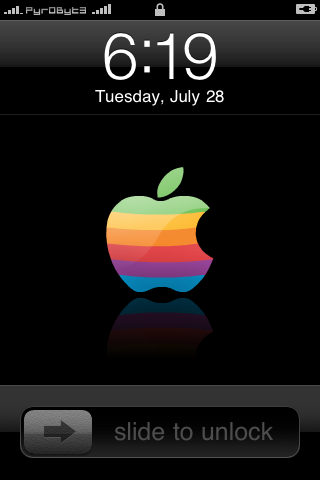
http://modmyi.com/forums/downloads/battery-icons/13/retro-apple-battery-31944/
http://i31.tinypic.com/k00k1c.png
the files are already named what they suppose to be and there are 17 inside
Applejuiced
Aug 22, 2009, 11:27 PM
Yes, this will work perfect.
I think im just going to use this one instead
http://modmyi.com/forums/downloads/battery-icons/13/retro-apple-battery-31944/
http://i31.tinypic.com/k00k1c.png
the files are already named what they suppose to be and there are 17 inside
Applejuiced
Aug 22, 2009, 11:30 PM
Number 18 wont do anything.
You need to rename the firee.png to 17 if you want it to work and show up as full.
Remove the first one with the red line.
And then rename the rest instead of 2 to 1 and so on.
Where 17 is the completelly full batttery logo.
If you still want to use this one instead of the other you posted above.
heres the folder with the 18 pngs
can you guys check it out
the first one is named firee.png and the battery image is full
the last one witht he number 17th is almost full but not there yet
so im thinkin I should add that full image named firee.png as number 18 in the sprinboard folder?
Applejuiced
Aug 22, 2009, 11:36 PM
Here, I fixed the firee battery icon and named it right.
If you want to check it out all you gotta do is drag and drop.
Che Castro
Aug 23, 2009, 12:06 AM
Here, I fixed the firee battery icon and named it right.
If you want to check it out all you gotta do is drag and drop.
:eek::eek::eek::eek::eek::eek:
http://www.youtube.com/watch?v=-Qae_TUTeGo
Applejuiced:cool:
now i need to decide which one to use, I kinda like both :o
which one you guys like more?
Applejuiced
Aug 23, 2009, 12:09 AM
LMAO :D
MR MIYAGI RULES :D
I like the firee thing better but up to you.
You can switch it any time you want.
You didnt like the duracell one?
Che Castro
Aug 23, 2009, 12:24 AM
nah the duracel was ok, i like these better
now if there was only a way to make the fire move inside the battery while its chargin :D
it could be done with some photoshop guru macrumors member :)
lol thanks Applejuiced ill use the fire now & the apple when 3.1 comes out :apple:
Applejuiced
Aug 23, 2009, 12:45 AM
LMAO :D
Now you're asking for too much :D
now if there was only a way to make the fire move inside the battery while its chargin :D
it could be done with some photoshop guru macrumors member :)
vBulletin® v3.8.6, Copyright ©2000-2012, Jelsoft Enterprises Ltd.