View Full Version : Apple Releases Mac OS X 10.6.1
Surrix
Sep 10, 2009, 04:39 PM
I can't find news of this anywhere. 10.6.1 just showed up in my Software Update. Did this just happen?

Mr. Wonderful
Sep 10, 2009, 04:39 PM
9MB install via SU.
TwinCities Dan
Sep 10, 2009, 04:39 PM
Yes, just happened! :cool:
Mr. Wonderful
Sep 10, 2009, 04:40 PM
Only 9MB. The other 60MB must have all been debugging.
killmoms
Sep 10, 2009, 04:41 PM
...So it is! That was quick. Maybe 10.6.1 will bring even more subtle refinements (http://subtlerefinements.tumblr.com/).
xUKHCx
Sep 10, 2009, 04:41 PM
The 10.6.1 Update is recommended for all users running Mac OS X Snow Leopard and includes general operating system fixes that enhance the stability, compatibility, and security of your Mac, including fixes for:
compatibility with some Sierra Wireless 3G modems
an issue that might cause DVD playback to stop unexpectedly
some printer compatibility drivers not appearing properly in the add printer browser
an issue that might make it difficult to remove an item from the Dock
instances where automatic account setup in Mail might not work
an issue where pressing cmd-opt-t in Mail brings up the special characters menu instead of moving a message
Motion 4 becoming unresponsive
For detailed information on this update, please visit this website: http://support.apple.com/kb/HT3810.
For information on the security content of this update, please visit: http://support.apple.com/kb/HT1222.
75.1MB for me, 2007 C2D MacBook
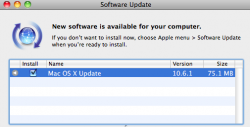
193593
edit: Odd they didn't include this in the Software Update summary but on the linked pages
Includes an update to Adobe Flash Player plug-in version 10.0.32.18
HLdan
Sep 10, 2009, 04:42 PM
Mine is 75.1MB.
rdowns
Sep 10, 2009, 04:44 PM
Please, please, please fix printing.
75.1 MB for late 2008 MB.
EricNau
Sep 10, 2009, 04:45 PM
Only 9.8 MB for my CoreDuo MacBook.
...Maybe those with an extra 32 bits have an extra 65.2 MB to download. :D
macrem
Sep 10, 2009, 04:45 PM
Now the I'm-waiting-for-.1-ers can install SL :D
darkpaw
Sep 10, 2009, 04:46 PM
My Software Update says it's 75.1MB - Mac Pro (Early 2008).
yellow
Sep 10, 2009, 04:46 PM
I would like a fix to Get Info. Whenever I get info for the first time on anything, it hangs for a VERY long time before opening. Happens after each reboot or logout.
Mr. Wonderful
Sep 10, 2009, 04:47 PM
Only 9.8 MB for my CD MacBook.
...Maybe those with an extra 32 bits have an extra 65.2 MB to download. :D
That's probably it. Which is BS.
Somebody should check if any more computers got 64-bit booting enabled.
MacRumors
Sep 10, 2009, 04:48 PM
http://www.macrumors.com/images/macrumorsthreadlogo.gif (http://www.macrumors.com/2009/09/10/apple-releases-mac-os-x-10-6-1/)
Apple today released Mac OS X 10.6.1, the first maintenance release for Snow Leopard. The most recent developer build of OS X 10.6.1, Build 10B504 (http://www.macrumors.com/2009/09/08/apple-seeds-mac-os-x-10-6-1-build-10b504-to-developers/), was seeded just two days ago.The 10.6.1 Update is recommended for all users running Mac OS X Snow Leopard and includes general operating system fixes that enhance the stability, compatibility, and security of your Mac, including fixes for:
- compatibility with some Sierra Wireless 3G modems
- an issue that might cause DVD playback to stop unexpectedly
- some printer compatibility drivers not appearing properly in the add printer browser
- an issue that might make it difficult to remove an item from the Dock
- instances where automatic account setup in Mail might not work
- an issue where pressing cmd-opt-t in Mail brings up the special characters menu instead of moving a message
- Motion 4 becoming unresponsive
For detailed information on this update, please visit this website: http://support.apple.com/kb/HT3810 (http://support.apple.com/kb/HT3810. ).
For information on the security content of this update, please visit: http://support.apple.com/kb/HT1222.Apple has also released security updates for earlier operating system versions.
Article Link: Apple Releases Mac OS X 10.6.1 (http://www.macrumors.com/2009/09/10/apple-releases-mac-os-x-10-6-1/)
techlover828
Sep 10, 2009, 04:49 PM
that's so weird I opened up software update literally as it was realesed
Bill Gates
Sep 10, 2009, 04:49 PM
That was quick!
Mr. Wonderful
Sep 10, 2009, 04:50 PM
Someone should check to see if any more machines gained the ability to boot in 64-bit mode. Though I doubt that's happening.
I think the theory about the different download size does have to do with patches to 64-bit mode.
Compile 'em all
Sep 10, 2009, 04:50 PM
That was quick!
That's what she said :p :o
Installing...
rfrankl
Sep 10, 2009, 04:51 PM
That's what she said :p :o
Installing...
I don't think anyone predicted this quick.
jav6454
Sep 10, 2009, 04:51 PM
Great, bugs are swatted even more!
Luigi193
Sep 10, 2009, 04:52 PM
What a pleasant surprise!! I was about to reinstall because every program crashes every 10 minutes for some reason on my machine... maybe this fixes it...
killmoms
Sep 10, 2009, 04:52 PM
Not much there, is there? I'm getting the 9MB version on my pre-Santa Rosa C2D MBP.
rezzo
Sep 10, 2009, 04:53 PM
10.6.1? Very poor.
Look like a 10.6.0.1 IMO. :rolleyes:
Bostonaholic
Sep 10, 2009, 04:53 PM
A 13 day point release, wow.
macnerd77
Sep 10, 2009, 04:53 PM
i am on a mid 2007 imac core2duo. My download size was 75.1 MB If this helps anyone
:apple:
rdowns
Sep 10, 2009, 04:53 PM
Getting really slow d/l times from them. Everything else is snappy.
Takuta-Nui
Sep 10, 2009, 04:54 PM
Wow, I was browsing a page in this forum and then decided to check Software Update. I do that, and then see this. Nice. :P
Looks like iTunes comes first, though...
ob81
Sep 10, 2009, 04:54 PM
looks like i will be waiting even longer to get snow leopard.
Keleko
Sep 10, 2009, 04:54 PM
75MB for me, and I am using 32 bit SL kernel.
zw-gator
Sep 10, 2009, 04:55 PM
I have yet to recieve 10.6 via the UTD program...I ordered in June :mad:
SilentPanda
Sep 10, 2009, 04:56 PM
A 13 day point release, wow.
I'm sure the discs were finalized before 13 days ago. While it's only 13 days for us the update was most likely well under way prior to that.
BWhaler
Sep 10, 2009, 04:56 PM
I hope it fixes the crazy heat & fan noises on the MacBook Pros.
devburke
Sep 10, 2009, 04:56 PM
looks like i will be waiting even longer to get snow leopard.
What? I don’t understand. 10.6.1 being released makes you wait longer?
nagromme
Sep 10, 2009, 04:57 PM
I like these short lists of fixes! With so much changing under the hood, SL makes me nervous. But reports of problems have been unusually low for a new OS. An update with very few fixes reinforces that good impression.
I think I'm going to go Snow Leopard :)
Stridder44
Sep 10, 2009, 04:57 PM
Wohoo!! Making something awesome even better!
Jimmetry
Sep 10, 2009, 04:57 PM
I'm going to take a wild guess here and say that this wasn't actually supposed to be released yet, but they decided to do it since that Adobe Flash Player vulnerability is causing a lot of bad press.
I think I'll skip it. Bring on 10.6.2! :cool:
Edit:
Oh, I forgot to ask... does it make Safari snappier? >_>
bigandtasty
Sep 10, 2009, 04:58 PM
NICE! Now I can upgrade to Snow Leopard:) Just wanted to see 10.6.1 come out before doing so.
Bostonaholic
Sep 10, 2009, 04:58 PM
I'm sure the discs were finalized before 13 days ago. While it's only 13 days for us the update was most likely well under way prior to that.
I'm sure that's the case, I was merely pointing out the fact that it was such a short amount of time between the minor release and a "patch" point release.
SilentPanda
Sep 10, 2009, 04:59 PM
Hey Arn, the link
on the main page gets a 404 error. :confused:
The link shows up fine here. On a side note, if you or anybody notices something wrong in future stories, the report button is generally the better option to go as we may not read all the posts in the thread.
Morod
Sep 10, 2009, 04:59 PM
Anyone know if a combo update for this will be released?
themoonisdown09
Sep 10, 2009, 05:00 PM
I doubt it will, but I hope it fixes my iTunes 9 issue. Every time I open up iTunes 9, I get the Firewall prompt that asks me to either "Allow" or "Deny" it incoming network connections. I click "Allow", but it still prompts me. I also checked my Firewall settings and iTunes is in there.
I have tried reinstalling iTunes 9. I don't have Little Snitch or any other network monitor running. Hmmmm.
I'm going to take a wild guess here and say that this wasn't actually supposed to be released yet, but they decided to do it since that Adobe Flash Player vulnerability is causing a lot of bad press.
I think I'll skip it. Bring on 10.6.2! :cool:
On second thought, you might as well wait until 10.6.4... just for sh**s and giggles.
emulator
Sep 10, 2009, 05:00 PM
Anyone know if a combo update for this will be released?
and really, what would that combine?
SilentPanda
Sep 10, 2009, 05:00 PM
I'm sure that's the case, I was merely pointing out the fact that it was such a short amount of time between the minor release and a "patch" point release.
What minor release and path point release? There was 10.6.0 which was a major release and then today's 10.6.1 patch or minor release.
Eric S.
Sep 10, 2009, 05:00 PM
13 days, must be a record.
smartalic34
Sep 10, 2009, 05:01 PM
Only 9.8 MB for my CoreDuo MacBook.
...Maybe those with an extra 32 bits have an extra 65.2 MB to download. :D
75.1MB update here on my 32-bit Core Duo MBP... :rolleyes:
RyanR.
Sep 10, 2009, 05:01 PM
NICE! Now I can upgrade to Snow Leopard:) Just wanted to see 10.6.1 come out before doing so.
Apple knows there are a lot of people like you that's why the 13 day .1 release. IT"S ALL A CONSPIRACY!!!!:p
kbmb
Sep 10, 2009, 05:02 PM
Anyone know if a combo update for this will be released?
There is no such thing as a combo .1 update.....since....well....it's the only update.
I'm sure an offline update will be posted at some point.
-Kevin
devburke
Sep 10, 2009, 05:02 PM
193600
Damn you Apple!!! **shakes fist**
Fortunately, it seems to have picked up right where it left off when I restarted it.
Surely
Sep 10, 2009, 05:02 PM
Oh good. Now I can finally install Snow Leopard.
Clean Install versus Upgrade....... Any recommendations?
rdowns
Sep 10, 2009, 05:03 PM
Damn you, Apple.
Have got this twice now.
Michaelgtrusa
Sep 10, 2009, 05:03 PM
Seems ok for me. it took several min.
Eric S.
Sep 10, 2009, 05:03 PM
Apple has also released security updates for earlier operating system versions.
So did 10.5 get a "security update"? That would probably be a sign that 10.5.8 is really going to be the final numbered release for Leopard.
Anuba
Sep 10, 2009, 05:03 PM
75 megs? Wow, mine isn't even 10 MB.
(MBP 17" 2.8 from June).
jaw04005
Sep 10, 2009, 05:04 PM
Yup mine is 9.8MB too running Core 2 Duo 2Ghz MacBook (Early 2007).
macnerd77
Sep 10, 2009, 05:04 PM
Well this sucks. :-(
http://i206.photobucket.com/albums/bb270/macnerd77/Screenshot2009-09-10at20058PM-1.jpg
Gonna try the install again
Nerver mind just restarted the update and i went fine :-)
Bostonaholic
Sep 10, 2009, 05:05 PM
What minor release and path point release? There was 10.6.0 which was a major release and then today's 10.6.1 patch or minor release.
I'm thinking of 10 as the major release, 10.6 as a minor release, and 10.6.1 is a point release. And any subsequent updates in the future would be patches or "bug fixes".
devburke
Sep 10, 2009, 05:06 PM
Apple knows there are a lot of people like you that's why the 13 day .1 release. IT"S ALL A CONSPIRACY!!!!:p
Protip: Use caps lock. Holding Shift will alter your punctuation too.
:p
California King
Sep 10, 2009, 05:06 PM
Hmm, strange. After downloading, it said that it could not be verified...downloading again.
jmcguckin
Sep 10, 2009, 05:07 PM
downloading now, only 9.8MB on this end... either way, I'm not complaining, because this is just another (albeit small) step toward making Snow Leopard a more stable OS- and I say this in spite of the fact that I haven't had any issues with it prior to this update.
dobermann69
Sep 10, 2009, 05:09 PM
Originally Posted by Morod
Anyone know if a combo update for this will be released?
and really, what would that combine?
LOL :D
DUSTmurph
Sep 10, 2009, 05:10 PM
I love the new Marble UI in .1
The Samurai
Sep 10, 2009, 05:10 PM
Woah
Mines is a hundred meg.
MBP 13" - just got it a week ago an all..
EDIT: ok ive got two downloads, didnt see the file size of the other one lol
Jimmetry
Sep 10, 2009, 05:10 PM
On second thought, you might as well wait until 10.6.4... just for sh**s and giggles.
Well if .4 is the first one that actually contains substantial fixes, then perhaps. I haven't had any problems with Snow Leopard in the sense of serious bugs... and I doubt there's a big list of hidden problems they're addressing for an update that's 9MB. It'll be 75% Adobe. I want the little cosmetic things like having stack items show label colours... not exactly on Apple's priority list (they still haven't fixed the non-Seagate-related hard drive bug in the '09 MBPs)
tl;dr
Installing a point update requires a restart... which is tedious. Not worth it :p
devburke
Sep 10, 2009, 05:10 PM
I love the new Marble UI in .1
Haha, nice try.
brownieguy19
Sep 10, 2009, 05:11 PM
Safari is definitely faster.
Thomas Harte
Sep 10, 2009, 05:11 PM
I doubt it will, but I hope it fixes my iTunes 9 issue. Every time I open up iTunes 9, I get the Firewall prompt that asks me to either "Allow" or "Deny" it incoming network connections. I click "Allow", but it still prompts me. I also checked my Firewall settings and iTunes is in there.
I used to get that for iConquer under 10.5 — no matter what I did, the OS was unwilling to remember my answer. In the end I just stopped using the software, it was so annoying.
yoppie
Sep 10, 2009, 05:12 PM
Hmm, strange. After downloading, it said that it could not be verified...downloading again.
I keep getting this error too.
devburke
Sep 10, 2009, 05:12 PM
Well if .4 is the first one that actually contains substantial fixes, then perhaps. I haven't had any problems with Snow Leopard in the sense of serious bugs... and I doubt there's a big list of hidden problems they're addressing for an update that's 9MB. It'll be 75% Adobe. I want the little cosmetic things like having stack items show label colours... not exactly on Apple's priority list (they still haven't fixed the non-Seagate-related hard drive bug in the '09 MBPs)
tl;dr
Installing a point update requires a restart... which is tedious. Not worth it :p
A restart is tedious? It takes 1, maybe two minutes. 3 tops, if you throw in reloading someapps you’ve got open.
devburke
Sep 10, 2009, 05:12 PM
Safari is definitely faster.
Perhaps even…snappier?
AndrewWx
Sep 10, 2009, 05:13 PM
Do any of the people who are seeing the larger install size also have the latest flash update installed?
Diaresi
Sep 10, 2009, 05:14 PM
Do any of the people who are seeing the larger install size also have the latest flash update installed?
Yes. Flash isn't that big anyway :eek:
cjmillsnun
Sep 10, 2009, 05:15 PM
75.1MiB download here (still getting used to that...), still allows my hack into K64 (GOOD 'cos I'm working on Kexts)
And YES I did have the latest version of Flash installed before the update.
rdowns
Sep 10, 2009, 05:15 PM
Installed successfully. Printing to HP 1012 over an AE still not working. :mad:
Rhalliwell1
Sep 10, 2009, 05:15 PM
9.8meg for mid 2009 iMac (see sig)
California King
Sep 10, 2009, 05:15 PM
I keep getting this error too.
Did you download SL or did u install it with the retail CD?
smartalic34
Sep 10, 2009, 05:15 PM
Do any of the people who are seeing the larger install size also have the latest flash update installed?
yes, I did install the latest Flash player before this update, and I'm on a core duo machine. yet I have the 75.1MB install...
N10248
Sep 10, 2009, 05:15 PM
Do any of the people who are seeing the larger install size also have the latest flash update installed?
Mines 75mb, I have the latest Flash, and its a 2009 iMac
macnerd77
Sep 10, 2009, 05:15 PM
Safari does see more peppy. Also iTunes 9 is running much quicker. Only took 2 bounces to open instead on the usual 7 bounces.
:D
wwwluckyro
Sep 10, 2009, 05:16 PM
Haha, nice try.
I heard from reliable sources that .2 brings a new Basalt UI. It's gonna be awesome! Even more chrome than iTunes 9 :D
jaw04005
Sep 10, 2009, 05:16 PM
Seem to have fixed my problem with Safari not staying in the Dock.
pdjudd
Sep 10, 2009, 05:16 PM
A 13 day point release, wow.
The OS has been in Golden master for a while longer than that. Once the OS hits golden master they start on the next minor point release instead of patching the master.
In short, they have been working on this since the OS was GM.
Morod
Sep 10, 2009, 05:16 PM
and really, what would that combine?
The .1 update and my stupidity? :D
Thanks for the answer!
Chrysaor
Sep 10, 2009, 05:17 PM
They removed the 'Download Update only' option in software update and replaced it with 'Go to Apple downloads' and its not there yet ... :rolleyes:
borcanm
Sep 10, 2009, 05:17 PM
Oh good. Now I can finally install Snow Leopard.
Clean Install versus Upgrade....... Any recommendations?
Clean install.
dwman
Sep 10, 2009, 05:17 PM
Nice timing. I was thinking of upgrading to SL this weekend anyway. :)
treichert
Sep 10, 2009, 05:19 PM
Did you download SL or did u install it with the retail CD?
Doesn't matter, they're the exact same thing.
ncsmith4
Sep 10, 2009, 05:19 PM
I hope it fixes the crazy heat & fan noises on the MacBook Pros.
SERIOUSLY! Thank God other people are experiencing this and it's not just me...
Well, not "thank God" youre experiencing this. But Im glad its not just me. You know what I mean... haha.
EDIT: Mine is all installed. Too early to tell though.
Bostonaholic
Sep 10, 2009, 05:19 PM
The OS has been in Golden master for a while longer than that. Once the OS hits golden master they start on the next minor point release instead of patching the master.
In short, they have been working on this since the OS was GM.
Yes, see my post here (http://forums.macrumors.com/showpost.php?p=8459850&postcount=38).
phinsup
Sep 10, 2009, 05:20 PM
early 08 macbook pro 75.1 megs, macbook air 1st gen 9.8. haven't installed it on the imac yet.
Cereal
Sep 10, 2009, 05:20 PM
http://i206.photobucket.com/albums/bb270/macnerd77/Screenshot2009-09-10at20058PM-1.jpg
Cannot be saved?!?!?!?
Try having a Baptist install it ;)
macnerd77
Sep 10, 2009, 05:21 PM
Oh good. Now I can finally install Snow Leopard.
Clean Install versus Upgrade....... Any recommendations?
I always perform a clean install. It's the only way to go. IMO
HLdan
Sep 10, 2009, 05:22 PM
They removed the 'Download Update only' option in software update and replaced it with 'Go to Apple downloads' and its not there yet ... :rolleyes:
Yeah, it's not there for Dell Hackintosh users. :p
California King
Sep 10, 2009, 05:22 PM
Anyone else's speed way down? It's taking me about 15 minutes to download
yetanotherdave
Sep 10, 2009, 05:23 PM
Has the safari build number changed? Anyone have any plugins affected by this update?
(10.6.0 is Version 4.0.3 (6531.9))
Anuba
Sep 10, 2009, 05:23 PM
So far Safari seems faster, yeah. The first launch after a reboot used to take forever.
My MBP was nice enough to hang after I installed the 9.8 MB update... the installation progressed nicely but afterwards I got stuck on a blue screen with the spinning wheel. I left it for 10 minutes before I forced a reboot.
wongwil
Sep 10, 2009, 05:23 PM
doesn't fix the multi-touch 4-finger swipe expose as mentioned in this thread:
http://forums.macrumors.com/showthread.php?t=771786
Kind of a bummer because that's the only thing that still bugs me on SL. I don't understand how something that worked perfectly on Leopard became buggy in SL. Hopefully it will be addressed in 10.6.2.
Stridder44
Sep 10, 2009, 05:24 PM
Safari is definitely faster.
Newer version perhaps? After applying the 10.6.1 update I'm seeing Safari v. 4.0.3 (6531.9). Not sure what the version was before I applied the 10.6.1 update, or if it even changed.
EDIT:
Has the safari build number changed? Anyone have any plugins affected by this update?
(10.6.0 is Version 4.0.3 (6531.9))
Ok, I guess the version numbers didn't change then.
KompleX
Sep 10, 2009, 05:24 PM
seems to have fixed the pointer from jumping around while in zoom mode. that was the only bug that i was aware of in 10.6.
electroshock
Sep 10, 2009, 05:25 PM
Software Update kept timing out during the 10.6.1 download. Fired up HTTP Scoop (tuffcode.com app -- good stuff) and got the URL that software update was asking for.
Then fired up Terminal and did:
$ wget <URL>
Sure enough, the connection dropped once during the download but wget didn't miss a beat and promptly reopened the connection, resuming where it'd left off. Seconds later, I had a 10.6.1 dmg image, and am now booted into 10.6.1.
macnerd77
Sep 10, 2009, 05:25 PM
Has the safari build number changed? Anyone have any plugins affected by this update?
(10.6.0 is Version 4.0.3 (6531.9))
Nope still the same build number Version 4.0.3 (6531.9)
i don't have any plugins installed so i can't check those
:(
polaris20
Sep 10, 2009, 05:28 PM
75.1MB for me, 2007 C2D MacBook
193593
edit: Odd they didn't include this in the Software Update summary but on the linked pages
that's good, I was wondering about that.
macnerd77
Sep 10, 2009, 05:28 PM
Software Update kept timing out during the 10.6.1 download. Fired up HTTP Scoop (tuffcode.com app -- good stuff) and got the URL that software update was asking for.
Then fired up Terminal and did:
$ wget <URL>
Sure enough, the connection dropped once during the download but wget didn't miss a beat and promptly reopened the connection, resuming where it'd left off. Seconds later, I had a 10.6.1 dmg image, and am now booted into 10.6.1.
I love wget :)
londonmystery
Sep 10, 2009, 05:30 PM
75MB for me on 2009 June uMBP, for what its worth. :):)
Ninja Dom
Sep 10, 2009, 05:31 PM
The difference in size may be due to whether you have all the Printer Drivers installed.
I don't have any Printer Drivers so my update is only a small 9Mb.
Thomas Harte
Sep 10, 2009, 05:31 PM
Has the safari build number changed? Anyone have any plugins affected by this update?
(10.6.0 is Version 4.0.3 (6531.9))
Keywurl is still working fine. The odd thing is that the install seemed to do something my Safari web page image cache, so upon first launch in 10.6.1 just now, I enjoyed several minutes of frenzied disk activity.
yoppie
Sep 10, 2009, 05:32 PM
Did you download SL or did u install it with the retail CD?
I installed Snow Leopard with my UTD disc. I have the update working now.
djchuckc27
Sep 10, 2009, 05:32 PM
BOOOO! iDisk is still slow.
Concorde Rules
Sep 10, 2009, 05:33 PM
To anyone not buying snow leopard until later:
I've got it installed on a Mac Pro and Macbook Pro.
They are both running... PERFECTLY.
Even the Mac Pro in 64 bit mode runs PERFECTLY....
What else are you wanting?
phinsup
Sep 10, 2009, 05:33 PM
Broke growlmail beta though.
netwalker
Sep 10, 2009, 05:33 PM
No fix for the Java 1.5 issue of Snow Leopard?
http://discussions.apple.com/thread.jspa?threadID=2140099&tstart=0
Some applications still depend on a 1.5 JVM. Apple obviously just removed it completely with SL, which until now is my only negative SL experience.
moose.boy
Sep 10, 2009, 05:34 PM
in 10.6.1 mail still crashes when trying to set up an nhs.net e-mail account.
Absolutely useless.
Please no one bleat on about how it's an exchange server error - attempting to set up an e-mail account should not cause an application to crash.
Surely
Sep 10, 2009, 05:34 PM
Clean install.
I always perform a clean install. It's the only way to go. IMO
Thanks, that's what I was leaning towards.
Is it as simple as this?:
Back up with Time Machine
Do a Clean Install of Snow Leopard on my MacBook
Migrate/Restore all files/applications/settings from the Time Machine HD back to my MacBook
...
Profit
synner
Sep 10, 2009, 05:35 PM
Grrrrrr !
Installed ok, but Safari is now being a pain...
Was all running ok, I use bbc.co.uk as my homepage with my locale set it gives me local weather and news on the homepage. After the update It will not save my locale preference.. If I edit my locale it says that it is already set , but weather gives me London weather (300 miles away) and news just says "Set your location to receive local news". REALLY annoying !
Anyone know what might cause this? Was working perfectly well under Tiger, leopard 10.5.2 - 10.5.8 and Snow leopard 10.6.0..
Bri
mosx
Sep 10, 2009, 05:36 PM
Update was 75MB for me on a uMB.
I only have one problem with Snow Leopard. I use the monoprice mini-DisplayPort to HDMI adapter to connect to my LG display. On Leopard everything worked just peachy. But now if I put the system to sleep and try to wake it with the lid closed and connected to the LG, the Mac just falls back asleep. On the second try it will wake up, but then the menu bar is solid no matter what and everything inside a Finder window disappears. This happens if I put the system to sleep using the built-in display then connect it to the external while its asleep and wake it with the lid closed (worked just fine in Leopard) or if I put the system to sleep while its already connected to the external display and try to wake it with the lid closed. The only way it works fine is by leaving the lid open, which is just pointless because I don't need multiple displays. And so far as I can tell, Snow Leopard still has no way to disable built-in displays in software like Windows.
Sehnsucht
Sep 10, 2009, 05:37 PM
...
$ wget <URL>
...
Why doesn't
$ man wget
return a manual page? I wanted to read up on that, sounds interesting.
Chrysaor
Sep 10, 2009, 05:37 PM
Looks like there are new display drivers for Intel, ATI and NVIDIA in 6.1.
DCJ001
Sep 10, 2009, 05:38 PM
I always perform a clean install. It's the only way to go. IMO
Does doing a clean install instead of a simple upgrade make you feel that you know a better way to install an upgrade?
A simple upgrade is quicker and easier and gives the same result as a clean install.
BRLawyer
Sep 10, 2009, 05:39 PM
...So it is! That was quick. Maybe 10.6.1 will bring even more subtle refinements (http://subtlerefinements.tumblr.com/).
Once more, Apple leads the way in customer service...what an incredibly QUICK response to the most immediate bugs identified in the world's best OS..! Congrats, Apple, and THANK YOU!
Sehnsucht
Sep 10, 2009, 05:41 PM
To anyone not buying snow leopard until later:
I've got it installed on a Mac Pro and Macbook Pro.
They are both running... PERFECTLY.
Even the Mac Pro in 64 bit mode runs PERFECTLY....
What else are you wanting?
I just installed the 10.6.1 update, and am now going to check and see if my ExpressCard reader still causes kernel panics....
electroshock
Sep 10, 2009, 05:42 PM
Why doesn't
$ man wget
return a manual page? I wanted to read up on that, sounds interesting.
Whoops, sorry about that. I must've forgotten I had wget installed via MacPorts. :) I'm just so used to using wget on all the platforms I use including UNIX and Windows.
MacOS X comes with curl which is equivalent to wget, and I believe curl also has interrupted download/resume support, too, though I'm not sure if it's automatically done by default. curl's great, too.
g-7
Sep 10, 2009, 05:43 PM
Apple Remote issue still not fixed, the "exclusive mode" still not available. :mad:
BRLawyer
Sep 10, 2009, 05:43 PM
To anyone not buying snow leopard until later:
I've got it installed on a Mac Pro and Macbook Pro.
They are both running... PERFECTLY.
Even the Mac Pro in 64 bit mode runs PERFECTLY....
What else are you wanting?
Mine also runs PERFECTLY, absolutely NO issues to report in the operation of 10.6.
In fact, the only minor problem I had was during the installation process for the iLife '09 DVD (I bought the Box Set), which didn't accept my click on the "install" button...I rebooted and it worked fine again.
Edit: 10.6.1 weighs only 9.8Mb for me.
polaris20
Sep 10, 2009, 05:43 PM
To anyone not buying snow leopard until later:
I've got it installed on a Mac Pro and Macbook Pro.
They are both running... PERFECTLY.
Even the Mac Pro in 64 bit mode runs PERFECTLY....
What else are you wanting?
I would like for it to make me a grilled cheese and ham, lightly golden on the outside.
Seriously though, we've got it running on 2 uMBP's, 2 Mac Pro's, an iMac, and a Mac Mini. Works fine.
Mine also runs PERFECTLY, absolutely NO issues to report in the operation of 10.6.
In fact, the only minor problem I had was during the installation process for the iLife '09 DVD (I bought the Box Set), which didn't accept my click on the "install" button...I rebooted and it worked fine again.
A weird oddity with mine was that it wouldn't enter TM at first. I rebooted, then it worked fine, and has since. Weird.
Donut4000
Sep 10, 2009, 05:44 PM
Drat! Just as Smart Scroll updates to Snow Leopard, Snow Leopard updates and breaks it. Back to patch waiting again..:rolleyes:
N10248
Sep 10, 2009, 05:44 PM
It seems to have fixed a small Finder problem, often when i renamed a file and quickly selected the filename text it would often drag the text out and create a "Text Clipping" file.
Can't even make it do it now.
daneoni
Sep 10, 2009, 05:45 PM
Still gonna hold off on snow leopard i mean 9megs just tells me bare minimum update
Concorde Rules
Sep 10, 2009, 05:45 PM
I would like for it to make me a grilled cheese and ham, lightly golden on the outside.
Seriously though, we've got it running on 2 uMBP's, 2 Mac Pro's, an iMac, and a Mac Mini. Works fine.
I knew I would get some smart as comment :p (No, im not missing an s :p)
But if a Mid, 2007 Macbook Pro 15", Late 2007 MBP 17" and a 2009 Mac Pro all work without a hitch (without custom software issues) then there is utterly no reason to wait what so ever :P
f00f
Sep 10, 2009, 05:46 PM
Thanks, that's what I was leaning towards.
Is it as simple as this?:
Back up with Time Machine
Do a Clean Install of Snow Leopard on my MacBook
Migrate/Restore all files/applications/settings from the Time Machine HD back to my MacBook
...
Profit
Yes it is. That process worked well on a 2006 iMac anyway. :-)
blufire
Sep 10, 2009, 05:49 PM
Thanks, that's what I was leaning towards.
Is it as simple as this?:
Back up with Time Machine
Do a Clean Install of Snow Leopard on my MacBook
Migrate/Restore all files/applications/settings from the Time Machine HD back to my MacBook
...
Profit
You really should just try a default upgrade. It's equivalent to (or actually better than) an archive & install. Just do step 1 (backup with Time Machine) and then try the default upgrade first. If it's really not working, then go to the rest of the trouble, but it's worth trying.
macnerd77
Sep 10, 2009, 05:49 PM
Does doing a clean install instead of a simple upgrade make you feel that you know a better way to install an upgrade?
A simple upgrade is quicker and easier and gives the same result as a clean install.
I have run into issues before performing an upgrade. It is hard to diagnose the issues if you have performed an upgrade. I prefer to do a clean install Because if there are any issues (which i have never encountered) They will be much easier to diagnose.
ro2nie
Sep 10, 2009, 05:50 PM
Still gonna hold off on snow leopard i mean 9megs just tells me bare minimum update
9Mb? Not sure where you got that number from. It's actually 75.1Mb.
blufire
Sep 10, 2009, 05:51 PM
Grrrrrr !
Installed ok, but Safari is now being a pain...
Was all running ok, I use bbc.co.uk as my homepage with my locale set it gives me local weather and news on the homepage. After the update It will not save my locale preference.. If I edit my locale it says that it is already set , but weather gives me London weather (300 miles away) and news just says "Set your location to receive local news". REALLY annoying !
Anyone know what might cause this? Was working perfectly well under Tiger, leopard 10.5.2 - 10.5.8 and Snow leopard 10.6.0..
Bri
Try resetting (deleting) cookies. Safari > Reset Safari... and leave only "Remove all cookies" checked. Might also want to erase cache while you're at it.
Surely
Sep 10, 2009, 05:55 PM
You really should just try a default upgrade. It's equivalent to (or actually better than) an archive & install. Just do step 1 (backup with Time Machine) and then try the default upgrade first. If it's really not working, then go to the rest of the trouble, but it's worth trying.
What do you mean by "really not working"?
A noticeable lag? Repeated crashing of applications? Will there be more space cleared in my HD with a clean install vs. an upgrade?
What will I really be missing if I do one over the other?
Are there any real benchmark testing results out there that show the difference between the two?
Gloor
Sep 10, 2009, 05:56 PM
Can someone please try if the glitch of graph editor in MAYA has been fixed? I can't try it until weekend and the suspense is killing me :)
adztaylor
Sep 10, 2009, 05:56 PM
Broke growlmail beta though.
I have that issue.
synner
Sep 10, 2009, 05:58 PM
Try resetting (deleting) cookies. Safari > Reset Safari... and leave only "Remove all cookies" checked. Might also want to erase cache while you're at it.
Hi,
Thanks very much for that, unfortunately it didn't work....
Any more ideas before I end up wiping and putting 10.6.0 back on ?
Thanks
Bri
Chimpy
Sep 10, 2009, 05:58 PM
Gotta love Apple - updates out the door less than two weeks after release of the OS.
I don't care what the haters say - yes, you can spin it bad, but I think it's a great thing.
blufire
Sep 10, 2009, 06:02 PM
What do you mean by "really not working"?
A noticeable lag? Repeated crashing of applications? Will there be more space cleared in my HD with a clean install vs. an upgrade?
What will I really be missing if I do one over the other?
Are there any real benchmark testing results out there that show the difference between the two?
"Really not working," as in "getting strange errors that don't seem easily fixable." What you stand to gain is time. Migrating from an old HD is slow enough, let alone migrating from a TM backup (it's typically even slower). The standard upgrade should take roughly 30-60 minutes and could save you a LOT of time that would be wasted in the [generally] unnecessary migration step.
I did several straight upgrades and haven't experienced any major issues—most were perfect, maybe one or two minor quirks on other systems that ended up being due to old browser plugins. No big deal. The new default install is equivalent to the old archive & install, minus the "Previous Systems" folder.
greg400
Sep 10, 2009, 06:02 PM
Wow, after I installed this on my 9,1 iMac Safari Top Sites started to glitch and show a streak of lines whenever I click on one of them. Never had this problem with 10.6.0
Some "update" this was.
daneoni
Sep 10, 2009, 06:02 PM
9Mb? Not sure where you got that number from. It's actually 75.1Mb.
Here
75 megs? Wow, mine isn't even 10 MB.
(MBP 17" 2.8 from June).
corinhorn
Sep 10, 2009, 06:04 PM
seems to have fixed the pointer from jumping around while in zoom mode. that was the only bug that i was aware of in 10.6.
Hasn't fixed it for me.
devburke
Sep 10, 2009, 06:05 PM
Damn.
193610
That was the latest, SL-compatible beta. Oh well, now we wait for GrowlMail to update.
blufire
Sep 10, 2009, 06:05 PM
Hi,
Thanks very much for that, unfortunately it didn't work....
Any more ideas before I end up wiping and putting 10.6.0 back on ?
Thanks
Bri
What's strange is that 10.6.1 doesn't change Safari, so I'm not sure what could be causing that (besides weird cookies). If you do decide to reinstall OS X, try backing up and then doing a standard install rather than a full wipe. It behaves as an archive & install.
lorkp
Sep 10, 2009, 06:08 PM
It didn't fix the brightness bug for the 9cc2 panels in the 13" MBPs. :(
California King
Sep 10, 2009, 06:09 PM
Finally working now. Took a 2nd download for it to install. Safari does seem faster! :)
Bjohnson33
Sep 10, 2009, 06:10 PM
Someone should check to see if any more machines gained the ability to boot in 64-bit mode. Though I doubt that's happening.
I think the theory about the different download size does have to do with patches to 64-bit mode.
For all of the people that complain about not booting into 64-bit mode, if you were put in front of two computers, one running in 32-bit mode and the other in 64-bit mode, do you think you could tell the difference between the two? It really doesn't seem like something to get worked up about.
johncallen
Sep 10, 2009, 06:11 PM
Still no support for HP Deskjet 2100 series. Thanks alot HP *******s. I am going to have to buy a new printer, and I'll never buy another HP!
jaw04005
Sep 10, 2009, 06:11 PM
So why are some 9MB and others 70+MBs? Mine was 9MB. Weird but everything seems to be OK.
chrisgeleven
Sep 10, 2009, 06:12 PM
Only 9.8 MB for my CoreDuo MacBook.
...Maybe those with an extra 32 bits have an extra 65.2 MB to download. :D
Nope, I have a 1st gen MacBook Core Duo and my 10.6.1 update was 75 MB.
Skorpion24
Sep 10, 2009, 06:16 PM
Installed, but I still have slowdowns with spaces :(
Kilamite
Sep 10, 2009, 06:17 PM
9MB for me.
Hasn't fixed the trackpad sluggish feeling and occasional tap not being recognised. Ah well..
ShiftyPig
Sep 10, 2009, 06:19 PM
My printer still won't work with SL, so the CD stays in the box.
cult hero
Sep 10, 2009, 06:19 PM
Looks like there are new display drivers for Intel, ATI and NVIDIA in 6.1.
Which thus far appear to have fixed my weird "flicker" issue. I'll know for sure after a day of use, but still. That was my main gripe.
ShiftyPig
Sep 10, 2009, 06:21 PM
So, what exactly was the point of installing 10.6.0 other than being a guinea pig?
TrojanAvenger
Sep 10, 2009, 06:22 PM
I'm not sure if this is the right place to ask, but has anyone tried 10.6.1 yet with Pro Tools 8? I know Digidesign doesn't even support 10.6, but I'm curious.
memco
Sep 10, 2009, 06:22 PM
Man, this is 165MB on my 2.4ghz unibody.
Kilamite
Sep 10, 2009, 06:22 PM
So why are some 9MB and others 70+MBs? Mine was 9MB. Weird but everything seems to be OK.
Yeah I want to know too..
crazyxzer0
Sep 10, 2009, 06:23 PM
Man, this is 165MB on my 2.4ghz unibody.
odd it was 75mb for mine :)
BollywooD
Sep 10, 2009, 06:24 PM
MailTags (http://www.indev.ca/MailTags.html) Beta has also been broken...
<edit>Scrap that, I was using Beta 1, Beta 2 (http://www.indev.ca/Downloads/MailTagsSL2.dmg) still works fine</edit>
cult hero
Sep 10, 2009, 06:24 PM
So, what exactly was the point of installing 10.6.0 other than being a guinea pig?
Well... on three of the four machines I've installed it on I've see minor to moderate speed increases and no problems.
On my MBP (late 2008 unibody) I've had a few problems with MacPorts and a minor video issue that 10.6.1 has taken care of. All in all, it's been a good experience for me. Hell, my two printers even work fine.
pkoch1
Sep 10, 2009, 06:24 PM
I'm not sure if this is the right place to ask, but has anyone tried 10.6.1 yet with Pro Tools 8? I know Digidesign doesn't even support 10.6, but I'm curious.
I used it with no problems with LE in 10.6, but not 10.6.1 yet. It has crashed on me, but no more often than with 10.5.8, haha.
smartalic34
Sep 10, 2009, 06:26 PM
10.6.1 definitely makes iTunes 9 launch faster. before, I couldnt launch with less than 6 bounces. now iTunes launches in 2 bounces. still bloated though...
Burnsey
Sep 10, 2009, 06:27 PM
And the bloating up of the OS begins, one update at a time. I'll pass.
xUKHCx
Sep 10, 2009, 06:27 PM
So why are some 9MB and others 70+MBs? Mine was 9MB. Weird but everything seems to be OK.
It is the same with all delta updates, different machines have different needs in terms of patches, the software updater picks the appropriate update for the machine.
For example say there was part of the update to fix graphics drivers for the X1600 that my iMac has but your MacBook Pro doesn't there is no need to download and install that part of the update to your machine.
corinhorn
Sep 10, 2009, 06:29 PM
10.6.1 definitely makes iTunes 9 launch faster. before, I couldnt launch with less than 6 bounces. now iTunes launches in 2 bounces. still bloated though...Try Midol
blufire
Sep 10, 2009, 06:31 PM
10.6.1 definitely makes iTunes 9 launch faster. before, I couldnt launch with less than 6 bounces. now iTunes launches in 2 bounces. still bloated though...
iTunes Store scrolls more smoothly too.
fleshman03
Sep 10, 2009, 06:35 PM
Jesus, they have been busy. It's like a job keeping up with all these updates, keynotes, iPods and iPhone updates...
Now all I want is my damn, freaking tablet!
jsnuff1
Sep 10, 2009, 06:36 PM
how do you check whether your in 64 bit mode?
Kilamite
Sep 10, 2009, 06:39 PM
It is the same with all delta updates, different machines have different needs in terms of patches, the software updater picks the appropriate update for the machine.
For example say there was part of the update to fix graphics drivers for the X1600 that my iMac has but your MacBook Pro doesn't there is no need to download and install that part of the update to your machine.
Yeah - but the same machine..? My mate has the exact same MacBook Pro as me, and his was 75MB where mine was 9MB.
What gives..?
Van W
Sep 10, 2009, 06:39 PM
how do you check whether your in 64 bit mode?
Go to System Profiler>Software and look for 64-bit Kernel and Extensions. It should say "No" or "Yes".
Stiss
Sep 10, 2009, 06:41 PM
unless you have more than 32GB ram its pointless loading into a 64bit kernal. Instead hit Cmd + space, type Activity and load Activity monitor. You will see most of the native apps are Intel 64 Bit. Thats good enough.
Anyway, 10MB here on a 2.4ghz alubook with 4gb Ram
iBookG4user
Sep 10, 2009, 06:43 PM
9.8 MB on my Rev C MacBook Air, going to install now. Hopefully it fixes the invisible icons. Going to install now.
Also showing as 9.8 MB on my Rev D MacBook Pro (Early 2008).
doug in albq
Sep 10, 2009, 06:45 PM
my crystal ball (Pacifist) says that there are updated GMA X3100 drivers.
Have not yet loaded the upgrade to see if the performance is any better.
HyperZboy
Sep 10, 2009, 06:46 PM
I know I'm going to get slammed for this post by the INTEL masses again (and there won't be any PowerPC people here to defend me because they've stopped reading about Snow Leopard mostly), but so be it. I think Apple has abandoned not only PowerPC, but left people who paid $129 for Leopard with an unfinished product that is now basically FIXED or STILL GETTING FIXED in Snow Leopard. That's how I feel.
Where is my 10.5.9?
Ya know, the version of Leopard that stops Safari from crashing 8-12 times a week, and gives PowerPC users some of the bug fixes in 10.6 and 10.6.1.
Ya know, the version of Leopard for those people who paid the SAME $129 for Leopard and don't get any of the Snow Leopard bug fixes (except for security fixes)!
Ya know, the version of Leopard that fixes some of the interface anomalies.
I won't even get into the fact that some of the new features in SL could be PowerPC compatible because that's a whole other argument.
Don't get me wrong, I applaud Apple for continuing security releases for even Tiger at this time, although I'm sure that'll stop soon though.
But, some features even in iTunes 9 work in Windows XP & Intel Macs yet won't work on faster more powerful PowerPC Macs sold just 3 years ago. I can understand Apple discontinuing G3 support (that quietly kind of went unnoticed), but iMac G5s and PowerMac G5s were quite expensive machines to abandon in my opinion on some of those features and I'm not sure I can see a technical reason why other than Apple just saying FU customer.
Makes no sense w/ Snow Leopard or iTunes... Why would a less powerful NON-APPLE machine be supported over a more powerful $3000 APPLE machine that's only 3 years old?
Not to mention Quicktime X... If that gets released for Windows XP & Vista and not for Apple's own $3000 more powerful Powermac G5s sold 3 years ago, I think I'll go postal.
I hate to say it, but if that happens, I'll be taking a serious look at Windows 7.
And that would be the first time I considered purchasing a PC since 1987!
This is a very poor way to treat your loyal hardware customers Apple IMHO. :(
PS: Let the attacks begin...
snakesqzns
Sep 10, 2009, 06:47 PM
Man I could swear I already received this update.
Was there a list of these changes posted somewhere before today? :confused:
Eidorian
Sep 10, 2009, 06:47 PM
Am I the only person that looks at the receipt of files before installing a package? :confused:
my crystal ball (Pacifist) says that there are updated GMA X3100 drivers.
Have not yet loaded the upgrade to see if the performance is any better.I guess not. Nice to know when I get home. :D
Stiss
Sep 10, 2009, 06:48 PM
I know I'm going to get slammed for this post by the INTEL masses again (and there won't be any PowerPC people here to defend me because they've stopped reading about Snow Leopard mostly), but so be it. I think Apple has abandoned not only PowerPC, but left people who paid $129 for Leopard with an unfinished product that is now basically FIXED or STILL GETTING FIXED in Snow Leopard. That's how I feel.
Where is my 10.5.9?
Ya know, the version of Leopard that stops Safari from crashing 8-12 times a week, and gives PowerPC users some of the bug fixes in 10.6 and 10.6.1.
Ya know, the version of Leopard for those people who paid the SAME $129 for Leopard and don't get any of the Snow Leopard bug fixes (except for security fixes)!
Ya know, the version of Leopard that fixes some of the interface anomalies.
I won't even get into the fact that some of the new features in SL could be PowerPC compatible because that's a whole other argument.
Don't get me wrong, I applaud Apple for continuing security releases for even Tiger at this time, although I'm sure that'll stop soon though.
But, some features even in iTunes 9 work in Windows XP & Intel Macs yet won't work on faster more powerful PowerPC Macs sold just 3 years ago. I can understand Apple discontinuing G3 support (that quietly kind of went unnoticed), but iMac G5s and PowerMac G5s were quite expensive machines to abandon in my opinion on some of those features and I'm not sure I can see a technical reason why other than Apple just saying FU customer.
Makes no sense w/ Snow Leopard or iTunes... Why would a less powerful NON-APPLE machine be supported over a more powerful $3000 APPLE machine that's only 3 years old?
Not to mention Quicktime X... If that gets released for Windows XP & Vista and not for Apple's own $3000 more powerful Powermac G5s sold 3 years ago, I think I'll go postal.
I hate to say it, but if that happens, I'll be taking a serious look at Windows 7.
And that would be the first time I considered purchasing a PC since 1987!
This is a very poor way to treat your loyal hardware customers Apple IMHO. :(
PS: Let the attacks begin...
I agree. Let us be attacked together.
sporadicMotion
Sep 10, 2009, 06:51 PM
I know I'm going to get slammed for this post by the INTEL masses again (and there won't be any PowerPC people here to defend me because they've stopped reading about Snow Leopard mostly), but so be it. I think Apple has abandoned not only PowerPC, but left people who paid $129 for Leopard with an unfinished product that is now basically FIXED or STILL GETTING FIXED in Snow Leopard. That's how I feel.
Where is my 10.5.9?
Ya know, the version of Leopard that stops Safari from crashing 8-12 times a week, and gives PowerPC users some of the bug fixes in 10.6 and 10.6.1.
Ya know, the version of Leopard for those people who paid the SAME $129 for Leopard and don't get any of the Snow Leopard bug fixes (except for security fixes)!
Ya know, the version of Leopard that fixes some of the interface anomalies.
I won't even get into the fact that some of the new features in SL could be PowerPC compatible because that's a whole other argument.
Don't get me wrong, I applaud Apple for continuing security releases for even Tiger at this time, although I'm sure that'll stop soon though.
But, some features even in iTunes 9 work in Windows XP & Intel Macs yet won't work on faster more powerful PowerPC Macs sold just 3 years ago. I can understand Apple discontinuing G3 support (that quietly kind of went unnoticed), but iMac G5s and PowerMac G5s were quite expensive machines to abandon in my opinion on some of those features and I'm not sure I can see a technical reason why other than Apple just saying FU customer.
Makes no sense w/ Snow Leopard or iTunes... Why would a less powerful NON-APPLE machine be supported over a more powerful $3000 APPLE machine that's only 3 years old?
Not to mention Quicktime X... If that gets released for Windows XP & Vista and not for Apple's own $3000 more powerful Powermac G5s sold 3 years ago, I think I'll go postal.
I hate to say it, but if that happens, I'll be taking a serious look at Windows 7.
And that would be the first time I considered purchasing a PC since 1987!
This is a very poor way to treat your loyal hardware customers Apple IMHO. :(
PS: Let the attacks begin...
10.5.9 will come. They're supporting a new product right now... give them time.
As for the whole PPC... PPC is done. It's just a fact. 3 years is more than enough time to migrate.
It's not worth whining about.
devburke
Sep 10, 2009, 06:52 PM
And the bloating up of the OS begins, one update at a time. I'll pass.
Bug fixes and security patches are bloat?
Bill Gates
Sep 10, 2009, 06:52 PM
And the bloating up of the OS begins, one update at a time. I'll pass.
Are you joking or just ignorant? What's your definition of "bloat?"
marco114
Sep 10, 2009, 06:54 PM
Steve Is Back & Crackin The Whip!
MagicBoy
Sep 10, 2009, 06:54 PM
Anyone know if a combo update for this will be released?
Erm. It's the only update to Snow Leopard - no need for one!
wetrix
Sep 10, 2009, 06:54 PM
Mail 4.1 breaks the Attachment Scanner Plugin beta :-(
http://eaganj.free.fr/code/mail-plugin/
noodle654
Sep 10, 2009, 06:54 PM
Does this fix Safari WebPlugin thing? I can't even go on Youtube without my CPU at 80% and my fans at 6000RPM.
Eidorian
Sep 10, 2009, 06:55 PM
Does this fix Safari WebPlugin thing? I can't even go on Youtube without my CPU at 80% and my fans at 6000RPM.Have you updated your Flash plug-in?
shawnce
Sep 10, 2009, 06:56 PM
A 13 day point release, wow.
Apple was working on this and qualifying this well before the gold master of 10.6 left for manufacturing.
fleshman03
Sep 10, 2009, 06:56 PM
As for the whole PPC... PPC is done. It's just a fact. 3 years is more than enough time to migrate.
It's not worth whining about.
Oh man, you're gonna set him off. Soon, he'll get all town-hall on you!
All kidding aside, I can understand how he's not thrilled since there are some PPCs that I'd rather have over a MM or MacBook. But he did buy at a bad time and the world has moved on. Imagine how all the people felt who bought HD-DVDs right before they WB Dropped out of making them?
davidjearly
Sep 10, 2009, 06:58 PM
in 10.6.1 mail still crashes when trying to set up an nhs.net e-mail account.
Absolutely useless.
Please no one bleat on about how it's an exchange server error - attempting to set up an e-mail account should not cause an application to crash.
This is driving me insane too!
benlee
Sep 10, 2009, 06:59 PM
I would like for it to make me a grilled cheese and ham, lightly golden on the outside.
Great! Thanks a lot. Now I'm craving a grilled cheese, but I'm stuck in class till 10PM.
Any chance that if I download 10.6.1 I'll get one?
Bill Gates
Sep 10, 2009, 07:00 PM
Oh man, you're gonna set him off. Soon, he'll get all town-hall on you!
All kidding aside, I can understand how he's not thrilled since there are some PPCs that I'd rather have over a MM or MacBook. But he did buy at a bad time and the world has moved on. Imagine how all the people felt who bought HD-DVDs right before they WB Dropped out of making them?
I don't want to derail this thread but I feel that the comparison you made isn't the best one to make. People that bought HD-DVD players knew (or should have known) that it was a new format and that a format war was ongoing. Any person alive during the BetaMax vs. VHS format war would know the risk of buying into a new format early in the game when there is no clear market leader. People that bought PowerPC Macs before the Intel announcement could not have been expected to know that Apple would be making such a drastic change only a few months later, and that their brand new Macs would be rendered obsolete. I do not, however, have any sympathy for those that bought PowerPC Macs after WWDC 2005.
shawnce
Sep 10, 2009, 07:05 PM
Mail 4.1 breaks the Attachment Scanner Plugin beta :-(
http://eaganj.free.fr/code/mail-plugin/
Mail.app has no official/supported plugin interface.. so yeah expect things to break if Apple rev's Mail.app.
avidmacuser
Sep 10, 2009, 07:05 PM
Great, bugs are swatted even more!
seems like the update has brought some new bugs...
...can someone confirm not being able to view pictures in mail reviewing sent / or received messages. composed messages are showing the pictures via export from iPhoto and video clips seem to work ok for me too. :(
...yikes now I'm in trouble. No time to re-install everything.
***CORRECTED
checking with iTweakX under the Mail tab I discovered that display all messages as text was CHECKED.
unchecking it resulted in proper display of images in mail.
I dont recall making this setting in iTweakX but changing it back solved the issue.
Xavier
Sep 10, 2009, 07:06 PM
Does anyone know if this fixes the clock or Polarclock screensavers?
I am not expecting it to but it would be nice to know
michael.lauden
Sep 10, 2009, 07:07 PM
awesome! who ever rated this as a negative is weird though.
i'm hoping the clamshell bugs (for me at least) are fixed!
iBug2
Sep 10, 2009, 07:11 PM
This thing breaks 9400M hardware acceleration with Quicktime H.264.
My 1080p trailers no longer play on QuicktimeX player if I use the 9400M on my MBP. (They play at really bad fps).
Good job apple.
Anaemik
Sep 10, 2009, 07:12 PM
Only 9.8 MB for my CoreDuo MacBook.
...Maybe those with an extra 32 bits have an extra 65.2 MB to download. :D
I don't think so. I have a 2006 CD MBP and the 10.6.1 download size was ~75 MB for me.
FoxyKaye
Sep 10, 2009, 07:12 PM
I like these short lists of fixes! With so much changing under the hood, SL makes me nervous. But reports of problems have been unusually low for a new OS. An update with very few fixes reinforces that good impression.
I think I'm going to go Snow Leopard :)
It's enough for me to pull the trigger on SL at my own workstation - I'm still going to wait until likely early next year to do anything organization-wide (barring new equipment with it pre-installed). But it's my job to figure out what's going to work for us with SL, so the .1 update was enough for me to start the process.
Kristenn
Sep 10, 2009, 07:13 PM
Installed at it is working great =D It was 75 MB for me I think.
Bill Gates
Sep 10, 2009, 07:13 PM
This thing breaks 9400M hardware acceleration with Quicktime H.264.
My 1080p trailers no longer play on QuicktimeX player if I use the 9400M on my MBP. (They play at really bad fps).
Good job apple.
I'm having the same problem! :mad:
Anaemik
Sep 10, 2009, 07:14 PM
Does this fix Safari WebPlugin thing? I can't even go on Youtube without my CPU at 80% and my fans at 6000RPM.
That's what any Flash based video site has *always* been like for me :(
corinhorn
Sep 10, 2009, 07:16 PM
That's what any Flash based video site has *always* been like for me :(
And for me too. I hate flash video sites.
Stiss
Sep 10, 2009, 07:16 PM
Yeah well i want 10.6.2 to come with Coffee Machine, Space Rocket and Unicorn Feeder or I really will be pissed off.
jmpage2
Sep 10, 2009, 07:16 PM
Does anyone know if this fixes the clock or Polarclock screensavers?
I am not expecting it to but it would be nice to know
Screensaver authors need to fix their applications to work with the 64 bit control panel for screen savers. There's nothing Apple can do about it.
jmpage2
Sep 10, 2009, 07:17 PM
seems like the update has brought some new bugs...
...can someone confirm not being able to view pictures in mail reviewing sent / or received messages. composed messages are showing the pictures via export from iPhoto and video clips seem to work ok for me too. :(
...yikes now I'm in trouble. No time to re-install everything.
Nope, mine works fine, do you have mail plugins installed?
Lyra
Sep 10, 2009, 07:17 PM
I don't think so. I have a 2006 CD MBP and the 10.6.1 download size was ~75 MB for me.
Mine is a retarded 9.8MBs, but I've been told that it depends on what type of configuration you've picked during the installer. I've picked a few things here and there and deselected some others. So... it might be that.
Maybe we've already got what they need, it's just a minor update to something.
Probably the SMALLEST update ever. But then it has to be serious since they sacrificed a full number on the update. O_O
jmpage2
Sep 10, 2009, 07:19 PM
I really don't quite understand where all the hate is coming from. I've got 10.6 running on several machines and they are all working great. Some of you need to realize that it's not Apple's responsibility to make sure every peripheral and 3rd party application in the world work with their OS. It's not their fault if developers and printer makers are lazy bastards that don't update their software.
I installed the 10.6.1 update (only 9MB on my 2009 iMac so I'm guessing no new video card drivers) and notice Safari launches almost instantly now. VMWare Fusion is hella fast too, cut the start time to launch Windows 7 desktop by at least a minute.
I haven't had any bugs that I've noticed, but I guess I'm not a 'power user'.
greg400
Sep 10, 2009, 07:20 PM
Does this fix Safari WebPlugin thing? I can't even go on Youtube without my CPU at 80% and my fans at 6000RPM.
The problem there lies with 64-bit Safari. If you open Safari in 32-bit mode the flash cpu usage goes down considerably. You just have to wait until Adobe gets off their lazy asses and actually makes a usable version of flash for 64-bit Safari. Or OSX in general for that matter.
jmpage2
Sep 10, 2009, 07:20 PM
Mine is a retarded 9.8MBs, but I've been told that it depends on what type of configuration you've picked during the installer. I've picked a few things here and there and deselected some others. So... it might be that.
Maybe we've already got what they need, it's just a minor update to something.
Probably the SMALLEST update ever. But then it has to be serious since they sacrificed a full number on the update. O_O
I think if we did comparisons we would find that the difference in update size has to do with something like video card drivers, not the system configuration choices at install time.
Lyra
Sep 10, 2009, 07:22 PM
I think if we did comparisons we would find that the difference in update size has to do with something like video card drivers, not the system configuration choices at install time.
Your statement sounds way cooler than mine.
What he said! :p
I'm sure your right.
Lesser Evets
Sep 10, 2009, 07:27 PM
Great! It repaired my horrid DVD player problem. All is good there.
Trying out my PS from CS3 to see if that problem of saving is working better now. It seems to be better already... time will tell. Vanilla 6 was absolutely crap!!
andrew8404
Sep 10, 2009, 07:27 PM
So it was only 9.8 on my June MBP. It also disabled Candybar so it doesn't work now! Anyone else have this problem?
Anaemik
Sep 10, 2009, 07:28 PM
Thanks, that's what I was leaning towards.
Is it as simple as this?:
Back up with Time Machine
Do a Clean Install of Snow Leopard on my MacBook
Migrate/Restore all files/applications/settings from the Time Machine HD back to my MacBook
...
Profit
FTR as far as I know Apple *recommends* doing an upgrade install with SL, and it's definitely the method I'd try first. why cause yourself extra trouble with re-installing all your apps and setting on an OS that has been designed to be installed as an update?
Surprised people just come straight out and say "clean install" without considering that SL has been designed with upgrade installs in mind. Makes me even wonder if they tried it before formatting their HDs and making a ton of extra work for themselves....
Anaemik
Sep 10, 2009, 07:31 PM
Hrmm, another random shot in the dark -
Do those people with the 75mb install all have the Developer tools installed? I'm thinking perhaps Apple added some extra support for iPhone Os 3.1 to the dev tools or something?
Edit: ahh, I just saw a post saying there's new gfx drivers in the package. This is prob it.
AJ1BostonMASS
Sep 10, 2009, 07:33 PM
Yeah well i want 10.6.2 to come with Coffee Machine, Space Rocket and Unicorn Feeder or I really will be pissed off.
I feel the same way! I want all that plus a lava lamp and a puppy!
Or im going to get a pc and a zune!
jmpage2
Sep 10, 2009, 07:35 PM
I feel the same way! I want all that plus a lava lamp and a puppy!
Or im going to get a pc and a zune!
ZUNNNNNNNNNNNNNNNNE!!!!!!
:p
http://www.blogcdn.com/www.engadget.com/media/2008/04/4-10-08-zune-guy.jpg
commander.data
Sep 10, 2009, 07:36 PM
Well I guess Tiger isn't quite dead yet. Seeing how quite this 10.6.1 release was, I guess it's still possible for Leopard to get 10.5.9 with the next 10.6.2 since Tiger got 10.4.11 when Leopard got 10.5.1.
MagicWok
Sep 10, 2009, 07:36 PM
Hopefully this fixes the bug I experience from time to time when playing DVD's in SL... ;)
Hopefully it is the one they're referring to
kunze50
Sep 10, 2009, 07:36 PM
Can anyone report if the update fixed the overactive fan/heating issue when video chatting in iChat or playing flash video? (when using the last point releases in leopard, I didn't have the fans amp up much at all). It would really suck if this is perminent in SL because of GPU usage.
Anaemik
Sep 10, 2009, 07:39 PM
I'm not sure if this is the right place to ask, but has anyone tried 10.6.1 yet with Pro Tools 8? I know Digidesign doesn't even support 10.6, but I'm curious.
Digidesign are super fussy like that. I'd probably wait til they officially support 10.6. Can't offer you any 1st hand experiences though I'm afraid.
Eric S.
Sep 10, 2009, 07:39 PM
Thanks, that's what I was leaning towards.
Is it as simple as this?:
Back up with Time Machine
Do a Clean Install of Snow Leopard on my MacBook
Migrate/Restore all files/applications/settings from the Time Machine HD back to my MacBook
...
Profit
It's that step 3 that seems ripe for user error to me.
You really should just try a default upgrade. It's equivalent to (or actually better than) an archive & install. Just do step 1 (backup with Time Machine) and then try the default upgrade first. If it's really not working, then go to the rest of the trouble, but it's worth trying.
That would be my game plan, if and when I upgrade.
What do you mean by "really not working"?
System crashes/hangs, applications suddenly terminating, noticeable wifi dropouts, long pauses or lags in system operation, that kind of thing.
I know I'm going to get slammed for this post by the INTEL masses again (and there won't be any PowerPC people here to defend me because they've stopped reading about Snow Leopard mostly), but so be it. I think Apple has abandoned not only PowerPC, but left people who paid $129 for Leopard with an unfinished product that is now basically FIXED or STILL GETTING FIXED in Snow Leopard. That's how I feel.
Where is my 10.5.9?
I sympathize but hey, we've been over the same ground about a dozen times since June '08, when the first 10.6 developer release showed up as Intel-only. At this point everyone has known for a long time that Apple has made this decision for better or worse, right or wrong, inconvenient for loyal customers or not. And I'm still stretching my PM G4 out as long as I can, currently running Leopard, but it's time to start moving into the next phase ...
Yeah, more painful for G5 owners, I agree. But it's not going to change.
jmpage2
Sep 10, 2009, 07:40 PM
Can anyone report if the update fixed the overactive fan/heating issue when video chatting in iChat or playing flash video? (when using the last point releases in leopard, I didn't have the fans amp up much at all). It would really suck if this is perminent in SL because of GPU usage.
Well, there was a known problem with the flash version that 10.6.0 shipped with, so let's hope the update fixes that problem.
sporadicMotion
Sep 10, 2009, 07:41 PM
Oh man, you're gonna set him off. Soon, he'll get all town-hall on you!
All kidding aside, I can understand how he's not thrilled since there are some PPCs that I'd rather have over a MM or MacBook. But he did buy at a bad time and the world has moved on. Imagine how all the people felt who bought HD-DVDs right before they WB Dropped out of making them?
Meh, it's the internet... and yes, that's life... time to buy does make a difference and so does knowing when it's time to upgrade. Tech isn't gonna stop changing and it's not with it to any corp to support antiquated/dead end tech. I too cling too PPC in the depths of my heart... but I clung to 68k too... it's just a non issue when it comes down to it... not worth complaining. Upgrade once per year or every 6 mo. Saves you from purchasing :apple: care and if your smart and patient with selling your machine... it costs less in the long run.
I spend $400 a year on new computers and I buy a new laptop every 6 mo.
If I waited and saved that money over 3 years I would only have $1200... not enough to replace the machine that I bought in the first place for $2700
There is my upgrade vs. 3 year antique rant. :p
SeattleMoose
Sep 10, 2009, 07:44 PM
Have just flooded the streets in Seattle after the yearly Ballmer Presentation (showed Zune sales going straight up) and are now rushing home......TO INSTALL 10.6.1.
Sad but true.......MS is just too "90's".
Ballmer revealed that Gates was so embarassed by the Seinfeld ads that he couldn't face the troops again and quit.;)
Now back to the real news.....time to buy SL and take the plunge.
Amdahl
Sep 10, 2009, 07:48 PM
I know I'm going to get slammed for this post by the INTEL masses again (and there won't be any PowerPC people here to defend me because they've stopped reading about Snow Leopard mostly), but so be it.
....
excellent observations snipped...
This is a very poor way to treat your loyal hardware customers Apple IMHO. :(
Yep.. Apple truly sells toys now, not computers. Once they have your money, you're useless.
PS: Let the attacks begin...
It's Stockholm Syndrome.
commander.data
Sep 10, 2009, 07:50 PM
For all of the people that complain about not booting into 64-bit mode, if you were put in front of two computers, one running in 32-bit mode and the other in 64-bit mode, do you think you could tell the difference between the two? It really doesn't seem like something to get worked up about.
http://macperformanceguide.com/SnowLeopard-Performance.html
Actually yes. For heavy computer users, there is a definite performance advantage of running a 64-bit kernel over a 32-bit kernel even when running 32-bit software. It appears to be most prevalent in I/O intensive operations where the OS itself is faster. Presumably, Mac Pro users, especially those importing audio/video/photos would most benefit from the 64-bit kernel so it's disappointing that 65nm Woodcrest and Clovertown Mac Pros can't enable the 64-bit kernel.
eoren1
Sep 10, 2009, 07:50 PM
So mine showed as 9MB. I remembered I had downloaded the Adobe flash player but not updated it. I closed the software update, installed the flash player update and then reran software update. It now shows the file size as 75MB. I wonder if the update will do the 9MB flash update first and, when rerun, do the 75MB upgrade. For all those concerned about the 9MB update, go ahead and update the flash player first and you should be all set.
E
Amdahl
Sep 10, 2009, 07:51 PM
I do not, however, have any sympathy for those that bought PowerPC Macs after WWDC 2005.
So, you have no sympathy for people who kept the Mac business profitable for nearly 1.5 years?
You certainly picked the right name!
Well I guess Tiger isn't quite dead yet. Seeing how quite this 10.6.1 release was, I guess it's still possible for Leopard to get 10.5.9 with the next 10.6.2 since Tiger got 10.4.11 when Leopard got 10.5.1.
Tiger didn't get the Java update. This Security update was probably already in the pipeline before SL released, so wait for the next one before declaring Tiger undead.
electronboy
Sep 10, 2009, 07:52 PM
Even after 10.6.1 I still can't print to my HP LaserJet P1006. I have tried all possible solutions and no go. While, I am an IT professional, I may have missed some solution, but I don't believe so. I just get a different error message this time. :mad:
With my Late 2006 iMac 20" I was perfectly able to join my 5 GHz AirPort Extreme network. After upgrading to 10.6 my AirPort card refused to work--again all known solutions were tried. 10.6.1 slightly improved the situation, but I still can't use the internal WiFi as it was configured before. :mad:
With these problems I'd say 10.6.1 remains very laden with bugs and I cannot recommend it to anyone. Thankfully, I don't have any other issues, but these are two biggies. :(
sladey
Sep 10, 2009, 07:55 PM
I just installed 10.6.1 but it doesn't fix my black screen headache...
My MacbookAir and Macbook Pro love SL, but...
My iMac Core Duo (first intel iMac) goes to a black screen after a few minutes operation. I can hear it still running.... but no matter what I do I can't get control back with out powering off and on again.
Has anyone got a solution to this headache???
(While I'm on headaches... since installing SL an all my three machines, mobile me is stuck in a never ending sync... any ideas? Logging in and out of mobileme doesn't help... neither does 10.6.1!)
AidenShaw
Sep 10, 2009, 07:58 PM
...so it's disappointing that 65nm Woodcrest and Clovertown Mac Pros can't enable the 64-bit kernel.
It's truly disappointing that any Apple system that can run a 64-bit Windows kernel and a 64-bit Linux kernel is arbitrarily blocked from running a 64-bit Apple kernel.
FoxyKaye
Sep 10, 2009, 07:58 PM
FTR as far as I know Apple *recommends* doing an upgrade install with SL, and it's definitely the method I'd try first. why cause yourself extra trouble with re-installing all your apps and setting on an OS that has been designed to be installed as an update?
Surprised people just come straight out and say "clean install" without considering that SL has been designed with upgrade installs in mind. Makes me even wonder if they tried it before formatting their HDs and making a ton of extra work for themselves....
Old superstitions and experiences die hard. The "clean install" vs. upgrade install is a religious debate.
I fall on the "clean install" side of things, after an appropriate clone of my hard drive is made. I do this mainly because I take the opportunity to redraw the partition map of the hard drive and reformat - theoretically mapping out any new bad sectors since the drive was new. I also tend to believe, rightly or wrongly, that doing a complete, clean install of the OS and all its relevant files at the very start of the hard drive is "better" than installing over an existing OS.
I've had fine experiences with upgrade installs, and with using the Migration Assistant, but like I said, we're talking about religion and not necessarily logic in this debate. Other religious issues include fragmentation and repairing permissions, both of which are vigorously debated on MR.
FoxyKaye
Sep 10, 2009, 08:00 PM
I just installed 10.6.1 but it doesn't fix my black screen headache...
My MacbookAir and Macbook Pro love SL, but...
My iMac Core Duo (first intel iMac) goes to a black screen after a few minutes operation. I can hear it still running.... but no matter what I do I can't get control back with out powering off and on again.
Has anyone got a solution to this headache???
(While I'm on headaches... since installing SL an all my three machines, mobile me is stuck in a never ending sync... any ideas? Logging in and out of mobileme doesn't help... neither does 10.6.1!)
Hardware problems with your backlight or inverter?
sladey
Sep 10, 2009, 08:02 PM
Hardware problems with your backlight or inverter?
I don't think so. If I adjust the screen brightness or sound level the indicators still come up on screen...
Maybe something to do with screen saver. If I use a hot corner to start the screen saver then don't automatically jump straight out of it it just goes black... any ideas? (Apart from turning the screen saver off altogether?)
Edit: a quick search on screen saver problems shows that this is a genuine bug... obviously 10.6.1 doesn't fix it.
Educ8r
Sep 10, 2009, 08:16 PM
The way my programs are crashing is absolutely ridiculous, my iMac is basically useless!
jmpage2
Sep 10, 2009, 08:17 PM
The way my programs are crashing is absolutely ridiculous, my iMac is basically useless!
Try reinstalling and see how it works before you bring back your applications, 3rd party plugins, etc. The overwhelming majority of those complaining about such things have highly customized machines, unsupported 3rd party software, ancient printers or peripherals, etc.
tkermit
Sep 10, 2009, 08:27 PM
H.264 playback performance seems improved on a Core Duo Macbook 2 Ghz with its GMA 950 graphics card. On 10.6.0, Snow Leopard's video performance seemed worse than on Leopard, just barely managing to play 720p flawlessly. Now, I can suddenly play 1080p trailers from Apple's site without many if any skipped frames. Whatever they did - I like it. :)
Exposé performance appears to be slightly better too - although, I think, still worse than on Leopard.
(Note that I have only tested 10.6.1 on an external 20" Cinema Display so far)
GeeYouEye
Sep 10, 2009, 08:34 PM
Does anyone know if this fixes the Finder's disrespect for creator codes? I really, really can't upgrade to Snow Leopard until this is fixed.
tkermit
Sep 10, 2009, 08:37 PM
Does anyone know if this fixes the Finder's disrespect for creator codes?
It doesn't.
EDIT: My personal opinion, by the way, is that this doesn't need any fixing.
Burnsey
Sep 10, 2009, 08:39 PM
Bug fixes and security patches are bloat?
Are you joking or just ignorant? What's your definition of "bloat?"
When I first installed Leopard, it was pretty fast and smooth, then the updates started coming, and one after another they slowed the OS down, each one ruined something the next one was set to fix. Slowly my boot times started to creep past the 1:30 mark, with every update it started to take longer and longer to boot. Well I like my snow leopard just fine the way it is now, I havent seen these boot times since Tiger.
Poncho
Sep 10, 2009, 08:43 PM
When I first installed Snow Leopard everything seemed fine. The the apps started crashing. ITunes (8 and 9) Safari, iPhoto, Mail.... list goes on and on. Every damn 15 minutes or so. Perhaps this update will sort things out.
jmpage2
Sep 10, 2009, 08:48 PM
When I first installed Leopard, it was pretty fast and smooth, then the updates started coming, and one after another they slowed the OS down, each one ruined something the next one was set to fix. Slowly my boot times started to creep past the 1:30 mark, with every update it started to take longer and longer to boot. Well I like my snow leopard just fine the way it is now, I havent seen these boot times since Tiger.
Yes, I'm sure your slow downs and changed boot times had nothing to do with you adding additional applications, increased size of your user caches, etc. :rolleyes:
Poncho
Sep 10, 2009, 09:07 PM
Well, installed the update and not only has it wankered Appfresh, but SmartScroll too. And waited a week for the Smartscroll guy to get the app up to date for just 10.6.
Burnsey
Sep 10, 2009, 09:11 PM
Yes, I'm sure your slow downs and changed boot times had nothing to do with you adding additional applications, increased size of your user caches, etc. :rolleyes:
Oh please. I upgraded to Leopard from Tiger, with all my applications in place. Leopard alone doubled my boot time from Tiger, and every subsequent update made it worse. I usually have little to no login items.
jmpage2
Sep 10, 2009, 09:13 PM
Oh please. I upgraded to Leopard from Tiger, with all my applications in place. Leopard alone doubled my boot time from Tiger, and every subsequent update made it worse. I usually have little to no login items.
Then don't install updates if that's your thing. Keep your system on 10.6.0 forever if that makes you happy. There's no need for you to go on a whine here about your previous crummy experiences with updates and a 10MB update hardly qualifies as 'bloat'. I have mp3 songs that have bigger file sizes.
P.S., my boot times are better on 10.6.1 than on 10.6.0 and many applications launch faster.
AppleNewton
Sep 10, 2009, 09:15 PM
Oh good. Now I can finally install Snow Leopard.
Clean Install versus Upgrade....... Any recommendations?
im installing an SSD into my 17" early 09 mbp, so i think im going to update all my apps and programs to the latest working versions.
clean install snow leopard and then do a migration assistant transfer of all my user accounts & apps.it was i usually do with new machines, etc.
see how well it works with a new ssd.
iMouse
Sep 10, 2009, 09:17 PM
Update was about 75MB like most have posted for my 20" Aluminum iMac 2.4 (Mid-2007).
Still no support for 64-bit kernel and extensions even though it is EFI_64 compliant. :(
gmcalpin
Sep 10, 2009, 09:19 PM
When I first installed Leopard, it was pretty fast and smooth, then the updates started coming, and one after another they slowed the OS down, each one ruined something the next one was set to fix. Slowly my boot times started to creep past the 1:30 mark, with every update it started to take longer and longer to boot.
It's a moot point now, but if you'd just done a clean reinstall, Leopard would've gotten back up to speed.
My G5 started to get a little sluggish somewhere in the 10.5.4 range and I just reinstalled everything. It was as snappy as the day I got it afterwards (unsurprisingly).
jorditordera
Sep 10, 2009, 09:25 PM
I know this is a little bit off topic, but thought since it was a new topic, more people would be reading it and I might be able to get some help.
Has anybody experienced any problem with Quicktime X and Snow Leopard? I had no problems with QT7 in Leopard when watching HD trailers from the Apple web, or even the keynotes. No the trailers will take so long to load that I have to pause it and wait until it completely loads. The keynote won´t even load.
I was wondering if it is possible to assign QT7 to Safari, so when I try to watch a trailer or any other video contents from the web it doesn´t automatically open QTX.
Thanks a lot in advance.
AidenShaw
Sep 10, 2009, 09:32 PM
im installing an SSD into my 17" early 09 mbp, so i think im going to update all my apps and programs to the latest working versions.
clean install snow leopard and then do a migration assistant transfer of all my user accounts & apps.it was i usually do with new machines, etc.
see how well it works with a new ssd.
Backup, backup, and backup again....
ElBerserko
Sep 10, 2009, 09:38 PM
For all those concerned about the 9MB update, go ahead and update the flash player first and you should be all set.
There is no reason to be concerned or to trick the installer into giving you the bigger update. Software update picks the right update for your situation. The 10MB update isn't missing anything.
From http://support.apple.com/kb/HT1228:
"Sometimes, Software Update preferences is able to offer a "smaller-sized Delta" update than you might expect, or smaller than what you might see on other computers installing the same update. The "smaller Delta" updates are offered when some Mac OS X system files can be modified instead of replaced in their entirety."
"Sometimes, modifications made to Mac OS X system files, including ones made by third-party products, may require the installation of a full sized version of a Mac OS X software update. Again, you don't have to worry about figuring out which kind of update is best for you, just let Software Update preferences do the work."
vBulletin® v3.8.6, Copyright ©2000-2012, Jelsoft Enterprises Ltd.