View Full Version : Mac > TV works but I get a black border?
jjjester
Jan 4, 2010, 03:06 PM
Kinda as the title says, I've fixed my macbook upto my tv with a mini dv to dvi > dvi to hdmi and it works great. But, theres a black border around whatever I view. It's manageable to watch, but I would much prefer the full screen. Any one have any ideas?

spinnerlys
Jan 4, 2010, 03:15 PM
What do you use to watch something on your TV?
Software I mean.
VLC, QT Player, Movist, something else?
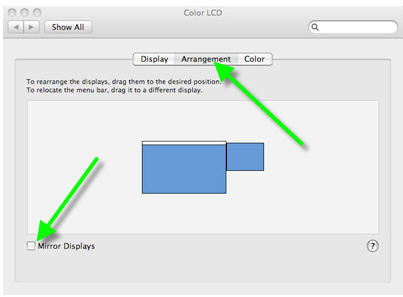
Also, is the display mirrored or extended?
http://trs.unimelb.edu.au/template-assets-custom/images/osx_display_prefs_arrange.png http://instruct.ehc.edu/laptops/mac_pref.jpg
jjjester
Jan 4, 2010, 03:18 PM
I use VLC and my display is mirrored. I just dont get it :/
spinnerlys
Jan 4, 2010, 03:32 PM
I use VLC and my display is mirrored. I just dont get it :/
If you have an HDTV set, that explains it, as the HDTV is capable of a resolution higher than 1280x800 (13" MB resolution).
So in order to get rid of the black border, extend the display rather than mirroring it and set the TV's resolution to something that matches the HDTV's capabilities (look those up in the manual of your TV, something like 1920x1080 or so). Than just drag the player and play window to the TV and go fullscreen and voilá, black borders should be gone.
jjjester
Jan 4, 2010, 04:36 PM
Wow thanks a lot! Problem fixed :D
vBulletin® v3.8.6, Copyright ©2000-2012, Jelsoft Enterprises Ltd.