View Full Version : Keyboard Shortcuts (Windows Alt key functions)
trader999
Aug 19, 2004, 12:25 AM
Does anyone know how to make a mac have an Alt key similar to that of a PC. For instance, in Windows Excel, selecting the Alt key will allow the user to quickly select File, Edit and the other menu headers. This can allow for much more efficient Excel usage to the function that do not have Cmd functions associated with them.
I love my Powerbook, but I am frustrated using it for Excel, which is a program that I require constantly.
Thanks
stoid
Aug 19, 2004, 12:57 AM
The option key is also an alt key. If you look, it says alt in the upper corner. I'm not sure exactly what you are trying to do though, so I can't tell you if the Mac works the same way.
Jalexster
Aug 19, 2004, 01:52 AM
If you hit alt once on a Windows computer, you can navgate menus, and select options onscreen by pressing the letter corrosponding to the letter underlined in the option's title.
That only makes sense, if you belive it makes sense. And if you use Windows.
Veldek
Aug 19, 2004, 02:17 AM
I’d say it’s even easier on a Mac as you have specific key commands for „New“ etc. You don’t need to push Alt first and then the corresponding key, but just use the specific command on a Mac.
AmigoMac
Aug 19, 2004, 02:42 AM
I had the same situation, I went to system preferences > KB & Mouse > Keyboard shortcuts , there you can specify the way you want to access the menu, dock, toolbar ... try it, I have ctrl+f11 for the menu, I agree with veldek, once you have the app. shortcuts it's a lot faster, but sometimes you don't know them and using the keyboard may be faster than going to the mouse, if you have a desktop... I have an iBook and in the hard cases I just touch my pad, it's a long time since I haven't used my mouse ;)
cindyjk
Aug 21, 2009, 03:31 PM
I've had my Macbook Pro for a few weeks now. I am an experienced Windows user (and still use one at the office). I find I'm very frustrated with the Mac because I can't seem to find how to navigate from the keyboard. The other user described it well: in Windows, EVERY SINGLE menu command or dialog box has one unique letter underlined in its name-not just major functions like 'New' or 'File' or 'Save'. You touch Alt and this letter, and you jump to that command or dialog box. For example, say you're editing song info in iTunes. You can press Control+i to open the song's info - same as on Mac. BUT, if you want to immediately jump to the "Genre" box, you can press alt + g. Then, if you want to jump to the "Year" box, you can press alt + y. You don't have to memorize these combinations - the proper key is always underlined in the box or menu name. On Mac, I either have to take my hand off the keyboard and use the mouse to click in the box I want, or press the tab key multiple times to cycle through all the boxes until I get to the one I want. If you're a fast touch-typist (like I am), this is a MAJOR time waster. Am I missing something? I should would like to learn how to work more efficiently with my Mac! Thanks :confused:
devburke
Aug 21, 2009, 04:27 PM
189535
This window should show you how to move focus to the menu bar. For me, it's ^+f2 (^ means ctrl). It's worth noting though, that unless you set your f keys to do their standard functions rather than changing volume and brightness and stuff, you also have to hold fn.
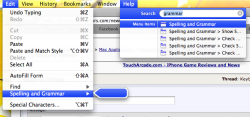
However, I prefer a different shortcut. cmd+? (a.k.a. cmd+shift+/) pops this dude open:
189538
Which allows you to either a) use the arrow keys to navigate to the menu you want, or b) just start typing in whatever command you want. If it's in there, it'll find it Spotlight-style, and when you highlight it, it'll go right to it, and this nice floaty arrow thing will point out to you very clearly where the command is.
189539
vBulletin® v3.8.6, Copyright ©2000-2012, Jelsoft Enterprises Ltd.