View Full Version : Browse iPod hard drive???
lPHONE
Apr 22, 2010, 11:38 AM
I have an iPod hard drive connected to my Mac and it has over 6000 songs
I need to browse the file names, but they all read something like FYBR.m4a.
Is there software to do this?
Is there a way to add these songs to the iTunes library WITHOUT copying them to my computer?
spinnerlys
Apr 22, 2010, 11:40 AM
Does the iPod not show up in iTunes?
Have you taken a look at exPod or Senuti?
lPHONE
Apr 22, 2010, 11:44 AM
Does the iPod not show up in iTunes?
Have you taken a look at exPod or Senuti?
because it's just the HDD
spinnerlys
Apr 22, 2010, 11:50 AM
because it's just the HDD
Ahh, I didn't understand that.
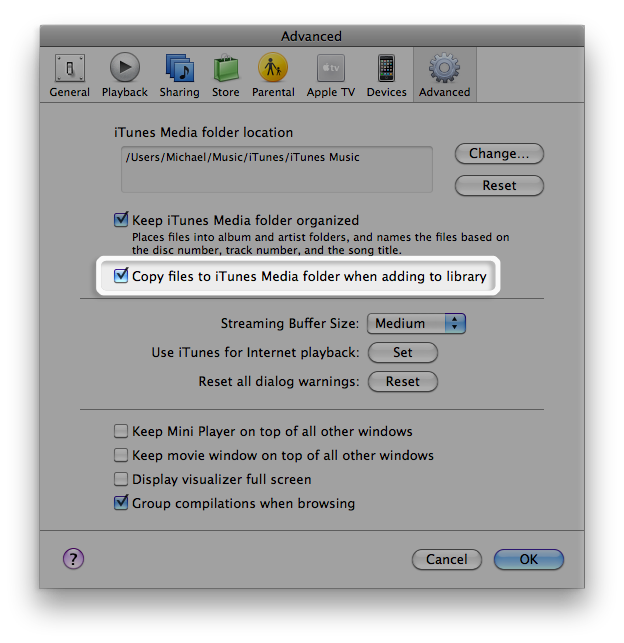
What happens if you drag one of the songs to iTunes while the following is disabled?
http://km.support.apple.com/library/APPLE/APPLECARE_ALLGEOS/HT1751/HT1751_01----en.png
That might be a bit cumbersome, but you could work with playlists.
lPHONE
Apr 22, 2010, 12:13 PM
Ahh, I didn't understand that.
What happens if you drag one of the songs to iTunes while the following is disabled?
http://km.support.apple.com/library/APPLE/APPLECARE_ALLGEOS/HT1751/HT1751_01----en.png
That might be a bit cumbersome, but you could work with playlists.
That works. Now I've got 6,411 songs in my library. Now the question is, when I see a song that I want on my Mac, how do I import it? Or do I have to go back to the hard drive and try to decipher those funny track names?
spinnerlys
Apr 22, 2010, 12:34 PM
That works. Now I've got 6,411 songs in my library. Now the question is, when I see a song that I want on my Mac, how do I import it? Or do I have to go back to the hard drive and try to decipher those funny track names?
You can select a song, right click on it and select SHOW IN FINDER.
http://www.brown.edu/web/itunes/img/show_in_finder.png
Then copy it to wherever you want and either manually rename it or read this thread: http://forums.macosxhints.com/archive/index.php/t-62995.html
vBulletin® v3.8.6, Copyright ©2000-2012, Jelsoft Enterprises Ltd.