View Full Version : iMac 27" 'actual' resolution query!
Chris Poole
May 14, 2010, 03:14 PM
Probably obvious.......but when I look at the resolution of my 27" iMac in the 'About this Mac' section it says............
iMac:
Resolution: 1920 x 1080
Pixel Depth: 32-Bit Color (ARGB8888)
Main Display: Yes
Mirror: Off
Online: Yes
Built-In: Yes
Connection Type: DisplayPort
Display Connector:
Status: No Display Connected
......Why would this be??? I thought it should say 2560x1440?? Also, surely its 64bit also??
Im a little confused, anyone explain pretty please.
Chris
Hellhammer
May 14, 2010, 03:16 PM
Are you sure you're using the native res? Check from Displays preferences. That is color bit, not OS X, not sure what that suppose to be
spinnerlys
May 14, 2010, 03:17 PM
Maybe you have the 21.5" iMac?
Have you looked at System Preferences > Displays and seen if you can change the resolution?
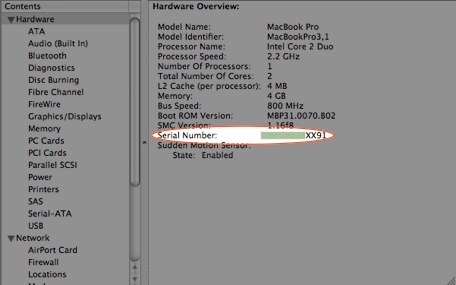
Have you also taken a look at System Profiler to confirm you have a 27" iMac?
Look for the serial number here
http://appleclinic.files.wordpress.com/2008/04/system-profiler1.jpg
and check it here http://www.appleserialnumberinfo.com/ .
Chris Poole
May 14, 2010, 03:23 PM
Hey.....I know us guys like to exaggerate our 'inch' sizes, but trust me on this one.....its def 27"!!
The issue is not that I cant reset the resolution to 2560x1440 but when I do then everything on the screen becomes tiny ie icons, toolbar etc
I just dont understand why the mac would tell me the resolution is anything but 2560 under 'About this mac'????
Chris
MacHamster68
May 14, 2010, 03:25 PM
no not 64 bit that would be a bit to much for the poor graphics card in the iMac
just read the wiki article about color depth
http://en.wikipedia.org/wiki/Color_depth
2560 x 1440 as thats the native resolution of the imac 27"
and its only natural that everything becomes smaller if you have such a high resolution
the higher the resolution the smaller things get on the screen, thats the idea of a high resolution to get more space
if you go the opposite way everything becomes bigger just set it to 1024x 768 and you will see huge icons
if you adjust while about this mac is open you will see just the previous screen resolution, so always close about this mac then adjust , then open about this mac again
spinnerlys
May 14, 2010, 03:27 PM
Hey.....I know us guys like to exaggerate our 'inch' sizes, but trust me on this one.....its def 27"!!
The issue is not that I cant reset the resolution to 2560x1440 but when I do then everything on the screen becomes tiny ie icons, toolbar etc
I just dont understand why the mac would tell me the resolution is anything but 2560 under 'About this mac'????
Chris
Maybe because the current resolution is 1920 x 1080? You mentioned you changed it, and 2560 x 1440 is a dense resolution, meaning a high pixel per inch count, thus the small icons and such.
I have a 17" uMBP with 1920 x 1200 pixel, which os often reserved for 24" displays, and icons and menu bar are quite "small", but I even manage to screen share to it via a 1680 x 1050 20" iMac.
Chris Poole
May 14, 2010, 03:29 PM
Its def a 27" as checked from the serial number link......thankyou.
If I change to the 2560 then is there a quick way to increase the size of the icons, toolbar etc etc as they really are 'silly small' now!!
Chris
ps.....when I change the resolution in preferences then the 'About this mac' still says 1920?? I must be missing something obvious.
spinnerlys
May 14, 2010, 03:40 PM
Its def a 27" as checked from the serial number link......thankyou.
If I change to the 2560 then is there a quick way to increase the size of the icons, toolbar etc etc as they really are 'silly small' now!!
Chris
ps.....when I change the resolution in preferences then the 'About this mac' still says 1920?? I must be missing something obvious.
Maybe a restart of System Profiler or the actual Mac can remedy that.
Also you can make your icons bigger via the View Options in Finder (CMD+J) and in a browser you can enlarge a page via CMD++.
Also MRoogle (http://mroogle.edesignuk.com/) will give you dozens of threads on this issue ("too small for my big screen").
MacHamster68
May 14, 2010, 04:12 PM
its more i think about personal preference , i quiet like the smaller icons and menu bar as i want space on the actual screen , so on any of my mac's screens i choose the maximum possible resolution
Stan Mikulenka
May 14, 2010, 07:10 PM
Hi Chris,
you can set the Desktop t & every Folder to it's own individual setting in Toolbar "View" option. Here are two different settings for my screen without changing the Screen resolution:
vBulletin® v3.8.6, Copyright ©2000-2012, Jelsoft Enterprises Ltd.