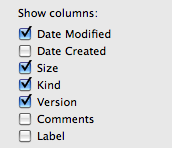
D djcyph macrumors member Original poster Jul 22, 2010 #1 is there anyway to get more options then what is in command J? i would like to have to have bit rate, album, etc.. as columns
is there anyway to get more options then what is in command J? i would like to have to have bit rate, album, etc.. as columns
slpdLoad macrumors 6502a Jul 23, 2010 #3 Pathfinder (http://www.cocoatech.com/, free trial) has a few more view options, but I don't think you can view things like album or bit-rate.
Pathfinder (http://www.cocoatech.com/, free trial) has a few more view options, but I don't think you can view things like album or bit-rate.
GGJstudios macrumors Westmere Jul 23, 2010 #4 djcyph said: is there anyway to get more options then what is in command J? i would like to have to have bit rate, album, etc.. as columns Click to expand... This is a known limitation of Finder, and one of a few areas where Windows Explorer trumps Finder.
djcyph said: is there anyway to get more options then what is in command J? i would like to have to have bit rate, album, etc.. as columns Click to expand... This is a known limitation of Finder, and one of a few areas where Windows Explorer trumps Finder.
D djcyph macrumors member Original poster Jul 23, 2010 #5 GGJstudios said: This is a known limitation of Finder, and one of a few areas where Windows Explorer trumps Finder. Click to expand... crap id really like to see bitrate
GGJstudios said: This is a known limitation of Finder, and one of a few areas where Windows Explorer trumps Finder. Click to expand... crap id really like to see bitrate
spinnerlys Guest Jul 23, 2010 #6 djcyph said: crap id really like to see bitrate Click to expand... The only way would be CMD+3 (icon view), but you can't sort that way.
djcyph said: crap id really like to see bitrate Click to expand... The only way would be CMD+3 (icon view), but you can't sort that way.
D djcyph macrumors member Original poster Jul 25, 2010 #7 spinnerlys said: The only way would be CMD+3 (icon view), but you can't sort that way. Click to expand... i noticed that! thanks
spinnerlys said: The only way would be CMD+3 (icon view), but you can't sort that way. Click to expand... i noticed that! thanks