
Got a tip for us?
Let us know
Become a MacRumors Supporter for $50/year with no ads, ability to filter front page stories, and private forums.
iOS Use single storyboard file for Base Internationalization in iOS 6 (1/2)
- Thread starter mikezang
- Start date
- Sort by reaction score
You are using an out of date browser. It may not display this or other websites correctly.
You should upgrade or use an alternative browser.
You should upgrade or use an alternative browser.

Use single storyboard file for Base Internationalization in iOS 6 (1/2)
You can use single storyboard file for multiple languages UI in iOS 6.
1. Create a new project
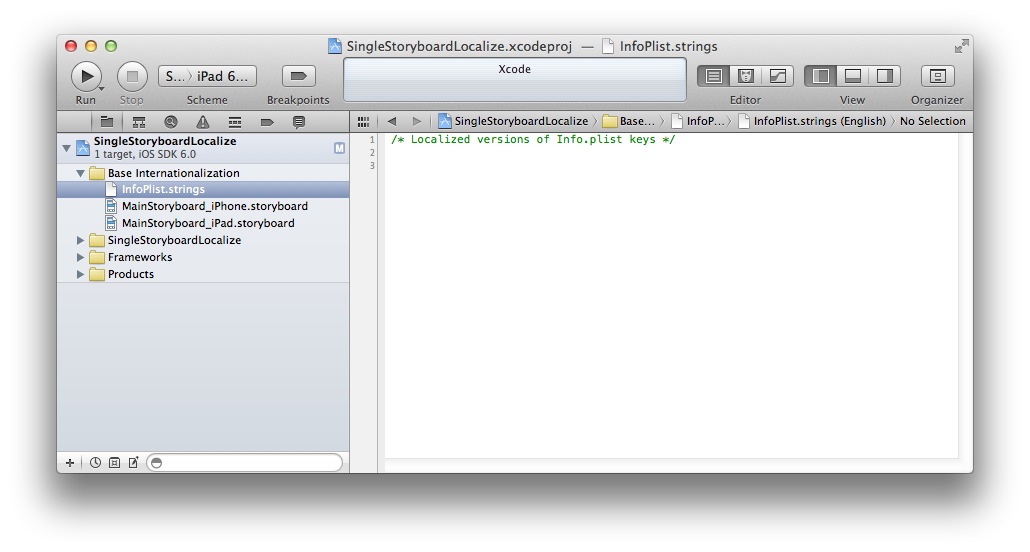
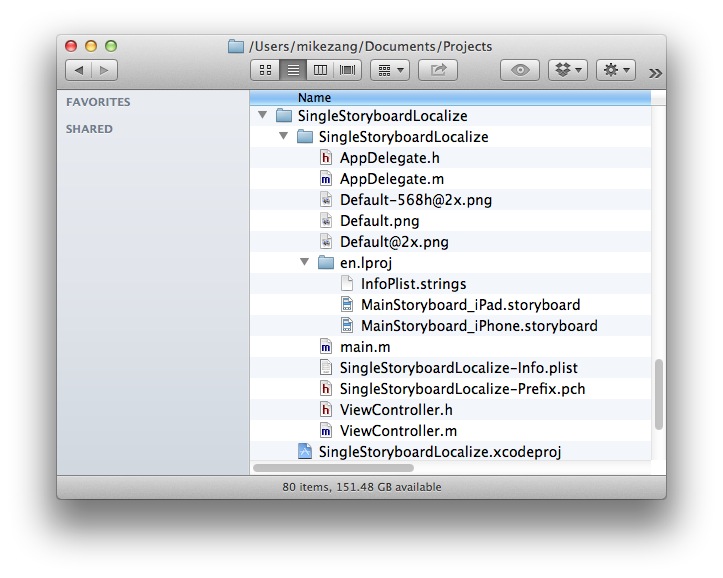
2. Create Localizable.strings file
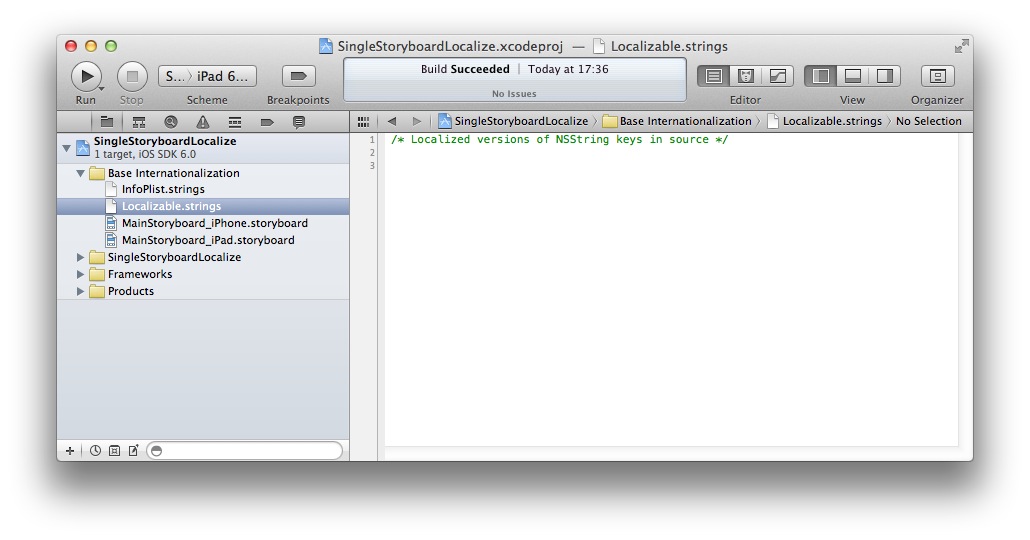
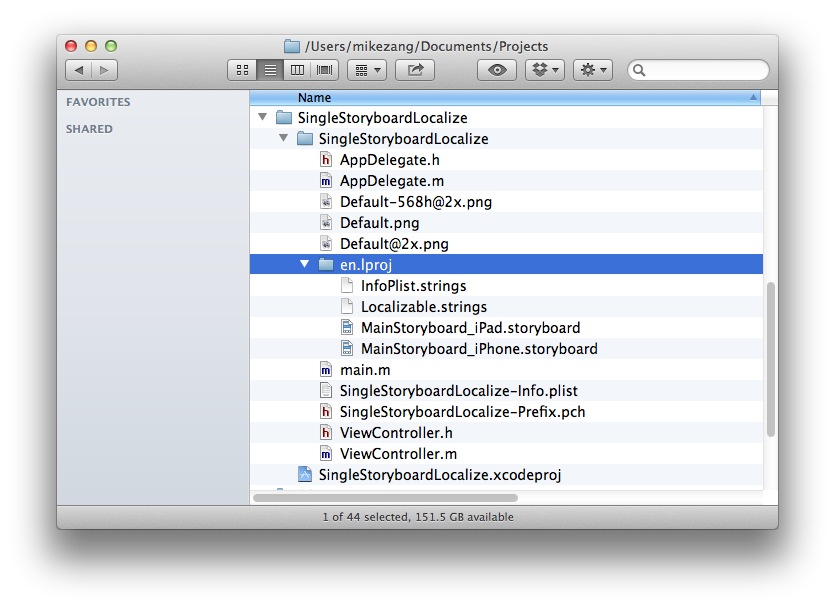
3. Use Base Internationalization
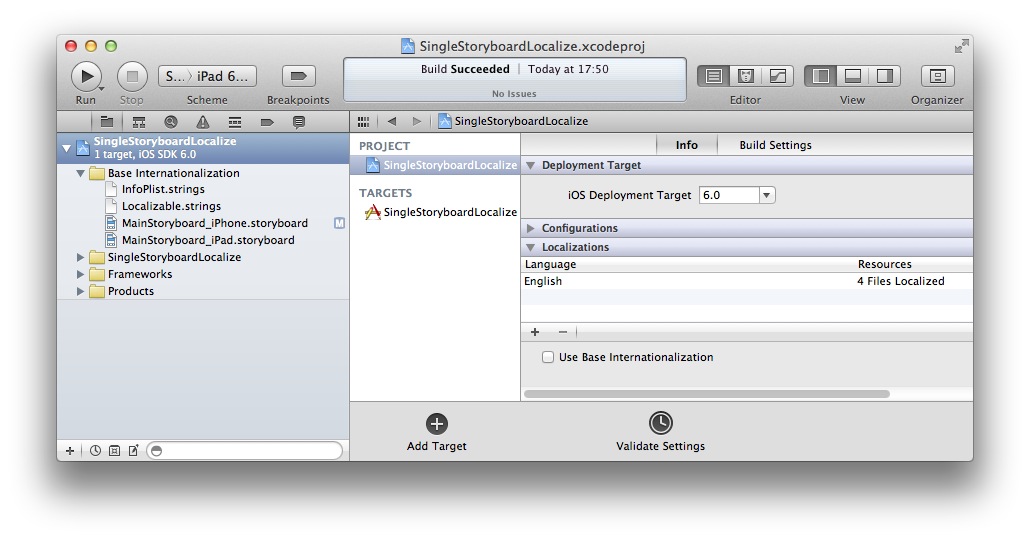
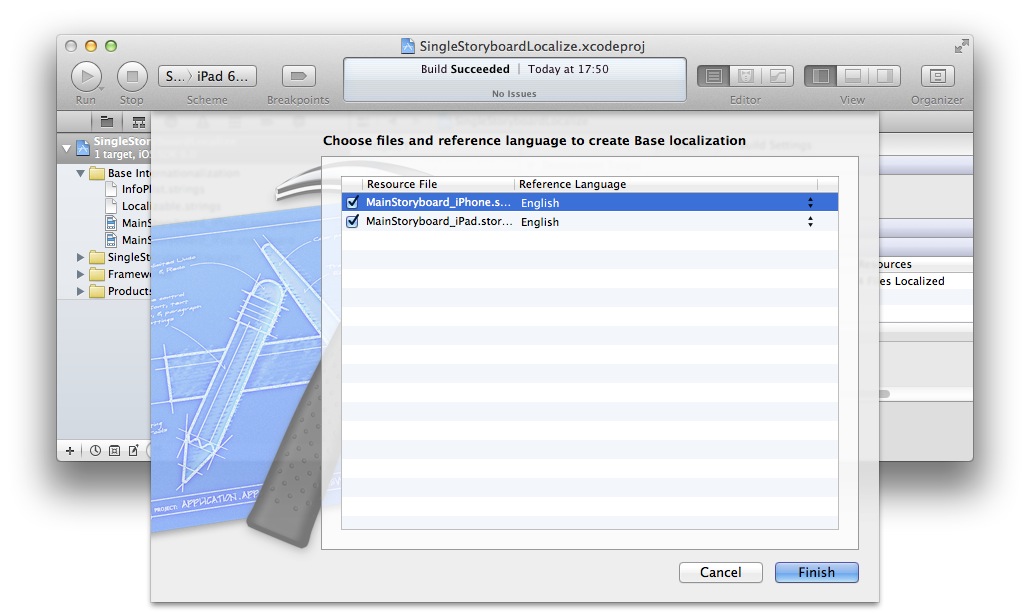
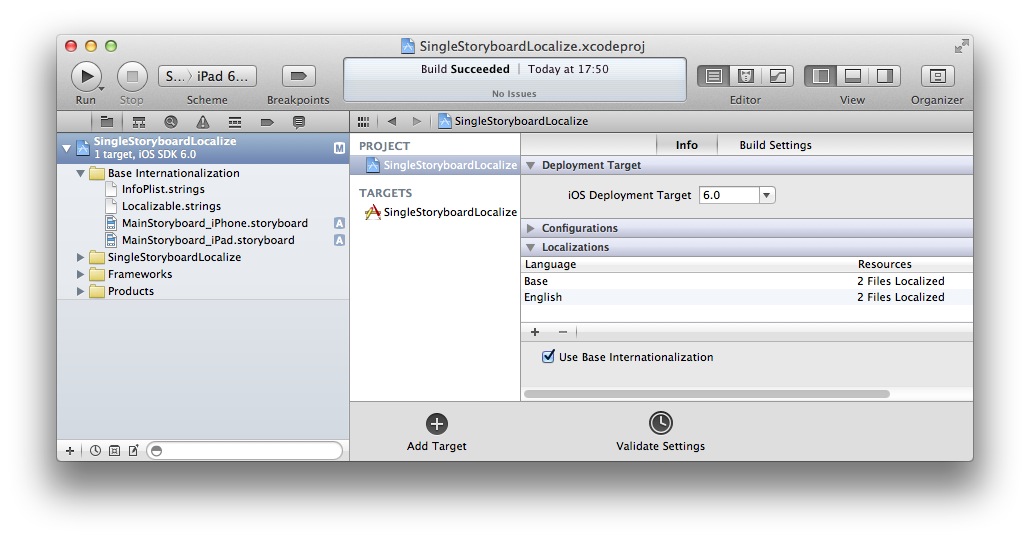
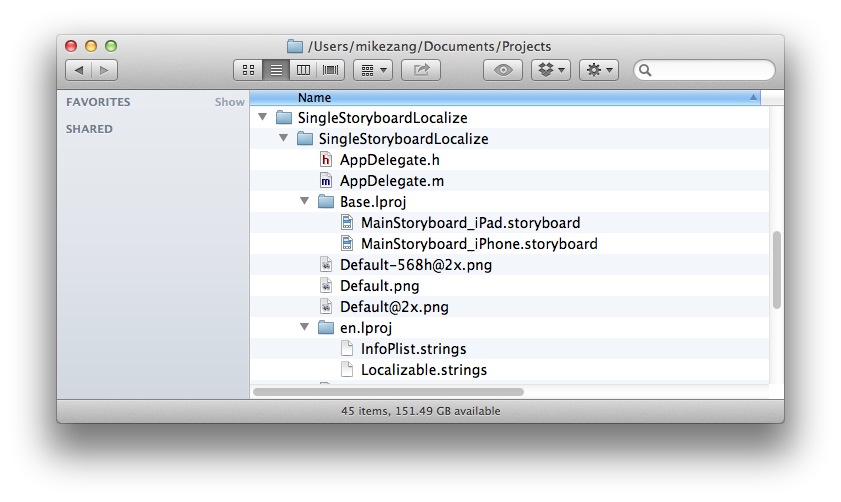
4. Create MainStoryboard_iPhone.strings/MainSToryboard_iPad.strings
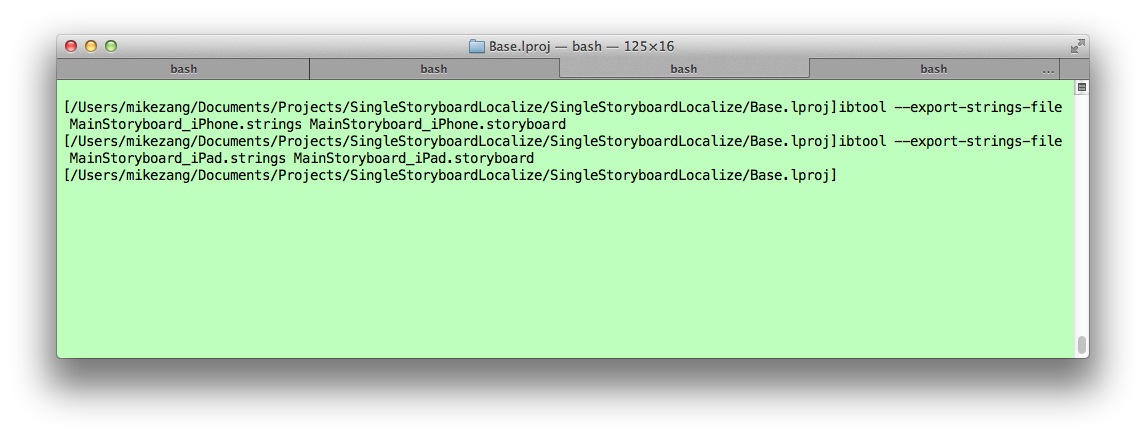
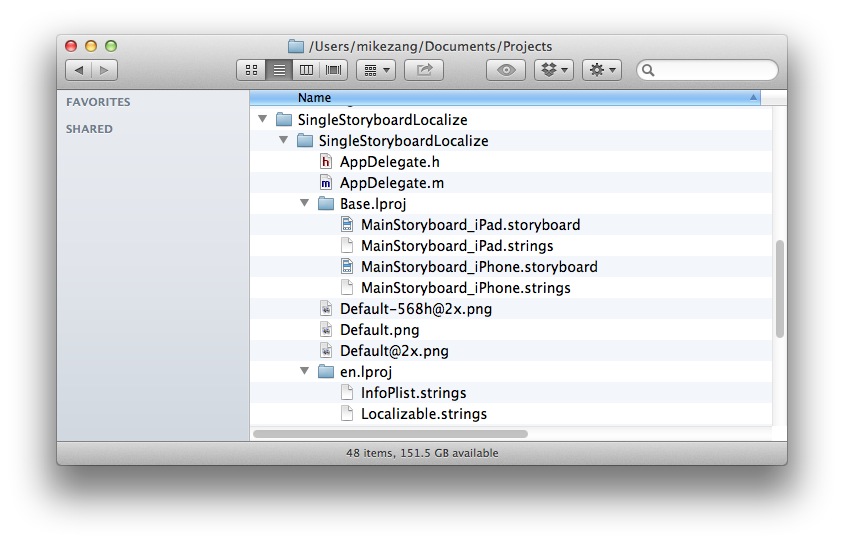
5. Move MainStoryboard*.strings file to en.lproj and add to project
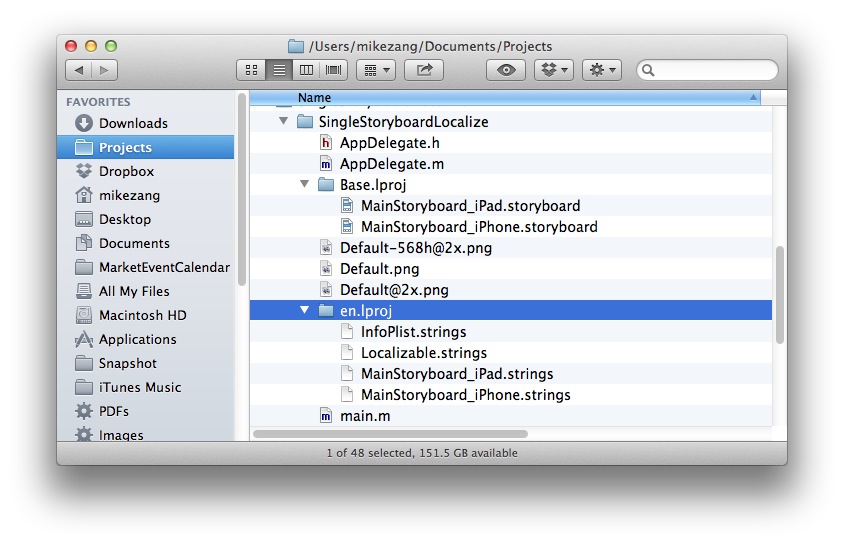
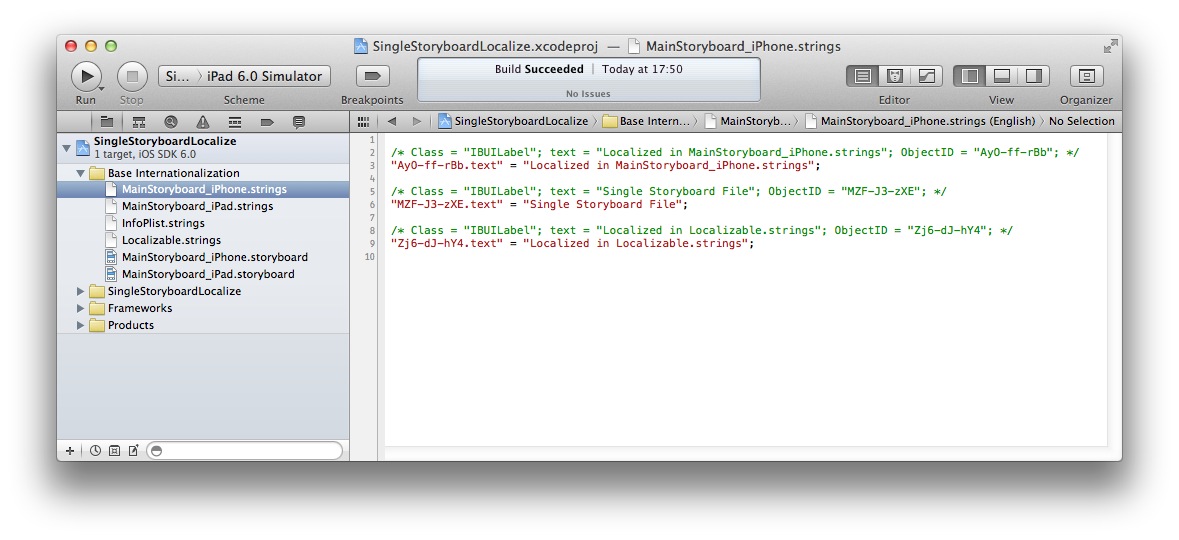
6. Add New Languages and only copy .strings files
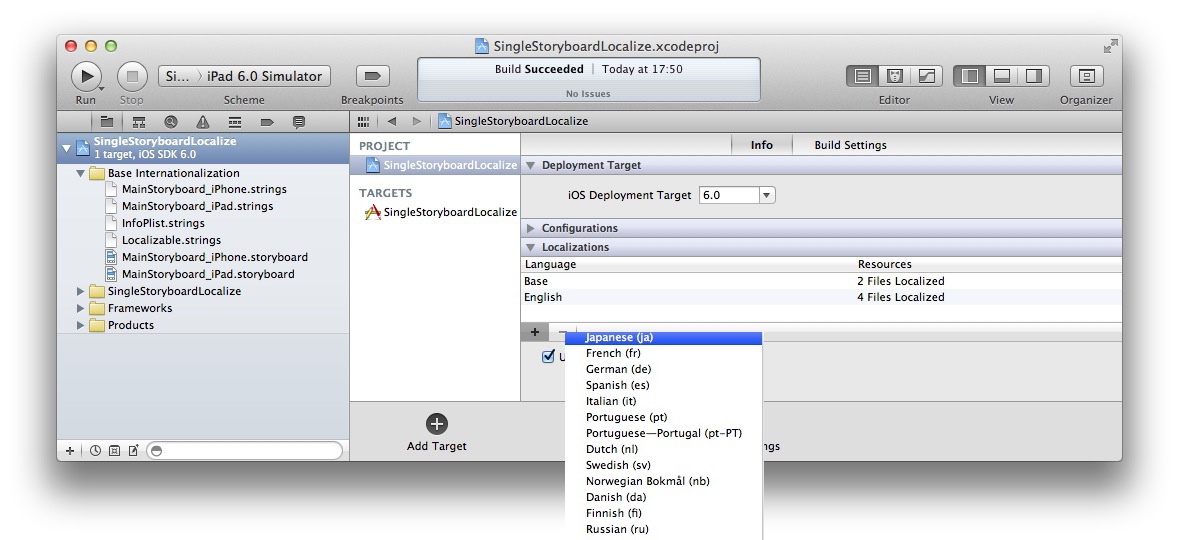
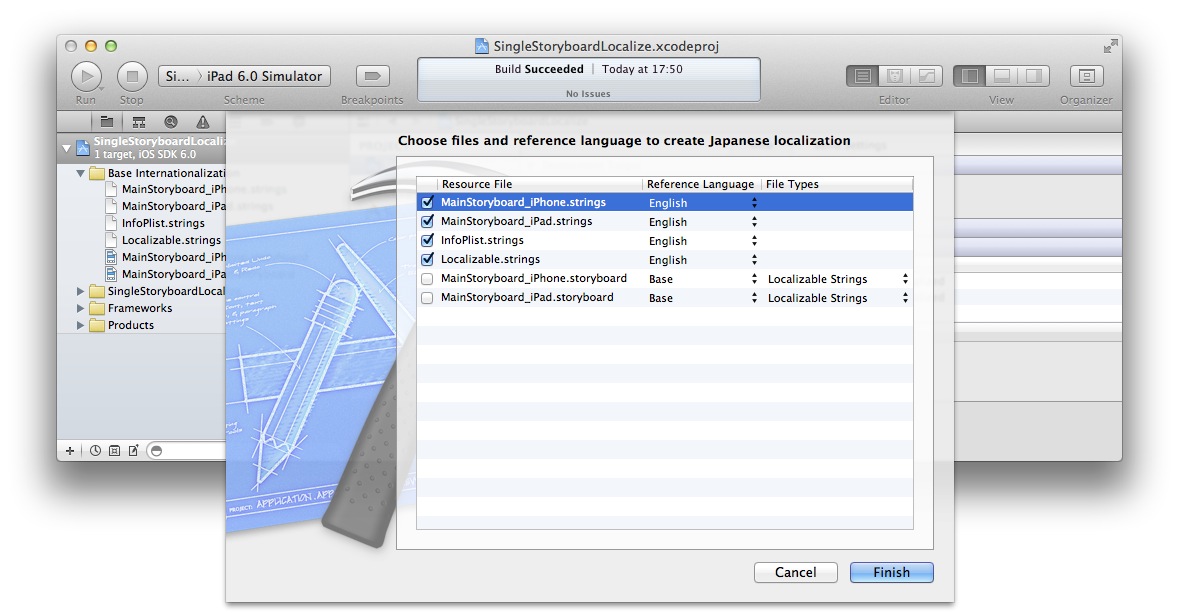
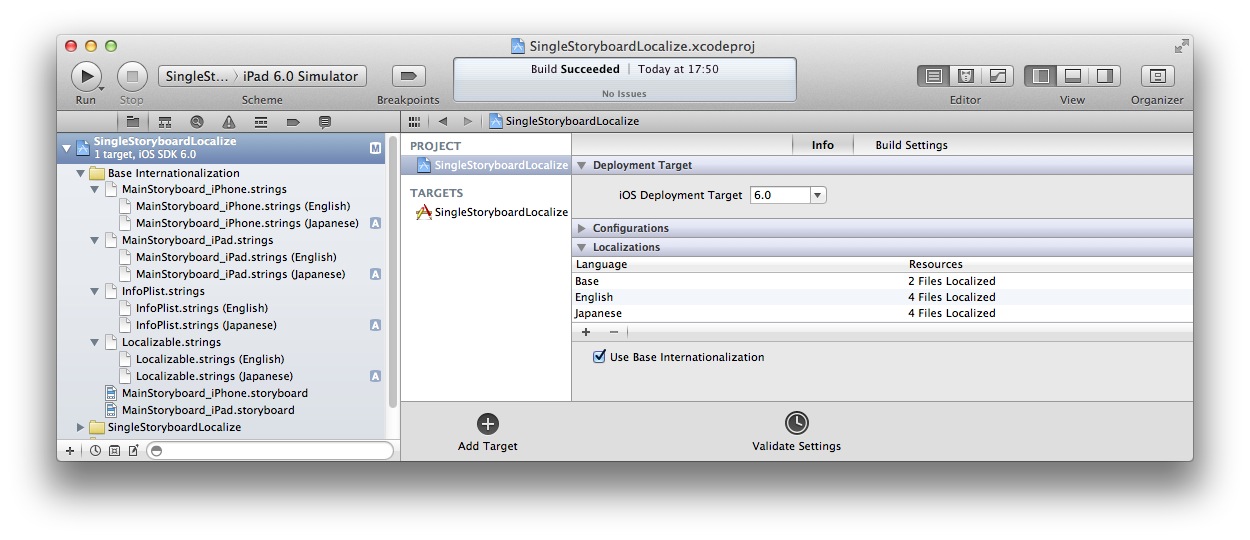
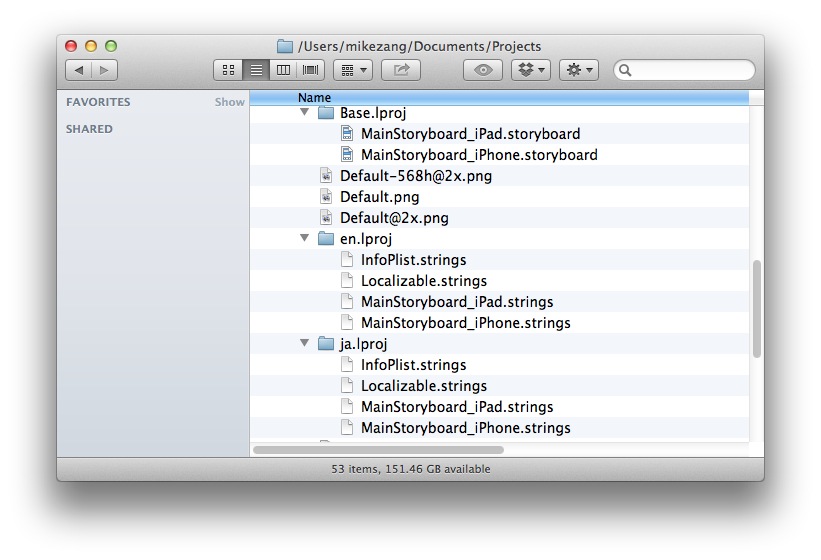
7. Localize strings files
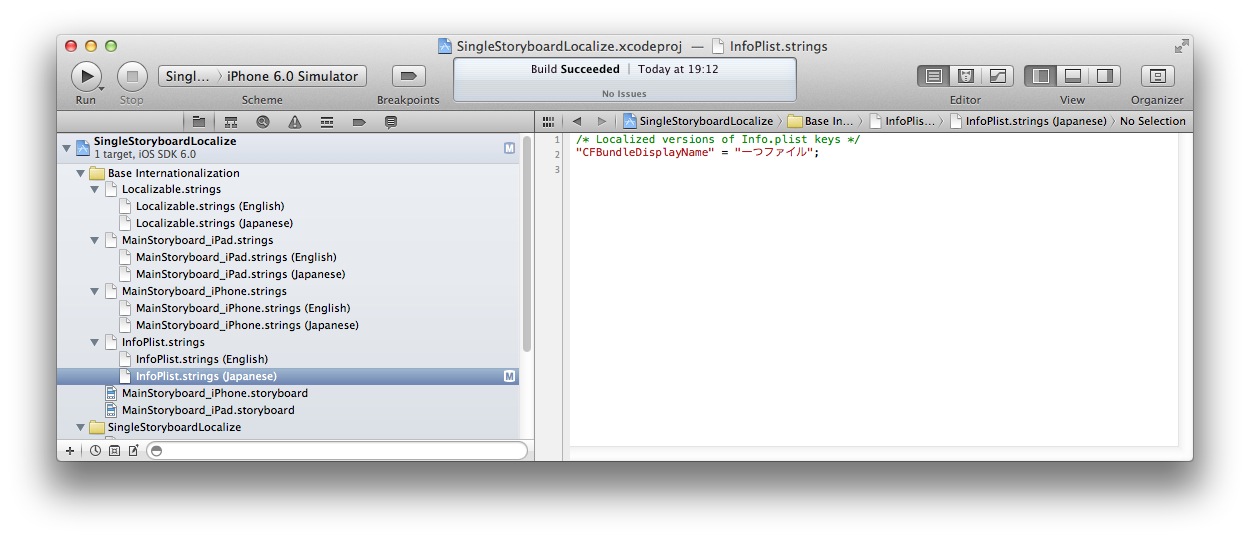
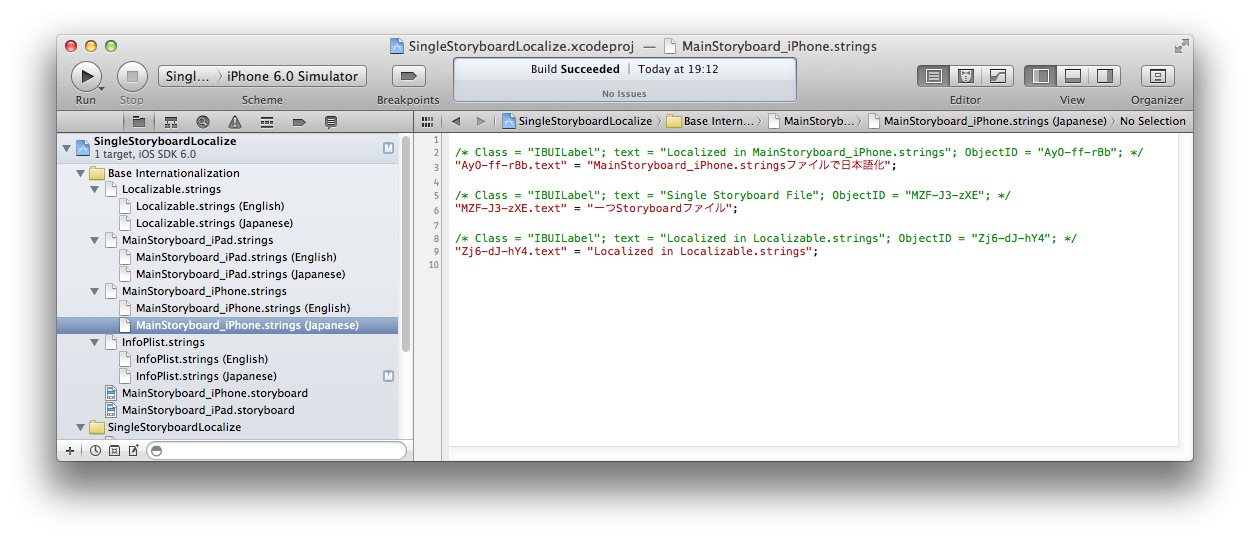
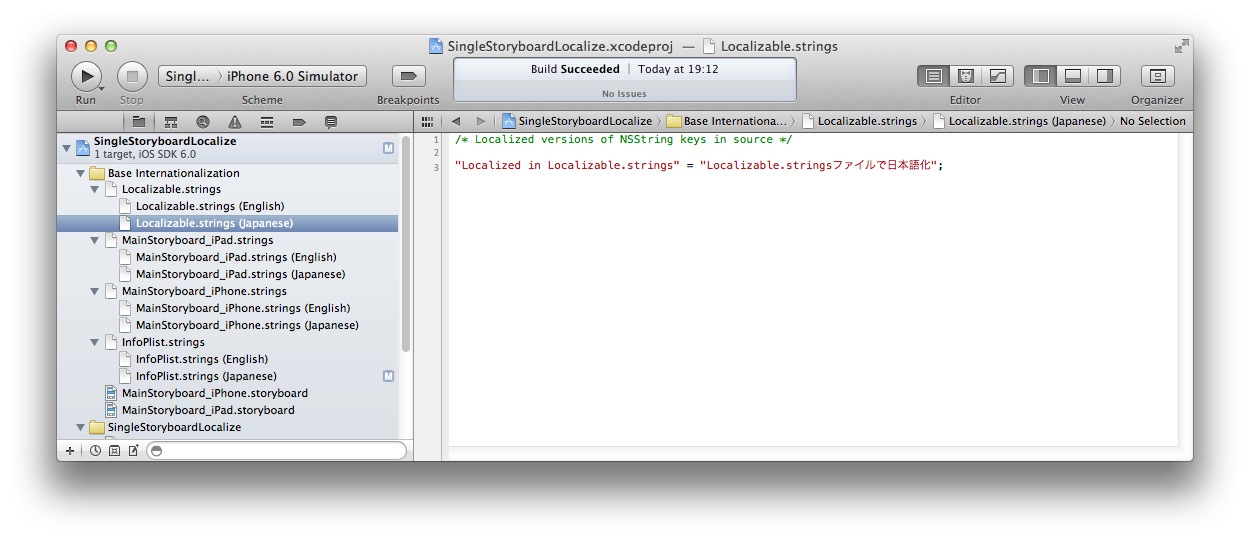
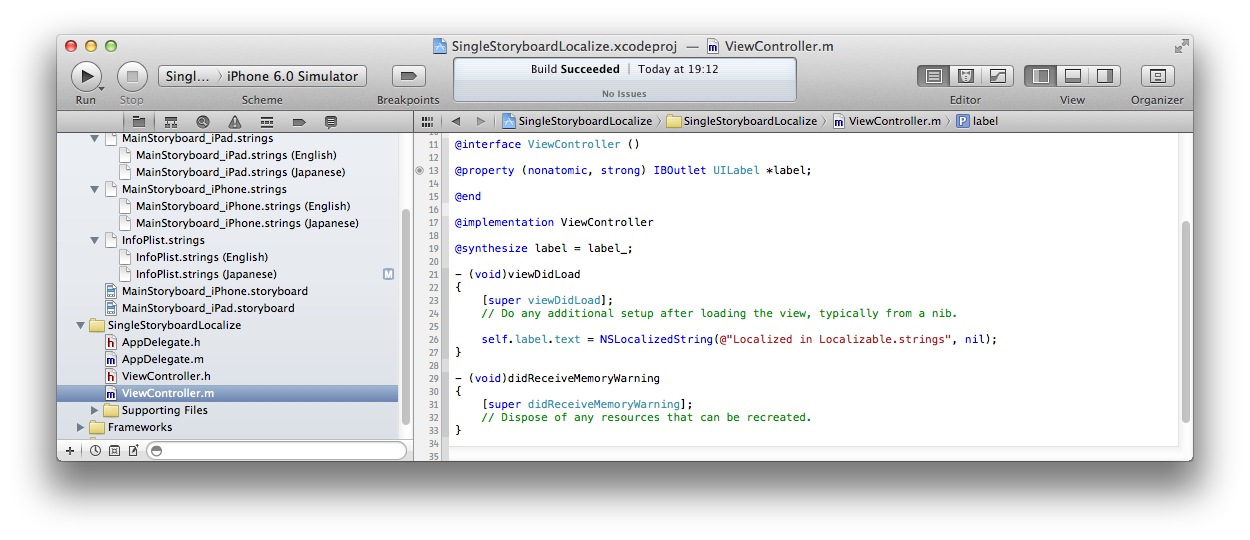
You can use single storyboard file for multiple languages UI in iOS 6.
1. Create a new project
2. Create Localizable.strings file
3. Use Base Internationalization
4. Create MainStoryboard_iPhone.strings/MainSToryboard_iPad.strings
5. Move MainStoryboard*.strings file to en.lproj and add to project
6. Add New Languages and only copy .strings files
7. Localize strings files
Last edited by a moderator:
Use single storyboard file for Base Internationalization in iOS 6 (2/2)
8. You got what you need, check attachments
9. Add Build Phase Run Script to update storyboards strings files auto
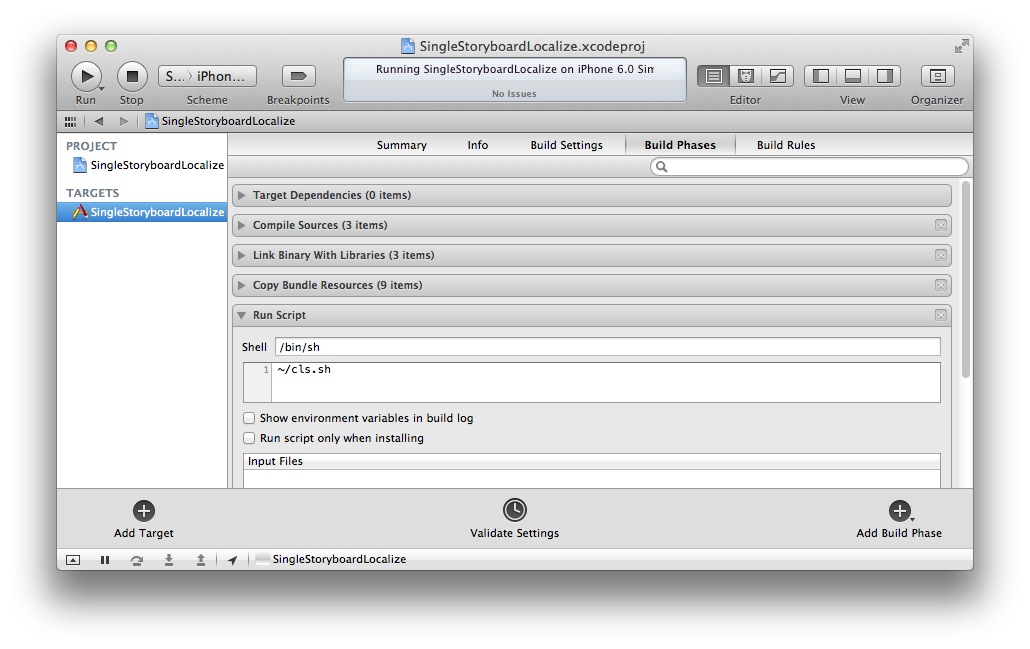
10. Create SingleStoryboardLocalize.py or .sh This script will do task as below(under construction):
10.1 Find Base.lproj folder in $(PROJECT_DIR)
10.2 Find all ??.lproj folders in $(PROJECT_DIR)
10.3 Find all .storyboard files in Base.lproj folder
10.4 use ibtool to create the newest storyboard strings files base on all .storyboard files and convert it to UTF-8 format
10.5 Merge the newest storybord strings files to all relevant localize strings files.
10.6 Delete the newest storyboard strings files.
I am not good at python, does anyone can do it for us?
8. You got what you need, check attachments
9. Add Build Phase Run Script to update storyboards strings files auto
10. Create SingleStoryboardLocalize.py or .sh This script will do task as below(under construction):
Code:
#!/bin/sh
# Auto Create Locale Strings Script
# cls.sh

# Find .storyboard file inside project folder
for storyboardPath in `find . -name "*.storyboard" -print`
do
  	# Get storyboard file name
  	storyboardFile=$(basename "$storyboardPath")

  	# Get Base strings file path
  	baseStringsPath=$(echo "$storyboardPath" | sed 's/storyboard/strings/g')

  	# Get New Base strings file path
  	newBaseStringsPath=$(echo "$storyboardPath" | sed 's/\.storyboard/_new\.strings/g')

  	# Get strings file name
  	stringsFile=$(basename "$baseStringsPath")
	#echo $stringsFile

  	echo Create $newBaseStringsPath from $storyboardFile
  	ibtool --export-strings-file $newBaseStringsPath $storyboardPath

  	# Convert UTF-16 to UTF-8
  	iconv -f UTF-16 -t UTF-8 $newBaseStringsPath > $baseStringsPath

	rm $newBaseStringsPath

  	# Get all locale strings file path
  	for localeStringsPath in `find . -name "$stringsFile" -print`
  	do
    	if [ $baseStringsPath != $localeStringsPath ]
    	then
      		oldLocaleStringsPath=$(echo "$localeStringsPath" | sed 's/\.strings/_old\.strings/g')

      		cp $localeStringsPath $oldLocaleStringsPath

      		echo Merge $baseStringsPath to $localeStringsPath
                awk 'NR==FNR&&/^\/\*/{x=$0;getline;a[x]=$0;next}/^\/\*/{x=$0;print;getline;$0=a[x]?a[x]:$0;printf $0"\n\n"}' $oldLocaleStringsPath $baseStringsPath > $localeStringsPath

		rm $oldLocaleStringsPath
    	fi
  	done
done10.2 Find all ??.lproj folders in $(PROJECT_DIR)
10.3 Find all .storyboard files in Base.lproj folder
10.4 use ibtool to create the newest storyboard strings files base on all .storyboard files and convert it to UTF-8 format
10.5 Merge the newest storybord strings files to all relevant localize strings files.
10.6 Delete the newest storyboard strings files.
I am not good at python, does anyone can do it for us?
Attachments


Last edited:
I got a better script to create locale strings auto before compile.
Code:
#!/bin/sh
# cls.sh - script to  Create Locale Strings auto

storyboardExt=".storyboard"
stringsExt=".strings"
newStringsExt=".strings.new"
oldStringsExt=".strings.old"
localeDirExt=".lproj"

# Find storyboard file full path inside project folder
for storyboardPath in `find . -name "*$storyboardExt" -print`
do
    # Get Base strings file full path
    baseStringsPath=$(echo "$storyboardPath" | sed "s/$storyboardExt/$stringsExt/")

    # Create strings file only when storyboard file newer
    if find $storyboardPath -prune -newer $baseStringsPath -print | grep -q .; then
        # Get storyboard file name and folder
        storyboardFile=$(basename "$storyboardPath")
        storyboardDir=$(dirname "$storyboardPath")

        # Get New Base strings file full path and strings file name
        newBaseStringsPath=$(echo "$storyboardPath" | sed "s/$storyboardExt/$newStringsExt/")
        stringsFile=$(basename "$baseStringsPath")
        ibtool --export-strings-file $newBaseStringsPath $storyboardPath
        iconv -f UTF-16 -t UTF-8 $newBaseStringsPath > $baseStringsPath
        rm $newBaseStringsPath

        # Get all locale strings folder
        for localeStringsDir in `find . -name "*$localeDirExt" -print`
        do
            # Skip Base strings folder
            if [ $localeStringsDir != $storyboardDir ]; then
                localeStringsPath=$localeStringsDir/$stringsFile

                # Just copy base strings file on first time
                if [ ! -e $localeStringsPath ]; then
                    cp $baseStringsPath $localeStringsPath
                else
                    oldLocaleStringsPath=$(echo "$localeStringsPath" | sed "s/$stringsExt/$oldStringsExt/")
                    cp $localeStringsPath $oldLocaleStringsPath

                    # Merge baseStringsPath to localeStringsPath
                    awk 'NR == FNR && /^\/\*/ {x=$0; getline; a[x]=$0; next} /^\/\*/ {x=$0; print; getline; $0=a[x]?a[x]:$0; printf $0"\n\n"}' $oldLocaleStringsPath $baseStringsPath > $localeStringsPath

                    rm $oldLocaleStringsPath
                fi
            fi
        done
    else
        echo "$storyboardPath file not modified."
    fi
doneThank you for this all. I got it to work. But i got 3 errors, when your script is running:
How can i solve this?
Code:
Shell Script Invocation Error
find: ./Project/Base.lproj/MainStoryboard_iPhone.strings: No such file or directory
./Project/Base.lproj/MainStoryboard_iPhone.storyboard file not modified.

Shell Script Invocation Error
find: ./Project/Base.lproj/MainStoryboard_iPad.strings: No such file or directory
./Project/Base.lproj/MainStoryboard_iPad.storyboard file not modified.

Command /bin/sh emitted errors but did not return a nonzero exit code to indicate failure
How can i solve this?
Well, you can just run "touch ./Project/Base.lproj/MainStoryboard_iPad.strings", this is the simplest way, or you can modify script beforeThank you for this all. I got it to work. But i got 3 errors, when your script is running:
Code:Shell Script Invocation Error find: ./Project/Base.lproj/MainStoryboard_iPhone.strings: No such file or directory ./Project/Base.lproj/MainStoryboard_iPhone.storyboard file not modified. Shell Script Invocation Error find: ./Project/Base.lproj/MainStoryboard_iPad.strings: No such file or directory ./Project/Base.lproj/MainStoryboard_iPad.storyboard file not modified. Command /bin/sh emitted errors but did not return a nonzero exit code to indicate failure
How can i solve this?
"if find $storyboardPath -prune -newer $baseStringsPath -print | grep -q .; then"
to check if file exists..
Last edited:
Sorry, but i tried all these points now 3x times and execute my app, it works very well if i switch and run to a foreign language, but if i switch back to english - all my changes in storyboard and for my .strings files will be ignored. instead of that it represents me an old version of my storyboard (with no new changes and so on... - i don't know where xcode get the old storyboard informations?)
I really don't understand what xcode is doing. Do you have any idea, whats going on?
For the foreign language everything works fine.
I really don't understand what xcode is doing. Do you have any idea, whats going on?
For the foreign language everything works fine.
Check en.lproj folder, delete them if you find any storyboard files, you only need storyboard files in Base.lproj folder.Sorry, but i tried all these points now 3x times and execute my app, it works very well if i switch and run to a foreign language, but if i switch back to english - all my changes in storyboard and for my .strings files will be ignored. instead of that it represents me an old version of my storyboard (with no new changes and so on... - i don't know where xcode get the old storyboard informations?)
I really don't understand what xcode is doing. Do you have any idea, whats going on?
For the foreign language everything works fine.
yes. there are only storyboard files in Base.lproj folder. The strings files in "en.lproj" and "de.lproj":
For english -> a old cached storyboard will be used (everything i have change in storyboard will be ignored - that MainStoryboard.strings file too).
For german -> the actual storyboard will be used, MainStoryboard.strings works fine too.
Instead of the MainStoryboards the localizable.strings files works correct everytime for both languages..
I don't know whats going on. my xcode version is 4.5.2 my iOS version is 6.01, Mac OSX: 10.7.5 ..all up to date.
Any suggestion, what is going wrong there? Where did xcode get that old Storyboard informations?
----------
Please, can you upload an example of your project so that i can check it with my xcode? I am not sure whether my project is damaged, or wrong configured or my mac or something else.
Best regards, rio
For english -> a old cached storyboard will be used (everything i have change in storyboard will be ignored - that MainStoryboard.strings file too).
For german -> the actual storyboard will be used, MainStoryboard.strings works fine too.
Instead of the MainStoryboards the localizable.strings files works correct everytime for both languages..
I don't know whats going on. my xcode version is 4.5.2 my iOS version is 6.01, Mac OSX: 10.7.5 ..all up to date.
Any suggestion, what is going wrong there? Where did xcode get that old Storyboard informations?
----------
Please, can you upload an example of your project so that i can check it with my xcode? I am not sure whether my project is damaged, or wrong configured or my mac or something else.
Best regards, rio
How to Propagate Changes in MainStoryboard
Maybe this is what the big scripts do, but I'm by no means a scripter, so I really don't understand what is going on there. But I'm curious how to handle the fundamental issue of when something gets changed in the storyboard. If you change the name of a button, or add/remove something, how do those changes get propagated to the *.strings files?
Up to the steps with the scripts, I followed along very well. I had to make a couple of minor adjustments, but the instructions were pretty much on-the-mark. Thanks a ton. This has saved me a ridiculous amount of effort.
Maybe this is what the big scripts do, but I'm by no means a scripter, so I really don't understand what is going on there. But I'm curious how to handle the fundamental issue of when something gets changed in the storyboard. If you change the name of a button, or add/remove something, how do those changes get propagated to the *.strings files?
Up to the steps with the scripts, I followed along very well. I had to make a couple of minor adjustments, but the instructions were pretty much on-the-mark. Thanks a ton. This has saved me a ridiculous amount of effort.
Last edited by a moderator:
Inconsistent Steps
In Step 5, you say to "Move MainStoryboard*.strings file to en.lproj and add to project". However, I get a run-time error with the script indicating that:
"find: ./Pandora/Base.lproj/MainStoryboard.strings: No such file or directory"
So it looks like the script is expecting storyboard.strings to be in the Base.lproj/ folder. Am I missing something here?
In Step 5, you say to "Move MainStoryboard*.strings file to en.lproj and add to project". However, I get a run-time error with the script indicating that:
"find: ./Pandora/Base.lproj/MainStoryboard.strings: No such file or directory"
So it looks like the script is expecting storyboard.strings to be in the Base.lproj/ folder. Am I missing something here?
If you use script what I provide, you don't need to follow steps, script will create storyboard.strings file in Base.lproj and copy and merge them to other lproj folder.
If you still got same error, just copy strings file to Base.lproj folder.
You mean the script will do everything from Step #1-9? Or from Step #4-9?
If you use script what I provide, you don't need to follow steps, script will create storyboard.strings file in Base.lproj and copy and merge them to other lproj folder.
If you still got same error, just copy strings file to Base.lproj folder.
Okay. I've got it working. But I'm noticing some things that I thought were supposed to be handled:
- I ran the script, then edited the ES version of MainStoryboard.strings, to add a comment at the top. I then ran the script again, and the edits were gone. I thought the script was supposed to merge the older and newer files? If I create the strings files, then edit them to add the translations, then modify the storyboard in a newer version, will running the script overwrite the existing strings files? If a merge isn't performed, and that was just my misunderstanding, that's fine. I just want to make sure that I understand the process and don't make any false assumptions.
- Also, in the Identity Inspector, under Document, I have edited the Label field for all of my objects to give them understandable identities. I thought that would be copied over into the strings files so that it is relatively easy to identify which strings were attached to which objects. Is this something that ibtool is supposed to do, or am I expecting too much?
Thanks for your help, by the way. I really appreciate it. Localization is a relatively new thing for me, and getting my head around this now will really make a big difference as we expand the project. We are starting with English and Spanish. But eventually we will be adding just about every language available, as the company this app is being written for is very globalized. It'll be pretty cool to have this system down.
Sorry🙂 I am not sure at the moment as it was long time ago🙁You mean the script will do everything from Step #1-9? Or from Step #4-9?
by the way, you said
I don't know why it will happen because my script didn't find strings file in Bse.lproj."find: ./Pandora/Base.lproj/MainStoryboard.strings: No such file or directory"
for easy to do, just copy strings file in en.lproj to Base,lproj at first, then script will create strings in Bse.lproj.
Bug in Xcode 4.6.1
I haven't filed it yet, but there is a bug in Xcode 4.6.1 that breaks the l10n process for storyboards. You cannot execute the process you outline above on an empty storyboard. If you do, then you will get a build error because the iPad storyboard is flagged as corrupted. Nothing else works from that point forward.
You have to populate at least the iPad storyboard with something before you get to the ibtool step.
I'm going to file a radar with Apple shortly. This has been killing me for the past couple of days, trying to figure it out. The lightbulb went on this morning and I confirmed it in about 20 minutes.
Update: radar # 13630796.
I haven't filed it yet, but there is a bug in Xcode 4.6.1 that breaks the l10n process for storyboards. You cannot execute the process you outline above on an empty storyboard. If you do, then you will get a build error because the iPad storyboard is flagged as corrupted. Nothing else works from that point forward.
You have to populate at least the iPad storyboard with something before you get to the ibtool step.
I'm going to file a radar with Apple shortly. This has been killing me for the past couple of days, trying to figure it out. The lightbulb went on this morning and I confirmed it in about 20 minutes.
Update: radar # 13630796.
Last edited:
This thread was very useful for me, and since I had to improve the shell script, I'm posting it here as a big "thank you".
This version handle non-existing .strings files and avoid mixing files from distinct Base.lproj folders.
I plan to extend this to .xib files, since I am working on a project with mixed storyboards and xibs.
This version handle non-existing .strings files and avoid mixing files from distinct Base.lproj folders.
I plan to extend this to .xib files, since I am working on a project with mixed storyboards and xibs.
Code:
#!/bin/sh
# Update storyboard string files
#
# by 2013 André Pinto andredsp@gmail.com
# based on https://forums.macrumors.com/threads/1467446/

storyboardExt=".storyboard"
stringsExt=".strings"
newStringsExt=".strings.new"
oldStringsExt=".strings.old"
localeDirExt=".lproj"
baselprojName="Base.lproj"

# Find Base internationalization folders
find . -name "$baselprojName" | while read baselprojPath
do
    # Get Base project dir
    baselprojDir=$(dirname "$baselprojPath")

    # Find storyboard file full path inside base project folder
    find "$baselprojPath" -name "*$storyboardExt" | while read storyboardPath
    do
        # Get Base strings file full path
        baseStringsPath=$(echo "$storyboardPath" | sed "s/$storyboardExt/$stringsExt/")

        # Get storyboard file name and folder
        storyboardFile=$(basename "$storyboardPath")
        storyboardDir=$(dirname "$storyboardPath")

        # Create strings file only when storyboard file newer
        newer=$(find "$storyboardPath" -prune -newer "$baseStringsPath")
        [ -f "$baseStringsPath" -a -z "$newer" ] && {
            echo "$storyboardFile file not modified."
            continue
        }

        # Get New Base strings file full path and strings file name
        newBaseStringsPath=$(echo "$storyboardPath" | sed "s/$storyboardExt/$newStringsExt/")
        stringsFile=$(basename "$baseStringsPath")

        echo "Creating default $stringsFile for $storyboardFile..."
        ibtool --export-strings-file "$newBaseStringsPath" "$storyboardPath"
        iconv -f UTF-16 -t UTF-8 "$newBaseStringsPath" > "$baseStringsPath"
        rm "$newBaseStringsPath"

        # Get all locale strings folder with same parent as Base
        ls -d "$baselprojDir/"*"$localeDirExt" | while read localeStringsDir
        do
            # Skip Base strings folder
            [ "$localeStringsDir" = "$storyboardDir" ] && continue

            localeDir=$(basename "$localeStringsDir")
            localeStringsPath="$localeStringsDir/$stringsFile"

            # Just copy base strings file on first time
            if [ ! -e "$localeStringsPath" ]; then
                echo "Copying default $stringsFile for $localeDir..."
                cp "$baseStringsPath" "$localeStringsPath"
            else
                echo "Merging $stringsFile changes for $localeDir..."
                oldLocaleStringsPath=$(echo "$localeStringsPath" | sed "s/$stringsExt/$oldStringsExt/")
                cp "$localeStringsPath" "$oldLocaleStringsPath"

                # Merge baseStringsPath to localeStringsPath
                awk '
NR == FNR && /^\/\*/ {
    x=$0
    getline
    a[x]=$0
    next
}
/^\/\*/ {
    x=$0
    print
    getline
    $0=a[x]?a[x]:$0
    printf $0"\n\n"
}'  "$oldLocaleStringsPath" "$baseStringsPath" > "$localeStringsPath"

                rm "$oldLocaleStringsPath"
            fi
        done
    done
done