|
|
|
|
#1 |
|
Ripping kids DVD questions
Hey I want to rip some kids DVD's to put on my ipod and then connect via HDMI to my car overhead DVD player. A couple quick questions.
- I have Handbrake/VLC. What settings do i have to check to make sure quality/ size isn't that goog/big. I dont need best quality or large files and want to make sure i encode them correctly. - Is there a way to rip the DVD and eliminate all the ads/previews at the beginning of the disc? I want just the movie to start right up. Thanks |
|
|
|
0
|
|
|
#2 |
|
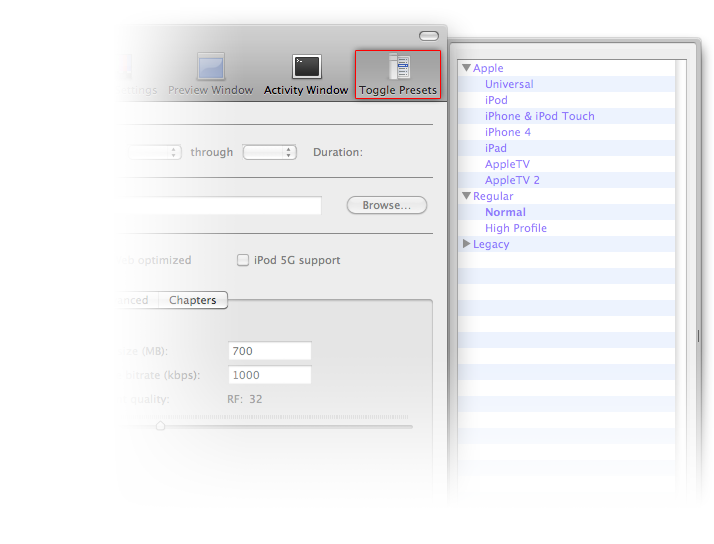
Use the NORMAL or APPLE TV presets for good quality files, the size should be between 500 to 1500 MB depending on the length of the movie.
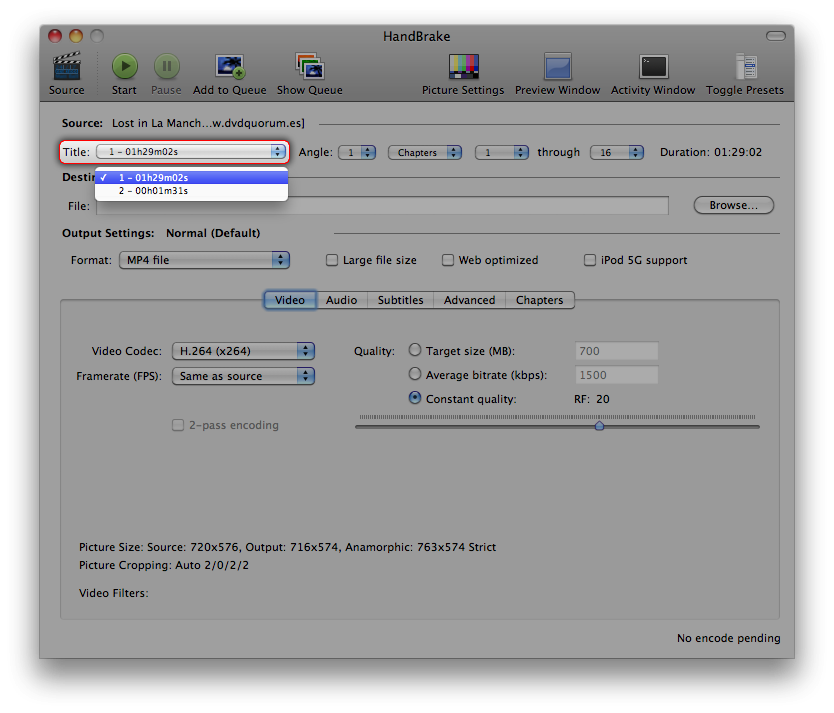
When in HandBrake, you can select which TITLE to transcode/convert, just select the longest one, as that will be the movie without all the trailers and extras.
__________________
This is not
|
|
|
|
0
|
|
|
#3 |
|
I think the "iPhone/iPod touch" preset does a nice enough job for smaller screens such as your car's overhead screen, and generates a file that's only 400 to 700 megabytes depending on movie length. Built-in auto entertainment screens that are 12" and smaller have low enough native resolution that any artifacts won't be readily noticed. Now, if you try to play the file on a 60" plasma, the pixelation will be definitely noticeable, especially on the text in the end credits.
I've HandBraked my daughter's entire DVD library for road trips using the iPhone/touch preset, but it also serves the same files to my 46" LCD TV in the family room via an tv 2. She doesn't seem to mind the slight degradation in quality, I only have to maintain one file per movie in the iTunes library, and no more scratched, chipped, broken, or lost discs! (There are a small handful of movies I've HandBraked in higher resolution, including WALL-E; in those cases I do maintain two files.)
__________________
dXTC A good bit of stuff: iMac 21.5" i3 · MBP 17" i5 · Two 5g iPod nanos · and more...geeve to me LAAAHRGE keess!
|
|
|
|
0
|
|
|
#4 |
|
Thanks for all the help. I don't exactly see any choices for "normal, apple tv, iphone/itouch" presets. Where should i be looking for that in handbrake? thanks again
|
|
|
|
0
|
|
|
#5 | |
|
Quote:
__________________
This is not
|
||
|
|
0
|
|
|
#6 |
|
Awesome, thanks for quick reply!
|
|
|
|
0
|
![]() |
|
«
Previous Thread
|
Next Thread
»
| Thread Tools | Search this Thread |
| Display Modes | |
|
|
Similar Threads
|
||||
| thread | Thread Starter | Forum | Replies | Last Post |
| Does anyone know of a free program (Intel) that will rip DVDs to .dvdmedia format? | alexreich | Apple TV and Home Theater | 8 | Feb 29, 2012 01:49 AM |
| Rip full DVD /w menu, subtitle, language etc. | Halvard | Mac Applications and Mac App Store | 6 | Feb 26, 2012 01:30 PM |
| Ripping DVD's | domcole | MacBook Air | 2 | Nov 18, 2010 03:28 PM |
| Ripping to DVD question | bobbyboulders | Mac Applications and Mac App Store | 7 | Jan 11, 2007 08:58 PM |
All times are GMT -5. The time now is 01:58 PM.


tv 2. She doesn't seem to mind the slight degradation in quality, I only have to maintain one file per movie in the iTunes library, and no more scratched, chipped, broken, or lost discs! (There are a small handful of movies I've HandBraked in higher resolution, including WALL-E; in those cases I do maintain two files.)


Hybrid Mode