
How do I get rid of these "look up" and "search with google" options when in other applications? They ****ing suck; if I want to look up something I would open chrome and search it.
I already went to settings - keyboard and unchecked all of the boxes but some (annoying) options are still there. The only options I want are cut, copy, and paste.
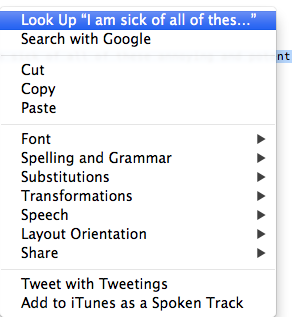
I'm sick of seeing them. Especially when copy and pasting login information. I don't want to search google for my login information.
Thanks for any and all help; I would be lost without you guys.
Love,
Ring
I already went to settings - keyboard and unchecked all of the boxes but some (annoying) options are still there. The only options I want are cut, copy, and paste.
I'm sick of seeing them. Especially when copy and pasting login information. I don't want to search google for my login information.
Thanks for any and all help; I would be lost without you guys.
Love,
Ring

