


Register FAQ / Rules Forum Spy Search Today's Posts Mark Forums Read
Go Back   MacRumors Forums > News and Article Discussion > MacRumors.com News Discussion

Reply
 
Thread Tools Search this Thread Display Modes
Old Jan 7, 2013, 06:19 PM   #1
MacRumors
macrumors bot
 
Join Date: Apr 2001
Intel Demos Future Ultrabook Designs, 4th Generation Core Processor Family


Intel demoed low power versions of its 4th Generation Intel Core Processor family (Haswell) that should make its way into Apple's next generation of MacBooks. The chips were first previewed in September 2011 and low power chips should be available in late 2013 or 2014, while desktop models are expected this spring.
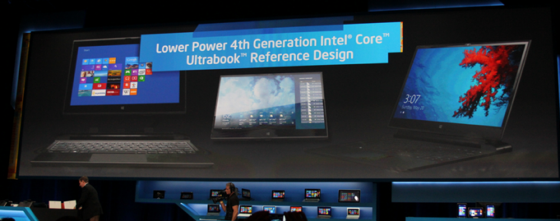
Image courtesy The Next Web
Intel also announced its intention to promote new Intel-powered touch-enabled Ultrabook devices using these new processors. Intel demonstrated one Ultrabook with a 13-hour battery life and said that these Ultrabooks with touch would start as low as $599, while units with a removable keyboard to convert to a tablet (like the Microsoft Surface) would start at around $799.

The company says the chips will provide a significant increase in both power and battery life and that devices using them should experience "true all-day battery life."
Quote:
The 4th generation Intel Core processor family enables true all-day battery life -- representing the most significant battery life capability improvement in Intel history. Skaugen disclosed that new systems are expected to deliver up to 9 hours of continuous battery life, freeing people from some of the wires and bulky power bricks typically toted around.

"The 4th generation Core processors are the first Intel chips built from the ground up with the Ultrabook in mind," Skaugen said. "We expect the tremendous advancements in lower-power Core processors, and the significant ramp of touch-based systems will lead to a significant new wave of convertible Ultrabooks and tablets that are thinner, lighter and, at the same time, have the performance required for more human-like interaction such as touch, voice and gesture controls."
Intel has previously said that power efficiency is one of its top priorities in chip design going forward. Versions of these chips will eventually make their way to the MacBook Air, iMac, and the MacBook Pro.

Article Link: Intel Demos Future Ultrabook Designs, 4th Generation Core Processor Family
MacRumors is offline   0 Reply With Quote
Old Jan 7, 2013, 06:21 PM   #2
daneoni
macrumors G4
 
daneoni's Avatar
 
Join Date: Mar 2006
Looking forward to the mainstream/performance chips. But do i have wrong that the chips will have a TDP of 37W, 47W and 57W i.e. 2W higher than the Bridge chips?
__________________
15" MBP Core i7 | 27" ACD | AEBS | 5G iPod | iPhone 5 | 3G Apple TV | iPad mini
daneoni is offline   2 Reply With Quote
Old Jan 7, 2013, 07:25 PM   #3
Mr. Retrofire
macrumors 68040
 
Mr. Retrofire's Avatar
 
Join Date: Mar 2010
Location: Inside a book.
Quote:
Originally Posted by daneoni View Post
Looking forward to the mainstream/performance chips. But do i have wrong that the chips will have a TDP of 37W, 47W and 57W i.e. 2W higher than the Bridge chips?
Even if that is true, better power management & more efficient transistors reduce the power requirements dramatically.
__________________
OS X 10.9 and iOS 7 delayed. Haswell Q3/Q4 2013.
--------------------
“Only the dead have seen the end of the war.”
-- Plato --
Mr. Retrofire is offline   0 Reply With Quote
Old Jan 7, 2013, 06:23 PM   #4
kbt1020
macrumors member
 
Join Date: Feb 2010
Sounds good, but I don't like the sound of LATE 2013 or 2014
__________________
One more thing...
kbt1020 is offline   14 Reply With Quote
Old Jan 7, 2013, 06:26 PM   #5
Pianoblack3
macrumors regular
 
Join Date: Jul 2012
Location: Scotland
Quote:
Originally Posted by kbt1020 View Post
Sounds good, but I don't like the sound of LATE 2013 or 2014
Got to hate getting into a new year, and companies are already rushing you to the end of it!
Pianoblack3 is offline   23 Reply With Quote
Old Jan 9, 2013, 05:32 AM   #6
shafie87
macrumors newbie
 
Join Date: Jan 2013
Quote:
Originally Posted by Pianoblack3 View Post
Got to hate getting into a new year, and companies are already rushing you to the end of it!
yes. people waits..and they announce another 'new' things next year..again wait..
shafie87 is offline   0 Reply With Quote
Old Jan 9, 2013, 05:23 PM   #7
Eidorian
macrumors Penryn
 
Eidorian's Avatar
 
Join Date: Mar 2005
Location: Indiana
Send a message via AIM to Eidorian
http://www.anandtech.com/show/6600/i...eforce-gt-650m

While Dirt gameplay video is not that impressive on an IGP/fGPU, Intel is showcasing the existence of GT3e with embedded DRAM!
__________________
Core i5 750 / 16 GB RAM / SSD / HD 7950 / Windows 8
MRoogle it!
Eidorian is offline   0 Reply With Quote
Old Jan 7, 2013, 06:27 PM   #8
wilycoder
macrumors 6502
 
Join Date: Aug 2008
"With the company putting its efforts behind touch-capable ultrabooks, there could be increased pressure on Apple to release a touch-enabled notebook -- something it has resisted thus far"

Just because MS takes a dump and gives us win8 means we all want gorilla arm syndrome and touch screen laptops? No.
wilycoder is offline   32 Reply With Quote
Old Jan 7, 2013, 06:34 PM   #9
ArtOfWarfare
macrumors 68040
 
ArtOfWarfare's Avatar
 
Join Date: Nov 2007
Send a message via Skype™ to ArtOfWarfare
Quote:
Originally Posted by wilycoder View Post
"With the company putting its efforts behind touch-capable ultrabooks, there could be increased pressure on Apple to release a touch-enabled notebook -- something it has resisted thus far"

Just because MS takes a dump and gives us win8 means we all want gorilla arm syndrome and touch screen laptops? No.
Have you actually used a laptop running Windows 8 or are you just making guesses about what the experience would entail? (I haven't even seen one running Windows 8 in person, yet.)
__________________
Battery Status - On the Mac App Store
The only app that'll estimate when your wireless devices will need their batteries changed.
Like it on Facebook!
ArtOfWarfare is offline   5 Reply With Quote
Old Jan 7, 2013, 06:36 PM   #10
SilentLoner
macrumors 6502a
 
SilentLoner's Avatar
 
Join Date: Dec 2007
Quote:
Originally Posted by ArtOfWarfare View Post
Have you actually used a laptop running Windows 8 or are you just making guesses about what the experience would entail? (I haven't even seen one running Windows 8 in person, yet.)
I have. My wife's laptop is a touch win 8 laptop. Lovely laptop but the touch just feels overkill.
SilentLoner is offline   3 Reply With Quote
Old Jan 7, 2013, 06:42 PM   #11
underkuerbis
macrumors newbie
 
Join Date: Mar 2011
Location: Bremen, Germany
Finally! I won't have to carry around my bulky power brick anymore! Wait a minute... *looking at my MBP power adapter*
underkuerbis is offline   3 Reply With Quote
Old Jan 7, 2013, 06:39 PM   #12
genovelle
macrumors 6502
 
Join Date: May 2008
Quote:
Originally Posted by ArtOfWarfare View Post
Have you actually used a laptop running Windows 8 or are you just making guesses about what the experience would entail? (I haven't even seen one running Windows 8 in person, yet.)
His comment doesn't require using win8. Using any touch screen that is upright creates the gorilla arm syndrome.
genovelle is offline   17 Reply With Quote
Old Jan 7, 2013, 10:32 PM   #13
a0me
macrumors 6502
 
Join Date: Oct 2006
Location: Tokyo, Japan
Quote:
Originally Posted by genovelle View Post
His comment doesn't require using win8. Using any touch screen that is upright creates the gorilla arm syndrome.
What most people who haven't used a Windows 8 touchscreen PC don't realize is that the touchscreen capabilities are a complement (not a replacement for) keyboard & mouse. Depending on what type of activity you do on your computer, there will be time when you'll almost never use the touchscreen (eg when your activity is focused on typing text) and others where you'll use it almost like a tablet (eg web browsing, AV editing, etc...).

The only real issue I have with these devices is that their screens quickly become a fingerprint ridden mess. I've come to accept this on my 3.5" screen, but on a 15" display, it's another story.

Hopefully someone will come up with a fingerprint-proof solution.

__________________
iMac 24"; MacBook Pro 15"; iPhone 4; iPod touch; tv
a0me is offline   0 Reply With Quote
Old Jan 7, 2013, 11:28 PM   #14
Virinprew
macrumors regular
 
Join Date: Apr 2012
Quote:
Originally Posted by genovelle View Post
His comment doesn't require using win8. Using any touch screen that is upright creates the gorilla arm syndrome.
Got to love that term "Gorilla arm syndrome".
Virinprew is offline   1 Reply With Quote
Old Jan 7, 2013, 06:40 PM   #15
Peace
macrumors P6
 
Peace's Avatar
 
Join Date: Apr 2005
Location: Space--The ONLY Frontier
Quote:
Originally Posted by ArtOfWarfare View Post
Have you actually used a laptop running Windows 8 or are you just making guesses about what the experience would entail? (I haven't even seen one running Windows 8 in person, yet.)
With all due respect you are doing the same thing the person you quoted is.

Irony.

But.

I don't like the idea of laptops with touch screens unless you can fold it over.
Peace is offline   1 Reply With Quote
Old Jan 7, 2013, 06:41 PM   #16
Aluminum213
macrumors 6502a
 
Join Date: Mar 2012
well looks like I'll be waiting till next for a new macbook then
__________________
2012 iMac 27" | i7 | 3.4Ghz | Fusion | 32GB RAM | 680MX 2010 MacBook Pro 13" iPhone 5 | Black | 32GB Time Capsule (4th Gen) TV (3rd Gen)
Aluminum213 is online now   1 Reply With Quote
Old Jan 7, 2013, 07:36 PM   #17
ArtOfWarfare
macrumors 68040
 
ArtOfWarfare's Avatar
 
Join Date: Nov 2007
Send a message via Skype™ to ArtOfWarfare
Quote:
Originally Posted by Peace View Post
With all due respect you are doing the same thing the person you quoted is.

Irony.
In what way? He says that he'll get gorilla arm from using a win8 laptop and I asked whether he has actually used a win8 laptop before... he stated something as fact and I asked a question regarding his statement.
__________________
Battery Status - On the Mac App Store
The only app that'll estimate when your wireless devices will need their batteries changed.
Like it on Facebook!
ArtOfWarfare is offline   2 Reply With Quote
Old Jan 7, 2013, 09:05 PM   #18
MartiNZ
macrumors 6502a
 
Join Date: Apr 2008
Location: Auckland, New Zealand
Quote:
Originally Posted by ArtOfWarfare View Post
Have you actually used a laptop running Windows 8 or are you just making guesses about what the experience would entail? (I haven't even seen one running Windows 8 in person, yet.)
For another view on this, I have barely used my Windows 8 laptop since I got my Surface RT, but when I have briefly done so, I have found to my surprise that I do try to touch the screen ... hell I even found myself doing that on an XP machine this morning. And yet it just doesn't happen on my SL MBP; I guess OS X really doesn't want to be touched, and as such I don't know how much longer laptops with it are going to be around. It's too hard to go back from touching.
MartiNZ is offline   1 Reply With Quote
Old Jan 7, 2013, 09:12 PM   #19
Peace
macrumors P6
 
Peace's Avatar
 
Join Date: Apr 2005
Location: Space--The ONLY Frontier
Quote:
Originally Posted by MartiNZ View Post
For another view on this, I have barely used my Windows 8 laptop since I got my Surface RT, but when I have briefly done so, I have found to my surprise that I do try to touch the screen ... hell I even found myself doing that on an XP machine this morning. And yet it just doesn't happen on my SL MBP; I guess OS X really doesn't want to be touched, and as such I don't know how much longer laptops with it are going to be around. It's too hard to go back from touching.
Take that metro GUI off the Win8 laptop and you probably wouldn't be wanting to touch it. Since the surface has the same GUI as Windows 8 that's probably why you tend to want to .

That's the difference between Apples view and Microsofts view.
Peace is offline   0 Reply With Quote
Old Jan 7, 2013, 07:36 PM   #20
Stridder44
macrumors 68040
 
Stridder44's Avatar
 
Join Date: Mar 2003
Location: California
Quote:
Originally Posted by wilycoder View Post
"With the company putting its efforts behind touch-capable ultrabooks, there could be increased pressure on Apple to release a touch-enabled notebook -- something it has resisted thus far"

Just because MS takes a dump and gives us win8 means we all want gorilla arm syndrome and touch screen laptops? No.

Amen. Ultrabooks? More like Ultra-boring.
__________________
"You have to know where the edge is if you want to live on it"

MacBook Pro 2.53GHz/320GB HDD/4GB RAM
iMac G4 800MHz/80GB HDD/512MB RAM, iPhone 4 16GB
Stridder44 is offline   3 Reply With Quote
Old Jan 7, 2013, 07:39 PM   #21
NorEaster
macrumors regular
 
Join Date: Feb 2012
Quote:
Originally Posted by wilycoder View Post
"With the company putting its efforts behind touch-capable ultrabooks, there could be increased pressure on Apple to release a touch-enabled notebook -- something it has resisted thus far"

Just because MS takes a dump and gives us win8 means we all want gorilla arm syndrome and touch screen laptops? No.
So do you think all of the iPad users out there that use the iPad to create media, type notes, and use productivity software with and without an attachable keyboard also have "gorilla arm syndrome"? Or are you just bashing MS because it's the "fun thing to do"?

Just curious...in your opinion, what exactly is the difference between using a touchscreen laptop and an iPad with a keyboard attachment?
NorEaster is offline   2 Reply With Quote
Old Jan 7, 2013, 07:47 PM   #22
TheralSadurns
macrumors member
 
Join Date: Jul 2010
Quote:
Originally Posted by NorEaster View Post
So do you think all of the iPad users out there that use the iPad to create media, type notes, and use productivity software with and without an attachable keyboard also have "gorilla arm syndrome"? Or are you just bashing MS because it's the "fun thing to do"?

Just curious...in your opinion, what exactly is the difference between using a touchscreen laptop and an iPad with a keyboard attachment?
I have to say... I used my iPad like that today. To take notes during a lecture using an Apple wireless keyboard to type faster.

Typing and all was really great. But having to touch the screen in this laptop-like configuration was not just awkward... it plain sucked!
Luckily with commands like CMD+B etc. I didn't have to touch the screen all that often!
When I did though... horrible horrible!
TheralSadurns is offline   2 Reply With Quote
Old Jan 7, 2013, 07:48 PM   #23
John.B
macrumors 68030
 
Join Date: Jan 2008
Location: Flyover Country
Quote:
Originally Posted by TheGenerous View Post
where's the 'Mac' rumor in the story?
This is now AndroidTrollingRumors, they just haven't gotten around to updating the URL.
__________________
Google Maps for iOS: "Directions may be inaccurate, incomplete, dangerous, or prohibited."
John.B is offline   5 Reply With Quote
Old Jan 7, 2013, 07:48 PM   #24
Krauser
macrumors regular
 
Join Date: Jan 2009
Quote:
Originally Posted by NorEaster View Post
So do you think all of the iPad users out there that use the iPad to create media, type notes, and use productivity software with and without an attachable keyboard also have "gorilla arm syndrome"? Or are you just bashing MS because it's the "fun thing to do"?

Just curious...in your opinion, what exactly is the difference between using a touchscreen laptop and an iPad with a keyboard attachment?
Not that I don't agree with you, but implying that using an iPad's touchscreen when propped up with the keyboard dock is actually comfortable, let alone the ideal way to use a touchscreen (as many manufacturers who are putting touchscreens on laptops seem to be implying), can't be a legitimate statement.

I've used many a Windows 8 laptop with touch screens and I just prefer mousing through the silly tile interface so I can get to the desktop and do things the right way. It's counterproductive and annoying. Unless you're holding it like a tablet or laying the screen flat on the ground, floating your hand and arm just to use a touchscreen on a laptop that already has a keyboard is not only unintuitive, but incredibly gimmicky.

Just my $.02.
Krauser is offline   6 Reply With Quote
Old Jan 7, 2013, 07:58 PM   #25
NorEaster
macrumors regular
 
Join Date: Feb 2012
Quote:
Originally Posted by Krauser View Post
Not that I don't agree with you, but implying that using an iPad's touchscreen when propped up with the keyboard dock is actually comfortable, let alone the ideal way to use a touchscreen (as many manufacturers who are putting touchscreens on laptops seem to be implying), can't be a legitimate statement.

I've used many a Windows 8 laptop with touch screens and I just prefer mousing through the silly tile interface so I can get to the desktop and do things the right way. It's counterproductive and annoying. Unless you're holding it like a tablet or laying the screen flat on the ground, floating your hand and arm just to use a touchscreen on a laptop that already has a keyboard is not only unintuitive, but incredibly gimmicky.

Just my $.02.
I agree... in my limited experience with touchscreen laptops, I found it awkward as well. I was just wondering with the OP was bashing win8 laptops when this use scenario existed well before win8 came out (ie, this scenario existed with the iPad + separate keyboard combo).
NorEaster is offline   0 Reply With Quote

Reply
MacRumors Forums > News and Article Discussion > MacRumors.com News Discussion

Thread Tools Search this Thread
Search this Thread:

Advanced Search
Display Modes

Posting Rules
You may not post new threads
You may not post replies
You may not post attachments
You may not edit your posts

BB code is On
Smilies are On
[IMG] code is On
HTML code is Off

Forum Jump


All times are GMT -5. The time now is 06:12 PM.

Mac Rumors | Mac | iPhone | iPhone Game Reviews | iPhone Apps

Mobile Version | Fixed | Fluid | Fluid HD
Powered by vBulletin® Version 3.8.6
Copyright ©2000 - 2013, Jelsoft Enterprises Ltd.

Privacy / DMCA contact / Affiliate and FTC Disclosure
Copyright 2002-2013, MacRumors.com, LLC