|
|
#1 |
|
GoodReader - How are you using it to sync files
I'm thinking *FTP* is the way to go...but I'd love to use GoodReader on my iPad to keep a organized *sync* of all folders and everything that is dumped to it. The bigger goal is to have it sync whether I'm in the office or out of the office.
This way, I can say, John, please drop XYZ of serverfolder X (in theory this would be the folder the FTP is serving) and then whether I'm on the LAN...or off the internal network, I can *sync* and see files for review. Just curious how ya'll are using GoodReader to Sync |
|
|
|
0
|
|
|
#2 |
|
Sounds like you should look into Dropbox.
|
|
|
|
0
|
|
|
#3 |
|
Not all work places are real keen on the idea of external hosting services for their confidential data thanks though.
I copy a set of my main share files to my iPad with goodreader sync client. Then, I've been pulling files as-needed, FTP, from that same share. Since I do fairly limited editing of data right now on here, I manually place back (FTP, email to myself and move at desktop or send to someone else) any files i do modify on an as-needed basis. I haven't had time to play with it long, but I was able to connect UNC to the goodreader folder when i first played with it. If I can get it to map a windows drive letter to the folder, should be able to use RichCopy to do some auto synchronization, but i just haven't played with it yet. |
|
|
|
0
|
|
|
#4 |
|
UNC is fine but to KISS....
The envisionment is LAN share \\server\folder share (FTP login would be married to this) This will serve as a easy folder where I can have any employee drop whatever, if not keep a organized folder structure. From there, from a usability standpoint, I would just *sync*. Bear in mind I do not have Ipad or Goodreader in hand, but this is my ~envisionment~ of how it would operate. IF I can make this work in the following scenario, this would make most sense from a day2day operating setup... |
|
|
|
0
|
|
|
#5 |
|
So is the goal to just have files sync, or to have them sync in real time?
The option I'm using right now is Goodreader on iPad + Chronosync on Mac. I have a sync file setup on my Mac, pointed at a folder on my drives and pointed at good reader when it's wirelessly mounted, and I'm able to bidirectionally sync between the two. Works great.
__________________
FLIQLO: The screensaver is ALWAYS FLIQLO |
|
|
|
0
|
|
|
#6 | |
|
Quote:
|
||
|
|
0
|
|
|
#7 |
|
It's a little wonky, but it works well for me.
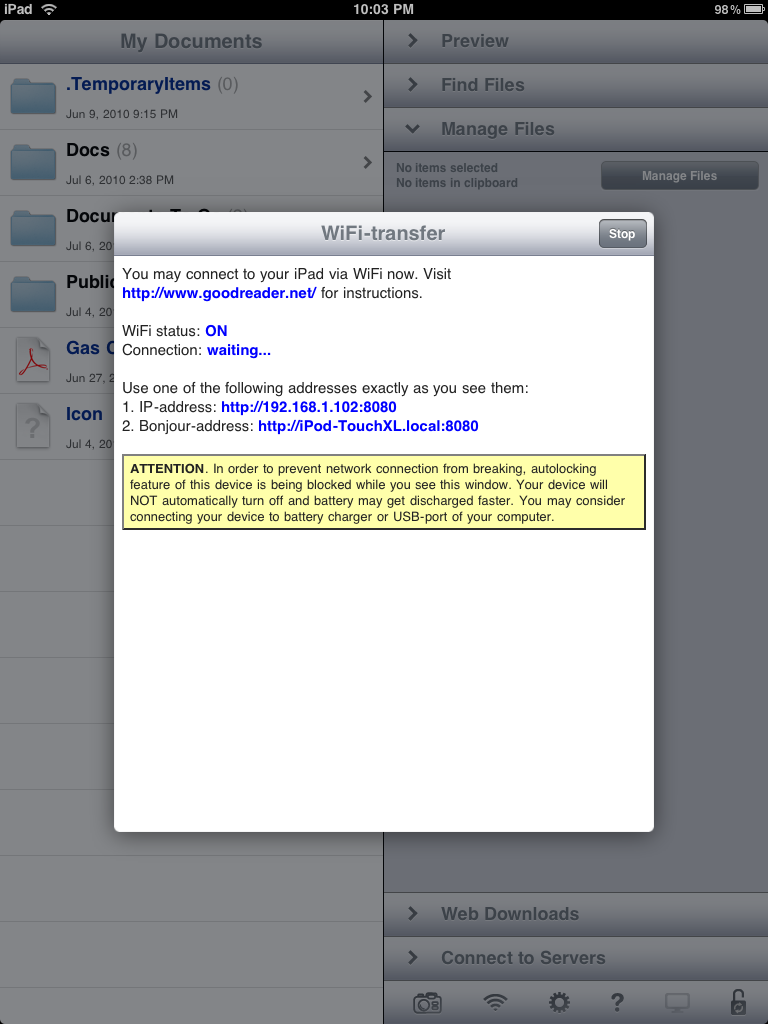
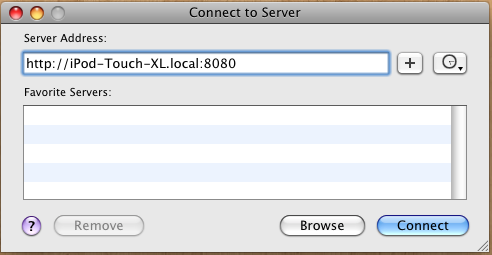
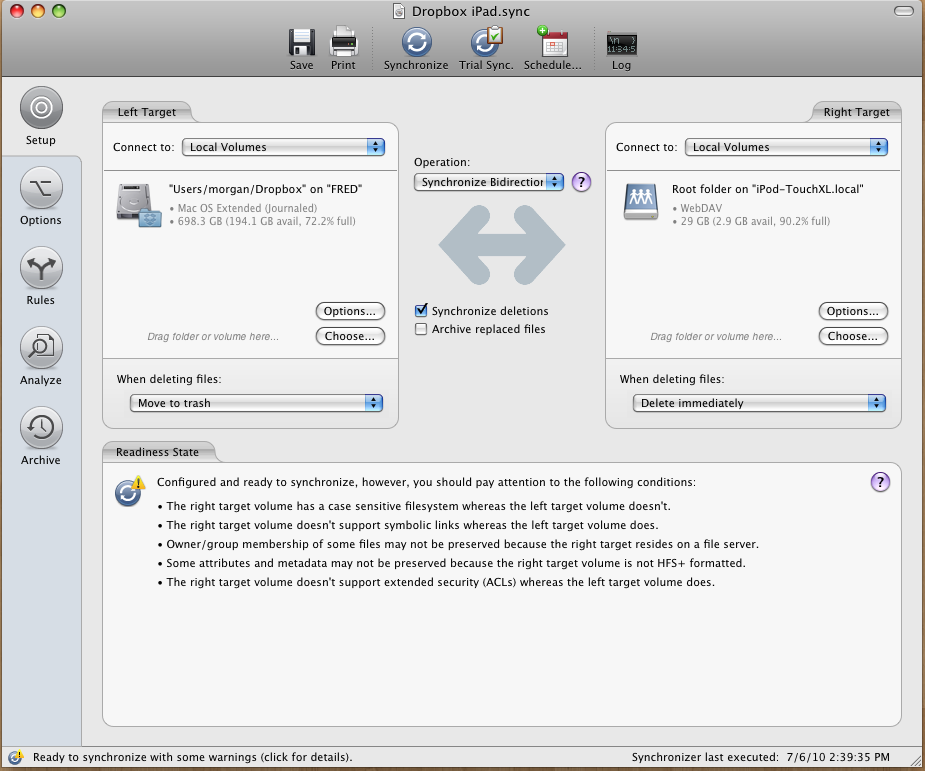
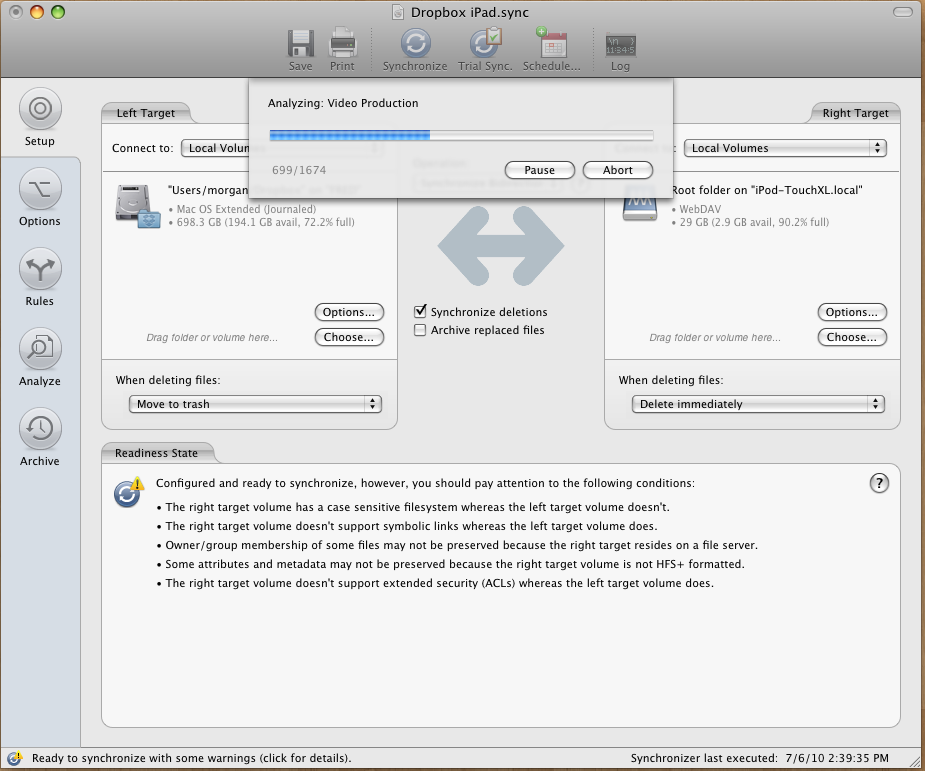
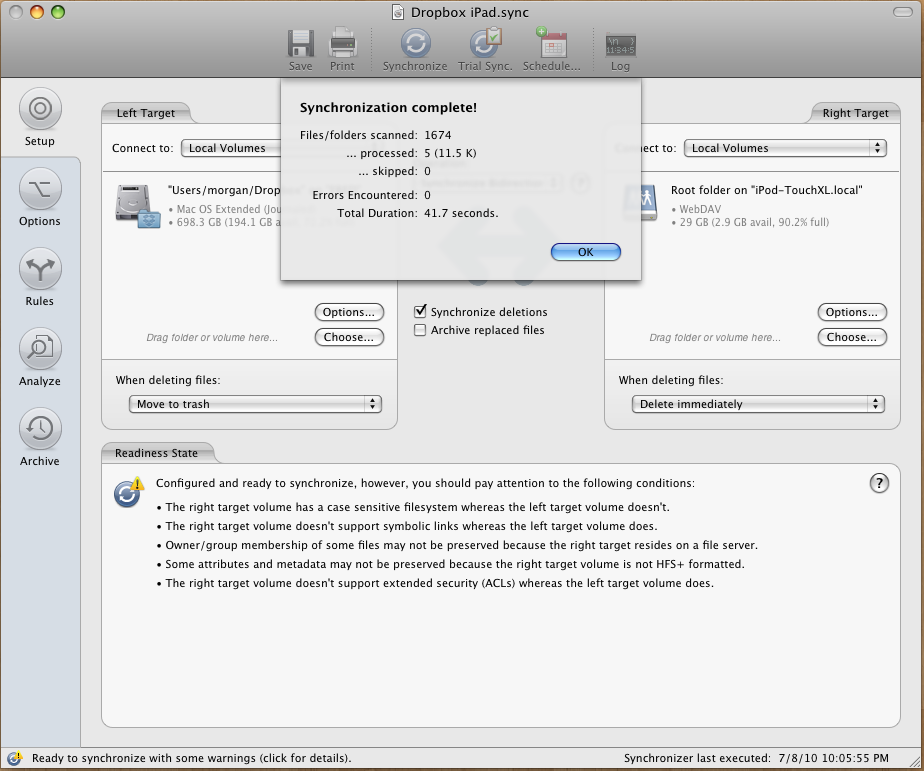
I basically do all this so I can have decent syncing between my Dropbox folder and my iPad. I realize there is a Dropbox app, but I hate that it doesn't store my files locally. In any case, first thing to do is hit the little Wifi icon in Goodreader which will bring this dialog up. ![]() The dialog tells you the information you'll need to connect your iPad as a wireless drive. You can do this from a browser as well, but I just mount mine. So you'll kit CMD K on your Mac, type in the address, and mount the iPad. ![]() You'll only have to do this mounting process on your Mac the first time, after that Chronosync will mount it for you as long as you have WiFi sharing mode on in Goodreader. The way I've got my syncing set up, I have my Dropbox folder on the left, this is considered the source. I have the syncing set up to be bidirectional, meaning changes will go both ways, and I've got the root folder of my iPad mounted as my target. ![]() Unfortunately Chronosync doesn't offer real time synchronization, and it isn't automated, you'll have to sit down at your Mac with your iPad and initiate the sync. Once you do so you'll see Chronosync going through and analyzing files, if it detects a change, it synchronizes the file, pretty straight forward. ![]() After it's done, it'll tell you how many files it has analyzed and the amount of data it processed. ![]() Though this method isn't ideal, it works well for me. Before I step out I do a quick synchronization, and once I get home I synchronize again.
__________________
FLIQLO: The screensaver is ALWAYS FLIQLO |
|
|
|
0
|
|
|
#8 |
|
I SSH into GoodReader's folder and transfer files that way... because with SSH, I can create/manage folders at the same time as file transfering. Works like a charm.
![]() (Note: this is just for file transfers.... I don't bother syncing)
__________________
Asylum-Photo(nsfw) iMac 24", 2.8ghz, OSX 10.7.5 - iPhone 4S, 16gb, iOS 6.1 JB - iPad Mini, 32gb, iOS 6.1 JB - Nexus 7, 16gb, Android 4.2
|
|
|
|
0
|
|
|
#9 |
|
Actually, it does! When you mark any file as a "favorite", Dropbox saves a local copy for offline access.
|
|
|
|
0
|
|
|
#10 |
|
To sync files, Dropbox is for me the way to go. It is a cross platform small client which "just works"
To get an extra 250 Mb of storage upon the free 2Gb click here |
|
|
|
0
|
|
|
#11 | |
|
Quote:
@Dorkington Why don't you just mount Goodreader's folder like a drive? Makes more sense than SSHing to me.
__________________
FLIQLO: The screensaver is ALWAYS FLIQLO |
||
|
|
0
|
|
|
#12 |
|
THANK YOU iCheddar for the extremely easy to follow walkthrough!
I may use this set up until Apple rolls out something robust that "just works" to auto sync folders bt a Mac and an iPad. For me (using the iPad as my primary computer as I do) the Mac-side storage would be just back up/emergency and/or iPad capacity overflow. But I really want this capability. |
|
|
|
0
|
|
|
#13 | |
|
Real Time Syncing
Quote:
Does anyone know of a feature to have it sync instantly and automatically as files are changed? (Push updates, if you will). I apologize if this was answered in another thread already, but I'm having a hard time finding an answer. Thanks! EDIT: I use Box.net on a Windows 7 PC to sync with GoodReader. Last edited by thefiction; Sep 13, 2011 at 01:01 PM. Reason: Additional Info |
||
|
|
0
|
|
|
#14 | ||
|
Quote:
Now (GoodReader version 3.8.0): Quote:
__________________
*** Is redesign innovation? The false burdens of Apple iOS *** | Apple User Art | Celebs with Macs | Mac: Power Users | Tech Humor |
|||
|
|
0
|
|
|
#15 |
|
|
0
|
|
|
#16 |
|
Help pls
Hi I am Using GoodReader to use the Remote Sync function..
This function works very well when i have to sync a complete folder ( root and sub folders ) How ever a MUCH NEEDED FUNCTION is SELECTIVE sync... Lets say I have a Root Folder with 10 Sub folders..( each sub folder with diff data ) How do i get this to work so that i can sync ONLY 1 SUB FOLDER to update the data instead of updating all the folder data as the data volume is very large EX Nav Logs ( ROOT FOLDER ) London ( sub Folder 1 ) Hongkong ( sub Folder 2 ) Milan ( sub Folder 3 ) Tokyo ( sub folder 4 ) Russia ( sub Folder 5 ) Now all the sub Folders have NEW DATA EVERY day but NOT all users would like to download ALL data in the sub folders If user 1 wants to sync data in Sub Folder 3,,, he should have an option to Sync only Sub Folder 3 and NOT ALL the sub folders Like wise if user 2 wants to Sync Sub Folder 5.. He should have this option Can you help me as how do i configure this in Remote Sync ( GoodReader Function ) using Sugar Sync cloud I desperately need this to work Regards Vikas |
|
|
|
0
|
![]() |
|
«
Previous Thread
|
Next Thread
»
| Thread Tools | Search this Thread |
| Display Modes | |
|
|
Similar Threads
|
||||
| thread | Thread Starter | Forum | Replies | Last Post |
| functional usage of stylus - how are you using it? | h00ligan | iPad | 11 | Jun 12, 2011 12:45 PM |
| MobileMe for Business Use - How do you use it? | MacFanUK | iCloud and Apple Services | 3 | May 14, 2010 01:44 PM |
| Thinking about Apple TV - How do you use it? | powerbook911 | Apple TV and Home Theater | 37 | Jul 30, 2007 06:50 PM |
| QuickSilver - How do you use it? | criana | Mac Applications and Mac App Store | 8 | Aug 16, 2004 11:06 AM |
| iTunes as a music classification system - How do YOU use it? | alex_ant | Mac Help/Tips | 13 | Apr 23, 2002 11:26 PM |
All times are GMT -5. The time now is 06:54 AM.


MacBook Pro Uni 13" - 2,53GHZ | 4GB of RAM
Linear Mode