I have a trial of the Adobe Suite on my computer that I want to fully delete. I know Adobe leaves residuals in your library and system files sometimes even after you go and delete it. Is there a Mac app that fully deletes programs?

Got a tip for us?
Let us know
Become a MacRumors Supporter for $50/year with no ads, ability to filter front page stories, and private forums.
Best way to FULLY DELETE a program?
- Thread starter jayeskreezy
- Start date
- Sort by reaction score
You are using an out of date browser. It may not display this or other websites correctly.
You should upgrade or use an alternative browser.
You should upgrade or use an alternative browser.

DaveAmbler
macrumors member

GGJstudios
macrumors Westmere
You can use apps like AppCleaner and AppZapper, but even they don't delete everything. They mostly only delete the .plist files that contain your user preferences for the apps, in case you ever want to reinstall them. These are very small text files and don't eat up much space anyway. What those apps leave behind are frequently much bigger files, typically located in the following folders:
/Users/username/Library/Application Support/
/Users/username/Library/Caches/
/Users/username/Library/Logs/
etc.
There is no app that removes everything. Even an app's uninstaller will leave things behind. If you want it all gone, manual deletion is the only way./Users/username/Library/Caches/
/Users/username/Library/Logs/
etc.

munkery
macrumors 68020
There is a new app called TrashMe that works like AppCleaner but has better detection rates.
http://trashme.jibapps.com/
http://trashme.jibapps.com/
GGJstudios
macrumors Westmere
There is a new app called TrashMe that works like AppCleaner but has better detection rates.
http://trashme.jibapps.com/
It's Snow Leopard only. Won't run on Leopard, so I can't test it. I'd be interested to see someone test to see if it detects things left by other apps, as described in my previous post.
I still recommend AppDelete as a more effective app than AppZapper or AppCleaner, but as GGJStudios suggested: if you really want every single bit of an app gone, your best bet is manually deleting it.
For that I suggest you download EasyFind, which will help you track all the files you want to look for...
http://www.macupdate.com/info.php/id/11076/easyfind
For that I suggest you download EasyFind, which will help you track all the files you want to look for...
http://www.macupdate.com/info.php/id/11076/easyfind
GGJstudios
macrumors Westmere
I just tested a few of these, using Skype.app as the file to be deleted.
AppZapper found 4 items
AppCleaner found 6 items
AppDelete found 9 items
EasyFind found 16 items
Finder found 17 items
AppZapper found 4 items
AppCleaner found 6 items
AppDelete found 9 items
EasyFind found 16 items
Finder found 17 items
munkery
macrumors 68020
Just for those interested, I compared AppDelete to TrashMe. They almost always found the same related items. The only exception was TrashMe found 1 more item related to NeoOffice.
How do you find so many items with Finder? Do you manually navigate various folders looking for files? Do you do a specific kind of search? I am unable to find that many using finder.
I do agree using finder is the most thorough way.
How do you find so many items with Finder? Do you manually navigate various folders looking for files? Do you do a specific kind of search? I am unable to find that many using finder.
I do agree using finder is the most thorough way.
GGJstudios
macrumors Westmere
Like this:How do you find so many items with Finder? Do you manually navigate various folders looking for files? Do you do a specific kind of search? I am unable to find that many using finder.
I do agree using finder is the most thorough way.
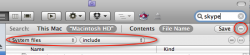
Like this:
Well, I tried the method you proposed and both Finder and EasyFind found 15 files related to Skype...
GGJstudios
macrumors Westmere
Well, I tried the method you proposed and both Finder and EasyFind found 15 files related to Skype...
It won't always be the same number of files for all users. Some users have crash reports or logs or other components that other users don't have.
It won't always be the same number of files for all users. Some users have crash reports or logs or other components that other users don't have.
I know.. the point I was trying to make is that apparently both will find the same amount of files.
GGJstudios
macrumors Westmere
I know.. the point I was trying to make is that apparently both will find the same amount of files.
... on some systems. They didn't find the same number on mine, but they were close enough. EasyFind works fine for those who don't want to use the built-in Finder functions.
circularforward
macrumors 6502
Just for those interested, I compared AppDelete to TrashMe. They almost always found the same related items. The only exception was TrashMe found 1 more item related to NeoOffice.
Thanks, I'll look into TrashMe now as it seems that it and AppDelete are better than AppZapper, which I had been using.
GGJstudios
macrumors Westmere
While this thread is a few months old, I'll add this for those who might find it in a search:
UPDATE for OS X 10.9 Mavericks and later: It has been discovered that on these versions of OS X, Finder may not produce search results from Library folders unless the search is started in the Library folder, even if System Files are included in the search criteria. You can either perform the following search once for your entire computer, then repeat it from the Library folders, or you may elect to use a Finder alternative app such as EasyFind until this issue is resolved.
To manually remove an application and all associated files:
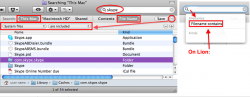
Click here to see a video demonstration of this procedure, created by simsaladimbamba.
Edit: In some rare instances, an app may create hidden files or folders. In such instances, follow steps 6 and 7, then repeat those steps to add another criteria, this time choosing "File visibility" > "Visible or Invisible". Then proceed with the remainder of the steps.
UPDATE for OS X 10.9 Mavericks and later: It has been discovered that on these versions of OS X, Finder may not produce search results from Library folders unless the search is started in the Library folder, even if System Files are included in the search criteria. You can either perform the following search once for your entire computer, then repeat it from the Library folders, or you may elect to use a Finder alternative app such as EasyFind until this issue is resolved.
To manually remove an application and all associated files:
- Launch Activity Monitor and change "My Processes" at the top to "All Processes", then make sure the app you want to remove is not running. If it is, quit the process before proceeding.
In some cases, when you try to quit a process, it automatically relaunches. If that is the case, you can check the following locations for apps that automatically launch on startup and delete any you don't need/want, including the app you want to delete:
- System Preferences > Users & Groups > yourusername > Login Items (SL and older: System Preferences > Accounts > yourusername > Login Items)
- In Finder, click Go > Go to Folder > /Library/LaunchAgents
- In Finder, click Go > Go to Folder > ~/Library/LaunchAgents
- In Finder, click Go > Go to Folder > /Library/StartupItems
Once you've removed the app from the startup list, restart your Mac and proceed with the uninstall process below.
- Launch Finder (see image below) and search your entire hard drive for the app name (hopefully unique, such as Skype)
- In Finder, select View > "as List", if you haven't already done so. Do not use "as Icons" for this procedure.
- You can narrow the search to specific folders or search your whole Mac, which is preferred
- In Snow Leopard and earlier, click "File Name" instead of "Contents" for better results.
In Lion and later, click the + button below the search term, then select "Name" "Contains" and enter the app name. (see image)
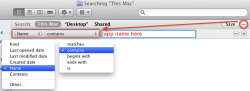
- Click the + button below the search term to add criteria, then click the search criteria drop-down and select "Other...", then "System files"
- Click the "aren't included" and change to "are included"
- Sort by name, kind, date, etc. to identify components of the app, such as folders, .plist files, cache files. etc.
- Delete all files and folders related to the app.
- Don't empty your Trash until you've determined that everything is working OK, in case you need to restore something you deleted by accident.
- A reboot might be necessary to completely remove some apps.
Click here to see a video demonstration of this procedure, created by simsaladimbamba.
Edit: In some rare instances, an app may create hidden files or folders. In such instances, follow steps 6 and 7, then repeat those steps to add another criteria, this time choosing "File visibility" > "Visible or Invisible". Then proceed with the remainder of the steps.
Last edited:


MasterHowl
macrumors 65816
http://www.freemacsoft.net/AppCleaner/
I use this application called App Cleaner... works like a dream!
I use this application called App Cleaner... works like a dream!
GGJstudios
macrumors Westmere
http://www.freemacsoft.net/AppCleaner/
I use this application called App Cleaner... works like a dream!
You didn't read the thread, did you? AppCleaner is not very effective.

-aggie-
macrumors P6
You didn't read the thread, did you? AppCleaner is not very effective.
Have you ever tried AppTrap?
GGJstudios
macrumors Westmere
Have you ever tried AppTrap?
I just tried it. What a pain! First, it leaves behind cache folders and other files, like the others, so it's not very thorough. Also, it doesn't list the files and locations first, so you can choose what to delete. It just moves the files it finds to the Trash. On Leopard, there's no way to know where the files came from, so if you change your mind, you can't easily put them back where they came from.
-aggie-
macrumors P6
I just tried it. What a pain! First, it leaves behind cache folders and other files, like the others, so it's not very thorough. Also, it doesn't list the files and locations first, so you can choose what to delete. It just moves the files it finds to the Trash. On Leopard, there's no way to know where the files came from, so if you change your mind, you can't easily put them back where they came from.
I didn't think anything of it when I first installed it. After seeing this thread, I may want to delete that app and not use any of the app cleaners.
GGJstudios
macrumors Westmere
I didn't think anything of it when I first installed it. After seeing this thread, I may want to delete that app and not use any of the app cleaners.
That's what I've done. I've tested most of them and have come to the conclusion that the manual method (post #16) is most effective.
Cool Runnings
macrumors regular
What about the uninstaller that comes bundled with the software? Most bigger companies software like Adobe CS and MS Office comes with an uninstaller. Even smaller programs have this sometimes.
Check in the .dmg of the program or install-cd/dvd.
Check in the .dmg of the program or install-cd/dvd.
GGJstudios
macrumors Westmere
Many times those uninstall apps leave behind .plist files and cache files. Their reasoning is that if you later decide to reinstall the app, your preferences will still be there. Manual deletion still has an advantage over uninstall apps, as long as you can identify all the files/folders that were installed.What about the uninstaller that comes bundled with the software? Most bigger companies software like Adobe CS and MS Office comes with an uninstaller. Even smaller programs have this sometimes.
Check in the .dmg of the program or install-cd/dvd.

Ifti
macrumors 601
While this thread is a few months old, I'll add this for those who might find it in a search:
To manually remove an application and all associated files:
- Launch Finder and search for the app name (hopefully unique, such as Skype)
- You can narrow the search to specific folders or search your whole Mac
- Searching "File Name" vs "Contents" usually provides better results.
- Click the + button below the search term to add criteria
- Click the "Album" drop-down and select "System files"
- Click the "Don't include" and change to "include"
- Sort by name, kind, date, etc. to identify components of the app, such as folders, .plist files, cache files. etc.
- Delete all files and folders related to the app.
- Don't empty your Trash until you've determined that everything is working OK, in case you need to restore something you deleted by accident.
- A reboot might be necessary to completely remove some apps.

Thank you very much for this.
Ive been using AppDelete and thinking Ive been doing a good job in keeping my system clean!
Is there any way to search for orphaned files etc from apps I may have previously removed with AppDelete?