|
|
#1 |
|
Mission Control - Still A Failure
I'm still running OS X 10.6.8 only because of Expose as it was done right the first time. I've tried Lion and Mountain Lion and both fail miserably due to the fact that multiple windows within a single application show up grouped and Apple has YET to provide users the option in System Preferences to 'ungroup' them. The problems with Mission Control are as follows;
Forced Grouping of Window Applications: - Needlessly grouped. If many windows are stacked, it is difficult to multitask or find a specific document. - Fanning out the grouped windows only works with a trackpad and only reveals a few extra pixels of the windows behind the top-most window. - Specifically showing only single application windows requires an extra click but does not make dragging and dropping objects from other documents or applications possible. The Dashboard and Spaces Thumbnails: - No reason to show any thumbnails if only one desktop is present and dashboard is not used as it takes up space. - Needs an option to disable extra desktops as many people dont use ‘spaces’ The Grey Border: - No reason to squeeze the desktop background into a smaller image while adding a grey tiled pattern. This constrains all thumbnails of open windows into a smaller area thereby making the thumbnails smaller. - The grey border is redundant and only adds more need for processing power to animate the entire process of Mission Control activation. Wallpaper should be fullscreen, just as it was in Snow Leopard’s Expose with a vignette. Click on the image to see which area I'm pointing out; ![]() -------------------------------------------------------- Is Apple ever going to acknowledge this problem? It's been 3 revisions since Lion, a release of Mountain Lion and there is absolutely no sign of support for this from the OS X developers. This whole debacle could be *easily* solved if Apple pulled its head out of its a$$ and eased up on not giving users options. By this I mean, it'd be a simple checkmark field in System Preferences to let the user customize Mission Control to their liking, or AT LEAST give the option to turn off grouping. Last edited by wikus; Mar 19, 2012 at 01:34 PM. |
|
|
|
18
|
|
|
#2 |
|
I felt the same way at first. I had to get my MBP replaced by apple and the new one came with Lion. At first I absolutely hated mission control, but it's actually not that bad.
I keep mail, cal, itunes open in full screen so i can easily access them with a 3 finger swipe and they don't take up room in mission control (other than their "spaces" at the top) Only problem I really had at that point was that window groupings would hide the windows i needed, but once I figured out how to expand the group it's honestly not really that bad. Nice to have all of my windows organized, and now that I can expand the group, I haven't had a problem determining which window in the group is the one I want to use. I would admit that without multi-touch gestures though, Mission Control would suck, so if you use a standard mouse stay on Snow Leopard. Hopefully apple will find a way to fix this, but I doubt it as they are adding more gestures like Notifications in Mountain Lion. An option to at least NOT group windows by application though would be really awesome. Wonder if there are any tweaks out there that do that. |
|
|
|
2
|
|
|
#3 |
|
I have an iMac with a touchpad and BetterTouchTools in SL, and I still find Spaces/Expose better than Mission Control. With SL, I can select any window in any space with at most 3 gestures, Spaces-Expose-select window.
In Lion, it would take possibly 5 gestures, MC-select space-MC-ungroup app's windows-select window. Lion:5 Gestures SL:3 Gestures To me with or without a touchpad, SL's Spaces/Expose works better than Lion's or ML's Mission Control. |
|
|
|
7
|
|
|
#4 | |
|
Quote:
I like Mission Control and have found it extremely useful. I won't spend too much time outlining my thoughts, but here are some vignettes.
|
||
|
|
11
|
|
|
#5 |
|
I hate Mission Control too, and all I can say is that Exposé and Spaces will be missed, and there is nothing we can do at the moment. I think Apple's strategy is to remove useful features and introduce eye-candy features that make sense to the "typical computer user" which is generally old people and people who don't care about how they use their computer. While they don't allow anything useful to be done, they allow less techy people to do things they wouldn't want to do in the first place.
__________________
Sent from my iPod Shuffle |
|
|
|
2
|
|
|
#6 |
|
No their goal is to help ease the way from iPad/iPhone to mac.
Perhaps you didn't realize that apple sells way more iDevices than Macs. A lot of those customers are new to computers/unfamiliar with how they work. Apple made the iPad very simple to use and understand. This is why everyone from per-schoolers to Grandparents are suddenly hopping on the bandwagon. By making the transition from iOS to OSX simpler and more similar, apple is allowing customers who have no idea how to use a computer to purchase a mac and be some what familiar with it. Some of us may not like the changes as "power" users, but it kind of needs to be done. Can't tell you how many people couldn't even install an app on their computer. How many people don't know how to "close" an app (no it's not the red button on the top left). How many people don't understand file directories, how many people couldn't format a hard drive, burn a disc, know what RAM is, etc. Yeah, a lot of people are going to be upset that computers and OS's are getting "dumber" but you have to realize, the tech savvy are in the minority. There are a lot more people unfamiliar with computers than those of us who need these "power" features. |
|
|
|
0
|
|
|
#7 | |
|
Quote:
In Mission Control, go ahead and stack those damn windows by app, but at least let us get a proper App Exposé when we 2-finger swipe up on a stack. Maybe allow us to see the current desktop in CONTEXT, with the other desktops situated to the right or to the left of the current desktop, instead of being at the top with no spacial relationship to the current one. When clicking on a dock icon that refers to an app that is more than 1 desktop away, in the animation, show us all the desktops in between. I hate seeing a desktop fly in from the left, and then swiping back to the right only to find that I'm not where I was, because I'm actually 5 desktops from where I was, but the animation didn't feel like I travelled 5 desktops to the left. It's just stupid! Something like this would be pretty cool: This would allow you to feel where the hell you are relative to other desktops.
__________________
Sent from my iPod Shuffle |
||
|
|
-11
|
|
|
#8 | |
|
Quote:
|
||
|
|
2
|
|
|
#9 |
|
Lion: 5 seconds
SL: 10 seconds. Wait what ? SL requires a ton more visual scanning to actually find something. The more windows, the longer it takes. With Lion, you'll use a few more gestures, but in the end you'll save on time it takes to visually scan the screen as the Expose'd windows will be much more limited. Mission Control/CMD-Tab/Dock clicks to select your application, then App Expose to select your window. More keystrokes/gestures, less time spent staring at a screen looking for a particular window. Your you can simply App Expose and then use the dock to switch applications in rapid succession if you're not sure which App has the window you want. Again, much faster than "Look ma', 100 windows...". The common error and bad mindset is thinking the actual Mission Control window with "grouped windows" is Expose. It's not. It's not intended to be. Expose is still there, it's a different gesture. Mission Control is Spaces/CMD-Tab. It's an application switcher. You're not supposed to go straight to your window from there, even though you can.
__________________
"What you leave behind is not what is engraved in stone monuments, but what is woven into the lives of others." -- Pericles |
|
|
|
6
|
|
|
#10 | |
|
Quote:
What you can do is use CMD-tab to switch apps, and while holding down CMD and tab, press the up or down arrows. This will get you into the expose of the selected app, which I find very convenient. |
||
|
|
0
|
|
|
#11 | |
|
Quote:
It takes you 10 seconds to find a window in 10.5/10.6 Expose? You must not be a visual person. I can scan through 40 - 60 windows in less than a second using a 10.5 style Expose/Spaces. Most of the time the animation takes longer than the scanning. Mission Control is great for non-visual people. It sucks ass for those of us that have good visual pattern recognition. Based upon the downgrade poll: http://forums.macrumors.com/showthread.php?t=1202064 and the fact that one of the major complaints in that thread was Mission Control, I would say that a lot of people (~1/3) prefer to scan for content then have it play hide-n-seek. Also, Expose is not still there. App Expose is, but that takes you out of Mission Control and now you can no longer drag you windows around and have to invoke Mission Control a second time. That is 6 animations just to move a Window. Heaven help you if you have to move a lot of windows. ****** design is ****** design even if some people find it acceptable. |
||
|
|
-2
|
|
|
#12 |
|
|
0
|
|
|
#13 |
|
It's a really sad thing that it is never going to change, even if we protest in front of Apple Stores. And the thing is, many Mac newbies (Windows converts via iOS) actually like it. So it is good for Apple. All we can hope that some brilliant developer "fixes" it for us.
__________________
. |
|
|
|
0
|
|
|
#14 | ||
|
Quote:
![]() Quote:
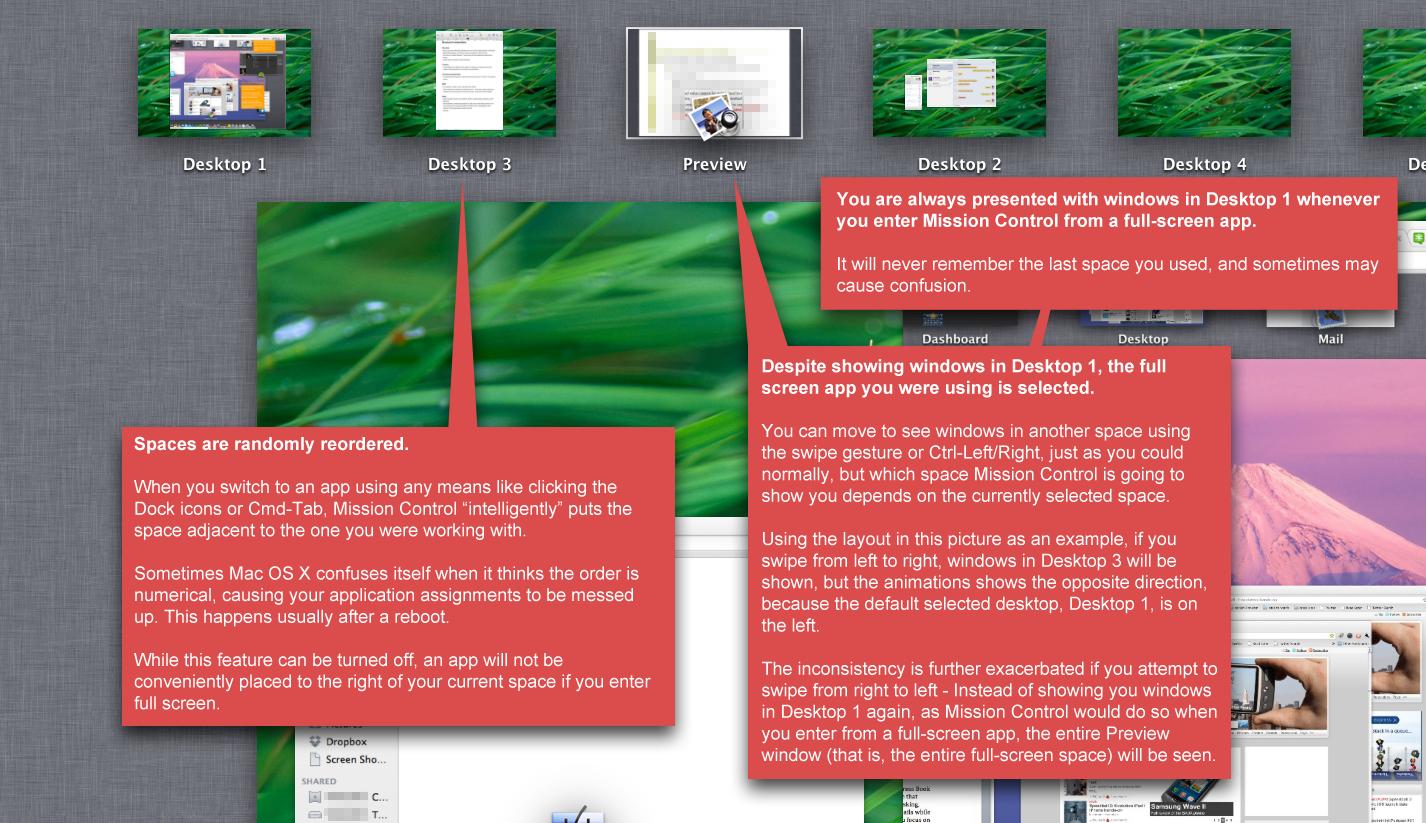
---------- You do know that your "Spaces are automatically reordered" point is a configuration option you can enable/disable ? Just disable it if it annoys it. It sure annoyed me and as soon as I found out it could be disabled, I disabled it.
__________________
"What you leave behind is not what is engraved in stone monuments, but what is woven into the lives of others." -- Pericles |
|||
|
|
5
|
|
|
#15 | |
|
Quote:
My workflow is not simple and there is no reasonable way to have Windows "open in the proper spot to begin with" and where they should be changes based upon what I'm doing from moment to moment. Images go from collection/sorting to Photoshop for measurement where the data is transferred to an excel sheet and then a custom program for analysis, next graphs are made and combined with said images in Adobe Indesign to form Figures that are then incorporated into papers. This process is often done in parallel with writing papers as I identify weak points in my discussion/conclusions. Not everything people do can be wrapped up in a nice little bow and stacked neatly in the corner. Mission Control works for you because your work flow is suitable for it (which is great because now you have something you like). I moved to OSX in Panther because Expose was perfect for my workflow. Mission Control is in no way, shape or form suitable for my workflow and negatively impacts my work as now I have to break my concentration to hunt-and-peck for things instead of just swiping to a corner, scanning for half a second and moving on my way. Hopefully ReSpaceApp will be fully functional soon. |
||
|
|
0
|
|
|
#16 |
|
I disabled it but there is still a minor annoyance - When you enter full screen, spaces are created on the far right.
|
|
|
|
0
|
|
|
#17 | |
|
Quote:
The reason I say Mission Control is less flexible than Spaces + Exposé is because you can't do these:
And of course, much more. Of course, most people would just say "Why would you want to do that? Just switch to another space, and drag the window from there." Yes, of course, you could. You could also use Windows, which doesn't offer useable window management (despite its name). After all, the vast majority of people are fine with it!
__________________
Sent from my iPod Shuffle |
||
|
|
0
|
|
|
#18 | |
|
Quote:
I work in photoshop, illustrator, lightroom and sometimes Indesign all at once where all interact with eachother. The inability to work between multiple documents per application and not being able to drag/drop objects with hitting a hot corner is *the main reason* why I won't bother with Lion or Mountain Lion. |
||
|
|
1
|
|
|
#19 | |
|
Quote:
For example, my mom had an imac and a windows notebook. Now she has an ipad and ... a windows notebook. She gave the mac to my sister... and her boyfriend... a gamer, wants to sell it for a windows machine. I think I convinced him to keep it by telling him he could run windows on it. He didn't know that... and honestly I think he is still skeptical (I don't live near them to show him how to do it). |
||
|
|
0
|
|
|
#20 | |
|
Quote:
---------- An often misused word. Workflow is about daisy chaining tasks together, not about the keyboard/mouse/trackpad short cuts to do so. In programming, a typical workflow would be : - checkout source from the repository - open a file in an editor and add/modify code to it. - run it through its build environnement to rebuild a binary for debugging - run it through the debugger to make sure it's behaving as it should - repeat 1 to 3 as many times as it takes to solve Bug Report or Change Request - commit source modifications back to the repository, tagging the new release along the way - run it through its build environnement to produce a release build - distribute the build to Q&A That's a workflow. That workflow can be accomplished on any number of platforms, for any number of applications for any projects. Listening to some people here, a workflow sounds like it's : - cmd-tab to application - open file - All Windows Expose to find the duck picture - All Windows Expose to find the flower picture - Hit spaces to move some windows around your desktops Where do you guys actually get any Work done in these Workflows ? I can get my work done on OS X, Windows, Linux, no matter what GUI/Editor/shortcuts/input devices I have. That's because my workflow is not something that is tied to UI candy for switching applications and moving windows around. My workflow is a flow of tasks. These tasks might differ in how they are accomplished, but the tasks themselves remain the same. I just adjust to the platform instead of trying to adjust the platform to myself.
__________________
"What you leave behind is not what is engraved in stone monuments, but what is woven into the lives of others." -- Pericles |
||
|
|
11
|
|
|
#21 | |
|
Quote:
The behavior of mission control when coming from a fullscreen app is a bit confusing. I never noticed that before. I've been using Ctrl+Arrows for navigating spaces on SL, now I'm swiping, which I actually prefer. Expose was a bit simpler in the sense that now I have to think whether swiping up or down will bring me the view I want to see, while before there was only the option to show all open windows. I find it amusing when people describe MC as failure, problem, or with other strong words. It's different, and one can not like it, but that doesn't make it a problem/failure. More choices would be great, but if I have learned something then it is not to look for choice in Apple products. |
||
|
|
1
|
|
|
#22 | |
|
Quote:
I can't tell you how many people don't understand how to install programs on a mac. I see people with macs who have 20dmg's mounted on their desktop and none of the apps are actually installed on their machine. Can't tell you how many people think the red button closes apps because that's what you do in windows. I'm sorry, but all of the grandparents using iPads... NOT tech savvy. All of the preschoolers and young children getting iPads... not tech savvy. You can't honestly think that of the 100+ million iDevices sold that the majority of those people are "tech savvy" And idk how you can claim they aren't meeting their goals... their goals are to sell iDevices and in return get more customers to buy mac products. Seems to be working pretty well to me. Last edited by xxBURT0Nxx; Mar 21, 2012 at 12:24 AM. |
||
|
|
0
|
|
|
#23 | |
|
Quote:
The majority of the people using Mac OS have been with apple for years, before the ipod, before apple was "cool". Apple's market share (being still under 10% or about that) hasn't gained that significantly since that time. The people who have been with apple all that time, who are probably on average more tech savy (not saying their computer scientists or geniuses) those are the people who are being alienated. The people who bought apple because they are creative professionals, and thats what you use(d). Most companies even had Macs for those departments because that was the case. I agree that people are buying macs now because they are "cool". Which brings up a post I made in another forum. Apple won't always be "cool", and then they are going to wish they didn't alienate the pros who supported them all that time... |
||
|
|
-2
|
|
|
#24 |
|
Heck, most of MacRumors user base isn't tech savvy. Most of them are Image editors/Video editors/Photographers who have no clue how a computer actually works, what a OS actually is (they think the GUI layer is the OS, they have no idea of everything else that sits between those pixels and the underlying hardware) or even what a Profession is (thinking Image editors/Video editors/Photographers are the only professionals out there).
__________________
"What you leave behind is not what is engraved in stone monuments, but what is woven into the lives of others." -- Pericles |
|
|
|
0
|
|
|
#25 | ||
|
Quote:
Workflow includes how the work gets done. If you had to go into Terminal and type in a 15 pin identifier that was randomized and unique every time you wanted to send an e-mail it would interrupt the flow of you work whenever you had to send an e-mail. Would e-mails get sent? Sure, but it would be a poor design and worthy of criticism. Mission Control adds additional steps and complexity to what was a seamless experience. Mission Control has severe deficiencies but you never address those deficiencies in your defense of Mission Control, you just say that it doesn't matter because the end result is the same. That is like saying eating at McDonalds is the same as eating at Farm Burger because you aren't hungry after you've eaten. Process Matters, Quality Matters, Experience Matters, Details Matter. Read the Steve Jobs book, you will see a person whose entire existence was consumed by those principles. Windows != OSX != Linux != MS-DOS just because you managed to get your work done. ---------- Quote:
Another need is that the sophisticated workflows of Image Editors, Photographers, etc. be enabled without knowing the details of the underlying OS. It should "just work" |
|||
|
|
1
|
![]() |
|
«
Previous Thread
|
Next Thread
»
| Thread Tools | Search this Thread |
| Display Modes | |
|
|
Similar Threads
|
||||
| thread | Thread Starter | Forum | Replies | Last Post |
| How to Spread stacks in Mission Control | nick123222 | Mac OS X 10.7 Lion | 13 | Jan 21, 2012 11:29 AM |
| Mac OS Lion - screen shakes | itai | Mac Applications and Mac App Store | 1 | Aug 26, 2011 12:09 PM |
| Mission control - any chance of a functionality patch? | whitedragon101 | Mac OS X 10.7 Lion | 11 | Jul 27, 2011 08:27 PM |
| Mission control, How to sort full screen apps | hyungsup | Mac OS X 10.7 Lion | 2 | Jul 27, 2011 03:22 PM |
| Mission Control - no top row | gwaagg | Mac OS X 10.7 Lion | 0 | Jul 27, 2011 03:32 AM |
All times are GMT -5. The time now is 01:12 PM.


Linear Mode