|
|
#1 |
|
Bonjour not working in Wifi/Ethernet
Hi,
I have a MacBook Pro with Mountain Lion installed, a Linux PC that serves as file server (using Netatalk), and a D-Link DIR-300 router. When all devices are connected via Ethernet, everything works fine. Hoverver, when i connect MacBook using WiFi, is cannot detect any services hosted by Linux box. I can connect by manually entering IP address in "Connect to server" window, though. The moment I plug ethernet cable, remote shares instantly show in Finder. However connected, both devices are in same network, ping each other etc. Can anyone help? |
|
|
|
0
|
|
|
#2 | |
|
Quote:
|
||
|
|
0
|
|
|
#3 |
|
Bonjour only works between all machines on the same subnet.
WiFi can be on a different IP subnet range from a wired connection, leaving your WiFi Mac in a different subnet and thus unable to "see" the subnet where Bonjour is. Code:
Maybe Ethernet is: 192.168.1.xxx Maybe WiFi is: 192.168.2.xxx
__________________
Obama is a true statesman whose experience as a state senator, half-term US Senator & guest lecturer in a Constitutional Law class has fully prepared him to take control of our nuclear arsenal.-Me |
|
|
|
0
|
|
|
#4 | |
|
Quote:
|
||
|
|
0
|
|
|
#5 |
|
OP did say he could communicate directly through IP address, so it would have to be something more like blocking port 5353.
|
|
|
|
0
|
|
|
#6 |
|
|
0
|
|
|
#7 |
|
Ok plausible then. Any particular router/brand that is doing this?
|
|
|
|
0
|
|
|
#8 |
|
you probably have multicast on WiFi disabled
|
|
|
|
0
|
|
|
#9 | |
|
Quote:
Code:
en0: flags=8863<UP,BROADCAST,SMART,RUNNING,SIMPLEX,MULTICAST> mtu 1500 options=2b<RXCSUM,TXCSUM,VLAN_HWTAGGING,TSO4> ether xx:xx:xx:xx:xx:xx inet 192.168.0.130 netmask 0xffffff00 broadcast 192.168.0.255 media: autoselect (100baseTX <full-duplex,flow-control>) status: active en1: flags=8863<UP,BROADCAST,SMART,RUNNING,SIMPLEX,MULTICAST> mtu 1500 ether xx:xx:xx:xx:xx:xx inet 192.168.0.102 netmask 0xffffff00 broadcast 192.168.0.255 media: autoselect status: active |
||
|
|
0
|
|
|
#10 |
|
and as I said, your "router" is probably blocking multicast to/from WiFi
with no multicast, there is no mDNS, the m in mDNS being multicast... with no mDNS there is no Bonjour... |
|
|
|
0
|
|
|
#11 |
|
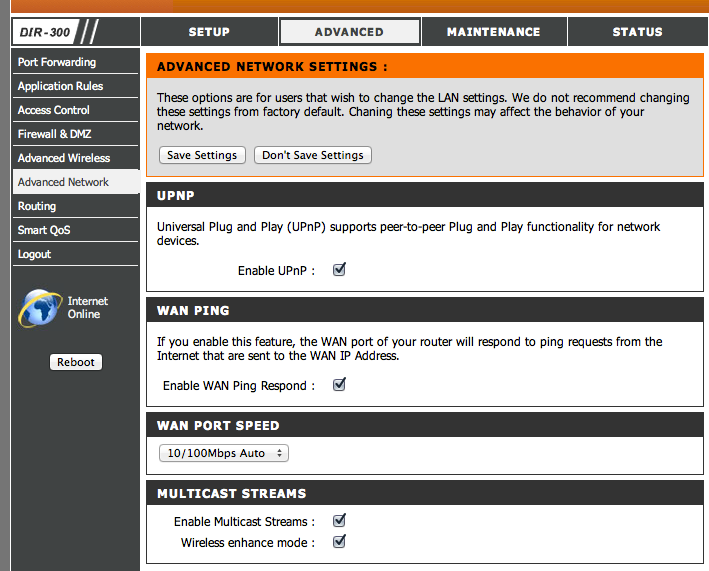
I have checked my router (DLink DIR-300) configuration, and in "Advanced Network" screen there is "Multicast Streams" section, with two options checked: "Enable Multicast Streams" and "Wireless enhance mode". Strange.
EDIT:
Last edited by el.pescado; Oct 15, 2012 at 04:10 PM. |
|
|
|
0
|
|
|
#12 |
|
you might want to try using Wireshark to see if you can see the mDNS packets
|
|
|
|
0
|
|
|
#13 |
|
Hi,
I'm sorry for bumping this old(ish) thread, but I'm having the exact same problem with my MacBook Pro running Mountain Lion, only with the wired connection, not the wireless: when connected through WiFi all network devices show immediately in Finder, when connected through Ethernet cable, nothing is shown. All devices are on the same subnetwork (192.168.1.x) and I've ruled out router configuration as the problem as a PPC Mac Mini running Leopard connected to the exact same Ethernet port in the router works as expected. Were you able to solve your problem? Any other suggestions? Ethernet device configuration? Thank you for any help you can provide |
|
|
|
0
|
![]() |
|
«
Previous Thread
|
Next Thread
»
| Thread Tools | Search this Thread |
| Display Modes | |
|
|
All times are GMT -5. The time now is 08:38 AM.


Linear Mode