|
|||||||
![]() |
|
|
Thread Tools | Search this Thread | Display Modes |
|
|
#1 |
|
major hassles with illustrator cs5 reflect tool doing seriously weird stuff...
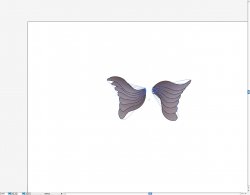
hi all .....first time here.....don't know if anyone will be able to help....I am running illustrator cs 5 in an osx snow leopard. I am trying to design some wings....do one then reflect/ copy to get the other side matching....simple yeah.....not so....my reflect seems to be giving me a back view so to speak of the object.........its like it kindly turns it the wing over and gives me a completely different perspective....very clever but not helpful........the same exercise works fine on cs 3 so I don't know if there is a preference I have missed but have spent hours looking at all the options to no avail. I have skype so if anyone can help and wants to chat rather than type my name is josephinestar....thanks all.......Jo

|
|
|
|
0
|
|
|
#2 |
|
Hi J
Can you please put up a screenshot of the resulting reflection? I suspect its how you have your anchor points arranged, but wont be able to tell until ive seen it. thanks Nath |
|
|
|
0
|
|
|
#3 |
|
There are usually multiple ways to achieve the same effect.
Duplicate your wing. Make sure the duplicated wing is selected. Go to the pulldown menu Window > Transform This opens the Transform palette. Click in the palette's upper right-hand corner to access the options. Select Flip Horizontal. |
|
|
|
0
|
|
|
#4 |
|
Reflect tool seems to work the same way it always has:
Select your wing; OPTION-click with the Reflect tool on the axis across which you wish to reflect; Choose the "vertical axis" option in the dialog; Click COPY.
__________________
Flash will be around a lot longer than Steve Jobs will. |
|
|
|
0
|
|
|
#5 |
|
autacraft
hope I am replying correctly.....I am adding a shot.....I have discovered that if I don't put a twist in the original wing I don't have any issues. Unfortunately in the original exercise I am copying from she put the twist in and still got a perfect mirror image.
|
|
|
|
0
|
|
|
#6 |
|
thanks
thanks to everyone else so far.....have tried all the suggestions but none have been successful......Jo
|
|
|
|
0
|
|
|
#7 |
|
Looking at your screenshot it appears that you have applied a warp effect to the wing. If you 'expand appearance' and try reflecting again I think it should work. Save a copy of the original wing so that you can adjust the effect if needed.
Hope that helps. |
|
|
|
0
|
|
|
#8 |
|
This should be the answer. A coworker of mine was having the same issue. He had used a brush applied as a stroke to a line and trying to reflect it was causing issues. He needed to expand the appearance of the brush stroke first.
__________________
|
|
|
|
0
|
|
|
#9 |
|
thanks to all you folks for your help and input.......being a newbie is nerve racking but no one made me feel like a complete idiot.....for this I give thanks. The designer who first posted this little exercise on youtube several years ago got back to me also, blessings to her and gave me another alternative and in movie form no less. When she says its cool will post the link but in the meantime here is something I did in about a minute after using her solutions.....
|
|
|
|
0
|
|
|
#10 |
|
Solution?
It'd be nice if you posted the solution to this.
|
|
|
|
0
|
![]() |
|
«
Previous Thread
|
Next Thread
»
| Thread Tools | Search this Thread |
| Display Modes | |
|
|
Similar Threads
|
||||
| thread | Thread Starter | Forum | Replies | Last Post |
| Is there a note tool in Illustrator CS5 like in PS? | nfable | Design and Graphics | 4 | Sep 30, 2011 02:35 AM |
| Illustrator CS5 plugin similar to HotDoors Cad Tools | Halcyon | Design and Graphics | 5 | Apr 7, 2011 10:00 AM |
| Doing weird stuff on SL 10.6 on Mail with GMAIL- I had around 6k messages on it--- | OverSpun | Mac OS X | 1 | Jul 12, 2010 11:47 AM |
| iPhone doing really weird stuff lately... | mrilyam | iPhone | 7 | Oct 17, 2008 05:46 PM |
| Seriously weird stuff with MacBook Pro | RHD | MacBook Pro | 3 | May 14, 2008 07:35 AM |
All times are GMT -5. The time now is 10:15 AM.


Linear Mode