|
|
#1 |
|
Adding Second Hard Drive to Mac Mini
Hey Peeps,
Just about to order the new Mac Mini, going to get the Base Model but buy 16gb of RAM to upgrade it. I also want to add a 128gb SSD Drive to it as a Boot Drive then add the original 500gb Drive as a second Hard Drive for Apps and Data. I have found this kit here to allow this: http://eshop.macsales.com/item/OWC/DIYIMM11D2/ Anyone have any experience with this kit? and should it work with the new Mac Mini? Are there any other kits like this that can be used? I am based in the UK so would love to order from a UK site if possible. All ideas, suggestions and tips for adding a second drive to the Mac Mini would be great
|
|
|
|
0
|
|
|
#2 |
|
The kit works with the new mac mini 2012.
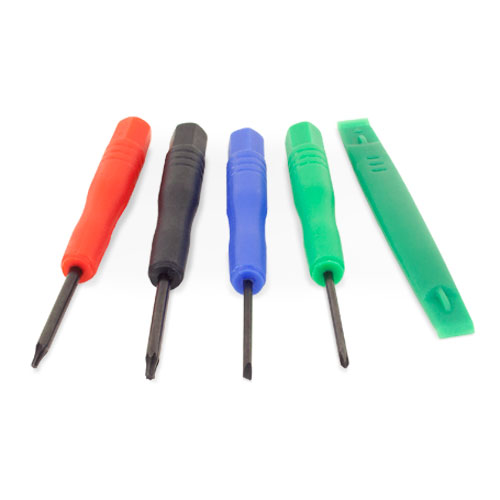
As stated on the site, it says "for Mac mini 2011-2012 Models". iFixit also has a kit, but it is more expensive :\ http://www.ifixit.com/Apple-Parts/Ma...-Kit/IF171-005 you could buy the Torx bitset on your own at a local hardware shop, but you'll have to find the other parts separately. |
|
|
|
0
|
|
|
#3 | |
|
Quote:
![]() I guess the easiest thing to do is buy this kit to save messing about! Will be ordering the memory from Crucial because that seems to be what allot of people go for, they also have an easy Memory Selector on their site. While I'm here, would I put the SSD in the place of the old one or in the empty space? (to make it the boot/master drive) and how do I get the OS on it? Can you tell I have only recently switched from Winblows haha
|
||
|
|
0
|
|
|
#4 | |
|
Quote:
As for putting the OS on it, you can: 1. Internet Recovery http://www.macrumors.com/2011/07/20/...nk-hard-drive/ 2. USB Installation http://gigaom.com/apple/quick-tip-cr...mountain-lion/ |
||
|
|
0
|
|
|
#5 | |
|
Quote:
![]() Going to have a read up before ordering parts in the next few days! |
||
|
|
0
|
|
|
#6 |
|
|
0
|
|
|
#7 |
|
I just received the OWC kit on Friday and installed a spare Samsung 830 256GB SSD in the main slot and moved the original drive to the secondary slot. Nuked both drives and did a fresh install of the OS onto the 830 SSD. So far things are working flawlessly. I highly recommend the OWC kit, especially for the price.
One quick note: if you do what I did, the original drive will have the electronics facing up (e.g. the drive will be upside down). You'll want to leave the black plastic cover on the original drive to protect the electronics, then install your SSD bare since it is a sealed unit with no electronics exposed. |
|
|
|
0
|
|
|
#8 | |
|
Quote:
|
||
|
|
0
|
|
|
#9 | |
|
Quote:
__________________
2012 Mac Mini; i5 Quad Core ITX Hackintosh with Blu-ray playback HTPC; 1 TB eSATA Apple TV; 3.8 gHz i7 Quad Core Hackintosh, 2GB HD5870; MacBook Pro i7; MacBook Air; iPhone 4s; 1st Mac=Centris 610 Last edited by Cave Man; Oct 30, 2012 at 01:51 PM. |
||
|
|
0
|
|
|
#10 | |
|
Quote:
In the UK so can't send it to OWC. |
||
|
|
0
|
|
|
#11 | |
|
Quote:
![]() Ordered my kit tonight with a estimated delivery time of 8-12 days. |
||
|
|
0
|
|
|
#12 |
|
I got my Mac Mini today and used the OWC data doubler to install a SSD as a second drive. It was a PITA and rather not very pleasant to do, but I got it done in about 1/2 hour or so. In retrospect I could have gone without keeping the 1 TB drive in there and just doing the simpler drive replacement.
In the end, if you are careful, patient and somewhat handy it's not that big of a deal to do. But if you don't go slowly and follow instructions you can do damage. |
|
|
|
0
|
|
|
#13 | |
|
Quote:
__________________
2012 Mac Mini; i5 Quad Core ITX Hackintosh with Blu-ray playback HTPC; 1 TB eSATA Apple TV; 3.8 gHz i7 Quad Core Hackintosh, 2GB HD5870; MacBook Pro i7; MacBook Air; iPhone 4s; 1st Mac=Centris 610 |
||
|
|
0
|
|
|
#14 | |
|
Quote:
|
||
|
|
0
|
|
|
#15 | |
|
Quote:
|
||
|
|
0
|
|
|
#16 | |||
|
Quote:
Quote:
Quote:
|
||||
|
|
0
|
|
|
#17 |
|
Let us know how it goes.
|
|
|
|
0
|
|
|
#18 |
|
Been thinking about doing this myself as well, but not having done something like this before I had a question before I took the plunge. Would an external SSD via USB 3.0 or Thunderbolt (does such a thing exist yet) be much slower than an internal SSD? If there is an obvious answer to this please bear with me for knowing bugger (i'm also in the UK
) all about how computers actually work.
|
|
|
|
0
|
|
|
#19 | |
|
Quote:
i have used this company I have the usb3 only on the way for testing http://www.amazon.co.uk/MiniPro-2-5-...1601036&sr=8-2 http://www.amazon.co.uk/MiniPro-2-5-...1601117&sr=8-4 I am testing this now I have a thread on it on this site just search my name on mac rumors . it is low cost it works it is a bit slow with a new sata III ssd. If you have a sata II ssd it would be good. http://www.amazon.co.uk/Seagate-STAE...1601208&sr=1-7 this should be good some users on our site have a smaller version http://www.amazon.co.uk/LaCie-Rugged...1601461&sr=1-2 there is a big thread on this item http://www.amazon.co.uk/Seagate-SRD0...1601552&sr=1-1 I would think the lacie rugged thunderbolt is good for you or the oyen usb3 only Last edited by philipma1957; Oct 30, 2012 at 07:54 AM. |
||
|
|
0
|
|
|
#20 |
|
I installed a 256gb Samsung 830 in my new 2012 mini yesterday with the ifixit kit using their online guide for the 2011. Everything thing went good and set it up as the boot drive. The install was definitely not for someone who is shy about poking around inside of a brand new computer, but as long as you follow the directions and take your time with the plugs, fragile wires and logic board removal you'll be ok. Booted into recovery HD mode using the option key at startup and did the Internet install of mt lion onto the ssd.
|
|
|
|
0
|
|
|
#21 | |
|
Quote:
|
||
|
|
0
|
|
|
#22 |
|
OK, got my 240 GB SSD installed (OWC Mercury Extreme 6G) along with the 1 TB drive that came with the 2012 Mini and all is well. There was really only one place that slowed me down - reinstalling the antenna grate; I could not get the two screw tabs to fit into their recessions. If you look closely at the grate, it actually has a bit of a groove on the curved side and this fits into curved edge of the Mini's chassis. It took a while to sort out, but the best approach to it seems to require having the curved side towards you, then while pushing the flat side of the grate towards you, gently lift the grate around the curved edge from right to left by putting a small screwdriver (with the OWC installation kit) into the holes around the edge. Eventually, the groove on the grate will pop into place and the two tabs for the screws will drop into their recessed places.
__________________
2012 Mac Mini; i5 Quad Core ITX Hackintosh with Blu-ray playback HTPC; 1 TB eSATA Apple TV; 3.8 gHz i7 Quad Core Hackintosh, 2GB HD5870; MacBook Pro i7; MacBook Air; iPhone 4s; 1st Mac=Centris 610 |
|
|
|
1
|
|
|
#23 | |
|
Quote:
|
||
|
|
0
|
|
|
#24 | |
|
Will do
![]() Will post a few pictures and screen shots when everything is done. Just really want to Data Doubler the turn up now but due to demand the item won't ship till at least tomorrow then needs to make it to the UK ![]() I'm so impatient ![]() Quote:
But if you want to clone your drive then Carbon Copy Cloner should work fine and its free
|
||
|
|
0
|
|
|
#25 |
|
CCC is no longer free.
|
|
|
|
0
|
![]() |
|
«
Previous Thread
|
Next Thread
»
| Thread Tools | Search this Thread |
| Display Modes | |
|
|
All times are GMT -5. The time now is 10:57 AM.


have fun!

Linear Mode