|
|
#1 |
|
Excel Opening As Read Only
Hi guys, for some reason when I can make a spreadsheet, save it (XLSX) without the read only option ticked but when I re open it it opens as Read Only and wants me to save the changes as a new file :/
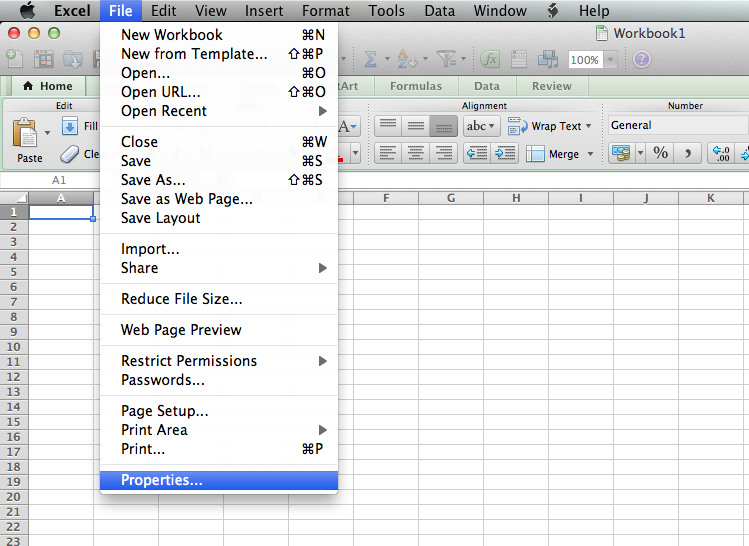
If I go to the spreadsheet properties whilst it's open, the Read Only box is ticked and greyed out so I can't change it!? Any one got any ideas on this? OS: Lion 10.7.2 Office 2011
__________________
2010 Macbook Pro i7 15" |
|
|
|
0
|
|
|
#2 |
|
Properties?
In the Get Info window for such a file, click the padlock to unlock it, enter your password, change the permissions, click the padlock to lock it. |
|
|
|
0
|
|
|
#3 | |
|
Quote:
And I have done, still opens as Read Only :/ Confuseddddd Ok EDIT: So I thought i'd try save it to a different place, did it straight to the desktop and it's fine :/
__________________
2010 Macbook Pro i7 15" Last edited by propaintballa; Nov 27, 2011 at 08:12 AM. |
||
|
|
0
|
|
|
#4 |
|
|
0
|
|
|
#5 | |
|
Quote:
![]() ![]() And i'm not sure, I dragged it back to the same folder and it was fine, very odd
__________________
2010 Macbook Pro i7 15" Last edited by propaintballa; Nov 28, 2011 at 05:08 AM. |
||
|
|
0
|
|
|
#6 |
|
Hmm. That's interesting. I was thinking (and writing) in terms of the file (or its icon) in a Finder window, not a menu option with the file open. So I had to open one and try it. Properties seems pretty useless to me. For the file that I opened, both Read Only and Hidden are not selectable. When I do as I suggested to you, for the same file from Finder, in the Get Info window I can change the Read Only to Read and Write. That's the Mac way, not the Microsoft way. So, did you try that route?
|
|
|
|
0
|
|
|
#7 |
|
Are you sure you are opening your Excel files in Excel and not Numbers? If you have Numbers as your default program, it will ask you to save as becauses you can only export to .xls format.
|
|
|
|
0
|
|
|
#8 | |
|
Quote:
I guess we'll just have to wait until it does it again for amazingly weird reason, silly thing. Yep, I don't even have numbers installed :P
__________________
2010 Macbook Pro i7 15" |
||
|
|
0
|
|
|
#9 |
|
|
0
|
|
|
#10 |
|
Nope, as the problem has ceased, for now at least
__________________
2010 Macbook Pro i7 15" |
|
|
|
0
|
|
|
#11 |
|
You can get help from a Mac MVP here:
Answers -Office for Mac Excel: http://answers.microsoft.com/en-us/mac/forum/macexcel |
|
|
|
0
|
|
|
#12 |
|
Excel file opening in Read Only Mode
I had this problem today, and finally figured out the solution. I had put a slash "/" in the filename, which is OK on the Mac, but Excel does NOT like it. When I removed the slash from the filename (using the finder), the Excel file then opened normally. I often use slashes when adding the date as part of the filename. When working on an Excel, Word, or PowerPoint file, I have to remember to use dashes, not slashes. In this case, my filename included the phrase "64/128 bit register". I changed it to "64 or 128 bit register".
Hope this helps someone. I wasted a lot of time on it. MacBook Pro (Early 2011) running OS 10.8 Mountain Lion Office for Mac 2011 vers 14.2.3 (120616) |
|
|
|
4
|
|
|
#13 |
|
Take out slash in file name worked for me
Worked for me, thanks!
had put a slash "/" in the filename, which is OK on the Mac, but Excel does NOT like it. When I removed the slash from the filename (using the finder), the Excel file then opened normally. I often use slashes when adding the date as part of the filename. When working on an Excel, Word, or PowerPoint file, I have to remember to use dashes, not slashes. In this case, my filename included the phrase "64/128 bit register". I changed it to "64 or 128 bit register". |
|
|
|
0
|
|
|
#14 | |
|
who would thought slash against dash
Quote:
hi there well i have been having this issues with some of the users getting this read only problem. So here it goes, microsoft needs to improve there coding!! in my case and i say this it might not work for all of you, (well i hope it does) the users always were using the slash ie, myfile_from_20/09/2012.xlsx. the solution that worked for me was to remove the slash and put a dash. now when they open it, it is no longer read only. i really hope this helps!, its people like you and me that make the problem solving a bit easier! So as someone once said....... THINK DIFFERENT! AMEN |
||
|
|
0
|
|
|
#15 |
|
So that was the problem
This problem was driving me nuts!
And who would have thought...I indeed used a slash in my filename. This was one useful thread. Thank you!
|
|
|
|
1
|
|
|
#16 |
|
Not the solution
I think this solution must be an accidental solve (i.e not the real fix)
I've had this problem with a few files which now cannot be accessed from another machine because it thinks someone else is currently modifying it. I've removed all non alphabet characters (/ - _ ) and the problem remains. 10.6.8 machine trying to access a .xls file stored on a 10.8.2 iMac. I've checked permissions are ok. Only workround is to save as a new file on the client machine, but as it's a file a number of us work on it's not a viable solution. |
|
|
|
0
|
|
|
#17 | |
|
Quote:
_________________________________________________________________ This was totally a fix for me... whew!!!! thanks!!!! _________________________________________________________________ |
||
|
|
1
|
|
|
#18 |
|
Thank you thank you thank you! Why didn't I think of this...Word won't save a doc with a slash in it but Excel sneakily saves it and then won't let you write in it again. It's been driving me NUTS. I'd tried everything...or so I thought.
|
|
|
|
0
|
![]() |
|
«
Previous Thread
|
Next Thread
»
| Thread Tools | Search this Thread |
| Display Modes | |
|
|
Similar Threads
|
||||
| thread | Thread Starter | Forum | Replies | Last Post |
| truecrypt only mounts my volumes as read only | sundaemon | Mac Peripherals | 3 | Jul 25, 2012 01:01 AM |
| ATTN iWizards!!...Mount rootfs as read only error...!!PLZ HELP | qomarf | Jailbreaks and iOS Hacks | 11 | Mar 26, 2012 11:25 AM |
| Help syncing 2nd Google calendar as read only? | jlpippin | iPhone Tips, Help and Troubleshooting | 2 | Sep 7, 2010 11:26 AM |
| External HDD showing as read only? | Shawh | OS X | 1 | Apr 17, 2010 07:17 AM |
| How do i save a numbers 08 file as read only? | Blakerules1206 | Mac Basics and Help | 2 | Nov 26, 2008 08:46 AM |
All times are GMT -5. The time now is 04:10 AM.


Linear Mode