|
|
#1 |
|
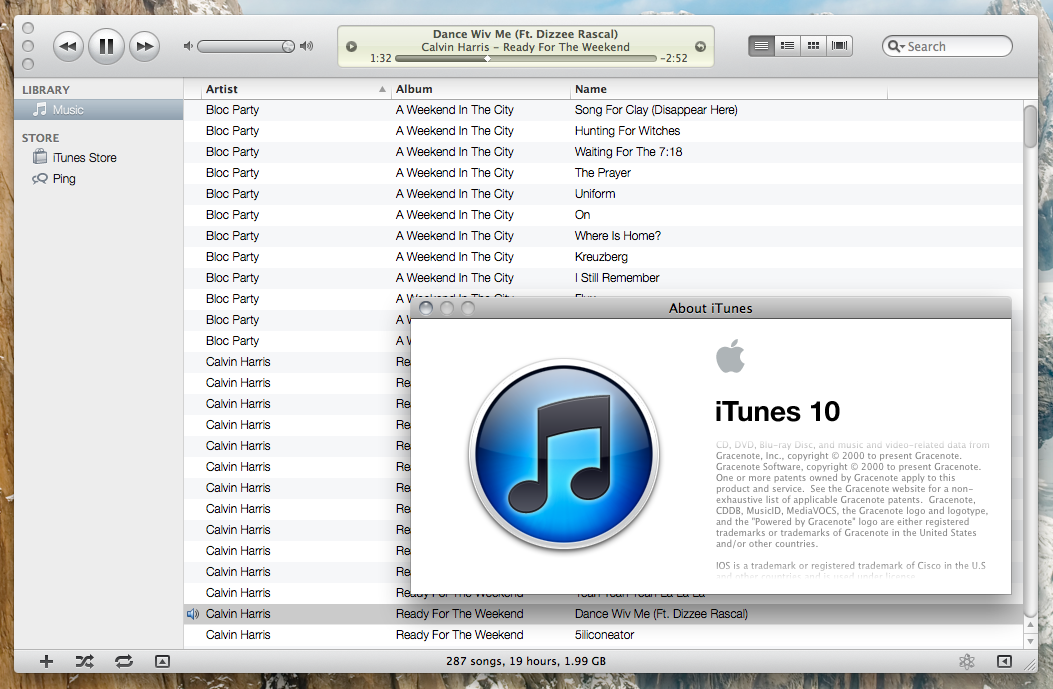
iTunes 10 change list font size and style.
This hint requires that you have apple developer tools installed in order to use plist editor. I have a root account enabled on my system which i was logged into to use this hint, i'm sure some of the more terminal thrifty users can chime in on how to do this through the terminal, please comment.
In the finder navigate to applications folder and right click on itunes and select Show Package Contents. Once Contents is open the path is Contents/Resources/English.lproj/TextStyles.plist. Right click on TextStyles.plist and open with Property List Editor.app. in Property List Editor.app locate 9003 and click the arrow next to it. You will see 3 lines of settings on the FONT row i changed the font to LucidaGrange-Bold. on the SIZE line i changed 13 to 18. then save the file I now have iTunes with a bold and larger font just the way i like it. Im a musician and use itunes to make my bands set lists I just take a screen capture of the list and print in preview. |
|
|
|
0
|
|
|
#2 |
|
OMG...I've wanted to know how to do this for ages!! I want Helvetica as the iTunes list font. I'm trying this NOW!
Thank you!! ![]() EDIT: I just tried it but it doesn't work I downloaded PList Edit Pro off Apple and edited the plist file like you said but it made no difference in iTunes. I did this under the root user too. Could it be because I wasn't using Apple Developer Tools?
Last edited by Davieis; Sep 2, 2010 at 10:03 AM. |
|
|
|
0
|
|
|
#3 |
|
OK I've worked out why it wasn't working. '9003' in property list editor corresponds to iTunes' Large Fonts setting. You need to change '9002' for the Small fonts setting. And you don't need to have Apple Developer tools, you can use any Plist Editor. I've wanted this for ages...
Last edited by Doctor Q; Sep 2, 2010 at 01:03 PM. Reason: changed oversized images from IMG to TIMG |
|
|
|
0
|
|
|
#4 |
|
__________________
13" Macbook Pro 2010 4GB RAM, 250GB HDD. iPhone 4, 16GB running iOS 4.2.1 on Orange UK. Last edited by Doctor Q; Sep 2, 2010 at 01:04 PM. Reason: changed oversized images from IMG to TIMG |
|
|
|
0
|
|
|
#5 |
|
|
0
|
|
|
#6 |
|
__________________
13" Macbook Pro 2010 4GB RAM, 250GB HDD. iPhone 4, 16GB running iOS 4.2.1 on Orange UK. |
|
|
|
0
|
|
|
#7 |
|
Any tips on how to get the font name right? Some I can get, but others I'm having issues with. Specifically, I'd like to try out Century Gothic, but I've tried "Century Gothic", "Century Gothic-Regular", "CenturyGothic", "CenturyGothic-Regular", and none have worked. It just shows the default font (albeit with my size choice, so I know part of this is working).
jW
__________________
The Bearded Nerd 13" MacBook Pro; 64GB iPod touch "It's a real burn, being right so often." NoiseTrade.com/Walker |
|
|
|
0
|
|
|
#8 |
|
Sorry i neglected to mention that this was to change theLARGE LIST font size and not the small. Large list is 9003 and small is 9002.
Mal its just a guess but i believe that the font would need to be a system font. One of the pre installed apple fonts from /Library/Fonts. Here is a list. http://en.wikipedia.org/wiki/List_of..._with_Mac_OS_X |
|
|
|
0
|
|
|
#9 |
|
Thank You !
THANK YOU, THANK YOU, THANK YOU.
Finally, a simple way to get bigger text on itunes. ![]() Man I have waited soooo long for this. Considering I use my mac mini on a HDTV and finally I can read itunes properly. THANK YOU! |
|
|
|
0
|
|
|
#10 |
|
Any idea what was the font used in iTunes 9? I would prefer to have the iTunes 9 fonts in iTunes 10.
|
|
|
|
0
|
|
|
#11 |
|
iTunes Mod not applying
I followed the instructions above (ie plist editor, etc) changed the fonts in the string and saved - but when I open iTunes the changes aren't applied.
I'm using the admin account. any suggestions? Thanks |
|
|
|
0
|
|
|
#12 |
|
Outstanding, Thank you, although, I was not allowed to just save the plist, I had to save it to the desktop, remove the original one and then transfer the new one in its place.
Now if only there was a way to increase the iTunes Store font. Sorry Apple but, I bought a 27 inch iMac and if I can't read what's up for sale, I'm not inclined to buy. |
|
|
|
1
|
|
|
#13 |
|
Easy
I wanted to say thank you very much as well. I too have been using a Mac Mini as my HTPC for almost a year and finally got annoyed enough to come here and try to do something about it.
Even as a non-programmer this was pretty easy to do and WOW what a difference it makes. I don't have to squint to see iTunes across the room now. Thanks again! p.s. I agree about the iTunes Store comment. Why does Apple want to force me into a $99 Apple TV when I've purchased a $700 Mac Mini? $900 when I add the wireless keyboard, trackpad and software upgrades. |
|
|
|
0
|
|
|
#14 |
|
super cool, thanks so much from me as well!!!
|
|
|
|
0
|
|
|
#15 | |
|
Method still works in iTunes 10.5.3, I was able to change the overall font - thanks original poster. Just using terminal and vi on the file works just fine, btw.
I do have a question, however. After changing the font size of the list elements (9002), I noticed that the lists in the left-hand bar have had their fonts increased as well. No worries, looks fine, but when I select an item on the left list (like Music, a playlist, etc.) I get a shrunken font from before, and have not been able to find the key value that controls that font. Has anyone figured this out? An annoying little detail that I would really like to put to rest. ---------- Quote:
<key>9029</key> <dict> <key>- loc hint -</key> <string>List Contents (Small Bold)</string> <key>font</key> <string>Verdana-Bold</string> <key>size</key> <integer>14</integer> </dict> Made those changes since I preferred the Verdana font and 14pt for my lists; now the selected item is bolded. |
||
|
|
0
|
|
|
#16 |
|
Awesome tip... thank you so much. I used Pref Setter because I didn't feel like downloading all of xcode. Note: I had to go to Get Info for the plist file and give myself read & write permissions before I was able to save changes made. Love my itunes in helvetica.. thank you OP!
__________________
I just have a bunch of laptops.
|
|
|
|
0
|
![]() |
|
«
Previous Thread
|
Next Thread
»
| Thread Tools | Search this Thread |
| Display Modes | |
|
|
Similar Threads
|
||||
| thread | Thread Starter | Forum | Replies | Last Post |
| Anyone use "Path Finder" and know how to change the font size for folders? | realchimera | Mac Basics and Help | 4 | Apr 22, 2013 12:28 PM |
| iOS5/iTunes 10 song date problem? | Dagless | iOS 5 and earlier | 2 | Nov 16, 2011 07:22 AM |
| iTunes 10.5 says 'missing component, error -42403' | Heisler98 | iOS 5 and earlier | 1 | Oct 16, 2011 04:04 PM |
| iTunes 10.4?!?!?!?! | Ringo-Chan | MacBook | 3 | Aug 20, 2011 02:16 AM |
| 1st gen AppleTV Lion/itunes 10.4 streaming issue | robemich | Apple TV and Home Theater | 1 | Jul 24, 2011 11:36 AM |
All times are GMT -5. The time now is 01:28 PM.


I downloaded PList Edit Pro off Apple and edited the plist file like you said but it made no difference in iTunes. I did this under the root user too. Could it be because I wasn't using Apple Developer Tools?


Linear Mode