
|
|
#1 |
|
Heat issues - Bottomless + DIY Filter
Hey there.
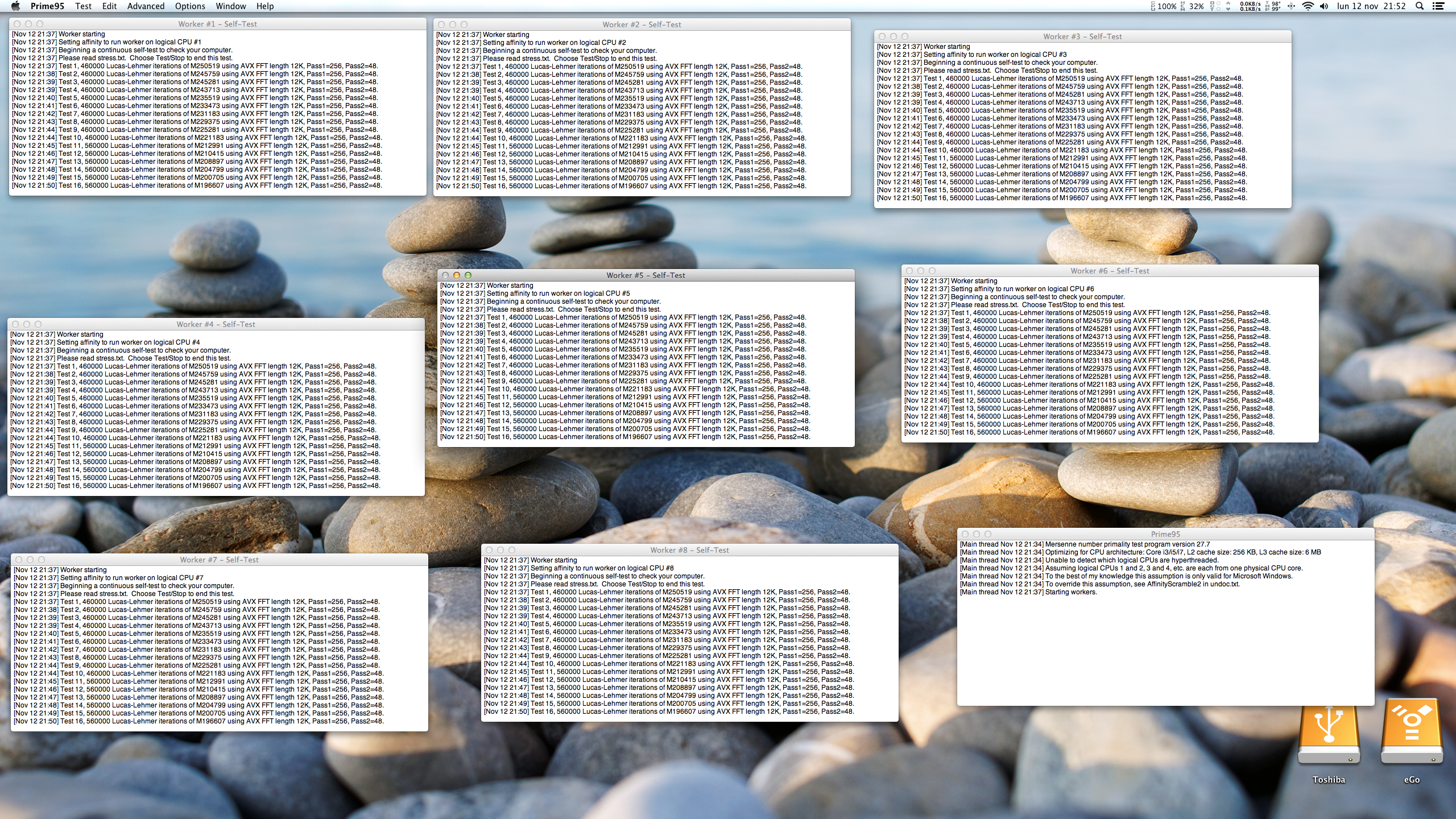
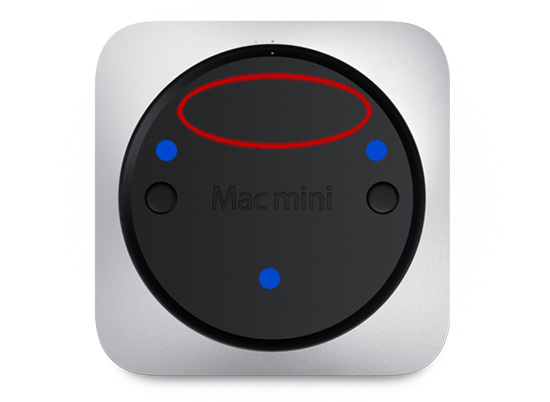
As a lot of you already know the i7 Mini is an oven. There are several threads in which it's been discussed its temps and how to deal with them under full load. philipma1957 and Snowcake are two who have been on the issue with special interest. In my case, a 2.6GHz i7, I was getting temps between 99-104ºC under full load. Here's a post in which, running Prime95 for 15 minutes I get CPU at 100ºC+ (although 98ºC are shown in the screenshot) and fans speeds of 5500 RPM in order to keep that temp. (Sooo noisy). It's not that that's unacceptable but thought I could do something about it. I mentioned in a couple of threads that I had bought a spare Mini Bottom cover off ebay and planed to mod it in order to achieve better temps and lower fan speeds. My intention was to remove this zone with a dremel and see a hell of an improvement. (Air is supposed to be swallowed in by the Mini through that red zone, in which the Antenna plate is) Did mod it but there was no improvement AT ALL. Still the same. So I decided to go another way and bought a fiber tiny net: ![]() Put two in a 45º 'polarization' which resulted in: ![]() I then took the bottom of the Mini off and put this custom air filter: ![]() For those wondering I attached it with a glue pistol so all the Air in has to go through the filter. ![]() This glue is extremely easy to remove and clean later on. This way I can remove this filer once every two months or so, clean it up and put it back with more glue. Raised the Mini 3cm with four rubber pads and this is what I get now: As you can see (after 30 minutes of Prime95), temps have dropped like 10ºC (they were between 87ºC and 95ºC all the time but mostly around 90s) and which is more amazing is that the fan just needed to spin at 3300rpm in order to keep those temps. Tried to manually put it at 5500rpm and temps went down to around 82-85ºC. Too much noise though. Not worth it.


__________________
2012 Mac Mini |
|
|
|
0
|
|
|
#2 |
|
GOOD RESULT! I still go with the laptop cooler and remove the black plate. I may combine your idea with the cooler.
|
|
|
|
0
|
|
|
#3 |
|
Yeah. I wanna try putting a quiet USB fan pointing at the bottom and see if that makes any difference.
__________________
2012 Mac Mini |
|
|
|
0
|
|
|
#4 |
|
Is this heat and noise only a problem with the i7?
Does the 2012 i5 have these problems too? With this and the hdmi issue Apple seem to have really messed up here. |
|
|
|
0
|
|
|
#5 | |
|
Quote:
the i7 only has issues if cpu is pushed hard. ie handbrake is a commonly used program that will use all 8 threads. |
||
|
|
0
|
|
|
#6 |
|
Thanks.
|
|
|
|
0
|
|
|
#7 | |
|
Quote:
That's why I wanted to do something about it. A CPU working at 90ºC under full load will live longer than another one working at 100ºC. Also, fan staying in low 3000rpm is much more quieter! (Main reason tbh) ![]() Plus with this filter I got all air enters covered. With the default bottom cover dust gets inside the Mini pretty easily.
__________________
2012 Mac Mini |
||
|
|
0
|
|
|
#8 |
|
First off - nice job on the filter! (though I fear there will be discoloration from the glue after a time)
I too have taken the bottom off and blown fans in. Not as dramatic an improvement as I was hoping (love to get 60degC CPU at 50% load). FWIW I have found that the heatsink right near the back (you can just feel a little of it feel it with the cover off) is where the build up is. Blowing or ventilating in other areas has little effect. With the cover off the noise from the mini is much greater. What was most effective for my kinds of loads was taking the internal fan up to 2400rpm (or more - noise becomes noticeable at 2800rpm for me). The internal fan has the only real path to drive air over the cpu heat sink. If we wanted external fan, no back cover cooling it would actually be better to take the internal fan and cowling out! But keep up the good work! From a practical POV 90degC is less stress than 100degC. (85% of Tj,max vs 95%) In my application (pro audio) I am looking at doing a constant load (lets say 25%). The mini by design will spin fans to about 2000rpm (nice and quiet) and regulate the CPU temp at 90 to 94degC. If one ran a machine like this 4 hours a day for a couple of years, would there be any issues or is this just fine in todays CPU world? The hardest part of this is that all will agree it is not optimal but is there any real evidence as to how "bad" it is?
__________________
2012Mini 2.6/256SSD/16G Mountain Lion 2011 MBP 15", 2.0, i7 quad Mountain Lion iphone4, ipad2, Apple TV, 24" LED, 27"ATD Last edited by propower; Nov 25, 2012 at 01:00 PM. |
|
|
|
0
|
|
|
#9 | |
|
Quote:
Also, have you tried if a 25% of CPU use puts the CPU at 95ºC? I could try it now but I'll get a biased temp as I'm running with this mod...
__________________
2012 Mac Mini |
||
|
|
0
|
|
|
#10 | |
|
Quote:
Yep - 25% gets me low 90's with the cover on and fan at default. Even 15% gets me close - the fans don't start raising until 90degC is hit! Raising fans to 2400rpm at 25% load lowers that ~10degC. Cover off lowers a little further (might have been 10 more degrees -- need to document better :-).
__________________
2012Mini 2.6/256SSD/16G Mountain Lion 2011 MBP 15", 2.0, i7 quad Mountain Lion iphone4, ipad2, Apple TV, 24" LED, 27"ATD |
||
|
|
0
|
|
|
#11 |
|
I've been wanting to get the new mini very badly, but I have (just) managed to restrain myself, while I look at the issues that people have raised.
I'm not sure how long I can hold off for, I fancy the 2.6 but there are some good deals on the 2.3 that I can't ignore. As and when I do get mine, rather than fix a filter, can't I just raise the mini and inch (I'm thinking some Lego bricks used as risers or some other way to raise it but letting air circulate), and then just not having a cover on at all. Is dust a real issue the reason why you choose to have a filter? Thanks for all your input btw. |
|
|
|
0
|
|
|
#12 | |
|
Quote:
You'll notice the Mini getting hotter and hotter with top temps hitting a new record every month. (Not 5ºC per month, but it'll definitely be noticeable over a 3 year time period). Check my OP. That custom made filter is damn simple. Just get a tiny net at your local hardware shop and stick it with tape if you don't wanna go the pistol glue road. I tried bottomless first and couldn't see even 1ºC difference in temps after installing the filter. (FYI, whole process took like 10 minutes)
__________________
2012 Mac Mini |
||
|
|
0
|
|
|
#13 | |
|
Quote:
Will be curious what comes next because if not the mini, and I don't like all in ones so no iMac, and I don't need a laptop so no retina and the 2013 MacPro will be WAY overkill and probably very expensive... hmm... I actually have no idea what will be next for me... Best to ALL... thanks for the discussions!
__________________
2012Mini 2.6/256SSD/16G Mountain Lion 2011 MBP 15", 2.0, i7 quad Mountain Lion iphone4, ipad2, Apple TV, 24" LED, 27"ATD |
||
|
|
0
|
|
|
#14 | |
|
Quote:
Next? Well… Minis took more than a year to get an update and they got incredible specs, so I can see them staying like this for 15+ months… Does your 2009 Mac Pro stay behind? Does it really slow you down? Cause if not you can always wait another iteration of the Mini and see. You can save money in the meantime and if the next Mini doesn't fit you either you can always go for a new Mac Pro.
__________________
2012 Mac Mini |
||
|
|
0
|
|
|
#15 |
|
Thinking of doing the same but just Dremel the entire bottom off the cover instead of the red bit you proposed....this way it should look a bit cleaner...
Should yield similar results???? |
|
|
|
0
|
|
|
#16 |
|
The 2009 MP never slowed me down. The 2009MP and the mini are very close spec wise. The mini was hopefully a move to a smaller form factor. If needed in the future I can actually upgrade the MP to a six core Westmere and 48G ram.
Best to all!
__________________
2012Mini 2.6/256SSD/16G Mountain Lion 2011 MBP 15", 2.0, i7 quad Mountain Lion iphone4, ipad2, Apple TV, 24" LED, 27"ATD |
|
|
|
0
|
|
|
#17 | ||
|
Quote:
The bottom part isn't visible at all in my case, (not even the top is too visible…), so I don't really care how the bottom looks. ![]() Quote:
__________________
2012 Mac Mini |
|||
|
|
0
|
|
|
#18 |
|
Sometimes the most obvious solutions are the hardest to see. Heat rises. The heat sink in the mini is fairly massive so most likely you would only need to find a better way for it to escape easier. Has anyone tried to place their mini vertically, so the bottom can dissipate heat better
|
|
|
|
0
|
|
|
#19 | |
|
Quote:
http://eshop.macsales.com/item/NewerTech/NUSTALYMINI/ http://www.amazon.com/Thermaltake-Mo...altech+usb+fan http://www.amazon.com/Thermaltake-Mo...altake+usb+fan |
||
|
|
0
|
|
|
#20 | |
|
Quote:
It'd be nice to find out though.
__________________
2012 Mac Mini |
||
|
|
0
|
|
|
#21 | |
|
Quote:
|
||
|
|
0
|
|
|
#22 | |
|
Quote:
__________________
Whole lotta Apples, very little $. |
||
|
|
0
|
|
|
#23 |
|
A fan would introduce more noise, which I think is why they want to cool down their minis (because the fans are running constantly). What would probably work, although I don't know the technical name for them, are those inserts that you see in hot/cold coolers that either keep picnic food hot or cold. Placing one of those on the mini should absorb the heat like a sponge, especially if you cooled it ahead of time. That would be noiseless and functional.
|
|
|
|
0
|
|
|
#24 | |
|
You don't see it unless you put the Mini upside down so it's fine with me as I don't intend to.
---------- Quote:
Well, apparently it didn't make such an impact on the temps.
__________________
2012 Mac Mini |
||
|
|
0
|
|
|
#25 | |
|
Quote:
I was thinking about doing something similar... but I'm not sure if I'm having heat issues to be honest. I have the i7 2.3 and I never hear the fans unless I am using Handbrake and I figure that's a non-issue.
__________________
Whole lotta Apples, very little $. |
||
|
|
0
|
![]() |
|
«
Previous Thread
|
Next Thread
»
| Thread Tools | Search this Thread |
| Display Modes | |
|
|
All times are GMT -5. The time now is 04:01 AM.


Linear Mode
