|
|
#1 |
|
USB 3 Hubs
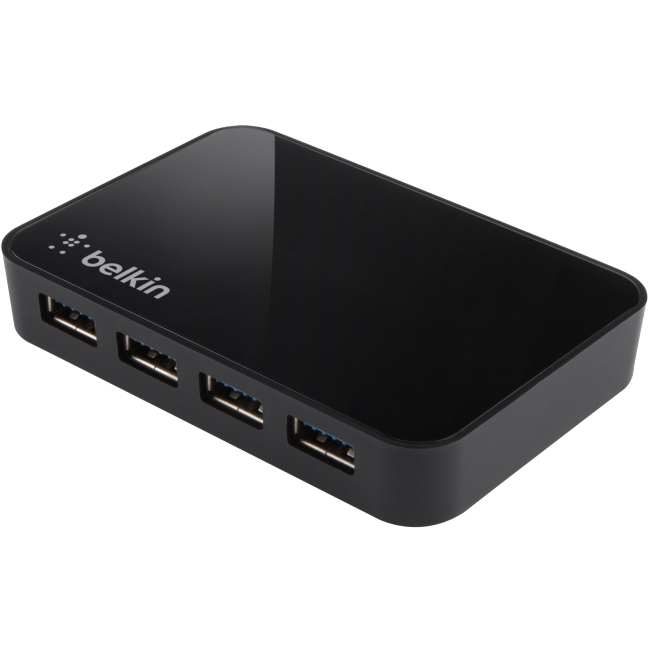
Anyone out there discovered a USB 3.0 hub that works properly and reliably? I have a Retina Macbook Pro. Having trouble finding a hub that will play nice with my computer...
All the ones I've found either have known issues working properly with OSX, or explicitly exclude Retina Macbook Pro in their tech specs.
__________________
|
|
|
|
0
|
|
|
#2 |
|
My wife has a 4 port Trendnet powered USB 3 hub we got at MicroCenter that works well with her rMBP.
__________________
Retina MBP 2.7GHz | 16GB | 768G Thunderbolt Display iPhone 5 | Black | 64GB | AT&T iPad 4 | Black | 64GB | WiFi only
|
|
|
|
0
|
|
|
#3 |
|
I am also on the hunt. I have a 7-port U-Speed powered hub that has given me nothing but trouble. The item description on Amazon now says "not compatible with Retina Macbook Pro." I'm back to my trusty belkin 4-port 2.0 hub until a definitive 3.0 hub appears...
I don't understand why a hub would be incompatible with a specific computer, although I guess it just doesn't play well with the retina macbook's USB controller. At any rate, I experienced random dropouts, inability to access external drives, and several cases of peripherals simply not working. Frustrating that it wasn't labeled as incompatible when I originally purchased it. |
|
|
|
0
|
|
|
#4 | |
|
Quote:
That is the exact same thing that happened to me. I ended up returning the U Speed since it never worked on my RMBP. I am using a belkin 2.0 4 port for a USB 3 to ESATA and various USB 2.0 HDD and peripherals. There is a new firmware update for the RMBP which is supposed to increase USB compatibility, but many users have reported issues after installing the updates. I want a USB 3 Hub so I can attache more USB 3 devices, but I am not ready to sacrifice the stability of my system, just to get more USB 3 ports. I do have a WD 2.5" USB 3 drive connected directly to the USB port on my RMBP and it has worked flawlessly for the past several months, so I know that USB 3 functionality is possible, but Hubs seem to be having issues. |
||
|
|
0
|
|
|
#5 |
|
Any new info on hubs? I need a 3.0 hub for my Mac Mini, but I read so much bad about them I don't know which one I want.
If only the mini had front usb .
|
|
|
|
0
|
|
|
#6 |
|
I have been using a Tripp-Lite USB 3 hub for a couple of days with a new Mac Mini. It works fine so far. I have put it to fairly good use with external HDDs and USB 3 flash drives.
|
|
|
|
0
|
|
|
#7 |
|
I have been using the J-Tech and it works perfectly with my retina macbook pro:
http://www.amazon.com/J-Tech-Digital...ds=usb+3.0+hub I have three USB3 drives (2 seagate, 1 WD) and one USB2 drive and they all mount perfectly every time I power up. |
|
|
|
0
|
|
|
#8 | ||
|
Quote:
Quote:
|
|||
|
|
0
|
|
|
#9 |
|
These problems have been one of the reasons why Apple took so long to implement USB3. Yet with all that problems still existing they could really shine with Thunderbolt - too bad they're not interested...
Oh btw.: To all posters claiming flawless operation - can you get similar speeds with your USB 3 device connected to the hub as you can reach when connected directly to the machine? One of the problems with USB 3 hubs is the massive limitation in data rate with some devices... |
|
|
|
0
|
|
|
#10 |
|
I use this one: http://www.amazon.com/gp/product/B00...ls_o00_s00_i00
It works flawlessly even when syncing my docked iPhone or reading/writing media via an external SuperDrive. I also use it with this hard drive dock and it works perfectly at USB3 speed. The hub sseems to be discontinued though. I paid $18.99 at the time (July).
__________________
MacBook Pro 13" (2012) | Core i7 @ 2.9 GHz | 256 GB Samsung 830 SSD | 16 GB Corsair RAM Thunderbolt Display iPad mini 32 GB WiFi iPhone 5 32 GB Apple TV 3 |
|
|
|
0
|
|
|
#11 | |
|
Quote:
We don't know when or if this item will be back in stock."
__________________
"Today's Macs are blazingly fast but people still whine about them not having stuff they'll never use on them anyway." |
||
|
|
0
|
|
|
#12 |
|
I have one of the uspeed 7 port hubs that other people have had problems with but it works great for me, (I got it back in July.)
I also just got one of the round rosewill 4 port hubs to keep at the office and it works great as well. http://www.amazon.com/Rosewill-RHB-6...will+usb+3+hub |
|
|
|
0
|
|
|
#13 |
|
4 port not a problem
I'm here as I suspect most are searching for answers on USB3.0 hub to macbook with retina display. I have a 4 port option that works flawlessly EVERY time. It's the USRobotics 8400. The problem is, it's only 4 port, and if you daisy chain, then realistically you only have 3 ports available. I have many USB 3.0 drives that I need to connect, and really need a 7 port option. That USpeed 7 port is a piece of junk. Tried several different versions of it, and all had major problems. Alot of the time, wouldn't even recognize connected USB 3 devices. That being said, it worked in my PC just fine, so appears to be an issue with MACbook pro with Retina. Does anyone know of a good 7 port option for the MBPro? Or do I just need to daisy chain several 4 port USR 8400s?
|
|
|
|
0
|
|
|
#14 |
|
Has anyone tried this hub http://goo.gl/dvtDU ?
Has the beauty, but not sure of the brawn.
__________________
2012 iMac 27" | i7 | 3.4Ghz | 1TB Fusion | 24GB RAM | 680MX | 10.8.2 |
|
|
|
0
|
|
|
#15 | |
|
Quote:
---------- a link to my post on USB 3 hubs:
__________________
"Today's Macs are blazingly fast but people still whine about them not having stuff they'll never use on them anyway." |
||
|
|
0
|
|
|
#16 |
|
You're right; thanks for catching that.
Scratch this hub.
__________________
2012 iMac 27" | i7 | 3.4Ghz | 1TB Fusion | 24GB RAM | 680MX | 10.8.2 |
|
|
|
0
|
|
|
#17 |
|
I posted in this thread
http://forums.macrumors.com/showthread.php?t=1528292 about problems that I'm having with my SIIG USB 3/2 hub with ethernet. I initially thought it was just the ethernet that was being fussy due to non-functional drivers. But it seems to be beyond that. I also purchased a new USB 3 WD Desktop drive that I had plugged into the hub. It seemed to be working well. But then I noticed that when the computer goes to sleep, the drive fails to wake up or isn't recognized. I have to manually unplug then replug it. This problem does not happen if its plugged into the USB 3 port on my MBP itself. So basically none of the hub is working, other than the USB 2 part. |
|
|
|
0
|
|
|
#18 |
|
Update | I got the D-link 4-port Superspeed USB 3 Hub
Just to let you all know, I got this one, the D-link 4-port Superspeed USB 3 Hub
http://www.dlink.com/ca/en/home-solu...peed-usb-3-hub It is pretty fast - I ran Blackmagic Speed Disk Test and found it to be effectively just as fast as connecting directly to the Macbook Pro. However almost every morning when I get to the computer, all my connected disks have been dismounted improperly (leaving a warning dialogue box about improper disconnect showing) and I have to pull out the USB cable from the rMBP and reinsert to get my disks back. Sometimes I iPhoto has to recatalogue the image library due to inconsistencies caused by the bad dismounts (I keep my photos on an external USB3 disk to save space). So needless to say that issue drives me nuts. I suspect it has something to do with sleep. But I don't really know. The hub cost me $50. These types of random dismounts should not happen, it's the kind of thing that should just work. But it seems like issues plague many hubs of different brands. I really hope there is some kind of software update that will turn it into a rock solid connection, because when it works, it's great.
__________________
|
|
|
|
0
|
|
|
#19 |
|
This thread reminds me of this ******** ad from a few years back, that implies that Mac works seamlessly with all kinds of hardware:
http://www.youtube.com/watch?v=H0qbP-rIpRg And yet Macs can't even work properly with USB 3 hubs, devices that shouldn't even need drivers, software or firmware updates, etc. |
|
|
|
0
|
|
|
#20 | |
|
Quote:
You will notice on the USB-IF website that there aren't many retail USB 3.0 hubs that are certified. Many manufactuers released hubs into the market without certification, as that is not a requirement. To affix the SuperSpeed logo, certification must be secured first. Most USB 3.0 products are not certified. Visit the usb.org website for a directory of products that are actually certified. As for drivers and firmware, you are only partially correct: - computer OS must have drivers that properly implement the USB spec; for USB 3.0, this means some sort of XHCI driver - USB hardware chips may or may not be upgradeable with firmware that correct deficiencies. Not all hardware may be fixable by firmware updates. Sometimes an actual hardware design change is necessary - while a chip supplier may have firmware updates to fix things, not all manufacturers who manufacture devices using these chips may actually supply firmware updates to correct issues Why look for devices that are USB-IF certified? The products must have passed electrical and interoperability tests with hubs, OS, and other devices. The tests are functional and electrical, making sure that signal quality and interconnection is goo for operating, cold starts, warm starts, and wake from sleep or hibernation. In other words a gauntlet of tests. That being said, not all good products carry the SuperSpeed certified logo. Some manufacturers, however, do perform the tests to make their products better. Alas, I have several USB 3.0 hubs that work fine for me, but they do not appear to be certified. SO, users will have to rely on recommendations on forums like this one here to help select products that "just work". Apple cannot make a poor product work better, if the overall design of that product is defective from the start. |

||
|
|
3
|
|
|
#21 |
|
My search on usb.org for certified usb 3.0-hubs resulted in "no entries found".
The nightmare continues!
|
|
|
|
0
|
|
|
#22 |
|
|
0
|
|
|
#23 |
|
|
0
|
![]() |
|
«
Previous Thread
|
Next Thread
»
| Thread Tools | Search this Thread |
| Display Modes | |
|
|
All times are GMT -5. The time now is 05:46 AM.


.
I paid $18.99 at the time (July).

Linear Mode