
|
|
#1 |
|
iTunes 11 & new TV show pet peeve?
So i dig the new layout and that the TV Shows are organized by Title and not Season! Choosing the 1st season photo artwork for the TV Show gallery is not a problem for me at all either in the TV Show flow, but once you click on a TV series and you are now inside that Series WHY when you scroll through the different Season of that series is that SEASON 1 art still the default? Each Seasons episodes change when clicked but the Season 1 artwork stays....? In the screen capture above Everybody loves Raymond is on Season 2 with the episodes, but as you can see the artwork is Season 1?!
Anyone figure out why or worked around this? Thanks in advance JIM
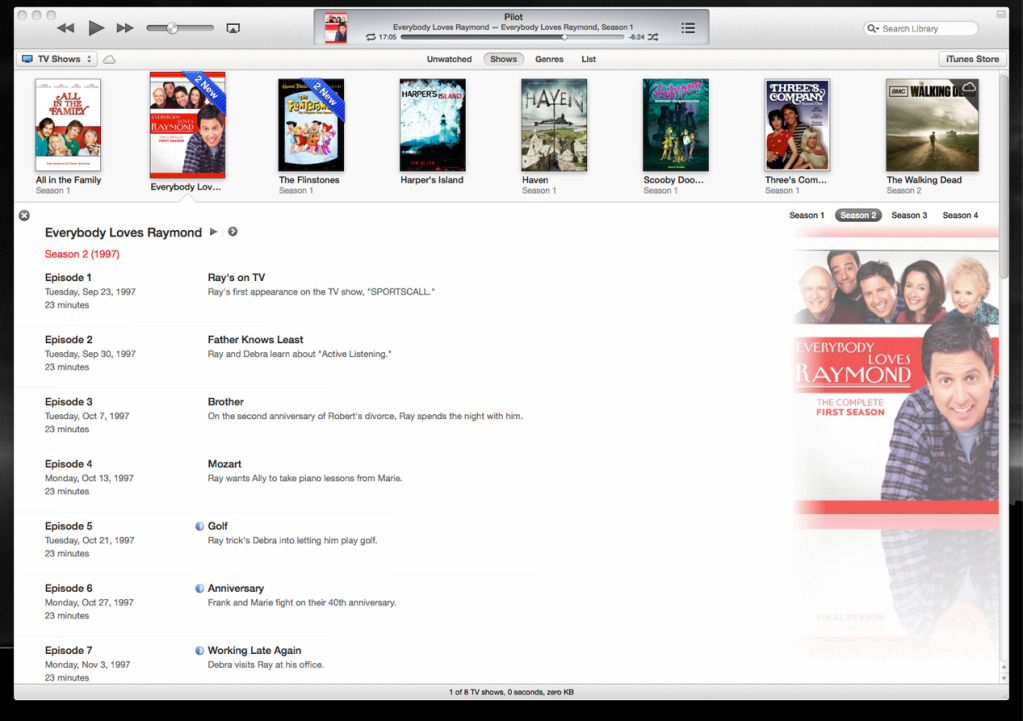
Last edited by SandboxGeneral; Dec 2, 2012 at 07:59 AM. Reason: Please use TIMG tags for large images |
|
|
|
0
|
|
|
#2 |
|
I noticed this exact same issue and it made me a rather sad panda. It works fine when I go through my Apple TV, and also has the correct artwork if you go into the list view or under 'Get Info'.
I spent a whole bunch of time ripping my Blu Rays and making sure each one had the correct season artwork. Seems kinda lame that they made it a moot point under such a beautiful interface... |
|
|
|
0
|
|
|
#3 |
|
Right back atcha, and hoping there will be a way for the season specific artwork to display properly in the future...
|
|
|
|
0
|
|
|
#4 |
|
same for me and i dont like it
__________________
15" i7 Quad Core MBP (Early 2011) 2.0GHz, 16GB RAM, 1TB HD, AMD Radeon HD 6490M(Intel HD Graphics 3000) OSX Lion 10.7.3 16GB Samsung Galaxy SIII with 32GB microSD |
|
|
|
0
|
|
|
#5 |
|
Oh Apple, you came so close to getting this right. It's great that all the seasons are now grouped together under one show (having multiple seasons listed as separate shows was irritating), but now it seems like all that artwork I gathered for everything post-season one was a wasted effort.
Ideally, here's what I'd want: series artwork, and then under that each season with its separate artwork. But I'd settle for having season 1 artwork serve as the default in the library and then displaying the artwork for other seasons within the show. |
|
|
|
2
|
|
|
#6 |
|
I wonder whether it's because of the effect on the style of the background when you change the art for each series...
I kind of miss seeing everything split by season to be honest |
|
|
|
0
|
|
|
#7 | |
|
Quote:
1 - While viewing seasons within iTunes the artwork should change to the episodes artwork. Even to the point that if I put different art for each episode said art should get displayed. 2 - AppleTV shoud follow iTunes lead and group the TV seasons of a single show under one 'top level' entry instead of having all the seasons from all of the shows all appear at the top level as has been the case thus far. IIRC ATV1 did it the right way tho its been a while. |
||
|
|
4
|
|
|
#8 |
|
Yeah this frustrates me too, especially since I can tell which season by the artwork and I find that most handy when viewing in iTunes. It's my only beef with the new iTunes....
__________________
13" Unibody Macbook 6,1 4GB RAM 500GB HD 16GB iPhone 5 32GB Wifi+3G iPad 4 ![]()
|
|
|
|
0
|
|
|
#9 |
|
Something else I've noticed (that is marginally more annoying) is, say you're watching an episode in season 4 of a series in full screen, when the episode finishes, the TV Shows view in iTunes defaults back to Series 1. Anyone else found this?
|
|
|
|
1
|
|
|
#10 |
|
This is immensely frustrating. Where's the solution, Apple? :/
|
|
|
|
0
|
|
|
#11 |
|
Yes, that's very annoying! I was starting to wonder just how many times Tony Soprano was going to flash back to his first visit to Dr Melfi...
__________________
2011 11" Air i5 1.6/4/128; 2011 Mac mini; iPad 3 32GB WiFi; iPhone 5 64GB; Apple TV3 |
|
|
|
0
|
|
|
#12 |
|
It's not just artwork
The greater issue than the artwork I'm having is I purchased "Hell on Wheels" from the iTunes store. The episodes downloaded fine, and it shows "Seasons 1, 2" under the artwork. When I click the artwork, it only shows the episodes from Season 1. They do show up if I go to List mode, but then it doesn't show the artwork associated with it. I cannot find anything to get it to show the episodes from Season 2 in the regular grid mode. What am I missing?
Also my iTunes is stuck in "dark" mode from the previous releases of iTunes. With the new UI, I can no longer read half of the text in the dark backgrounds. Apple took out the only way to change it back to "light" mode in Preferences. Does anyone know how to change it?
|
|
|
|
0
|
|
|
#13 | |
|
Quote:
I'm of no help on the other issue though. Sorry.
__________________
A voice of reason... in a world gone Mac.
|
||
|
|
0
|
|
|
#14 | |
|
Quote:
|
||
|
|
0
|
|
|
#15 |
|
well my pet peeve is not being able to shrink the size of the artwork for my movies and tv shows
__________________
acer win 7 3.0ghz amd dc 4gb ram; mac mini late 09 2.53ghz 8 gb of ram now with 500gb hard drive; mid 2010 macbookpro 13 base model with 500gb 7200 hybrid drive in place of the 250 |
|
|
|
1
|
|
|
#16 |
|
With iTunes 11, the 1st season artwork was the default for both the mail view as well as when you expanded to show the episodes. When viewing the episode listing, regardless of the season, you'd see just season 1 art.
However, I just updated to iTunes 11.0.2 and there has been a change. Now, you see the MOST RECENT season's artwork in both views. |
|
|
|
0
|
|
|
#17 | |
|
Quote:
Right clicking the movie and selecting get info shows the artwork still there, and when I close the get info window, the artwork will reappear. Annoying. Please Apple, do 10 minutes of QA before you release these builds. |
||
|
|
0
|
![]() |
|
«
Previous Thread
|
Next Thread
»
| Thread Tools | Search this Thread |
| Display Modes | |
|
|
All times are GMT -5. The time now is 10:45 AM.


Linear Mode
