

|
|||||||
![]() |
|
|
Thread Tools | Search this Thread | Display Modes |
|
|
#1 | |
|
Developers Behind Orchestra to Release Mailbox, A New Mail Management App
![]() Mailbox is an upcoming email management app developed by the team that designed collaborative task management app Orchestra, which was lauded for its simple design. Mailbox, which is designed to work with Gmail, features a clean, simple design that uses intuitive touch gestures, much like list-making app Clear. Quick swiping emails to the right removes them from the inbox and archives them, while a longer slide and hold deletes them. ![]() Reorganization of the inbox is also a simple task with drag gestures, and the app also allows users swipe left to "Snooze" emails, putting them out of sight and out of mind until later. TechCrunch has an early hands-on review of the app: Quote:
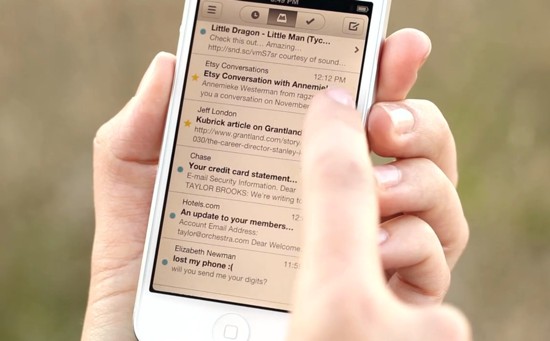
Though there are a slew of emailing apps available, including Apple's own Mail app, Google's Gmail app, and third party alternatives like Sparrow, no email client offers the innovative quick-swipe interface of Mailbox. Mailbox is in closed beta at this time, but the website states that it will be available for iPhone + Gmail after the new year. Article Link: Developers Behind Orchestra to Release Mailbox, A New Mail Management App |
||
|
|
1
|
|
|
#2 |
|
One day there will be the perfect solution to email and that will just be IT! Done forever.
Personally I think that is Sparrow, just an opinion of course.
__________________
www.charlieegan3.com |
|
|
|
1
|
|
|
#3 |
|
Gmail only at launch. Ughhh
Looks great though. We'll see how it progresses. |
|
|
|
2
|
|
|
#4 |
|
Eww!!!
Sorry that just looks brutal. Those half/full swipe gestures would drive me nuts. Going to delete instead of read by mistake. Seems like in trying to make mail more streamlined all they did is make it bloated and less intuitive. |
|
|
|
1
|
|
|
#5 |
|
|
1
|
|
|
#6 |
|
What are the chances that it has exchange support?
|
|
|
|
1
|
|
|
#7 | |
|
Quote:
__________________
www.charlieegan3.com |
||
|
|
1
|
|
|
#8 |
|
Too lazy to read; will it support iCloud, Gmail, notifications, etc.? Ta.
|
|
|
|
2
|
|
|
#9 |
|
|
4
|
|
|
#10 |
|
Yeah that's what we need. Another mail app
Last edited by dejo; Dec 14, 2012 at 09:50 AM. Reason: Quoted post deleted. |
|
|
|
2
|
|
|
#11 |
|
|
2
|
|
|
#12 |
|
Looks interesting. I'd probably check it out except I only use my gmail account for spam.
|
|
|
|
2
|
|
|
#13 |
|
Agreed. At the least, the swipes for "archive" and "delete" should be in opposite directions.
__________________
Apple //c, 1 MHz, 128k RAM, 5.25" floppy drive, 1-button mouse |
|
|
|
1
|
|
|
#14 | |
|
Quote:
The colored indicators are quite clear when you swipe but I think it's just a matter of getting used to it. My first thought from this demo is how intuitive and simple it was. I already use and prefer apps that use gestures like tweetbot, reeder, pocket, sparrow, chrome, etc... It did not take long to gain that muscle memory. A quick swipe is always faster and less tedious than 2-3 taps. If you thought this looks brutal you should see the gestures I have with bettertouchtool on my macbook air
|
||
|
|
2
|
|
|
#15 |
|
Video shows her using a white iPhone 5, but the phone she puts in her back pocket is an iPhone 4/4S.
Gotcha ! /coolstory |
|
|
|
4
|
|
|
#16 |
|
All e-mail goes through their servers. Not only does this mean you're putting the trust of your personal communications and/or business communications in the hands of a small company and hope they won't 1) read it, and 2) have insecure servers which could allow other people to read it, but if their service has an outage, you won't get any mail.
Also no Exchange support. So, no thanks. Design looks nice, and some nice UX ideas there, but going through their servers is a non-starter for me. |
|
|
|
3
|
|
|
#17 |
|
Looking forward to Mailbox. I miss Sparrow. I have high hopes for Mailbox. I've seen a lot of pretty cool concepts for email - none from Apple. I think most of these other start ups "get it". Let's just hope they don't all get bought up by Google first.
__________________
24" iMac 2008 iPad 2 iPhone 3G S⃣
|
|
|
|
1
|
|
|
#18 |
|
I never find any issues with the built in mail client. Do people really have that many problems with it that they need a 3rd party app for mail?
|
|
|
|
1
|
|
|
#19 |
|
It's not really easy to use. It's horrendous on the iPad actually. Too much clicking here and there to get to a label, when a swipe and a click will do in GMail.
__________________
Have You Hugged Your Mac Today?
Daily Expressions | Power Mac G5 | Late 2011 13" MacBook Pro | iPod Nano (7G) | iPod Shuffle (2012) | iPad Mini |
|
|
|
1
|
|
|
#20 |
|
There's a lot of new email browsers/clients all of a sudden. What features besides GUI do they offer over the supreme examples of Eudora or Thunderbird? Where's my Eudora iOS?
And while we're at it, where's my Newswatcher to browse groups and blogs? That so rocked. The old days WERE BETTER! Just Rocketman
__________________
Think Different-ly! The President campaigned against Congress. D Sen is led by D Sen ML Reid and D VP and Sen Pres Biden, under orders of D Pres Obama. http://www.gop.gov/indepth/jobs/tracker |
|
|
|
1
|
|
|
#21 |
|
As far as the app goes, the rightward swipes look simple enough. The leftward one not so much... It'd be nice if it could do the same thing as the right swipe but with all 6-9 options... Maybe make it more gradual, like, 1 hour, 2, 3, 6, 9, 12, 24, 36, 48, 72, 96, 120, 144, 168 hour options based on how far you swipe? Make it a toggle switch somewhere whether that menu pops up or they have something like I suggested?
The interface looks pretty quick and slick other than that. If the app is free, I'll definitely check it out. If they charge anything up front for it, it's all but certain I won't. (Not saying that's the way life should be, as a developer, I wish it wasn't the way things were, but that's the way it is: people are magnitudes more likely to get a free app than even a $1 app.) Last edited by dejo; Dec 14, 2012 at 09:52 AM. Reason: Quoted post deleted. |
|
|
|
1
|
|
|
#22 |
|
Sparrow rocked! Making it slick and easy and even fun to use. That's the key. Apple's email offerings are so dated. They haven't changed all that much since NeXTMail in the 90's. I think many of these new apps from other developers are really great.
__________________
24" iMac 2008 iPad 2 iPhone 3G S⃣
|
|
|
|
1
|
|
|
#23 |
|
not too keen on mail going through their servers, as some have noted...we'll see what this really entails. privacy is, well, not all that private in the end, but going through yet another set of "eyes" is not my cup o' tea.
i still use sparrow. it still rocks. using boxcar for notifications isn't as big a hassle as i originally thought. would love to see google use the sparrow UI for their gmail client...but doubt that'll happen. mailbox does look interesting...but i'm guessing it'll be $9.99...and i don't think i'll pay that much just to try it out.
__________________
2.4GHz MBP; 32GB 4S; 64GB iPad2; 3.1GHz i5 27" iMac (2011) w/12GB ram; AppleTV 2; iPod nano 6G |
|
|
|
1
|
|
|
#24 |
|
In my opinion, I think this is not a simple to use app. Why? Because the girl in the video uses 2 hands to navigate the app throughout the whole video!
LOL! ![]() Of course, I'm just kidding about the "not simple to use" comment.
__________________
Quite possibly the STUPIDEST & LAZIEST IDIOT at MacRumors.com with a lot of DUMB QUESTIONS!!!
![]() Please kindly forgive me for my stupidity & ignorance if my comments/questions ever offend you! ![]() Last edited by SPEEDwithJJ; Dec 14, 2012 at 01:58 AM. |
|
|
|
0
|
|
|
#25 |
|
There is no way I want a mail app that uses their servers.
__________________
Because I'm an ahole.
|
|
|
|
1
|
![]() |
|
«
Previous Thread
|
Next Thread
»
| Thread Tools | Search this Thread |
| Display Modes | |
|
|
All times are GMT -5. The time now is 02:27 PM.


iPad 2
LOL! 


Linear Mode
