|
|
#1 |
|
84 gb hidden file in user folder...?
Hey,
My startup disk ran out of hard drive space... trouble is, i don't know why. I open up my startup disk and organize by size. My user folder shows to be 90gb (my startup disk is a raid 0 pair of ssd's). I open up that folder and organize by size, and i only see 8 gigs of folders... ... is there something hidden in that folder which is taking up 84 gigs of data? how do i find it? thanks, r.
__________________
09QuadMacPro/2xIntelSSD's/ati/nvidea,macbookpro2ghz/iphone3gs16gig / tibook/powerbook/ibook/duo/classic/lc/newton / ipod5/10/30 shuffle/60 '80 moto guzzi 1000sp/ktmdukeII/theworldsumluv |
|
|
|
0
|
|
|
#2 |
|
If you're wondering what "Other" category in the Lion/ML storage tab is about, this may help explain:
What is this "Other" in the storage tab? What is eating my spaceFor space issues not explained by the above, there are a few things you can try, some of which may or may not apply:
How OS X and iOS report storage capacity |
|
|
|
0
|
|
|
#3 |
|
RE: du...
Hi whyrichard,
I'd do a "du -h" on your user folder to see how much space is in which directory/subdirectories. Good luck, Switon |
|
|
|
0
|
|
|
#4 | |
|
Quote:
__________________
"The case is so square that it easily stands at attention as if begging for treats." |
||
|
|
0
|
|
|
#5 |
|
The second poster mentioned this app within his very thorough post, but I'm going to 2nd this bit:
Get Daisy Disk (in the Mac app store). It's super useful for tracking down stuff like this. I find it easier than many other methods I've tried in the past. |
|
|
|
0
|
|
|
#6 |
|
|
0
|
|
|
#7 |
|
it is very strange. when i am in my user folder, my specific user is taking up 94gb. when i open the folder of my specific user the largest folder is 5 gb, then 3, then 1gb. there is a hidden file in there somewhere?
will daisy disk show the hidden file? What is the command to see hidden files again? thanks all for your help! r.
__________________
09QuadMacPro/2xIntelSSD's/ati/nvidea,macbookpro2ghz/iphone3gs16gig / tibook/powerbook/ibook/duo/classic/lc/newton / ipod5/10/30 shuffle/60 '80 moto guzzi 1000sp/ktmdukeII/theworldsumluv |
|
|
|
0
|
|
|
#8 |
|
To show hidden files in Finder, copy and paste the following command into a Terminal window, then press enter:
defaults write com.apple.finder AppleShowAllFiles TRUE && killall FinderTo hide hidden files in Finder, copy and paste the following command into a Terminal window, then press enter: defaults write com.apple.finder AppleShowAllFiles FALSE && killall Finder |
|
|
|
0
|
|
|
#9 |
|
Interesting....
... so being able to view my hidden files (THANK YOU!) i can see that my Library/application support/Mobile Sync folder contains backups that are 10 gigs each in the over the past two years... about 15 of them. ... how to remove these? is it safe to remove these? are these iphone backups? can I have them go to another hard drive by default? Thanks! r.
__________________
09QuadMacPro/2xIntelSSD's/ati/nvidea,macbookpro2ghz/iphone3gs16gig / tibook/powerbook/ibook/duo/classic/lc/newton / ipod5/10/30 shuffle/60 '80 moto guzzi 1000sp/ktmdukeII/theworldsumluv |
|
|
|
0
|
|
|
#10 | |
|
Quote:
|
||
|
|
0
|
|
|
#11 |
|
i don't see anything in your 2nd bullet point or the link about Mobile Sync backups... (?)
mobile sync backups are ios backups of my phone and iPad, yes? r.
__________________
09QuadMacPro/2xIntelSSD's/ati/nvidea,macbookpro2ghz/iphone3gs16gig / tibook/powerbook/ibook/duo/classic/lc/newton / ipod5/10/30 shuffle/60 '80 moto guzzi 1000sp/ktmdukeII/theworldsumluv |
|
|
|
0
|
|
|
#12 | |
|
Quote:
No, they are from Time Machine. They have nothing to do with iOS devices. |
||
|
|
0
|
|
|
#13 | ||
|
Quote:
Quote:
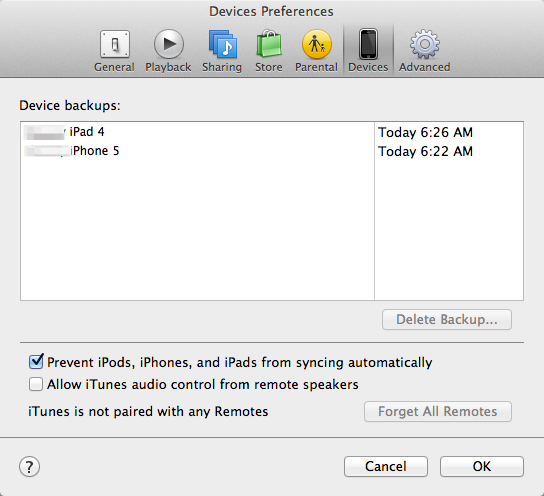
Those files are local backups of your iOS devices. There will be one file for every device you have ever backed up in iTunes, so they can add up. Open iTunes and in the preferences look at the Devices tab like in my screenshot. You should see an entry there for each iOS device (even the old ones). You can figure out what to get rid of my the names/dates. Each entry on this list will correspond with one of the files in ~/Library/application support/Mobile Sync. If for some reason they are not showing up in iTunes, just quit iTunes and delete all the files in ~/Library/application support/Mobile Sync from the Finder, then restart iTunes and make a new manual backup of iOS devices you still own.
|
|||
|
|
0
|
|
|
#14 |
|
Thanks. Thats what i thought.
r. Quote:
__________________
09QuadMacPro/2xIntelSSD's/ati/nvidea,macbookpro2ghz/iphone3gs16gig / tibook/powerbook/ibook/duo/classic/lc/newton / ipod5/10/30 shuffle/60 '80 moto guzzi 1000sp/ktmdukeII/theworldsumluv |
|
|
|
1
|
|
|
#15 |
|
|
0
|
![]() |
|
«
Previous Thread
|
Next Thread
»
| Thread Tools | Search this Thread |
| Display Modes | |
|
|
All times are GMT -5. The time now is 04:29 AM.


Linear Mode