
Got a tip for us?
Let us know
Become a MacRumors Supporter for $50/year with no ads, ability to filter front page stories, and private forums.
How to add a symbol to iPhone keyboard?
- Thread starter hello1
- Start date
- Sort by reaction score
You are using an out of date browser. It may not display this or other websites correctly.
You should upgrade or use an alternative browser.
You should upgrade or use an alternative browser.


All of the above replies = epic fail
HERE IS HOW TO ADD SYMBOLS IN YOUR SMS/EMAILS:
1) Go to settings -> general -> keyboard -> international keyboards.
2) Activate the japanese keyboard regardless of whether u speak japanese.
3) Open text box in SMS/EMAIL/Safari whatever.
4) Hit the globe button until it switches to japanese (kana not qwert) keyboard.
5) On the left hand side hit the second button from the bottom that says abc until it switches to *123.
6) Your keyboard should now have symbols on it.
refer to pictures
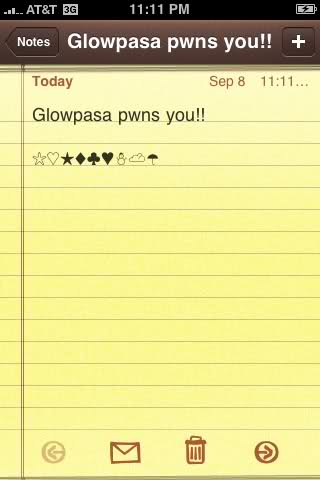
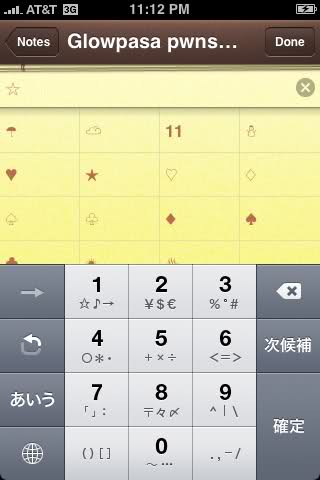
HERE IS HOW TO ADD SYMBOLS IN YOUR SMS/EMAILS:
1) Go to settings -> general -> keyboard -> international keyboards.
2) Activate the japanese keyboard regardless of whether u speak japanese.
3) Open text box in SMS/EMAIL/Safari whatever.
4) Hit the globe button until it switches to japanese (kana not qwert) keyboard.
5) On the left hand side hit the second button from the bottom that says abc until it switches to *123.
6) Your keyboard should now have symbols on it.
refer to pictures
CocoaPuffs
macrumors 68020
 , too, I forgot the path to that.
benzslrpee
macrumors 6502
motormouth
macrumors newbie
No check mark, but...
No check mark, but here's a few:
®©
To activate these & more on iPhone:
Settings
General
Keyboard
International Keyboards
Add New Keyboard...
Emoji
The end! Simply hit the world button to cycle amongst the keyboards!
PS. You can also add the Japanese 10 key for some more...
No check mark, but here's a few:
®©
To activate these & more on iPhone:
Settings
General
Keyboard
International Keyboards
Add New Keyboard...
Emoji
The end! Simply hit the world button to cycle amongst the keyboards!
PS. You can also add the Japanese 10 key for some more...

Small White Car
macrumors G4
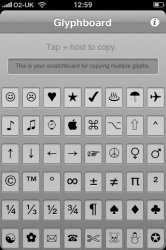
You should also check out the Glyph-Board.
You have to visit this link on an iOS device to see it:
http://mrgan.com/gb/
Follow the directions to add a link on your home screen. When you launch it you can then copy any icon and paste it anywhere else in iOS.
It looks like this:
You have to visit this link on an iOS device to see it:
http://mrgan.com/gb/
Follow the directions to add a link on your home screen. When you launch it you can then copy any icon and paste it anywhere else in iOS.
It looks like this:
Attachments
Keyboard Symbols - Emoji
I guess I'm missing something, because when I go to Add New Keyboard, there is no Emoji selection. Do I need to do something else first?
I guess I'm missing something, because when I go to Add New Keyboard, there is no Emoji selection. Do I need to do something else first?
No check mark, but here's a few:
®©
To activate these & more on iPhone:
Settings
General
Keyboard
International Keyboards
Add New Keyboard...
Emoji
The end! Simply hit the world button to cycle amongst the keyboards!
PS. You can also add the Japanese 10 key for some more...
Thanks, TangoDown. I appreciate the 'rest of the story'!
Yes, you do need to do something else first. You need to install Emoji Free from the app store - something that poster neglected to mention!

JetBlack7
macrumors 68030
You should also check out the Glyph-Board.
You have to visit this link on an iOS device to see it:
http://mrgan.com/gb/
Follow the directions to add a link on your home screen. When you launch it you can then copy any icon and paste it anywhere else in iOS.
It looks like this:
This is a very good alternative.
I guess I'm missing something, because when I go to Add New Keyboard, there is no Emoji selection. Do I need to do something else first?
Yes, you do need to do something else first. You need to install Emoji Free from the app store - something that poster neglected to mention!
I think you need iOS 6 or 6.0.1. I saw it right away without adding any additional apps.
Last edited:


atthecross
macrumors 6502
I tried that but it didn't work???????you type "appuru" on the japanese keyboard, wait about 2 sec and the apple logo should pop up.

Cabocathie
macrumors newbie
What am I doing wrong?
I did exactly that but can't see any symbols. What is the next step after the final step posted here?
I did exactly that but can't see any symbols. What is the next step after the final step posted here?
HERE IS HOW TO ADD SYMBOLS IN YOUR SMS/EMAILS:
1) Go to settings -> general -> keyboard -> international keyboards.
2) Activate the japanese keyboard regardless of whether u speak japanese.
3) Open text box in SMS/EMAIL/Safari whatever.
4) Hit the globe button until it switches to japanese (kana not qwert) keyboard.
5) On the left hand side hit the second button from the bottom that says abc until it switches to *123.
6) Your keyboard should now have symbols on it.
refer to pictures
Image
Image

Interstella5555
macrumors 603
I did exactly that but can't see any symbols. What is the next step after the final step posted here?
Isn't there an Emoji keyboard now that can be selected and used (at least in iOS 6 and above)?
Google "glyphboard". It lets you copy and paste all sorts of symbols.
The OP was just shy of 6 years ago, a lot has changed on the phone since then.