|
|
#1 |
|
USB 2.0 vs. Firewire 800 speeds
In my macbook pro, I have a 128GB SSD. My music and photos are too large to fit on the SSD. I currently have an external hard drive that is almost always connected to my mac that holds my music, pictures, and movies folder (I set up symbolic links). This hard drive is connected via Firewire 800. I am looking to get a more portable hard drive. The hard drives I am looking at are connected via USB 3.0/2.0. My mac doesn't have USB 3.0, so it would use USB 2.0. Would I notice a difference in speed when accessing the data from my hard drive using the USB 2.0 hard drive instead of a firewire 800 hard drive? Also, I think that more portable hard drive is 5400 RPM, whereas my firewire hard drive is 7200 RPM. Would this also affect speeds when accessing data? I am not too worried about backing up or transferring data because I usually transfer small files, i'm just worried about the speeds when accessing data.

__________________
15" Macbook Pro | 2.2Ghz i7 | 8GB RAM | 128GB Apple SSD | Hi-Res Antiglare |
|
|
|
0
|
|
|
#2 |
|
FireWire 800 will transfer files a little over twice as fast as USB 2. It'll also have a lower latency and it uses less computational resources.
__________________
Last edited by Intell; Yesterday at 11:50 AM. |
|
|
|
2
|
|
|
#3 |
|
I'm not worried about transfer speeds. If my music and photos are on the hard drive, would iTunes or iPhoto run slower because it has to access the data from the hard drive?
__________________
15" Macbook Pro | 2.2Ghz i7 | 8GB RAM | 128GB Apple SSD | Hi-Res Antiglare |
|
|
|
0
|
|
|
#4 | |
|
Quote:
If you only use iTunes with it it won't get slower, even movies can be played back with stuttering, USB 2 should do the job, but again there are FW 2,5 drives. |
||
|
|
0
|
|
|
#5 |
|
I know there are firewire drives, but as I said in the OP, I am looking for a more portable drive. Those drives don't have FW, only USB. But if you say it shouldn't be any slower, then I may buy the drive. I just wanted to know if others had experience with this.
__________________
15" Macbook Pro | 2.2Ghz i7 | 8GB RAM | 128GB Apple SSD | Hi-Res Antiglare |
|
|
|
0
|
|
|
#6 |
|
FW are known to be less CPU consumption since they have their own "CPU".
On the other hand, USB has to share its thinking with the main CPU so it will cause your computer to be more loaded.
__________________
17" MacBook Pro (Early 2011), 2.2GHz i7 Quad, 16GB RAM, 128GB SSD+1TB HDD@5400rpm 11" MacBook Air (Mid 2012), 2.0GHz i7 Dual, 8GB RAM, 256GB Flash iPhone 5 (White), 32GB
|
|
|
|
0
|
|
|
#7 |
|
You should get something like this. Abit expensive but in the long run, but you will have a usb3 compatible drive for when you get your next computer to get higher speeds.
http://www.bhphotovideo.com/bnh/cont...=REG&A=details
__________________
15" iMac G4, 1ghz PPC, 2gb RAM, 160gb HD 13" MBP, 2.5ghz i5, 8gb 1866mhz RAM, 240gb SSD iPhone, 16gb ; iPad 1, 64gb ; iPhone 4, 32gb iPod, 20gb ; iPod Nano, 16gb |
|
|
|
0
|
|
|
#8 | |
|
Quote:
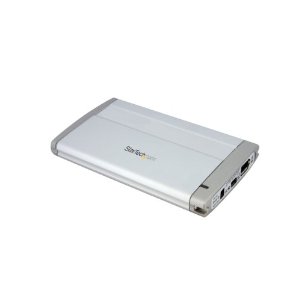
See Screenshot, a 2.5" drive. This is a fairly old external casing, it is still PATA but there are also SATA enclosures with FW and USB. Startech.com 2.5 inch USB FireWire SATA External Hard Drive Enclosure
|
||
|
|
0
|
|
|
#9 | |
|
Quote:
|
||
|
|
0
|
|
|
#10 |
|
To answer your question OP, yes, using USB 2.0 over FW800 will be slower. The applications will run at the same speed, but it will take them longer to sort through files and manipulate them (iPhoto especially). If your choices are USB 2.0 or FW800, use FW800.
USB 3.0 is faster than FW800, but since that's not an option, FW800 is likely the fastest option you have on your machine. A third and even faster option for you, would be an Optibay. This replaces your optical drive with another hard drive. You can use any 2.5" Hard Drive, like a 500GB HDD. It will be faster than anything external, and be always available. It will reduce your battery life some, but not a lot, perhaps not even noticeably. If you still use your optical drive, you can buy an external superdrive enclosure which will allow you to mount your superdrive into a USB 2.0 enclosure.
__________________
Windows7 PC - Phenom II 965@4GHz x4 Cores, 4GB DDR3-2133, Radeon HD5870 | iPhone 5 32GB | iPad WiFi+3G 64GB | Mid 2012 MacBook Pro 13", Dual 256GB SSD's in RAID 0, 16GB DDR3-1600 |
|
|
|
0
|
|
|
#11 |
|
Thanks for all your help guys. I think I'm just going to stay with my current hard drive. It's portable enough and has FW 800.
__________________
15" Macbook Pro | 2.2Ghz i7 | 8GB RAM | 128GB Apple SSD | Hi-Res Antiglare |
|
|
|
0
|
![]() |
|
«
Previous Thread
|
Next Thread
»
| Thread Tools | Search this Thread |
| Display Modes | |
|
|
All times are GMT -5. The time now is 06:34 PM.


17" MacBook Pro (Early 2011), 2.2GHz i7 Quad, 16GB RAM, 128GB SSD+1TB HDD@5400rpm
Linear Mode