|
|
#1 |
|
Subler/MP4Tools Help
OK...so I know there are workarounds for playing DTS on Apple TV but I'm looking to just convert the file over. My question is....I had a DTS Audio file that I converted to Dolby Pro Logic ii and the file ends up as AAC 2 Channel. Alternatively, the same file converted using AAC Multi Channel gave me an AAC 6 channel audio file.
Which is better? What's the best way to convert DTS to a Apple TV Friendly audio format while sacrificing the least amount of audio quality? Last edited by DaGrandMastah; Dec 29, 2012 at 10:04 PM. |
|
|
|
0
|
|
|
#2 | |
|
Quote:
The 6-channel audio file is true Surround Sound. This file format will encode each individual audio track for each speaker in the same fashion that DTS will. This is the best quality format that the ATV will support without ridiculous workarounds and is the only true surround sound you can get (again without ridiculous workarounds). The best thing to actually do with your rips is to have both. This will allow you to play it on any system and be fully supported. |
||
|
|
1
|
|
|
#3 | |
|
Quote:
Best would be to take the DTS to AC3 5.1 Dolby which as is well documented the AppleTV can pass thru to your receiver properly. |
||
|
|
1
|
|
|
#4 |
|
Whoops... Dyna above is right. I wasn't paying enough attention to the AAC specification.
Subler cannot mux into AC3, so you will have to use a different program (Handbrake is a great example) to make the AC3 audio file. You can either switch to have it do the full encode or turn the video settings to something ridiculously low and just make the audio track. Then you can mux the files together at the end using subler if you want to go that route. |
|
|
|
0
|
|
|
#5 | |
|
Quote:
So which setting would I use on Handbrake? I see AC3 (ffmpeg) under Codec but mixdown has Dolby Surround, Dolby Pro Logic 2 and 6 channel discrete. |
||
|
|
0
|
|
|
#6 | |
|
Quote:
|
||
|
|
0
|
|
|
#7 | |
|
Quote:
That sounds like it'll give me 2 audio streams. Am I importing both audio streams into the newly muxed file in Subler or am I only importing the AC3 5.1 dd track? |
||
|
|
0
|
|
|
#8 | |
|
Quote:
![]() Btw, on mac you can tell HB in preferences to send the file to subler if you want right after encoding. Makes things a bit more seamless ... just sayin'. |
||
|
|
0
|
|
|
#9 | |
|
Quote:
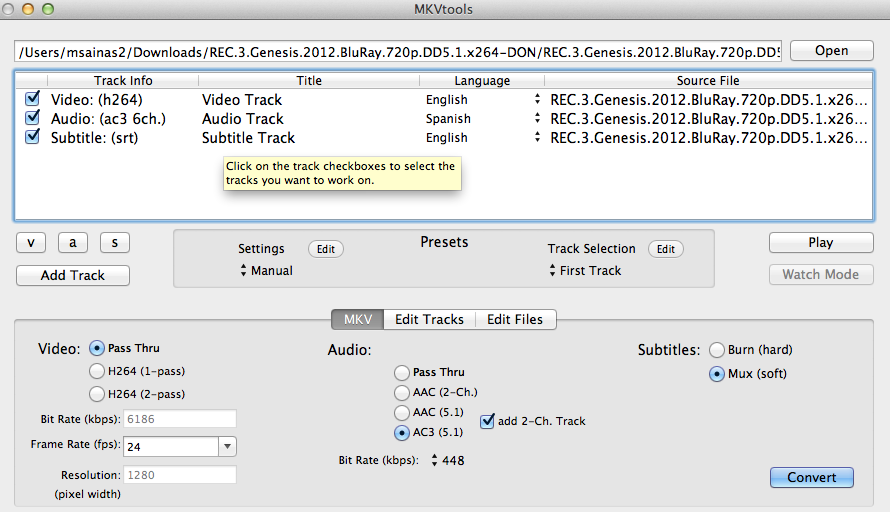
I think I've written a complete tutorial on this but can't find it now (I'll need to make my tutorials more organized, in, say, a tree or at least with keywords). Basically, what you need to do is very similar to how MKVTools is configured. See http://forums.macrumors.com/showthread.php?t=1495607 for the last installment of that series. |
||
|
|
0
|
|
|
#10 | |
|
Quote:
Ok....so when I import it into subler I want to import BOTH streams (aac 2.0 DPL2 and the AC3 5.1 DD) which one should be the primary stream in subler when muxing? So this will basically ensure that the file plays with surround sound when hooked up through optical and through regular speakers when not? Thanks alot for all the help btw. Been extremely helpful to learn all this stuff. I would have been doing it wrong this entire time otherwise. (I was never able to get mkv files to open in MP4tools) |
||
|
|
0
|
|
|
#11 | |
|
Quote:
Video (checked) AAC Dolby Digital Prologic (checked) AC3 (unchecked) Odd that your mkv would not open in mp4tools. It will be faster than HB for what you are trying to do (just generate 2 audio tracks fro an mkv dts source). Did you use the new version 3.2.1?
__________________
17" MacBook Pro, 2.66 GHz, 8GB RAM; AppleTV 3; iPad 2, 32GB; 2TB Time Capsule (RIP 9/12); AEBS w 1TB Seagate HDD; AE; 65" Mits DLP, Sony STR-DB1070 AVR
|
||
|
|
0
|
|
|
#12 | |
|
Quote:
|
||
|
|
0
|
|
|
#13 | |
|
Quote:
|
||
|
|
0
|
|
|
#14 | |
|
Quote:
__________________
17" MacBook Pro, 2.66 GHz, 8GB RAM; AppleTV 3; iPad 2, 32GB; 2TB Time Capsule (RIP 9/12); AEBS w 1TB Seagate HDD; AE; 65" Mits DLP, Sony STR-DB1070 AVR
|
||
|
|
0
|
|
|
#15 | |
|
Quote:
BTW, I've just checked the latest beta (released a week ago) of MP4Tools with a DTS-only MKV (the one at http://www.auby.no/files/video_tests...s_monsters.mkv ). The automatic mode with a combined 2-ch AAC + AC3 m4v output worked just fine. As it outputs M4V's natively, there's no need to pass its output to Subler either. |
||
|
|
0
|
|
|
#16 | |
|
Quote:
Update: just tried again and it opened my mkv's just fine. Not sure what was going on before. This is a good app with Emmgun putting good effort to support it. Think I'll support him.
__________________
17" MacBook Pro, 2.66 GHz, 8GB RAM; AppleTV 3; iPad 2, 32GB; 2TB Time Capsule (RIP 9/12); AEBS w 1TB Seagate HDD; AE; 65" Mits DLP, Sony STR-DB1070 AVR
Last edited by mic j; Dec 29, 2012 at 11:06 AM. Reason: update |
||
|
|
0
|
|
|
#17 | |
|
Quote:
|
||
|
|
0
|
|
|
#18 | |
|
Quote:
I don't think the problem was 3.2, I think it was probably me.
__________________
17" MacBook Pro, 2.66 GHz, 8GB RAM; AppleTV 3; iPad 2, 32GB; 2TB Time Capsule (RIP 9/12); AEBS w 1TB Seagate HDD; AE; 65" Mits DLP, Sony STR-DB1070 AVR
|
||
|
|
0
|
|
|
#19 |
|
I am still unable to load hte file into mp4tools. It will not accept any mov file. I'm only using the trial version as I dont' want to pay the $6 unless I know that it works for mkv's as well.
|
|
|
|
0
|
|
|
#20 |
|
Is it a mov or an mkv file?
__________________
17" MacBook Pro, 2.66 GHz, 8GB RAM; AppleTV 3; iPad 2, 32GB; 2TB Time Capsule (RIP 9/12); AEBS w 1TB Seagate HDD; AE; 65" Mits DLP, Sony STR-DB1070 AVR
|
|
|
|
0
|
|
|
#21 |
|
|
0
|
|
|
#22 |
|
|
0
|
|
|
#23 |
|
It should work in mp4tools, even if unregistered. Make sure you have version 3.2.1. Then try and add it. You can't drag and drop in the unregistered version, so you will need to add it using the file menu. If you can't add it, there might be something wrong with the file, so try some others.
__________________
17" MacBook Pro, 2.66 GHz, 8GB RAM; AppleTV 3; iPad 2, 32GB; 2TB Time Capsule (RIP 9/12); AEBS w 1TB Seagate HDD; AE; 65" Mits DLP, Sony STR-DB1070 AVR
|
|
|
|
0
|
|
|
#24 | |
|
Quote:
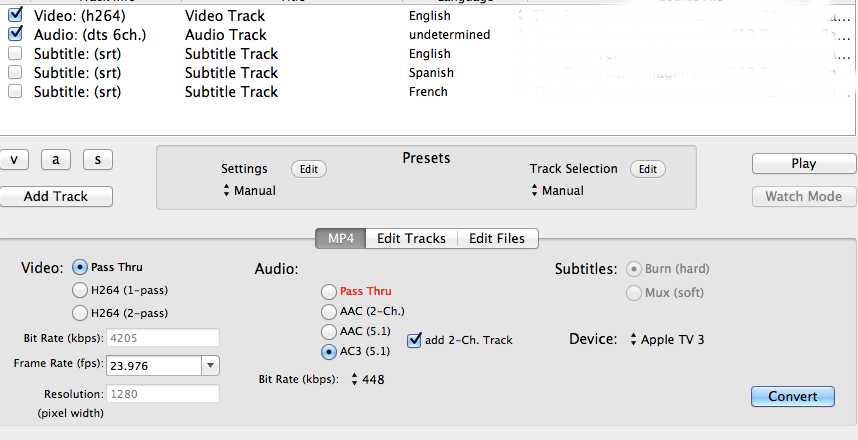
What do i do if I want to remux this file so that it plays on my apple tv? I selected Apple tv 3 as a device so I'm assuming I can pass thru, switch it to ac3 5.1 and add 2-ch track. The only other question I would have is what bit rate to use for the audio file? Also, once the file is output from MP4Tools can I throw it into Subler to update the metadata in it? Last edited by DaGrandMastah; Dec 29, 2012 at 09:44 PM. |
||
|
|
0
|
|
|
#25 |
|
Crap. now I think I'm more confused then ever. MP4Tools isn't making any sense.
I just reuxed 5 gb file and I ended up with a 349 mb m4v. I set it so the video was pass thru, the audio was ac5 5.1 and add 2 channel and that's it. I guess I just don't understand how this program works. I'm obviously doing something wrong.
Last edited by DaGrandMastah; Dec 30, 2012 at 01:03 AM. |
|
|
|
0
|
![]() |
|
«
Previous Thread
|
Next Thread
»
| Thread Tools | Search this Thread |
| Display Modes | |
|
|
All times are GMT -5. The time now is 06:10 AM.


17" MacBook Pro, 2.66 GHz, 8GB RAM;
Linear Mode