|
|
#1 |
|
Apple TV 3 - Poor Ethernet Performance
To try and improve streaming performance, I turned off WiFi on my Mac and connected my Mac straight to my Apple TV by ethernet. Works fine, however the streaming performance is just the same as WiFi.
Videos still buffer for the same duration, and worst of all, photos don't load instantly. Is this just a limitation of streaming? I'd have expected far better performance from being wired versus wireless.
__________________
15" MacBook Pro 2GHz i7 4GB 750GB | Mac mini 2.3GHz i7 16GB 1TB Fusion | OS X 10.8.3 iPhone 5 64GB | Apple TV 3 1080p | iOS 6.1.4 |
|
|
|
0
|
|
|
#2 | |
|
Quote:
Also, are you doing the "Computers" option on the AppleTV, or are you going directly to Movies/TV Shows/Photos/etc? If you're going through Movies/TV Shows/Photos/etc, then it's using your internet connection, which is probably the slow part, rather than streaming directly from the computer.
__________________
20" Aluminum iMac 7,1 (mid-2007, Santa Rosa,) upgraded to 2.6 GHz Penryn, 6 GB RAM, 1 TB HD, 4 TB total external hard drive |
||
|
|
0
|
|
|
#3 | |
|
The AppleTV only has a 100Mbps interface, there is no Gigabit.
Quote:
I would even try completely shutting down the Mac and aTV, connecting them and then powering them back up and try this again. Sometimes you may experience network hiccups if you disconnect a LAN cable from one source and the connect to another. Also do you know if you are using a CAT5, 5E or 6 LAN cable? Is it a "cross-over" cable or just a standard LAN cable? http://en.wikipedia.org/wiki/Crossover_cable
__________________
'11 iMac 27" RAID'd SSD, '09 iMac 27" X-25M SSD, '10 iMac 27", iMacG4 1GHz768MB, '10 MacMini, '11 MacMini '12 MiniServer '12 15"rMBP, '12 13" MBAir, iPad4 16GBWiFi, iPad4 32GB4G, aTV1,2 & 3 |
||
|
|
1
|
|
|
#4 | |
|
Quote:
Edit: mmomega beat me to it |
||
|
|
0
|
|
|
#5 |
|
Well, nevermind me then! (At least, that part of my post.)
__________________
20" Aluminum iMac 7,1 (mid-2007, Santa Rosa,) upgraded to 2.6 GHz Penryn, 6 GB RAM, 1 TB HD, 4 TB total external hard drive |
|
|
|
0
|
|
|
#6 |
|
Yes 100 mbps is slower than a good wifi connection but is it better than the Apple TV wifi connection? I've never had my Apple TV connect at anything faster than 65mbps over wifi even though my laptop connects to the same network at 450 mbps. So, in short, if your Apple TV is like mine plugging it into the ethernet port should improve the connection speed.
|
|
|
|
0
|
|
|
#7 |
|
The Apple TV's max wifi speed is 150mbps on wireless N 2.4Ghz or 300 Mbps on 5Ghz (Dual Band Routers only). If you aren't getting any better than 65mbps you may want to check your router settings. A lot of new routers will limit connection speed based upon the band you use. Also it will be limited if your router is far away or the connection goes through multiple walls.
|
|
|
|
0
|
|
|
#8 | |
|
Quote:
__________________
Mike |
||
|
|
0
|
|
|
#9 |
|
Not sure on the type of cable, but even if it was just going 100mbps, that's say 8MB/s in real world scenario.
I have some 1080p files, that have a data rate of ~5MB/s. When I stream them, it buffers for about 5-6 seconds, and then after playing for 10 secs, it has to buffer again.
__________________
15" MacBook Pro 2GHz i7 4GB 750GB | Mac mini 2.3GHz i7 16GB 1TB Fusion | OS X 10.8.3 iPhone 5 64GB | Apple TV 3 1080p | iOS 6.1.4 |
|
|
|
0
|
|
|
#10 | ||
|
Quote:
---------- Quote:
|
|||
|
|
0
|
|
|
#11 | |
|
Quote:
__________________
17" MacBook Pro, 2.66 GHz, 8GB RAM; AppleTV 3; iPad 2, 32GB; 2TB Time Capsule (RIP 9/12); AEBS w 1TB Seagate HDD; AE; 65" Mits DLP, Sony STR-DB1070 AVR
|
||
|
|
0
|
|
|
#12 | |
|
Quote:
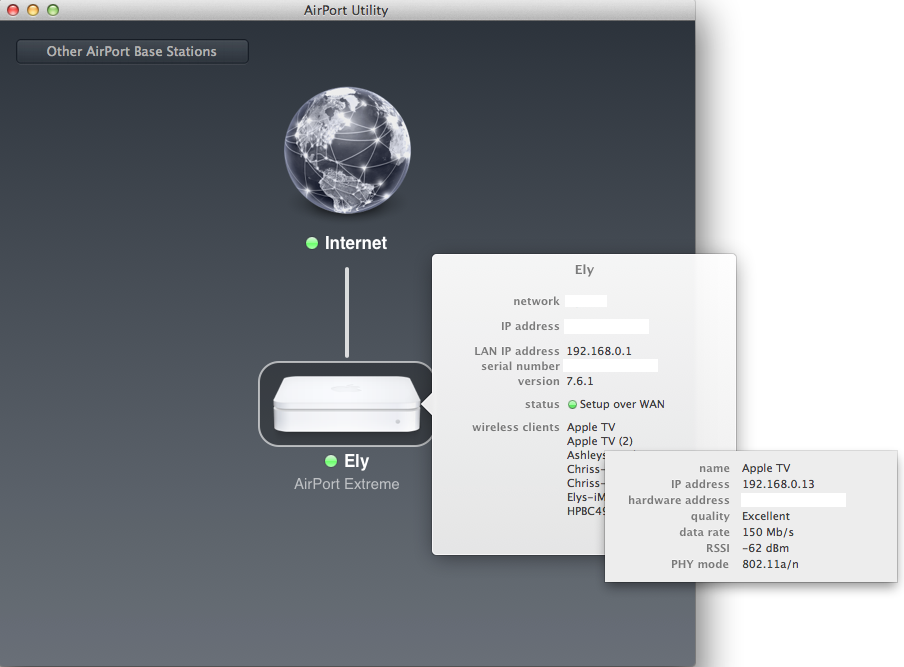
It is possible that the max speed for 2.4 Ghz is 65 mbps and the max for 5Ghz is 150mbps. Here is a screenie!
|
||
|
|
0
|
|
|
#13 | |
|
Quote:
In your case the wifi is faster than the ethernet cable is. I wonder what the problem is, maybe too much interference from neighbors, dunno. I'm also on the 5ghz band but only get 65mbps.
|
||
|
|
0
|
|
|
#14 | |
|
Quote:
__________________
17" MacBook Pro, 2.66 GHz, 8GB RAM; AppleTV 3; iPad 2, 32GB; 2TB Time Capsule (RIP 9/12); AEBS w 1TB Seagate HDD; AE; 65" Mits DLP, Sony STR-DB1070 AVR
|
||
|
|
0
|
|
|
#15 |
|
Except mine is running on the 5Ghz band and also capping at 65 Mb/s even tho my macbook air is hitting 300 Mb/s on the same network/distance. Any idea how to break this 65 Mb/s cap?
__________________
13" Macbook Air (2010), 1.86 GHz, 4 GB RAM, 128 GB SSD iPad 3 32GB LTE (at&t)
|
|
|
|
0
|
|
|
#16 |
|
Again, I would ask how far away your router is or how many walls it goes through? My router is literally 15 feet away from the ATV3 that gets this signal. Your MacBook Air may get a fine connection, but the ATV antennae are smaller and may not receive as high a signal. Wifi is all about SOS (strength of signal).
|
|
|
|
0
|
|
|
#17 | |
|
Quote:
__________________
13" Macbook Air (2010), 1.86 GHz, 4 GB RAM, 128 GB SSD iPad 3 32GB LTE (at&t)
|
||
|
|
0
|
|
|
#18 | |
|
Quote:
1. Go here to get Airport Utility 5.6.1 from Apple. 2. Go here and grab the workflow. This only extracts the Airport Utility app from the dmg file. 3. Drag the Airport Utility 5.6.1 dmg and drop it onto the Utility Extractor. 4. Wait a few seconds for the extractor to work and you will have the AU app. I named mine "Older Airport Utility" since it has the same icon as the newer version and dropped it into the Utilities folder. It will ask you to update the app each time you open it to version 6.1, just ignore that prompt and you can use the older version in ML.
__________________
'11 iMac 27" RAID'd SSD, '09 iMac 27" X-25M SSD, '10 iMac 27", iMacG4 1GHz768MB, '10 MacMini, '11 MacMini '12 MiniServer '12 15"rMBP, '12 13" MBAir, iPad4 16GBWiFi, iPad4 32GB4G, aTV1,2 & 3 |
||
|
|
1
|
|
|
#19 |
|
Are you having issues with streaming from the Internet or your Mac computer? I think it is your local computer.
If the Internet, what is your Internet bandwidth? Can you post your ping times and do a trace route? Maybe you are having issues on your local network that may show up in the pings and trace routes. Personally, I have not had any issues with streaming files from my local network nor the Internet to my ATV. I've even tried all 4 of them streaming the same file, though not all at the same exact starting time since they are across three floors and 4 different rooms.
|
|
|
|
0
|
|
|
#20 |
|
hi. i had this issue last night when my sister was trying to airplay(mirroring) with her ipad n the ATV3 n her 1080p tv. buffering issues, to the extent it looked extremely bad.
however on my ATV2 n my 720p tv(old), it(mirroring) worked perfectly. i was extremely puzzled. when i tried to use airplay(mirroring)with my mac air+her atv3, it gave some weird settings to my mac air. however.... (because it was mirroring, it didnt have to be 1080p, quality didnt really matter) when i switched the atv3 to 720p, everything was good.. i guess i'd need a faster network (in future) to support 1080p update: i just re-read ur post. what do u mean by streaming? Home sharing feature? Then it should be instantaneous, i dont have that sort of issue. Last edited by wharzhee; Jan 6, 2013 at 07:55 PM. |
|
|
|
0
|
|
|
#21 | |
|
Quote:
Pinging my Apple TV I get between 6-10ms. My local network is fine because I often access data stored on my raspberry pi, and transfer rates are fine. I should mention that my raspberry pi has been off for a while, and the only two devices on my network are my Apple TV and my laptop during this troubleshooting. Is there a way to see the data transfer rate between my Mac and Apple TV?
__________________
15" MacBook Pro 2GHz i7 4GB 750GB | Mac mini 2.3GHz i7 16GB 1TB Fusion | OS X 10.8.3 iPhone 5 64GB | Apple TV 3 1080p | iOS 6.1.4 |
||
|
|
0
|
|
|
#22 |
|
Hi
As you say about 1080p I assume this is an ATV3? What is your Mac? Have to say I can only assume that for some reason the Mac can't serve the file well enough. I say this as I have a 2006 iMac using a Seagate 2Tb USB (Usb3 drive running as usb2 cos of the machines age) as a library which is connected by cat6 to a Airport Extreme which then services 2 ATV3's wirelessly, perfectly every time with any quality of file I can throw at it. Other than a short delay as the Usb drive wakes and then loads the first segement (and I mean short, between 1 & 3 seconds) the only time I get buffering is when accessing trailers from t'internet. I find the ATV's wireless to be a lot better than an iPad 2. Know this doesn't solve the problem but might give you somewhere to look.
__________________
Simon 13" MBP mid 2012, 13" MB mid 2010, 20" iMac late 2006, 2 x ATV3, Assorted iPods |
|
|
|
0
|
|
|
#23 |
|
I don't wanna hijack the thread but there seems to be a lot of knowledgeable people in here in regards to home networking. I just have one question.
When I go into the airport utility and see a list of devices connect to my airport express, I see that, for instance, my macbook has a connection speed of 130mbps. Then when I go and do a speed test I get a speed of 16mbps. How does this happen? Is the 130 just a hypothetical "max" connection speed and the 16mbps is what my actual connection is? I just wanna make sure I maximize my connection speed. Thanks |
|
|
|
0
|
|
|
#24 |
|
I feel stupid, I'd always assumed wired would be faster then wireless on any device. Would wireless N (to my latest generation Time Capsule, less then a foot from the Apple TV) really be faster then using a Cat5E ethernet cable? If so that is messed up.
|
|
|
|
0
|
|
|
#25 | |
|
Quote:
Edit: And before anyone corrects me, yes you will still have packet loss with an ethernet connection, but the amount of loss is greatly reduced compared to wifi.
__________________
MBP 8,2 15" 2.2Ghz w/ 120GB SSD + 500GB MBA 4,2 13" 1.7Ghz w/ 128GB SSD Mac Mini 6,2 2.3ghz w/ 240GB SSD + 1TB Mac Pro 1,1 w/ 8 cores @ 2.66 w/ 240GB SSD |
||
|
|
0
|
![]() |
|
«
Previous Thread
|
Next Thread
»
| Thread Tools | Search this Thread |
| Display Modes | |
|
|
All times are GMT -5. The time now is 02:00 PM.


17" MacBook Pro, 2.66 GHz, 8GB RAM;
In your case the wifi is faster than the ethernet cable is. I wonder what the problem is, maybe too much interference from neighbors, dunno. I'm also on the 5ghz band but only get 65mbps.
Linear Mode