JohnLT13 macrumors 6502a Original poster Jan 6, 2013 #1 Ive tried to no avail to remove the HDD drive from my desktop. Im sure its simple, but its making me nuts. TIA Last edited by a moderator: Jan 6, 2013
Ive tried to no avail to remove the HDD drive from my desktop. Im sure its simple, but its making me nuts. TIA
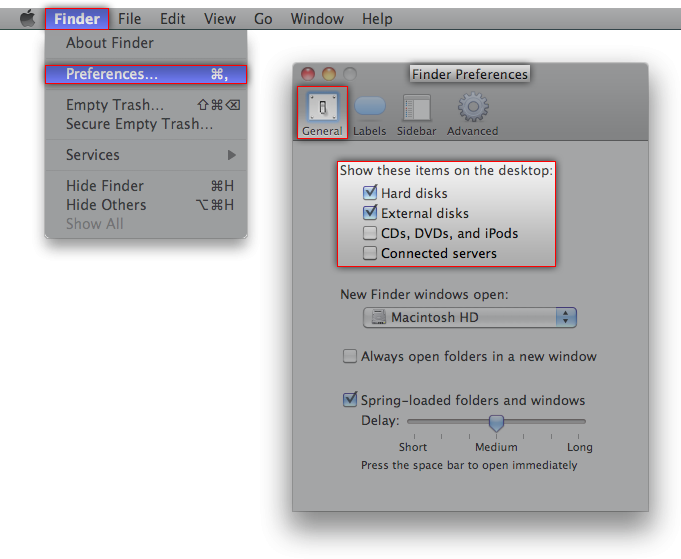
stridemat Moderator Staff member Jan 6, 2013 #3 Make sure you have 'Finder' in the top left of your screen and then press CMD+, The deselect the HDD box.
Make sure you have 'Finder' in the top left of your screen and then press CMD+, The deselect the HDD box.
J JohnnyComeLatly macrumors member Jan 6, 2013 #6 Its showing you that your hard drive is really far out, man (said in my best Cheech and Chong voice)
JohnLT13 macrumors 6502a Original poster Jan 6, 2013 #7 [/COLOR] robvas said: Source to that wallpaper? Click to expand... http://deskpoper.com/star-wars-death-star-9885/
[/COLOR] robvas said: Source to that wallpaper? Click to expand... http://deskpoper.com/star-wars-death-star-9885/
simsaladimbamba Guest Jan 6, 2013 #8 stridemat said: Make sure you have 'Finder' in the top left of your screen and then press CMD+, View attachment 388333 The deselect the HDD box. Click to expand... How does that help, if the item is showing on the Desktop and not the Sidebar? For that one has to go to Finder > Preferences > General > Show these items on the Desktop
stridemat said: Make sure you have 'Finder' in the top left of your screen and then press CMD+, View attachment 388333 The deselect the HDD box. Click to expand... How does that help, if the item is showing on the Desktop and not the Sidebar? For that one has to go to Finder > Preferences > General > Show these items on the Desktop