|
|
#1 |
|
Handbrake not working with 1080p
Hello all,
I've been trying to convert a bluray movie into a 1080p mp4 via handbrake, but have been unsuccessful. I use makeMKV to rip the bluray to mkv then try to compress it using handbrake. I want to keep the settings at 1080p for my 4th gen ipad and stream it over my network at home. When I set the settings to keep the encoding at 1080p I get the error on many different devices saying they cant recognize the format. But when I change it to encode in 720 it comes out perfect. I've tried the normal preset as well as high profile, and atv3, none of which worked. Has anyone else had this issue and resolved it? Im using a MBP with intel c2d 2.4 ghz 8gb mem if that is relevant at all. I appreciate your help. Thanks
__________________
Mid 2010 13" MBP 2.4 C2D, 1.64TB, 8gb RAM Iphone 5 16gb, Black/Slate |
|
|
|
0
|
|
|
#2 |
|
Handbrake has no problem with 1080p. Use
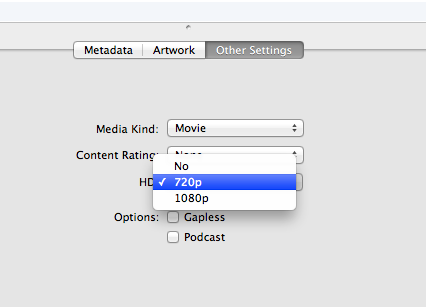
TV3 or High Profile preset and it works.Home sharing 1080p to Apple iDevices appears to have a bug (some (all?) can't see 1080p files via home sharing). For example, if you have a mix of 720p or SD and some 1080p in your home-shared iTunes library, the iDevice will see the 720p and less but not the 1080p. If you use something like subler to change the tag of a 1080p to 720p (even though the file is actually 1080p), it will work with home sharing. Bug! Best solution for now is to sync what you want to watch to the iDevice and then 1080p content made with Handbrake will show. Then, hope Apple decides to fix this bug soon. |
|
|
|
0
|
|
|
#3 | |
|
Quote:
__________________
Mid 2010 13" MBP 2.4 C2D, 1.64TB, 8gb RAM Iphone 5 16gb, Black/Slate |
||
|
|
0
|
|
|
#4 | |
|
Quote:
__________________
17" MacBook Pro, 2.66 GHz, 8GB RAM; AppleTV 3; iPad 2, 32GB; 2TB Time Capsule (RIP 9/12); AEBS w 1TB Seagate HDD; AE; 65" Mits DLP, Sony STR-DB1070 AVR
|
||
|
|
0
|
|
|
#5 |
|
I can't say for sure, but my iPad Mini is able to play Handbrake 1080p (high profile preset) just fine (if I sync it). Via home sharing, the Mini can't see the exact same files (unsynced). While the Mini is new, it's based on the iPad 2 platform. And the wife's iPad 2 works the same way.
If you have an iPad 3 or iPad 4, your's is more powerful than ours. Something else is in your way. You imply that you've tried syncing it to the iPad and it won't play that way either. Is that right? If so, something wrong. I know for certain that synced 1080p will play on both the Mini and iPad 2. Now if by "sync" you mean you're trying to stream via home sharing, that won't work because of the bug I referenced. To clarify, can you see the file in the video app after you "sync". If it is there and you try to play it, what happens? error message? video player crashes? Are you messing with any of the settings when you do the handbrake encode? Verify that you are just loading the mkv file and then clicking a preset like "high profile" or "Apple TV 3" before you start making the final .m4v file. Last edited by HobeSoundDarryl; Jan 6, 2013 at 06:10 PM. |
|
|
|
0
|
|
|
#6 |
|
I get it..the iPad 4th generation is the "mini". Never heard it referred to as "4th gen".
Thanks.
__________________
17" MacBook Pro, 2.66 GHz, 8GB RAM; AppleTV 3; iPad 2, 32GB; 2TB Time Capsule (RIP 9/12); AEBS w 1TB Seagate HDD; AE; 65" Mits DLP, Sony STR-DB1070 AVR
|
|
|
|
0
|
|
|
#7 |
|
Before you start your HB encode, make sure the display size is actually 1920x1080 or smaller. If it's even one pixel bigger, it won't play on your iPad. To fix this, change the Anamorphic setting from Loose to Strict.
I've run into this problem with the first three Bond movies, and numerous TV shows. They'll play fine on the Apple TV, but not on an iPad. For example, today I have an episode of Mad Men, that with the Apple TV 3 setting comes out to 1921x1082 with Anamorphic set to Loose. Setting it to Strict gives me 1918x1080 which will play on the iPad FYI, I'm using an iPad 3 and Apple TV 3. ---------- I think the 4th gen is the one with the Lightning connector maybe? |
|
|
|
0
|
|
|
#8 | |
|
Quote:
|
||
|
|
0
|
|
|
#9 |
|
when Apple announced the iPad mini, they replaced the iPad(3rd gen) with the iPad(4th gen) - this is noticeable[exteriorly] with the normal sized iPad with the lightning port.
|
|
|
|
0
|
|
|
#10 |
|
Someone please tell me if I have been doing this wrong: I have been compressing several of my bluray movies with Handbrake and the ATV3 preset. Most of the time, the format comes out around 1920x815. I thought that the difference between this and 1920x1080 was minimal. Isn't it just the black bars, or am I getting more black bars on this standard setting?
|
|
|
|
0
|
|
|
#11 | |
|
Quote:
In handbrake, the dimensions refer to the video you see, not the black bars. A 1920X815 is a 2.40:1 (or 2.35:1) picture which would have black bars on the top and bottom whereas 1920x1080 is a 16/9 picture which fills the screen. |
||
|
|
0
|
|
|
#12 | |
|
Quote:
|
||
|
|
0
|
|
|
#13 | |
|
Quote:
The 1920x800 is the exact same dimensions from the blu ray movie. If you add the space the black bars take up, it would equal 1920x1080. Handbrake doesn't encode the black bars, instead, the black bars are automatically added by your TV. Not sure if you understand black bars or not but here is a pretty good article about it. http://www.highdefdigest.com/news/show/764 |
||
|
|
0
|
|
|
#14 | |
|
Quote:
|
||
|
|
0
|
|
|
#15 |
|
|
0
|
![]() |
|
| Tags |
| 1080p, bluray, handbrake, mp4 |
«
Previous Thread
|
Next Thread
»
| Thread Tools | Search this Thread |
| Display Modes | |
|
|
All times are GMT -5. The time now is 09:06 AM.


Mid 2010 13" MBP 2.4 C2D, 1.64TB, 8gb RAM


Linear Mode