|
|
#26 |
|
Thank you Bonedaddio for the idea. In fact, the next thing I intend to try is this
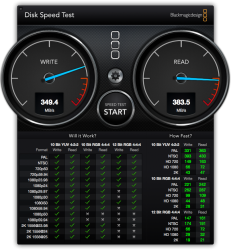
1. Install the drivers for the J4 to be recognised 2. Turn it into a RAID 0 logical drive 3. Make an image of my current running OS with disk utility to another partition. 4. Restore that image partition with disk utility onto the RAID 0 2TB drive. How does that sound? Any way bonedaddio for blazing speed, I mean really amazing results, I think we should look no further than OWC. The Helios thunderbolt enclosure with an accelsior PCI express card that connects to the imac port and boots from there promises 782MB/sec read and 763 MB/sec write speeds. No drivers, just plug an' play. Thank you guys for your recommendations. |
|
|
|
0
|
|
|
#27 |
|
I received my Thunderbolt Pegasus J4 and loaded it with 4 HGST Travelstar 1TB 7200rpm 2.5" hard disk drives. It is a really nice looking unit.
I found it wouldn't even see the drives without first loading the driver. Once the driver was loaded and rebooted, I used Disk Utility to create different RAID-0 arrays and tested them with BlackMagicDesign "DiskSpeedTest" with 4GB test option. I ran the test on a single disk, and 2-disk, 3-disk, and 4-disk RAID-0 configurations. I also ran the AJA test which produced similar results. Results: config ....... Write / Read MB/s 1 disk ....... 115 / 129 2 disk ....... 250 / 258 3 disk ....... 345 / 375 4 disk ....... 501 / 507 I like it! ![]() Of course, running 4 hard disks in RAID-0 ... YOU WILL WANT TO KEEP A GOOD BACKUP STRATEGY! -howard ... Last edited by hfg; Jan 10, 2013 at 03:57 PM. |
|
|
|
0
|
|
|
#28 |
|
Great results! Crazy. Too much noise for me, though.
|
|
|
|
0
|
|
|
#29 |
|
Howard you are crazy
well nice job men.. I love your reviews.
|
|
|
|
0
|
|
|
#30 |
|
I am really impressed with how quiet the J4 is with 4 7200rpm 2.5" disks in it. I currently have it on my desk in front of me, but was planning on locating it under the desk where I wouldn't hear it. But I really can't hear it now!
It looks like it would sit nicely on the iMac stand base, with a DVD optical drive sitting on top of it. -howard Last edited by hfg; Jan 10, 2013 at 03:56 PM. |
|
|
|
0
|
|
|
#31 | |
|
Quote:
Still, those speeds scale excellently, and of course you get a LOT of storage space out of it. ![]() I do wish the darn thing didn't need drivers to be picked up in OS X, though. And it'd be nice if it worked AT ALL in Windows! |
||
|
|
0
|
|
|
#32 | |
|
Quote:
hfg; very cool results, considering these are Sata II drives! They're not on the list either... I'm thinking Promise really rushed the J4 out the door and it's not really ready for Prime Time yet. Sigh. I'm really in a quandry with my J4, I may be sending it back. I've been back and forth with Promise support, and they tell me that only the SSD drives on their supported list will work (nothing larger than the 300Gb Intel; no Samsung 840's; (for me, it DID work with a Crucial M4 SSD 256Gb), but Promise says that if it's not on the list, the data may be corrupted or the drive may not show up, etc. Just as an FYI, here's a transcript of several Promise support sessions: Request:- 9th January 2013 at 5:57This is not very "Promising" and I already have a new Seagate Backup Plus Desktop adapter that uses Samsung 840 drives just fine, and boots OSX and Windows just fine. I'm not sure I'll be keeping the J4, if I can return it. I suppose I could just keep it and wait for drivers and firmware... OR like hfg did, put 4 HDDs in and stripe away. Even a 2 disk stripe would be fine for data... 1TB of drives at 500 Mps for $400-$500 is not too bad, IMHO. Yeah, you'd really need to keep the backup thing going on. I'm not "up" on software raid striping reliability. Anyone have info on this??Signed, somewhat discouraged with the J4, but PLEASED with the Seagate Backup Plus Desktop! Last edited by bonedaddio; Jan 11, 2013 at 11:01 AM. |

||
|
|
0
|
|
|
#33 |
|
I wonder if the "Compatibility List" is simply the drives that they have used in their testing, rather than a comprehensive list of drives which will/won't work?
Their "official stance" will be to recommend only authorized drives which they have actually tested ... other drives may be perfectly fine as well, they just haven't purchased them and put them through their test programs. Regarding the SATA-II drives ... I don't think it would make much difference with hard disks if they were SATA-III (once the cache was read) in overall throughput. I think it is great to potentially have a 4TB disk with high-end SSD speeds. I am thinking that for my use and needs: Internal iMac SSD configured as 512GB -- OS X ..... 256GB -- Windows Pegasus j4: 2 bays for Fusion drive with 256GB SSD and 1TB hard disk Pegasus j4: 2 bays spanned for 2TB backup (first level - Time Machine) second level backup on Synology NAS in basement. (Time Machine and Windows) This will give me 1.75TB of OS X storage with 2TB of DAS backup. Booting OS X from the Pegasus is a non-issue for me. My Windows is now internal on SSD and no longer an issue with the Pegasus. -howard |
|
|
|
0
|
|
|
#34 |
|
Just wanted to get my test results in this thread as well. In case anyone else wants to get the Seagate TB Adapter STAE128. I put a Samsung 840 Pro 256gb disk in and running as boot drive.
Everything is running great, comes out of sleep perfectly.
__________________
------------------------------------------------ 2011 27" iMac 3.1ghz 256gb SSD, 2x Ipad 2, Ipad 3, IPhone 4, IPod Touch, IPod mini. |
|
|
|
0
|
|
|
#35 | |
|
Quote:
If I'd of had the money, I might have gone for the 768 SSD, but I didn't, and for less money I'll have decent performance I can live with. (Mutters about the *%#!$% Promise J4 gathering dust...) |
||
|
|
0
|
|
|
#36 | |
|
Quote:
That will be a sweet setup, looking forward to your results. Gotta love the Samsung SSD's, low power usage, which why I bought mine. If you are buying new, register online to get 3 months extra warranty.
__________________
------------------------------------------------ 2011 27" iMac 3.1ghz 256gb SSD, 2x Ipad 2, Ipad 3, IPhone 4, IPod Touch, IPod mini. |
||
|
|
0
|
|
|
#37 |
|
I have been having some more fun with the Pegasus J4 with 4 ea. 1TB 7200rpm drives as described above a few posts. Here are the RAID-0 results again with the hard disks:
Results: config ....... Write / Read MB/s 1 disk ....... 115 / 129 2 disk ....... 250 / 258 3 disk ....... 345 / 375 4 disk ....... 501 / 507 I replaced one of the hard drives with a Samsung 840 Pro 256GB SSD: 840Pro ....... 316 / 524 I then created a "Fusion" drive in the Pegasus J4 using the 256GB SSD and one of the 1TB hard disks. I left the other 2 hard disks as a 2TB RAID-0 for now. It all seems to work great so far, although now it is a tough decision whether to leave it as a fast 1.25TB Fusion drive ... or a not-quite-so-fast 2TB RAID-0 using two drive bays. Speed vs. Capacity! I have several tests with the same Samsung 840 Pro SSD 256GB on different interfaces with some confusing results: Write / Read MB/s ....... Interface 496 / 507 ....... on PCIe SATA-III in Mac Pro 242 / 376 ....... on Seagate Thunderbolt Adapter 316 / 524 ....... in Pegasus J4 Thunderbolt enclosure I am not seeing the speeds others here are getting with the 840 Pro SSD on the Seagate Thunderbolt Adapter (or GoFlex Adapter). -howard EDIT: after the 840 Pro had a chance to idle overnight, it may have been "trimmed" and reset some of the deleted space because today the write speed is somewhat faster going from 275MB/s to 316MB/s. Last edited by hfg; Jan 12, 2013 at 01:44 PM. Reason: update Fusion speed |
|
|
|
0
|
|
|
#38 | |
|
Quote:
Hmm, that is strange. Your write speeds should be higher than that with the seagate & 840 pro. There is new firmware out for the 840, but it wouldn't explain slower write speeds. Howard, Are all these results from the same machine? My seagate/840 combo is connected to my 2011 imac...
__________________
------------------------------------------------ 2011 27" iMac 3.1ghz 256gb SSD, 2x Ipad 2, Ipad 3, IPhone 4, IPod Touch, IPod mini. |
||
|
|
0
|
|
|
#39 | |
|
Quote:
-howard EDIT: as noted above, the write speed of the 840 Pro in the Fusion drive did increase from 275 to 316MB/s after being powered up and idle overnight, possibly a result of "trim" activity reseting deleted area. Last edited by hfg; Jan 12, 2013 at 01:47 PM. |
||
|
|
0
|
|
|
#40 | |
|
Quote:
One thing to try, although you may already done this... Use the Samsung magician tool (under windows only) to reset the drive. Then as you say, let it sit at the login screen for 12 hours so it can clean itself up. (Don't log in..)
__________________
------------------------------------------------ 2011 27" iMac 3.1ghz 256gb SSD, 2x Ipad 2, Ipad 3, IPhone 4, IPod Touch, IPod mini. |
||
|
|
0
|
|
|
#41 |
|
Return stuff time...
Returned today:
Pegasus J4 - I need it to work for Bootcamp, and it doesn't show up in Option Boot on my new iMac 27". Oddly enough, it DID show up on my late 2011 MacBook Pro. Go figure... I still think it's a great enclosure, from a concept and hardware point of view. Drivers, and compatibility, not so much. I'll get another one down the road if the fix the issues... $387 is too expensive a wait for me. Seagate GoFlex Desktop Adapter - it costs $30 more than the Backup Plus Desktop... and the Backup Plus is the newer model, so I got one. Samsung 840 SSD 256 Gb - Didn't really need it since the Pegasus J4 was going back. I got a 500Gb to use with the Desktop Plus adapter; 250/250 Mac OSX/Windows 7. I still have another 840 left... thinking about putting that in my Optibay on my MacBook Pro for bootcamping Windows 7. Still undecided... I have to believe that sooner or later, either they'll get the J4 sorted out or someone will make a REASONABLY priced TB enclosure. Till then, the Desktop Plus will work for me. Les |
|
|
|
0
|
|
|
#42 |
|
Thank you
for sharing all these findings. Have been a great read.
/Stefan |
|
|
|
0
|
|
|
#43 |
|
Interesting Reads
Hi i,m new to this forum, but it has been a very interesting read as well as the other thread about HDD and Thunderbolt.
I have a 2011 21.5 iMac 16gb, 1TB internal HDD and 3TB GoFlex Desk HDD with Thunderbolt. Tried Black Magic Disc Speed Test and unless i am doing something wrong, these were the results: 1TB internal HDD - approx 35-40 read/write 3TB GoFlex Desk Thunderbolt - approx 150-160 read/write I must say, the internal HDD seems incredibly slow! Way off what a lot of posts are getting why is that? If these tests are true, is it worth switching the OSX over to the Thunderbolt GoFlex Desk? Cheers |
|
|
|
0
|
|
|
#44 | |
|
Quote:
|
||
|
|
0
|
![]() |
|
«
Previous Thread
|
Next Thread
»
| Thread Tools | Search this Thread |
| Display Modes | |
|
|
All times are GMT -5. The time now is 03:50 PM.


55-11
well nice job men.. I love your reviews.

and I already have a new Seagate Backup Plus Desktop adapter that uses Samsung 840 drives just fine, and boots OSX and Windows just fine. I'm not sure I'll be keeping the J4, if I can return it. I suppose I could just keep it and wait for drivers and firmware... OR like hfg did, put 4 HDDs in and stripe away. Even a 2 disk stripe would be fine for data... 1TB of drives at 500 Mps for $400-$500 is not too bad, IMHO. Yeah, you'd really need to keep the backup thing going on. I'm not "up" on software raid striping reliability. Anyone have info on this??
Linear Mode