Register FAQ / Rules Forum Spy Search Today's Posts Mark Forums Read
Go Back   MacRumors Forums > Apple Applications > Mac Applications and Mac App Store

Reply
 
Thread Tools Search this Thread Display Modes
Old Oct 10, 2012, 01:00 AM   #26
Zach23
macrumors member
 
Join Date: Jun 2010
Quote:
Originally Posted by cjred View Post
Then use thermometer.app
Thanks man,
Yeah this seems like the best one so far. Wish it had a forecast of the whole day and a couple days in the future
Zach23 is offline   0 Reply With Quote
Old Jan 4, 2013, 12:57 AM   #27
mrk2010
macrumors newbie
 
Join Date: Dec 2010
Bumping an old thread. Just wondering if anyone knows of a good weather app that sits in the menu bar and uses weather data from Wunderground. All I can find on the Wunderground website is the widget. Since they've made their API available to developers, I'm sure that there is an app out there matching my description.
mrk2010 is offline   0 Reply With Quote
Old Jan 13, 2013, 08:05 PM   #28
Ledgem
macrumors 6502a
 
Ledgem's Avatar
 
Join Date: Jan 2008
Location: Northeast USA
I'd like to know, too. I've been using Meteo (Meteorologist), and it works pretty well... but I wouldn't mind a fancier-looking interface, and I really miss having an animated Doppler radar. Meteo has a snapshot of the Dopper, but seeing it in motion is a lot more informative.

MenuWeather looks like it has the features I'm looking for, but I'm not sure about the interface... Living Earth HD is beautiful, but lacks radar maps (for the moment, at least) and there are some big complaints about its resource usage. 500 MB for the weather is something that I can spare, but it seems a bit excessive.

There's also Weather HD, which seems to fit somewhere between the two in terms of design and price. It has all of the features... it's a pity there are no ways to trial each of these applications. Most of them are cheap enough that taking a hit on one wouldn't be so bad, but I'd feel really stupid if I had to go through two or three of them - especially if I did that, and ultimately decided that they were no better than (or even worse than) Meteo.
Ledgem is offline   0 Reply With Quote
Old Jan 13, 2013, 11:37 PM   #29
Weaselboy
macrumors 604
 
Weaselboy's Avatar
 
Join Date: Jan 2005
Quote:
Originally Posted by Ledgem View Post
I'd like to know, too. I've been using Meteo (Meteorologist), and it works pretty well... but I wouldn't mind a fancier-looking interface, and I really miss having an animated Doppler radar. Meteo has a snapshot of the Dopper, but seeing it in motion is a lot more informative.

MenuWeather looks like it has the features I'm looking for, but I'm not sure about the interface...
I have been using MenuWeather and am very happy with it. It does having animated radar for national, regional, and local. If there is something in particular about the interface you would like me yo check for you, I would be glad to do that.
Weaselboy is offline   0 Reply With Quote
Old Jan 14, 2013, 07:37 AM   #30
Ledgem
macrumors 6502a
 
Ledgem's Avatar
 
Join Date: Jan 2008
Location: Northeast USA
Quote:
Originally Posted by Weaselboy View Post
I have been using MenuWeather and am very happy with it. It does having animated radar for national, regional, and local. If there is something in particular about the interface you would like me yo check for you, I would be glad to do that.
Thanks, I appreciate the offer. It looks like to get the radar information you need to open the application itself, and can't just get it through the menubar drop down - is that true? It's not a deal-killer, but I'm curious.
Also, based on the reviews in the Mac App Store there are two other concerning points. First, a number of complaints focus on instability of the program under OS X 10.8, with people needing to force-shutdown and such. Have you experienced anything like that? Also, someone else wrote that the update frequency can only be set to 45 minutes at the fastest. Is that true, too?
Ledgem is offline   0 Reply With Quote
Old Jan 14, 2013, 08:03 AM   #31
polarsirkelen
macrumors newbie
 
Join Date: Jan 2013
Location: Tromsų, Norway
I'm using Farensius...
__________________
Greetings from the Arctic Circle
polarsirkelen is offline   0 Reply With Quote
Old Jan 14, 2013, 08:39 AM   #32
sk1wbw
macrumors 68000
 
sk1wbw's Avatar
 
Join Date: May 2011
Location: North Carolina
Anyone seen WeatherClip?

It uses Wunderground data. Just bought it and it looks nice.

----------

Quote:
Originally Posted by mrk2010 View Post
Bumping an old thread. Just wondering if anyone knows of a good weather app that sits in the menu bar and uses weather data from Wunderground. All I can find on the Wunderground website is the widget. Since they've made their API available to developers, I'm sure that there is an app out there matching my description.
WeatherClip
sk1wbw is online now   0 Reply With Quote
Old Jan 14, 2013, 08:48 AM   #33
Weaselboy
macrumors 604
 
Weaselboy's Avatar
 
Join Date: Jan 2005
Quote:
Originally Posted by Ledgem View Post
Thanks, I appreciate the offer. It looks like to get the radar information you need to open the application itself, and can't just get it through the menubar drop down - is that true? It's not a deal-killer, but I'm curious.
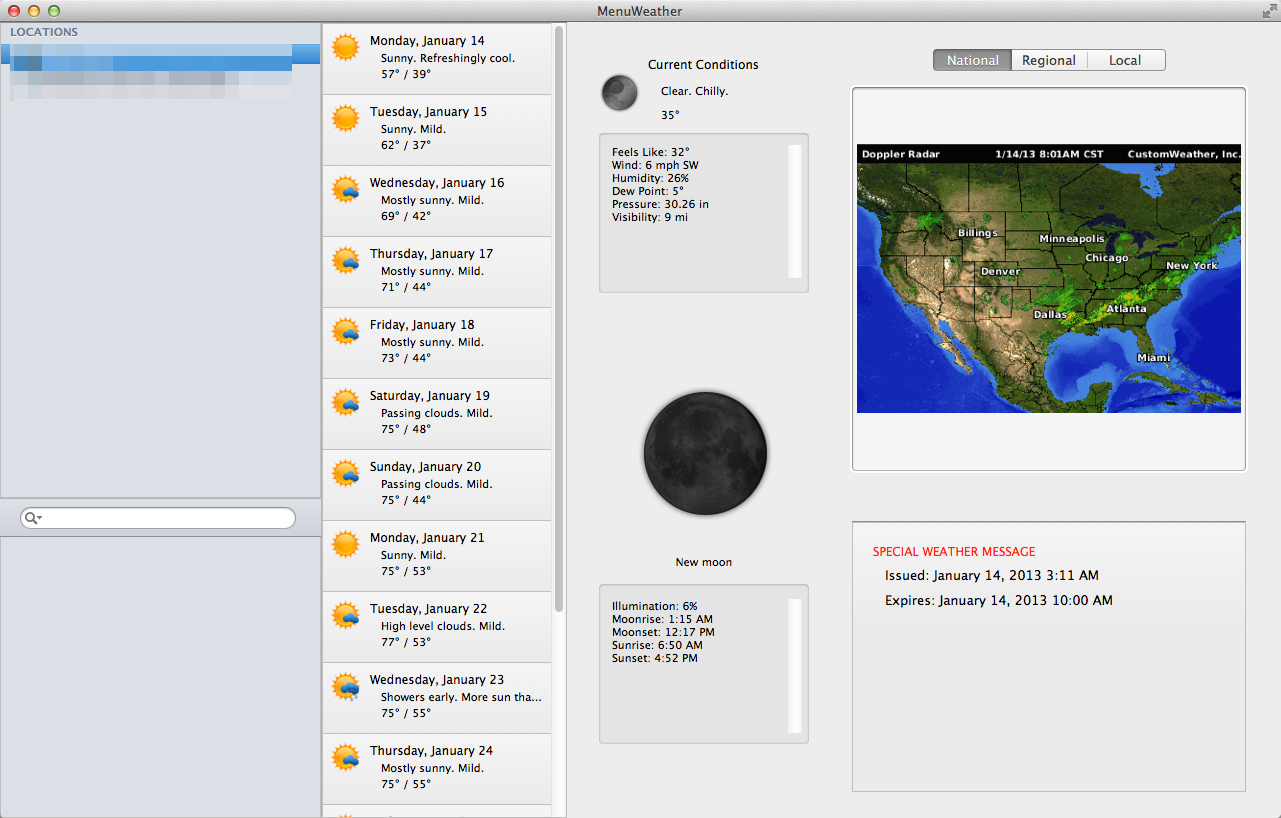
To get to radar info you click the menubar icon, then click "More Weather..." and the window below pops up. On the right there you can see where to click national, regional, or local for radar.

In the area I have shaded out it lists all the cities you are tracking weather for.

Thumb resize.

Quote:
Originally Posted by Ledgem View Post
Also, based on the reviews in the Mac App Store there are two other concerning points. First, a number of complaints focus on instability of the program under OS X 10.8, with people needing to force-shutdown and such. Have you experienced anything like that? Also, someone else wrote that the update frequency can only be set to 45 minutes at the fastest. Is that true, too?
I have been using Menu Weather for maybe a year, and I have never once had it crash or lockup.

Correct... the refresh options are 45 minutes, then one and two hours.

I read in a post somewhere from the dev. that he uses a paid weather service (he pays the service per registered user), and this is a limitation of that service. Supposedly, the upside to this is the paid service provides more accurate and complete weather data than the free weather sources used by many other apps. It seems to provide accurate info for the two cities I track.
Weaselboy is offline   1 Reply With Quote
Old Jan 14, 2013, 05:46 PM   #34
Ledgem
macrumors 6502a
 
Ledgem's Avatar
 
Join Date: Jan 2008
Location: Northeast USA
Thanks for the info. I'll keep using Meteorologist for now and will think on it some more.
Ledgem is offline   0 Reply With Quote
Old Jan 15, 2013, 02:39 PM   #35
terrymaz
macrumors member
 
Join Date: Aug 2010
Location: Hour North of Chicago
Quote:
Originally Posted by Zach23 View Post
The thing with Living Earth is that it forces the computer to use the NVIDIA graphics card always. I'm trying to find a new weather app to keep the integrated graphics on to conserve battery.
I was going to bring living earth up as well but was not aware of the issue you are speaking of. Is there a way to minimize this problem? Also, for some reason when i start my mac it shows to icons on the bottom of the dock open for it. I've tried messing with login item but cant seem to stop that from happening
__________________
15" MBPR 512/16GB,..15" 09 MBP...iPad 2 and 3..iPhone 5 ,...Apple TV 2, 2TB Time Capsule and a wifi network named Apple snob, You know you want one. LOL .)
terrymaz is offline   0 Reply With Quote
Old Jan 17, 2013, 04:28 PM   #36
Agronimo
macrumors newbie
 
Join Date: Jan 2013
Temps

I'm using Temps for a while now and I really love this app. Mac App Store link.
The last version brought a completely re-designed interface, it looks really great now.
You can add up to 12 locations. One click on the menu symbol and you see all your locations with current temperature and condition image. Move the mouse over one of the locations and the detail view with more weather infos and a 3 day forecast appears.
For me it's the best menubar weather app!

Last edited by Agronimo; Jan 18, 2013 at 08:45 AM.
Agronimo is offline   0 Reply With Quote
Old Apr 4, 2013, 01:50 PM   #37
plaintiger
macrumors newbie
 
Join Date: Sep 2008
Quote:
Originally Posted by Agronimo View Post
I'm using Temps for a while now and I really love this app. Mac App Store link.
The last version brought a completely re-designed interface, it looks really great now.
You can add up to 12 locations. One click on the menu symbol and you see all your locations with current temperature and condition image. Move the mouse over one of the locations and the detail view with more weather infos and a 3 day forecast appears.
For me it's the best menubar weather app!
i just tried Temps on your recommendation and found it to be a complete waste of $3.00. the server's continually down. if you want to make sure your Mac is still able to display spinning rainbow beachballs, Temps is great for that. but if it's weather you want, you'll have to look elsewhere.
__________________
there are three kinds of people: those who can count, and those who can't.
plaintiger is offline   0 Reply With Quote
Old Apr 4, 2013, 02:33 PM   #38
plaintiger
macrumors newbie
 
Join Date: Sep 2008
update: i'm no longer using Menu Weather - it's just too damn problematic. it works for a while, and then one issue or another arises - most recently, the app's been unable to find weather and just sits in my menu bar spinning, and displaying a beachball if i dare click it. i just got tired of its unreliability and after looking at a few other options went back to Meteorologist. it's not gorgeous and doesn't have some cool features like Menu Weather's (occasionally-working) ability to determine your current location, but it provides everything i absolutely require, and more, is very configurable, and it's free. and it seems to be pretty diligently updated too. works for me, at least until something better comes along.
__________________
there are three kinds of people: those who can count, and those who can't.
plaintiger is offline   0 Reply With Quote
Old Apr 26, 2013, 12:24 PM   #39
Agronimo
macrumors newbie
 
Join Date: Jan 2013
Quote:
Originally Posted by plaintiger View Post
i just tried Temps on your recommendation and found it to be a complete waste of $3.00. the server's continually down. if you want to make sure your Mac is still able to display spinning rainbow beachballs, Temps is great for that. but if it's weather you want, you'll have to look elsewhere.
Sorry, but that's not true. I'm using Temps for about a year nearly every day now - without the problems you are describing in your post. Try it again, I'm sure it works.
Agronimo is offline   0 Reply With Quote

Reply
MacRumors Forums > Apple Applications > Mac Applications and Mac App Store

Thread Tools Search this Thread
Search this Thread:

Advanced Search
Display Modes

Posting Rules
You may not post new threads
You may not post replies
You may not post attachments
You may not edit your posts

BB code is On
Smilies are On
[IMG] code is On
HTML code is Off

Forum Jump

Similar Threads
thread Thread Starter Forum Replies Last Post
Best Weather App? zachlegomaniac iPhone and iPod touch Apps 22 Jan 31, 2012 05:49 PM
Account name in the menu bar danakm Mac OS X 10.7 Lion 9 Jul 21, 2011 07:39 AM
How can I stop mac menu bar appearing in games polo3400 Mac and PC Games 4 Feb 17, 2011 04:31 PM
Screen resolution problems results in double menu bar frannyy MacBook 0 Nov 6, 2010 09:03 AM
Menu bar weather display? dan7592 OS X 2 Dec 9, 2008 11:38 PM


All times are GMT -5. The time now is 07:09 PM.

Mac Rumors | Mac | iPhone | iPhone Game Reviews | iPhone Apps

Mobile Version | Fixed | Fluid | Fluid HD
Powered by vBulletin® Version 3.8.6
Copyright ©2000 - 2013, Jelsoft Enterprises Ltd.

Privacy / DMCA contact / Affiliate and FTC Disclosure
Copyright 2002-2013, MacRumors.com, LLC
