|
|
#1 |
|
Mac Mini 2012 HDMI No Signal Issue
Hi everyone, I am new to the forum as well as new to the mac world. I have purchased my mini last week, so far everything seems okay until I realize that sometimes my Mac Mini does not produce any images on the screen. (Note that the screen shows no signal from the cable).
I am pretty sure everything is going okay with my HDMI cable and my monitor. The issue occurs when I tried to wake my Mac Mini from sleep. In order to get image from the screen, I need to force shut down my Mini, disconnect every cables attached, and reattached it again. And then after some trials it will start to produce image on my monitor. (I am using a 22" Samsung LCD HDTV anyway) I also have upgraded my Mac Mini to its latest firmware. Does anyone experience this issue? Should I contact apple and demand for a new machine? Thank you in advance! |
|
|
|
0
|
|
|
#2 |
|
Me too. I have the same problem. I use a dell monitor.
|
|
|
|
0
|
|
|
#3 |
|
well lets say you both did 10.8.2 and the firmware update.
the vast majority of us that did this have had the problems stop. So 1) you may have a bad cable 2) a bad mini 3) a bad monitor 4) an unknown Here is a link for a work around cable http://www.monoprice.com/products/pr...seq=1&format=2 http://www.monoprice.com/products/pr...seq=1&format=2 buy 2 you get a discount below is a link for a discount at monoprice http://forums.anandtech.com/showthread.php?t=2295445 I would also consider buying a low cost hdmi cable from them or a dvi to hdmi . At least if you spend this money a little under 20 bucks or so. you will know that cabling is not the problem. |
|
|
|
0
|
|
|
#4 | |
|
May I know how do you deal with your problem? Have you contacted Apple?
Quote:
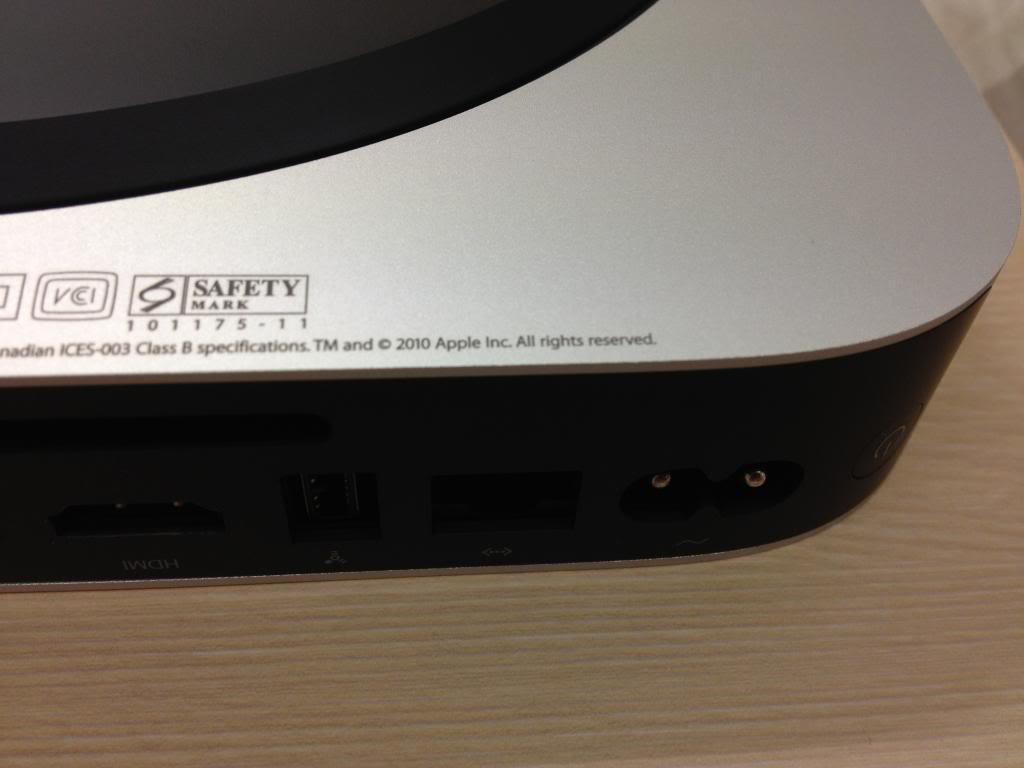
Anyway, Although I purchased my Mac Mini from the Apple Store, I am a bit curious about the printing in the base of Mac Mini. I bought the 2012 base model and I found that the year of the printing in the base is 2010. I saw a picture of 2012 Mac Mini in another website and it shows that the printed year is in 2012. Anyone can explain this to me? ![]() |
||
|
|
0
|
|
|
#5 | |
|
Quote:
__________________
MBP 8,2 15" 2.2Ghz w/ 120GB SSD + 500GB MBA 4,2 13" 1.7Ghz w/ 128GB SSD Mac Mini 6,2 2.3ghz w/ 240GB SSD + 1TB Mac Pro 1,1 w/ 8 cores @ 2.66 w/ 240GB SSD |
||
|
|
0
|
|
|
#6 |
|
I punched the serial number in it reads the machine is a 2012.
|
|
|
|
0
|
|
|
#7 | ||
|
Quote:
Quote:
Anyway, I changed the duration from 15 minutes to 1 hour before my Mini goes to sleep whenever I do not use it. The issue apparently appears whenever I wake up my Mini. I will see how it goes first and if it still exists probably I am going to take it to genius bar. |
|||
|
|
0
|
|
|
#8 |
|
|
0
|
|
|
#9 | |
|
Quote:
Last edited by SoCalReviews; Jan 24, 2013 at 11:55 AM. |
||
|
|
0
|
|
|
#10 |
|
Just received my 2012 Mini this morning. It's going to be my software development machine, but for right now I hooked it up to my living room TV for setup, via HDMI.
Did basic setup, updates, and then set it to install XCode, which takes quite some time. It went to sleep or else the video wigged-out. Cannot wake it from sleep. Is there a secret? What firmware update? Should it need a firmware update if I received it today? I already did all available updates. I already had a mini-DP to HDMI adapter, but no display on the mini-DP output either. Edit: Well, the first problem was that I didn't know how to wake it up from sleep. I called Apple support, and was told I could hit any key on the keyboard or move the mouse. That didn't work. I wound-up waking it up by tapping the power button, as you would on a notebook. The support guy insisted that any key should work, until I told him I was using a USB keyboard, and he groaned. (What? Only works with Bluetooth?) After some more experiments, found that only the System (OK, "Windows") key will wake it up. Yea, I'm not using an Apple keyboard, so sue me. ![]() I got it woke up, but the the display went bonkers after a bit. Blocks of the UI missing. Sometimes parts would re-paint as I dragged the mouse. Support guy then insists the problem is I had it plugged into my AV receiver and that it wasn't re-negotiating properly because "it's already connected to the TV" (what should that have to do with it?) and I should plug the Mini directly into the TV instead. I told the rep thank you, but you're not being helpful and hung up. I'd asked him to go through some of the frustrating missing UI features of Mountain Lion vs. Lion and he didn't at all like me diverting him from his script. This is why I don't bother to buy AppleCare. I've now disabled sleep, and am going to leave it off. It's too hinky to trust. I've switched to the DP port, using a DP to HDMI adapter. Haven't had a problem since. The HDMI port is still flawed. Unfortuantely, I need both ports for my work. I need to work with two screens. If it won't work, I'm afraid it will have to go back, and I will build a Hackintosh instead. Now, what firmware update? Last edited by jtara; Jan 25, 2013 at 06:13 PM. |
|
|
|
0
|
|
|
#11 | |
|
Quote:
|
||
|
|
0
|
|
|
#12 | |
|
Quote:
The problem hasn't recurred, and I've even switched it back to the HDMI port AND switched back to the AV receiver rather than connecting directly to the TV. I think that the promblem with the improper painting of the screen occured only after it had gone to sleep and woke back up. Since I now have sleep disabled, that condition won't occur. However, I haven't used it a lot yet. I have it on my living room TV temporarily for set-up and test, and it's a bit of a pain cause I'm using a keyboard with a pointing stick. It's good enough to set it to doing some one-hour download and and setup, etc. I'll move it to my office when I have time next weekend. On the HDMI port (only) it will quickly sync, then the picture will go black, then it will sync again. The blank-out doesn't occur when using the DP port. I ran an 8-hour stress test over-night with my 16GB Kingston HyperX LoVo RAM installed, with no errors, and performance in a very tight range, so the CPU never throttled. Happy with that at least. |
||
|
|
0
|
![]() |
|
«
Previous Thread
|
Next Thread
»
| Thread Tools | Search this Thread |
| Display Modes | |
|
|
All times are GMT -5. The time now is 09:10 PM.


Linear Mode